sidehand0.5.1
Let your AI agent use Windows apps while you keep working: reads and operates desktop controls without stealing your focus, from Windows or WSL. Zero dependencies.
Untested on omp
This is a pi package. No one has reported whether it works on omp yet. If you try it, add your result below.
Reports 0
No reports yet.
Readme

Sidehand
AI 智能体在后台操作你的 Windows 应用,键盘始终在你手里。




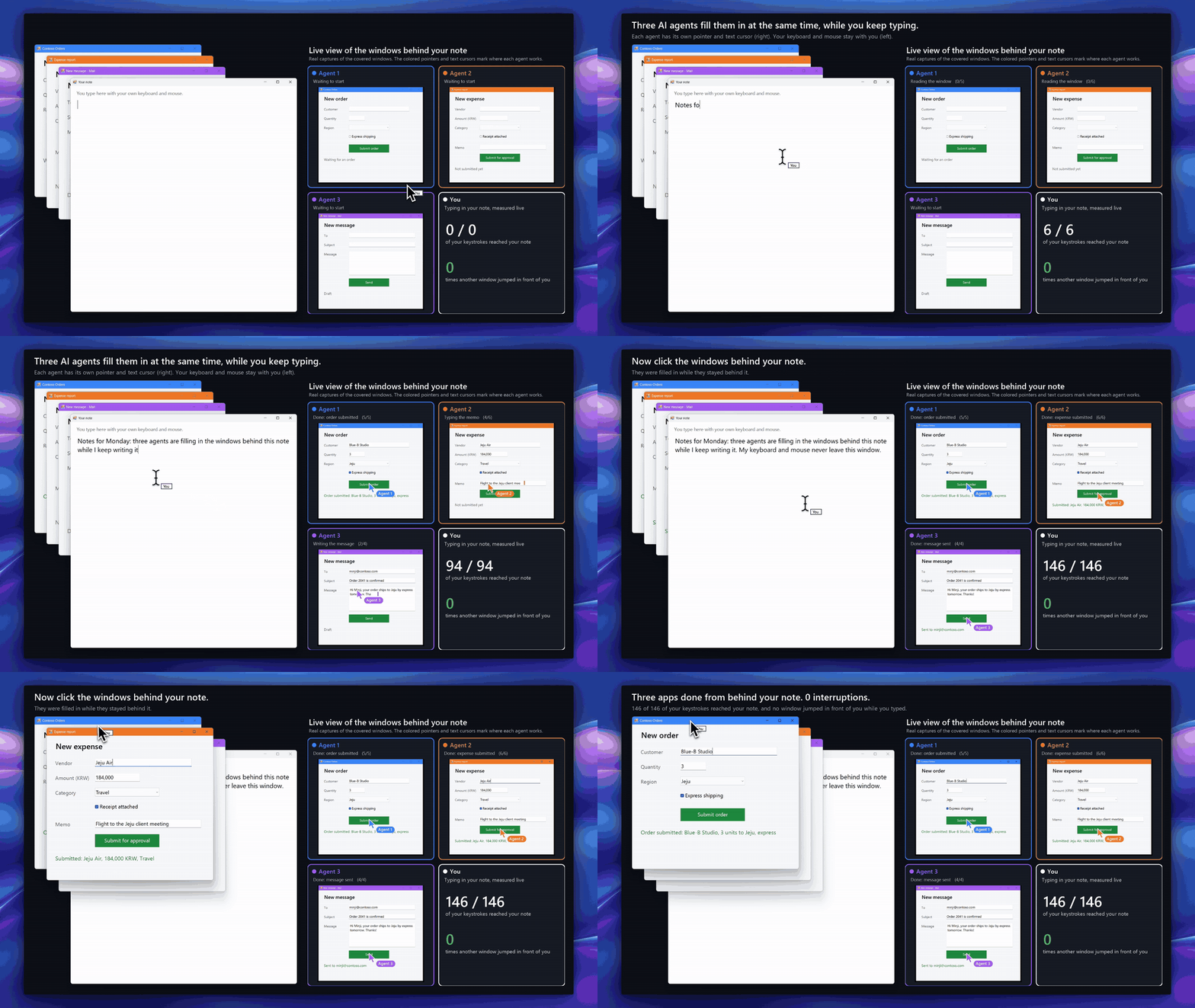
Sidehand 让 Claude、Codex、Cursor 或任何 MCP 客户端读取并操作你当前窗口后面的 Windows 应用。它可以输入文字、点击、从列表中选择,并把界面读成文本,全程不移动你的鼠标,也不抢你的键盘。
为什么用 Sidehand
- 在基准测试任务中,你的便笺始终握着键盘:被占用 0 秒,没有窗口跳到前台,光标一次也没动。
- 它在被你的窗口遮住的窗口里工作,你可以继续使用前面的窗口。
- 每个控件只占一行短文本:同一任务 Sidehand 用了 277 个 token,其他工具用了 2,488 到 13,425 个。读取一个窗口时,在常见应用上 token 用量约为 agent-desktop 的 1/4 到 1/5,在 Edge 网页上约为 1/20。
- 它用 2.0 秒完成任务。另外两个完成任务的工具 Windows-MCP 和 Terminator 分别用了 65.5 秒和 68.0 秒。
快速开始
需要 Windows 10 或 11 和 Node 18.3+。把服务器加到你的 MCP 客户端:
{
  "mcpServers": {
    "sidehand": { "command": "npx", "args": ["-y", "sidehand", "mcp"] }
  }
}
| 客户端 | 配置位置 |
|---|---|
| Claude Code | claude mcp add sidehand -- npx -y sidehand mcp |
| Cursor | ~/.cursor/mcp.json |
| Codex | codex mcp add sidehand -- npx -y sidehand mcp |
| Claude Desktop | 设置 › 开发者 › 编辑配置 |
| pi | pi install git:github.com/Blue-B/sidehand |
在原生 Windows 上,Claude Desktop、Cursor 和 Codex 需要用 cmd /c npx 启动。这一设置以及 Codex TOML、CLI、Claude Code 的 guard 钩子和 SIDEHAND_ALLOW 见 docs/setup.md(英文)。
也可以把下面这段话发给你的 AI 智能体,它会自己完成设置:
帮你自己安装 Sidehand(https://github.com/Blue-B/sidehand):在你的 MCP 设置里添加一个名为 "sidehand" 的
MCP 服务器,command 为 "npx",args 为 ["-y", "sidehand", "mcp"]。
如果你是 Claude Code,还要运行 `npm install -g sidehand`,并添加该仓库 docs/setup.md 里的
`sidehand guard` PreToolUse 钩子。完成后告诉我是否需要重启你。
用 sidehand doctor(或 npx -y sidehand doctor)检查环境。
与其他方案对比
| Sidehand | Claude computer use | ChatGPT computer use | agent-desktop | |
|---|---|---|---|---|
| 它工作时你能继续打字 | ✅ | ❌ 在 Windows 上会隐藏你的其他窗口 | ❌ 在 Windows 上会移动指针并占据前台 | ❌ 窗口跳到前台 4 次 |
| 能操作被遮住的窗口 | ✅ | ❌ 在 Windows 上不行 | ❌ 在 Windows 上不行 | ✅ |
| 以文本方式读取应用 | ✅ | 截图 | 截图 | ✅ |
Sidehand 和 agent-desktop 经过实测(docs/benchmark.md,英文),computer use 两列的内容来自所链接的厂商页面。更多工具和全部来源见 docs/comparison.md(英文)。
用法
$ sidehand tree "Contoso Orders"
window: Contoso Orders  (18 elements)
  e4 Edit "Customer"
  e12 Button "Submit order"

$ sidehand act e4 type "Blue-B Studio"
$ sidehand act e12 click
| 命令 | 作用 |
|---|---|
tree <标题> |
以文本列出窗口中的控件,每个带一个 ref(e4) |
act <ref> <动作> [值] |
type、click、select、check、press、wheel、drag 等 |
ocr <标题> |
用 Windows OCR 读取自绘窗口(游戏、Qt、画布)中的文字,带可供 act 点击的 ref(t1) |
wait <标题> <文字> |
等待包含该文字的控件出现(或用 --gone 等它消失) |
window、launch |
移动、调整大小、恢复或关闭窗口;启动应用且不抢焦点 |
capture、mask |
给被遮住的窗口截图;用黑块、像素化或模糊遮盖区域 |
doctor |
检查环境 |
MCP 和 pi 以工具形式提供同样的功能(ui_tree、ui_ocr、ui_act 等)。全部命令和选项见 docs/usage.md(英文)。
后台可以做什么
| Win32、WinForms | WPF | Chrome、Edge | VS Code | |
|---|---|---|---|---|
| 输入、点击、勾选、选择、展开 | ✅ | ✅ | ✅(<select> 除外) |
✅ 点击 |
| 滚轮、双击 | ✅ | ✅ 通过 UI Automation | ✅ | - |
| 右键、悬停、拖动 | ✅ | ❌ | ✅ | - |
| 按键和快捷键 | ✅ | 按钮或链接上的 Enter;其他需要同意 | 按钮或链接上的 Enter;其他需要同意 | 需要同意 |
“同意”指 --allow-foreground,即允许它占据前台。
直接读取原始鼠标输入(raw input)的游戏会忽略投递的点击,但 capture 和 ocr 仍然可用。
以管理员身份运行的应用需要智能体也以管理员身份运行。详情见 docs/usage.md(英文)。
故障排除
先运行 sidehand doctor。它检查 Node、WSL、PowerShell、执行策略、引擎和 OCR 语言,不会操作任何窗口。
- 原生 Windows 上出现
spawn npx ENOENT:用cmd /c npx启动服务器(docs/setup.md)。 - Codex 启动超时:在
[mcp_servers.sidehand]下加上startup_timeout_sec = 60。 - “在此系统上禁止运行脚本”:执行策略由组策略设置,只有管理员能更改。
ocr提示没有安装语言:添加 Windows OCR 语言包。- 以管理员身份运行的应用没有反应:请也以管理员身份运行智能体。
更多见 docs/troubleshooting.md(英文)。
安全
Sidehand 从其他窗口读到的文字会交给你的智能体,请像对待网页内容一样对待它:网页或消息可能试图向智能体下指令。
SIDEHAND_ALLOW 可以限制它能看到的窗口;它传给 PowerShell 的每个字符串都会加引号,否则直接拒绝。
许可证
PolyForm Shield 1.0.0。可以免费用于任何目的,包括在工作中使用;但不能构建或提供与 Sidehand 竞争、或与 Blue-B 用 Sidehand 提供的产品竞争的产品,无论免费还是收费。 其中包含专利许可;任何声称 Sidehand 侵犯专利的人,其专利许可随即终止。 如需商业许可,请提交 issue。