pi-winfs-bridge1.0.2
Make Windows drives fast for Pi running inside WSL2: routes read/edit/ls/find/grep through a native Windows helper instead of drvfs/9p.
Untested on omp
This is a pi package. No one has reported whether it works on omp yet. If you try it, add your result below.
Reports 0
No reports yet.
Readme
pi-winfs-bridge
Make Windows drives on /mnt/c, /mnt/d, … as fast as native NTFS for Pi running inside WSL2.


English
A Pi extension. When Pi runs inside WSL2 and touches Windows drives
mounted at /mnt/c, /mnt/d, … every stat / readdir / open is a cross-VM RPC over
9p (drvfs). Metadata-heavy work — directory walks, grep, find, git status — slows
down by a factor of tens to hundreds.
This extension reroutes those file operations through a tiny native Windows helper
(pure-standard-library Python 3) that talks to NTFS directly, and runs grep through the
Windows-side rg.exe.
Use it when: Pi runs in WSL2 but your projects and data live on Windows drives.
Don't use it when: Pi runs directly on Windows, or your files are in WSL's own ext4. The extension detects both cases and goes dormant — it changes nothing.
Why
Measured on this machine (C:\Users\<you>\AppData\Local\Packages, 4928 files):
| Operation | WSL over 9p | Native NTFS | Speedup |
|---|---|---|---|
| Directory tree walk | 7.2 ~ 7.8 s | 0.10 ~ 0.13 s | ~80x |
| Read 200 files (52 MB) | 2.63 s | 0.05 s | 52x |
Single stat |
0.16 ms | 0.01 ms | 16x |
Single readdir |
0.90 ms | 0.02 ms | 45x |
End-to-end through the extension's real code path (4927 files / 46 MB):
| Scenario | WSL over 9p | Bridged | Speedup |
|---|---|---|---|
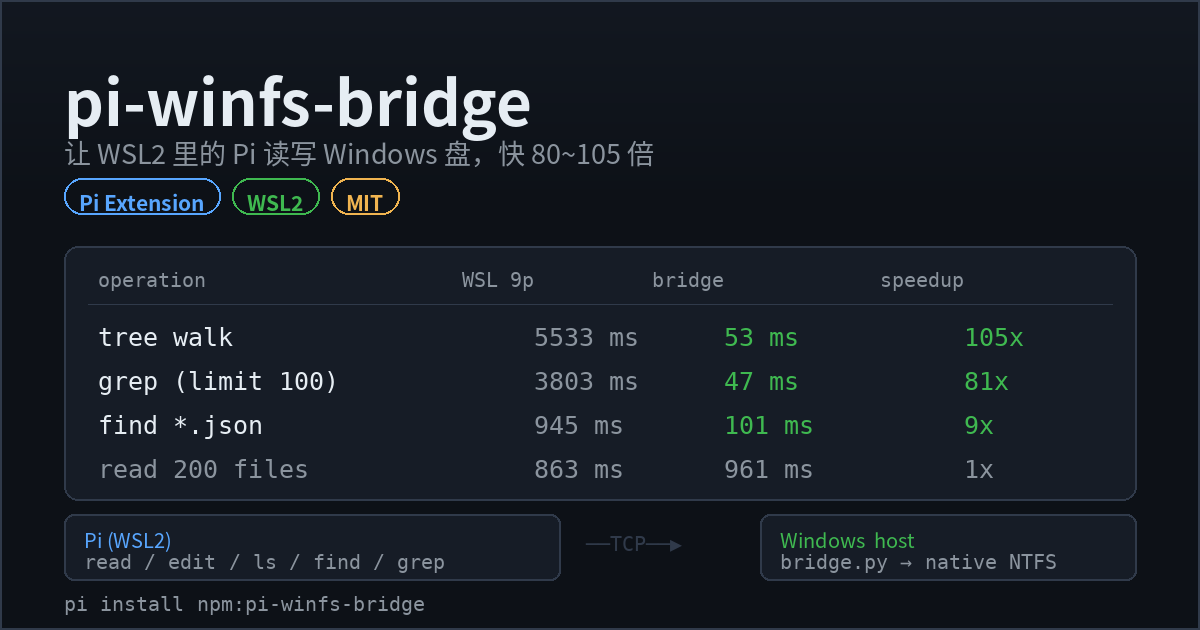
| Recursive tree walk | 5533 ms | 53 ms | 105x |
grep (Pi default limit=100) |
3803 ms | 47 ms | 81x |
find *.json |
945 ms | 101 ms | 9x |
read 200 files (pure payload) |
863 ms | 961 ms | even |
Gains concentrate in metadata-heavy operations (ls / find / grep / tree / git status). Bulk content reads are a wash — there the bottleneck is the bytes themselves, not the filesystem boundary.
Install
Option 1 — npm (recommended)
pi install npm:pi-winfs-bridge
Pin a version: pi install npm:pi-winfs-bridge@1.0.1
Option 2 — git source
pi install git:github.com/linji3/pi-winfs-bridge
Pin a tag: pi install git:github.com/linji3/pi-winfs-bridge@v1.0.0
Option 3 — local checkout
git clone https://github.com/linji3/pi-winfs-bridge
pi install ./pi-winfs-bridge
Option 4 — manual copy
mkdir -p ~/.pi/agent/extensions/winfs-bridge
cp pi-winfs-bridge/extensions/winfs-bridge/* ~/.pi/agent/extensions/winfs-bridge/
Pi loads it on startup. No configuration needed.
Requirements
- WSL2 (a drvfs entry in
/proc/mounts) - Python 3.8+ on the Windows side (
where pythonmust resolve) rg.exepreferred (optional — the Windows-side Python fallback covers it)
How it works
  Pi (WSL2, ext4)                      Windows host
  ┌────────────────────┐              ┌──────────────────────────────┐
  │ winfs-bridge ext   │  TCP (WSL vNIC) │ bridge.py (Python 3, stdlib) │
  │ read/write/edit    │ ───────────▶ │ calls NTFS APIs directly     │
  │ ls/find/grep       │              │ grep via Windows rg.exe      │
  └────────────────────┘              └──────────────────────────────┘
- The extension parses
/proc/mountsand maps every drvfs mount (/mnt/c→C:\). - The built-in
read/edit/ls/find/greptools are re-registered with Pi's own definitions; only the underlying file I/O is swapped for bridge calls. Fuzzy matching, diffs, truncation and rendering stay byte-identical. writeis deliberately not intercepted. It is a contested name (ccstyle and similar register rich-diff variants) and first registration wins. Writing a small file over 9p costs ~7 ms anyway — not worth shadowing someone else's feature. Edit files throughedit; that path is already full speed.greprunsrg.exeon the Windows side (native NTFS traversal, native.gitignoresemantics) and returns--nulloutput, with paths normalized back to relative POSIX.- Paths outside Windows drives (WSL ext4) keep the original code path, untouched.
- If the bridge is unavailable it falls back to native 9p: slower, never broken. A killed bridge process is restarted automatically.
On first use it will:
- copy
bridge.pyinto the Windows temp dir (%TEMP%\pi-winfs-bridge\); - launch
python bridge.pyon Windows via WSL interop; - handshake over a random token and random port (token auth plus an
--allow-rootallowlist). The port is read from the child's stdout — drvfs caches file writes, so a Windows-written file can take seconds to appear inside WSL; the stdout handshake brings cold start from ~12 s down to ~0.2 s.
Later sessions reuse the running Windows process (validated by script SHA-256, so a
version bump restarts it) — one Pi session does not leak one python.exe.
Usage
Model side (automatic). Use read / edit / ls / find / grep as usual with a
/mnt/c/... path and you get native Windows speed. No prompt changes required.
An extra winfs tool exposes Windows-side operations directly:
winfs op=tree  path=/mnt/c/Users/me/Documents maxDepth=3
winfs op=stat  path=/mnt/c/Users/me/Desktop/x.xlsx
winfs op=list  path=/mnt/c/Users/me/Desktop
winfs op=grep  path=/mnt/c/Users/me/Documents pattern="invoice"
winfs op=find  path=/mnt/c/Users/me pattern=*.pdf
winfs op=read  path=/mnt/c/Users/me/notes.md
Human side.
| Command | Effect |
|---|---|
/winfs-status |
Bridge state, mount mapping, and a live 9p vs native benchmark |
/winfs-bench [path] |
Benchmark only |
Temporarily disable
WINFS_BRIDGE=0 pi            # or
touch ~/.pi/agent/winfs-bridge.disabled
Development
git clone https://github.com/linji3/pi-winfs-bridge
cd pi-winfs-bridge
npm test          # full regression (creates a temp dir on a Windows drive)
npm run bench     # 9p vs bridged benchmark
npm run selftest  # kill the Windows helper, confirm reads still work (restart/fallback)
The test harness locates @earendil-works/pi-coding-agent and jiti from your local Pi
install; nothing is hard-coded. Override with:
| Variable | Meaning |
|---|---|
WINFS_TEST_DIR |
Windows-side scratch dir, default /mnt/c/Users/$USER/winfs-bridge-test |
PI_CODING_AGENT_DIR |
Pi config directory |
PI_MANAGED_INSTALL_ROOT |
Pi managed install root |
Regenerate the gallery card with python3 scripts/make-preview.py (needs Pillow).
Troubleshooting
| Symptom | Fix |
|---|---|
Status bar shows winfs bridge offline |
Run /winfs-status for detail; check where python on Windows |
| Windows Firewall prompt | Allow "Private networks" (the bridge binds only the WSL vNIC address, never public) |
| Bridge process killed | Nothing to do — the next call respawns it |
npm test cannot find Pi |
Ensure Pi is installed on the same machine, or set PI_MANAGED_INSTALL_ROOT |
| Want it always-on | Run bridge.py --host <WSL gateway IP> --port 7411 --token <token> --allow-root C:\ from a Windows scheduled task |
Optional: tune 9p itself
The bridge already sidesteps the 9p metadata bottleneck, so this is optional (it makes
chmod and friends actually take effect):
# /etc/wsl.conf
[automount]
options="metadata,umask=22,fmask=11"
Then wsl --shutdown from Windows and reopen.
Caveats
- The bash tool is not affected. Running
rg/find/git statusinside bash on a Windows drive still goes over 9p. Prefer thegrep/findtools; rungiton the Windows side. - Security boundary: the bridge listens only on the WSL virtual NIC address, handshakes with a random token, and may only access the roots of mounted Windows drives.
- License: MIT.
中文
一个 Pi 扩展。装在 WSL2 里的 Pi,读写 /mnt/c、/mnt/d 之类的
Windows 盘时,会自动改走一个运行在 Windows 侧的小服务,绕开 drvfs/9p 的元数据瓶颈。
适用场景:Pi 跑在 WSL2 里,但项目/资料放在 Windows 盘上。
不适用:Pi 直接跑在 Windows 上,或者文件都在 WSL 的 ext4 里(扩展会自动退出, 什么都不做)。
为什么需要它
WSL2 通过 9p/Plan9(drvfs)把 Windows 磁盘挂到 /mnt/c、/mnt/d…… 每一次
stat / readdir / open 都是一次跨到 Windows 主机的 RPC。元数据密集型的操作
(遍历目录树、grep、find、git status)会被拖垮几十倍。
本机实测(C:\Users\<你>\AppData\Local\Packages,4928 个文件):
| 操作 | WSL 走 9p | Windows 原生 NTFS | 倍数 |
|---|---|---|---|
| 遍历目录树 | 7.2 ~ 7.8 s | 0.10 ~ 0.13 s | ~80x |
| 读 200 个文件(52 MB) | 2.63 s | 0.05 s | 52x |
单次 stat |
0.16 ms | 0.01 ms | 16x |
单次 readdir |
0.90 ms | 0.02 ms | 45x |
端到端实测(走扩展真实代码路径,4927 个文件 / 46 MB):
| 场景 | WSL 走 9p | 桥接 | 倍数 |
|---|---|---|---|
| 递归遍历目录树 | 5533 ms | 53 ms | 105x |
grep(Pi 默认 limit=100) |
3803 ms | 47 ms | 81x |
find *.json |
945 ms | 101 ms | 9x |
read 200 个文件(纯内容传输) |
863 ms | 961 ms | 持平 |
收益集中在元数据密集型操作(ls / find / grep / tree / git status);纯大文件 内容读取两者持平——瓶颈变成数据量本身,不再是文件系统边界。
安装
方式一:从 npm 安装(推荐)
pi install npm:pi-winfs-bridge
固定版本:pi install npm:pi-winfs-bridge@1.0.1
方式二:从 git 源安装
pi install git:github.com/linji3/pi-winfs-bridge
固定到某个版本:pi install git:github.com/linji3/pi-winfs-bridge@v1.0.0
方式三:从本地目录安装
git clone https://github.com/linji3/pi-winfs-bridge
pi install ./pi-winfs-bridge
方式四:手动放进去
mkdir -p ~/.pi/agent/extensions/winfs-bridge
cp pi-winfs-bridge/extensions/winfs-bridge/* ~/.pi/agent/extensions/winfs-bridge/
Pi 启动时自动加载,无需任何配置。
要求
- WSL2(
/proc/mounts里有 drvfs 挂载) - Windows 上有 Python 3.8+(
where python能找到即可) - 有
rg.exe更佳(没有也能用,Windows 端 Python 兜底)
原理
  Pi (WSL2, ext4)                      Windows 主机
  ┌────────────────────┐              ┌───────────────────────────┐
  │ winfs-bridge 扩展   │  TCP(WSL 网卡) │ bridge.py (Python 3, 纯标准库)│
  │ read/write/edit    │ ───────────▶ │ 直接调 NTFS API            │
  │ ls/find/grep       │              │ grep 走 Windows 端 rg.exe   │
  └────────────────────┘              └───────────────────────────┘
- 扩展解析
/proc/mounts,识别所有 drvfs 挂载点(/mnt/c→C:\)。 - 内置的
read/edit/ls/find/grep用 Pi 自己的定义重新注册, 只把底层文件操作换成桥接调用——模糊匹配、diff、截断、渲染全部保持原样。 write故意不接管:它是个抢手名字(ccstyle 之类会注册带富 diff 的版本), 谁先注册归谁。而 9p 写一个小文件只要 ~7 ms,本来就不值得为它去顶掉别人的功能。 改文件走edit,那条路是全速的。grep改成在 Windows 侧用rg.exe跑(原生 NTFS 遍历 + 原生 .gitignore 语义), 原始输出用--null格式回传,路径统一还原成相对 POSIX 路径。- 不在 Windows 盘上的路径(WSL 的 ext4)完全走原逻辑,不受影响。
- 桥接不可用时自动回退到原生 9p 路径:慢,但不会坏;桥接进程被杀掉会自动重启。
首次使用时它会:
- 把
bridge.py复制到 Windows 临时目录(%TEMP%\pi-winfs-bridge\); - 通过 WSL interop 在 Windows 上启动
python bridge.py; - 用随机 token + 随机端口握手(token 认证 +
--allow-root目录白名单)。端口从子进程 stdout 读取——drvfs 的文件缓存会让 Windows 写的文件在 WSL 里延迟数秒才可见,走 stdout 握手能把冷启动从 ~12 s 压到 ~0.2 s。
后续会话会复用已经跑着的那个 Windows 进程(用脚本 SHA-256 校验版本,版本变了才 换新进程),所以不会每开一个 Pi 会话就多留一个 python。
用法
模型侧(自动)
模型照常用 read / edit / ls / find / grep,路径给 /mnt/c/...
就会自动走 Windows 原生速度。不需要改提示词。
额外的 winfs 工具可以直接做 Windows 侧操作:
winfs op=tree  path=/mnt/c/Users/me/Documents maxDepth=3
winfs op=stat  path=/mnt/c/Users/me/Desktop/x.xlsx
winfs op=list  path=/mnt/c/Users/me/Desktop
winfs op=grep  path=/mnt/c/Users/me/Documents pattern="发票"
winfs op=find  path=/mnt/c/Users/me pattern=*.pdf
winfs op=read  path=/mnt/c/Users/me/notes.md
人侧
| 命令 | 作用 |
|---|---|
/winfs-status |
显示桥接状态、挂载点映射,并当场跑一次 9p vs 原生测速 |
/winfs-bench [路径] |
单独跑测速对比 |
临时关掉
WINFS_BRIDGE=0 pi        # 或者
touch ~/.pi/agent/winfs-bridge.disabled
开发与测试
git clone https://github.com/linji3/pi-winfs-bridge
cd pi-winfs-bridge
npm test        # 全量回归(需要在 Windows 盘上建临时目录跑)
npm run bench   # 9p vs 桥接测速
npm run selftest # 杀掉 Windows 侧 helper 后确认还能读(自动重启/回退)
测试脚本会自动从本机 Pi 安装里找到 @earendil-works/pi-coding-agent 和 jiti,
不写死任何路径。可用环境变量覆盖:
| 变量 | 说明 |
|---|---|
WINFS_TEST_DIR |
测试用的 Windows 盘目录,默认 /mnt/c/Users/$USER/winfs-bridge-test |
PI_CODING_AGENT_DIR |
Pi 配置目录 |
PI_MANAGED_INSTALL_ROOT |
Pi 托管安装根目录 |
画廊预览图用 python3 scripts/make-preview.py 重新生成(需要 Pillow)。
故障排查
| 现象 | 处理 |
|---|---|
状态栏显示 winfs bridge offline |
/winfs-status 看 detail;Windows 上确认 where python 有输出 |
| Windows 防火墙弹窗 | 允许「专用网络」访问(桥接只绑 WSL 虚拟网卡地址,不对外暴露) |
| 桥接进程被杀 | 不用管,下一次调用会自动拉起 |
npm test 报找不到 Pi |
确认 Pi 装在同一台机器上,或设 PI_MANAGED_INSTALL_ROOT |
| 想要常驻 | Windows 计划任务/启动项里跑 bridge.py --host <WSL网关IP> --port 7411 --token <token> --allow-root C:\ |
可选:给 9p 本身加料
桥接已经绕开了 9p 的元数据瓶颈,所以这步是可选的(会让 chmod 等真正生效):
# /etc/wsl.conf
[automount]
options="metadata,umask=22,fmask=11"
改完在 Windows 里执行 wsl --shutdown 再重开。
注意
- bash 工具不受影响:在 WSL 里直接跑
rg/find/git status扫 Windows 盘依旧走 9p。模型应优先用grep/find工具;git建议在 Windows 侧执行。 - 安全边界:桥接只监听 WSL 虚拟网卡地址,握手用随机 token,并且只允许访问已挂载的 Windows 盘根目录。
- 许可证:MIT。
MIT © linji3