pi-tinychat0.2.0
A tiny local web UI for the Pi coding agent with a live plan panel and context compaction presets.
Untested on omp
This is a pi package. No one has reported whether it works on omp yet. If you try it, add your result below.
Reports 0
No reports yet.
Readme

Pi TinyChat
Tiny UI. Full Pi. Zero Bloat.


English | 日本語
Pi TinyChat is a local browser window for the Pi coding agent. The conversation stays on the left and the plan stays on the right.
It is for people who like Pi in a terminal but want a calmer screen for long tasks — without adding a second app to babysit.
Pi TinyChat is an independent community project. It is not an official Pi project and is not affiliated with the Pi maintainers.
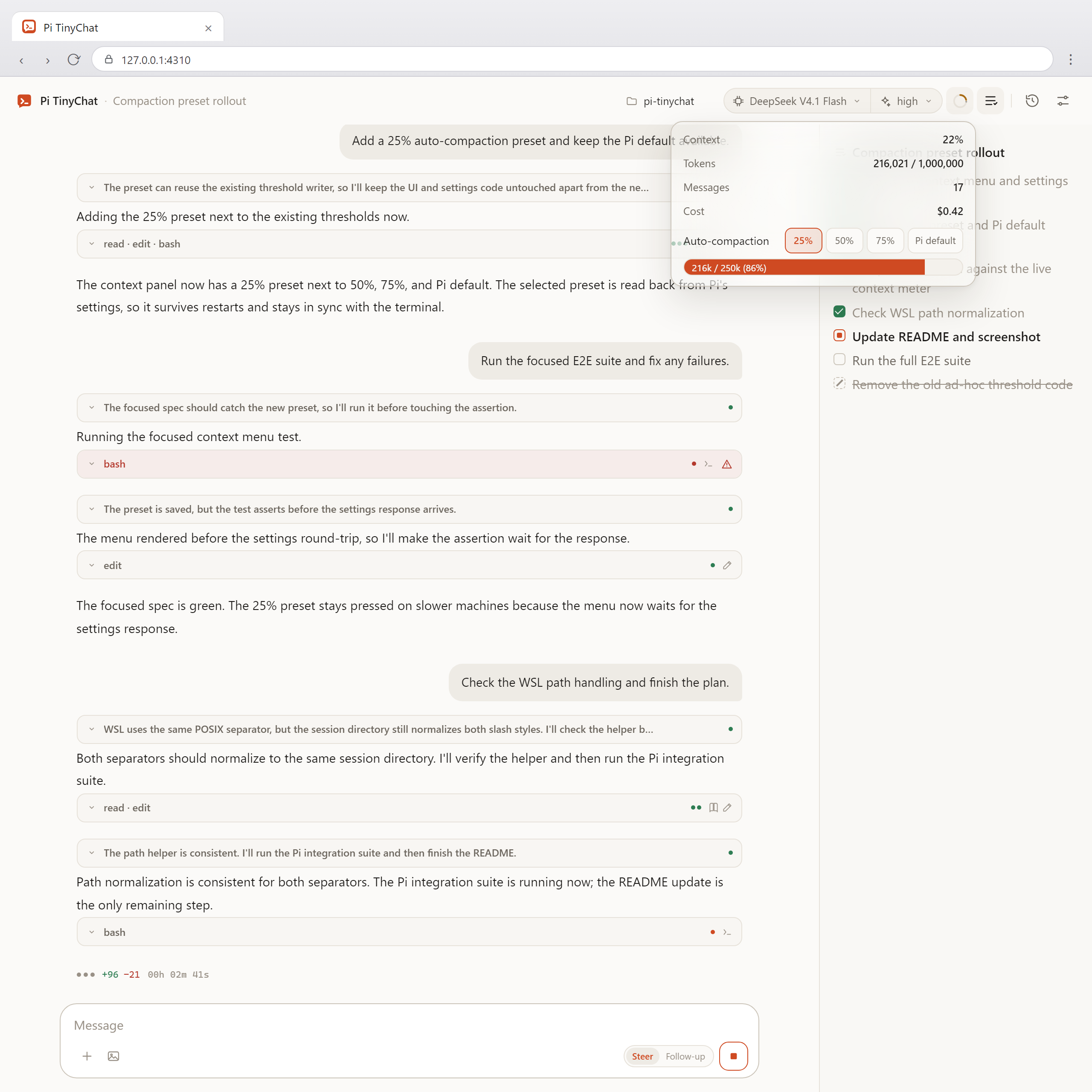
What you get
- A plan you can glance at. The agent publishes a checklist, and the right panel shows done, current, and pending items while it works. Short progress notes in the user's language collect under the step they belong to and stay there.
- Context control you can actually feel. Set auto-compaction at 25%, 50%, or 75% of the model window, or leave Pi's default. See the context ring and the exact reserve before the next long turn. Long-context models often get less precise well before the window is full, so 25–50% is a practical range. Open the ring to switch presets, or run
/compactfrom the + menu to compact manually. - Sessions that keep running. Open another conversation without stopping the one in flight. Each session has its own Pi process.
- A conversation made for reading. Streaming Markdown, compact thinking and tool cards, image attachments, and extension dialogs.
- Your Pi setup. Login, models, reasoning effort, context usage, auto-compaction, and session history come from Pi itself.
- A small stack. Plain ES modules in the browser, JSONL over Pi RPC, no React, no bundler, no database, and no runtime dependencies.
Quick start
You need Node.js 22.19 or newer and Pi. Pi TinyChat runs Pi in the current directory, so start it from the project you want to work in:
npx pi-tinychat
Use --cwd /path/to/project when you start from another directory.
Or install the command globally:
npm install -g pi-tinychat
pi-tinychat
The browser opens at http://127.0.0.1:4310. If that port is taken, Pi TinyChat automatically uses the next free port. Use --port to start from another port, and --no-open when you do not want the browser to open automatically.
Authenticate once in a terminal; Pi TinyChat reuses that login:
pi
/login
If you use API keys instead of /login, set the provider key in the shell that launches Pi TinyChat, for example OPENAI_API_KEY, ANTHROPIC_API_KEY, OPENCODE_API_KEY, DEEPSEEK_API_KEY, GEMINI_API_KEY, or OPENROUTER_API_KEY.
The npm package is published with the pi-package keyword, which is what the Pi package catalog uses for discovery.
The plan panel
Pi TinyChat includes a small Pi extension that gives the agent a tiny_plan tool. For a multi-step task, the agent writes a short provisional plan before the first substantive tool call, then marks each step in progress and done as it goes. Completed steps stay in the panel as a log; when a new request arrives, unfinished steps are kept with a strikethrough and the new plan is appended below. The plan keeps its current granularity; the agent uses a one-sentence note for the current focus between steps instead of adding micro-steps.
The right panel mirrors that plan immediately and stores it in the Pi session, so reopening or resuming the conversation brings the checklist back. Notes accumulate as bullets under the step where they were written and stay after it completes, and the running tool shows next to the elapsed time in the chat, so the panel explains what the agent is doing while the chat keeps the finer detail without extra model calls.
Options
--cwd <path>    Working directory for Pi (default: current directory)
--port <port>   Start at this port on 127.0.0.1 (default: $PI_TINYCHAT_PORT or 4310; falls back to the next free port)
--no-open       Do not open the browser automatically
--pi <path>     Path to the pi executable or CLI entry point
--continue      Resume the most recent Pi session in the directory
--help          Show help
--version       Show the version
Security
Pi TinyChat is local-first by design:
- No runtime dependencies and no install scripts. The npm package ships plain JavaScript and one Pi extension; it does not add a dependency tree to your project.
- Localhost only. The server binds to
127.0.0.1, checks the Host and Origin headers, and requires a per-launch token. - Launch token, then cookie. The token in the launch URL is exchanged for an
HttpOnly,SameSite=Strictcookie, and the URL is cleaned up. - Strict browser policy. Static files are served with a Content Security Policy,
nosniff, and no-store caching. Markdown is escaped before rendering. - Reviewable releases.
npm publishruns lint, typecheck, i18n checks, a real-Pi offline integration test, and a tarball check. GitHub Actions publishes with npm provenance. - No telemetry. Pi TinyChat does not send usage data anywhere.
How it works
- Local first. Conversations and settings use Pi's files. UI preferences live in
localStorage; there is no separate database or log store. - Pi-native state. Login, models, reasoning effort, context usage, and compaction settings come from Pi.
- One process per session. Background sessions stay alive, so switching conversations does not interrupt running work.
- Official RPC. Pi runs as a separate
pi --mode rpcprocess and speaks JSONL. Agent behavior stays with Pi.
Other Pi UIs
| UI | Best for |
|---|---|
| Pi TinyChat | A small local chat with a live Plan panel and context compaction presets. No build step or runtime dependencies. |
| pi-web | A full web workspace: session branching, Git worktrees, file browsing, MCP/model/skill management, subagents, and mobile. |
| pi-web-simple | A simple RPC-based web UI with Git and file management. |
| pipane | Another RPC-based browser UI for Pi. |
Troubleshooting
piis not found — pass--pi /path/to/pior setPI_TINYCHAT_PI.- The model is
unknownor sending fails — run/loginin a terminal, or set a provider API key in the shell that launches Pi TinyChat. Check withpi auth check --provider <provider>. - Project
.pisettings have no effect — runpionce in that project and execute/trust. RPC mode follows Pi's trust rules. - History is empty or shows another project — make sure
--cwdmatches the directory you use with Pi. SetPI_CODING_AGENT_DIRandPI_CODING_AGENT_SESSION_DIRin the same environment if you customize them. - The port is in use — Pi TinyChat automatically tries the next 20 ports. Pass
--portto choose the starting port.
Compatibility
| Item | Detail |
|---|---|
| Pi version | Tested with 1.4.0; CI also checks the latest weekly Pi release. |
| Node.js | 22.19 or newer. |
| OS | Windows 10/11, macOS, and Linux (including WSL). |
| Terminal-first features | /login, /tree, /fork, /clone, and TUI-only custom UI stay in the Pi terminal. |
Project .pi |
Follows Pi's trust rules. Run /trust once in the project before starting Pi TinyChat. |
| Resources | Each open session keeps a Pi process alive, so memory and CPU use grow with the number of sessions. |
| Multiple tabs | Session switching is not synchronized across browser tabs. |
Development
npm ci
npm link                      # makes the `pi-tinychat` command available locally
pi-tinychat                   # starts Pi in this repository
npm run check                 # lint, types, i18n, E2E, tarball check
Individual checks and the manual real-model smoke test are defined in package.json. CI runs on Node 22.19 on Ubuntu and Windows, with a weekly check against the latest Pi.
Releasing
Releases are published from GitHub Actions, so no local npm login or npm publish is needed.
Bump
versioninpackage.json, commit it on a development branch, and merge through a pull request.mainis protected.Tag the merged commit and push the tag:
git tag -a vX.Y.Z -m "vX.Y.Z"
git push origin vX.Y.Z
Create and publish a GitHub Release for that tag. Publishing starts
.github/workflows/publish.yml. A draft release does not trigger it;workflow_dispatchskips the tag check and publishes the currentmain.The workflow verifies that the tag matches
package.json, runs the tests and theprepublishOnlychecks, then runsnpm publish --provenance --access publicthrough npm Trusted Publishing (OIDC). NoNPM_TOKENis stored.Confirm the published version:
gh run watch
npm view pi-tinychat version