pi-sleep-agent0.8.1
A reviewable sleep and dream cycle for Pi agent memory.
Untested on omp
This is a pi package. No one has reported whether it works on omp yet. If you try it, add your result below.
Reports 0
No reports yet.
Readme
Sleep
Give your coding agents useful memory without giving memory control.
Capture while agents work. Consolidate when they stop. Promote only what you approve.




Sleep adds a reviewable memory cycle to Pi, OmO, and Claude Code. It records useful observations during a session, turns them into provisional memory after the session, and keeps permanent memory behind an explicit human approval step.
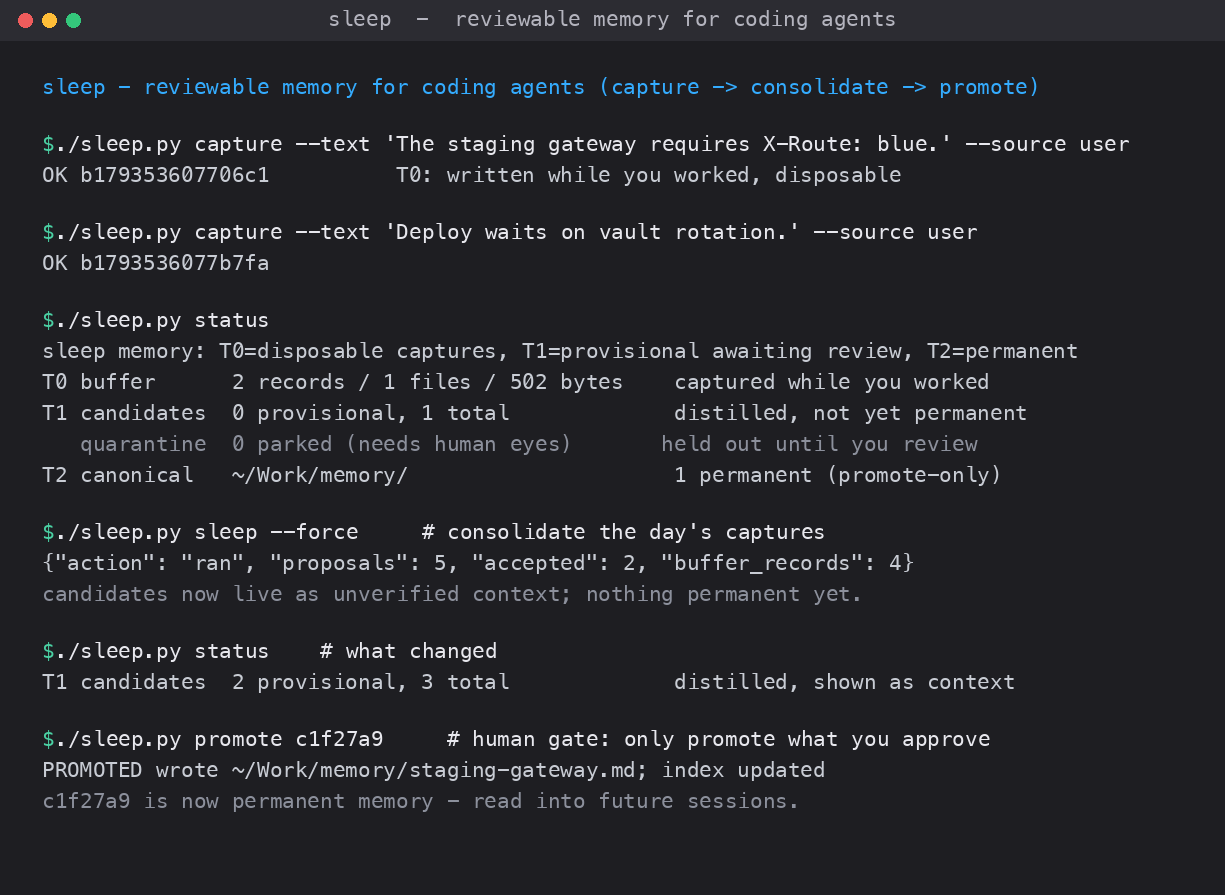
The whole loop in one screen: agents write disposable captures (T0) while they work, sleep distills them into provisional memory (T1) that your next session can use, and nothing becomes permanent (T2) until you run promote.
What you get
- Automatic capture. Hooks and the Pi extension collect useful observations while you work.
- Budgeted consolidation. Sleep runs only after the record and time gates pass.
- Review before permanence. New memories stay provisional until you promote or refuse them.
- Nightly dream cycle. Mine repeated preferences, consolidate recent observations, and measure memory effects while you are away.
- Measured replay. Run the same task with memory off and on before deciding whether a memory helps.
- Repeated preference detection.
minefinds instructions you gave in multiple sessions without a model call. - Project isolation. A project's provisional memory is injected only into that project.
- Reviewable permanence. Each approved memory in your index carries its review date and source, so you can tell when a saved instruction was pinned.
- Stale-value scan.
doctor --stale <value>finds which approved records still hold a value you know has changed (for example a deployment URL). Unreviewed provisional candidates are also flagged: a fact the agent proposed once and never rediscovered for 4+ weeks keeps getting injected into every session's context, sodoctorsurfaces it asstale-candidate-unrediscovered(a report line it never acts on, nothing is dropped). - Safety gates. Secrets are redacted, hostile text is quarantined, and machine-generated prompts cannot claim user provenance.
Install
Requirements:
- Python 3.10 or newer
- Claude Code CLI for model-backed consolidation and replay
- Pi, OmO, Claude Code, or any combination of them
./install.sh --dry-run     # show every change without writing
./install.sh               # install the shared skill and Claude Code hooks
./install.sh --extension   # also install the Pi/OmO extension
./install.sh --launchd     # also schedule the nightly pass on macOS
The installer runs the test suite first, creates backups before configuration changes, and is safe to run again.
Pi / OmO extension
Pi and OmO require Sleep's user-installed extension for automatic integration:
./install.sh --extension
The installer links this repository's extension/ directory to:
~/.omo/agent/extensions/sleep
The extension loads on the next Pi or OmO session and performs three jobs:
- captures user messages and relevant tool activity into T0,
- injects matching T1 provisional memory into the agent context,
- wakes the sleep policy after the agent settles.
Verify that it loaded:
omo -p 'hi' >/dev/null 2>&1
tail -4 ~/.sleep/logs/extension.log
The log should contain session_start, publish, and agent_settled entries.
Without this extension, the Sleep CLI still works when you run commands manually, and Claude Code can still use its own hooks. Pi and OmO, however, will not capture sessions, inject provisional memory, or trigger sleep automatically.
Install from npm (Pi / OmO)
Sleep also ships as the npm package pi-sleep-agent, so Pi and OmO can use
the extension without cloning the repository. Install it through the pi install
package flow:
pi install npm:pi-sleep-agent
# or, for a specific published version
pi install npm:pi-sleep-agent@0.1.0
The package contains the extension (pi.extensions), the Sleep skill
(pi.skills), and the Python runtime behind it, so the CLI works from the
installed package too. Pi manages the package under its own directory; do not
guess that path. The extension resolves its own runtime from the package and
records it in the log, so the verification below proves it loaded the installed
copy rather than a checkout:
omo -p 'hi' >/dev/null 2>&1
tail -4 ~/.sleep/logs/extension.log     # session_start, publish, agent_settled
Those three log lines are the proof that the packaged extension loaded and its
Python runtime ran. If they do not appear, reload the extension (pi install it
again, or restart the session); do not dig under the package directory and guess
a path.
Verify the tarball contract locally without publishing:
npm run pack:check     # what npm pack would ship, as JSON
npm run smoke:package  # install the tarball into an isolated Pi home and prove it loads
To remove Sleep and restore the backed-up configuration:
./uninstall.sh
Quick start
Check the installation:
./sleep.py status -v
./sleep.py doctor
./sleep.py sleep --dry-run
Capture a useful observation manually when needed:
./sleep.py capture --text "The staging gateway requires X-Route: blue." --kind fact --source user
Run a consolidation pass:
./sleep.py sleep --dry-run
./sleep.py sleep --force
Review the resulting candidate before making it permanent:
./sleep.py status -v
./sleep.py show <candidate-id>
./sleep.py promote <candidate-id> --dry-run
./sleep.py promote <candidate-id>
Reject an incorrect candidate without deleting its audit trail:
./sleep.py refuse <candidate-id> --note "Incorrect for the current deployment."
Day-to-day workflow
After installation, normal sessions need no extra commands:
- The integration captures observations into the temporary T0 buffer.
- The sleep gate waits for at least 3 records and 6 hours since the previous pass.
- A model condenses the buffer into provisional T1 candidates.
- Provisional candidates can appear as clearly marked background context in matching projects.
- You inspect candidates and choose whether to promote them into permanent T2 memory.
session activity -> T0 buffer -> gated sleep -> T1 provisional memory
                                                   |
                                             review or replay
                                                   |
                                             explicit promote
                                                   |
                                             T2 permanent memory
Dream cycle
Dream is Sleep's unattended reflection phase. It does not update model weights and it never writes permanent memory on its own.
A dream pass performs four steps:
- Mine. Find instructions you repeated across separate sessions in the same project. This step is deterministic and makes no model call.
- Consolidate. When the sleep gate passes, ask the configured model to turn recent T0 observations into provisional T1 candidates.
- Hygiene. Run the read-only
doctorscan and fold any findings (duplicate headings, near-duplicate candidates, or stale values when you pass--stale <value>) into the night's report. - Replay. When replay is due, run selected tasks with provisional memory off and on, then write a comparison report.
Every result stays reviewable. Candidates remain in T1 until you explicitly run promote.
Preview the complete dream pass without model calls or writes:
./sleep.py nightly --dry-run
./sleep.py nightly --dry-run --stale https://old.internal/app   # also scan approved memory for a changed value
Run it now:
./sleep.py nightly --force
Run the two dream components separately when you want more control:
./sleep.py mine --dry-run
./sleep.py mine

./sleep.py replay --limit 3              # show the replay plan
./sleep.py replay --run --limit 3 --budget 0.10
--budget is the maximum cost per task across both replay arms. Dream reports are written under $SLEEP_HOME/reports/ and never trigger promotion automatically.
Useful commands
| Command | Purpose |
|---|---|
./sleep.py status -v |
Show buffer, candidate, quarantine, and permanent-memory status |
./sleep.py sleep --dry-run |
Check whether the sleep gate would run |
./sleep.py sleep --force |
Run consolidation now |
./sleep.py show <id> |
Inspect a candidate and its rendered context |
./sleep.py promote <id> |
Move an approved candidate to permanent memory |
./sleep.py demote <id> --note "..." |
Un-approve a promoted memory: mark the approved record as retracted (kept on record, not deleted) and reopen the candidate as refused |
./sleep.py refuse <id> --note "..." |
Record that a candidate is incorrect |
./sleep.py replay --run --limit 3 |
Compare selected tasks with memory off and on |
./sleep.py mine --dry-run |
Find preferences repeated across sessions |
./sleep.py nightly --dry-run |
Preview the unattended nightly workflow |
./sleep.py doctor |
Find duplicate or overlapping memory records, and flag provisional candidates not rediscovered for 4+ weeks (report only, never dropped) |
./sleep.py doctor --stale <value> |
Show which approved records still hold a stale value (e.g. a changed URL) |
./sleep.py inject --project "$PWD" |
Print provisional context for the current project |
Run ./sleep.py <command> --help for command-specific options.
Supported agents
| Agent | Integration |
|---|---|
| Claude Code | UserPromptSubmit, PostToolUse, Stop, and PreCompact hooks |
| Pi / OmO | Required user-installed extension: ./install.sh --extension |
Both integrations share $SLEEP_HOME, so candidates reviewed from one client are visible to the other when the project scope matches.
Configure unattended model calls
Interactive runs inherit your current environment. Scheduled macOS runs read additional values from $SLEEP_HOME/env, which defaults to ~/.sleep/env.
mkdir -p ~/.sleep
touch ~/.sleep/env
chmod 600 ~/.sleep/env
The file accepts KEY=VALUE lines. Common settings are:
ANTHROPIC_API_KEY=...
ANTHROPIC_BASE_URL=...
ANTHROPIC_MODEL=...
SLEEP_MODEL=...
An explicit --model wins over SLEEP_MODEL, which wins over ANTHROPIC_MODEL. Existing process environment variables win over values in the file.
Before enabling the schedule, test the same path manually:
./sleep.py nightly --dry-run
./sleep.py sleep --force --budget 0.10
Review and safety model
Sleep separates memory into three tiers:
| Tier | Meaning | Who writes it |
|---|---|---|
| T0 | Temporary session observations | Hooks, extension, or capture |
| T1 | Provisional memory shown as unverified background | Consolidation and mine |
| T2 | Permanent memory | Only an explicit promote command |
Additional safeguards:
- Model output is always stamped as agent-generated and cannot mark itself user-confirmed.
- Provisional memory is rendered as background, not as an instruction.
- Secret-like values are replaced with redaction markers.
- Prompt-injection and exfiltration shapes are moved to quarantine.
- Mixed-project buffers fail closed instead of assigning facts to the wrong project.
- Replay reports results but never promotes memory automatically.
- Every model call has an explicit budget limit.
Data and logs
All runtime data lives under $SLEEP_HOME, which defaults to ~/.sleep:
buffer/         temporary T0 records
candidates/     provisional T1 records
reports/        replay reports
logs/           hook and nightly logs
.quarantine/    rejected unsafe input
state.json      sleep and replay timestamps
env             optional scheduled-run environment
Useful logs:
~/.sleep/logs/hook-fires.log
~/.sleep/logs/hook.log
~/.sleep/logs/nightly.log
Use another home for testing or for a separate memory pool:
SLEEP_HOME=/tmp/my-sleep ./sleep.py status -v
Troubleshooting
Nothing was captured
./sleep.py status -v
./sleep.py doctor
Check ~/.sleep/logs/hook-fires.log. If it is empty, the integration did not fire. If it contains events but the buffer is empty, the events were ignored or quarantined.
Sleep keeps skipping
The default gate requires 3 records and a 6-hour interval. Inspect the decision with:
./sleep.py sleep --dry-run
Use --force only when you intentionally want a model call.
The scheduled pass cannot reach the model
Confirm that ~/.sleep/env exists, has mode 0600, and contains the same provider settings used by your interactive shell. Then run ./sleep.py sleep --force before relying on launchd.
A candidate appears in the wrong context
Run ./sleep.py show <id> and check its cwd. Mixed-project batches are kept in T0 and return an error instead of producing candidates.