pi-model-release-sort0.6.1
Sort pi's /model list by release date and hide the models you don't use, right from the model selector.
Untested on omp
This is a pi package. No one has reported whether it works on omp yet. If you try it, add your result below.
Reports 0
No reports yet.
Readme
pi-model-release-sort
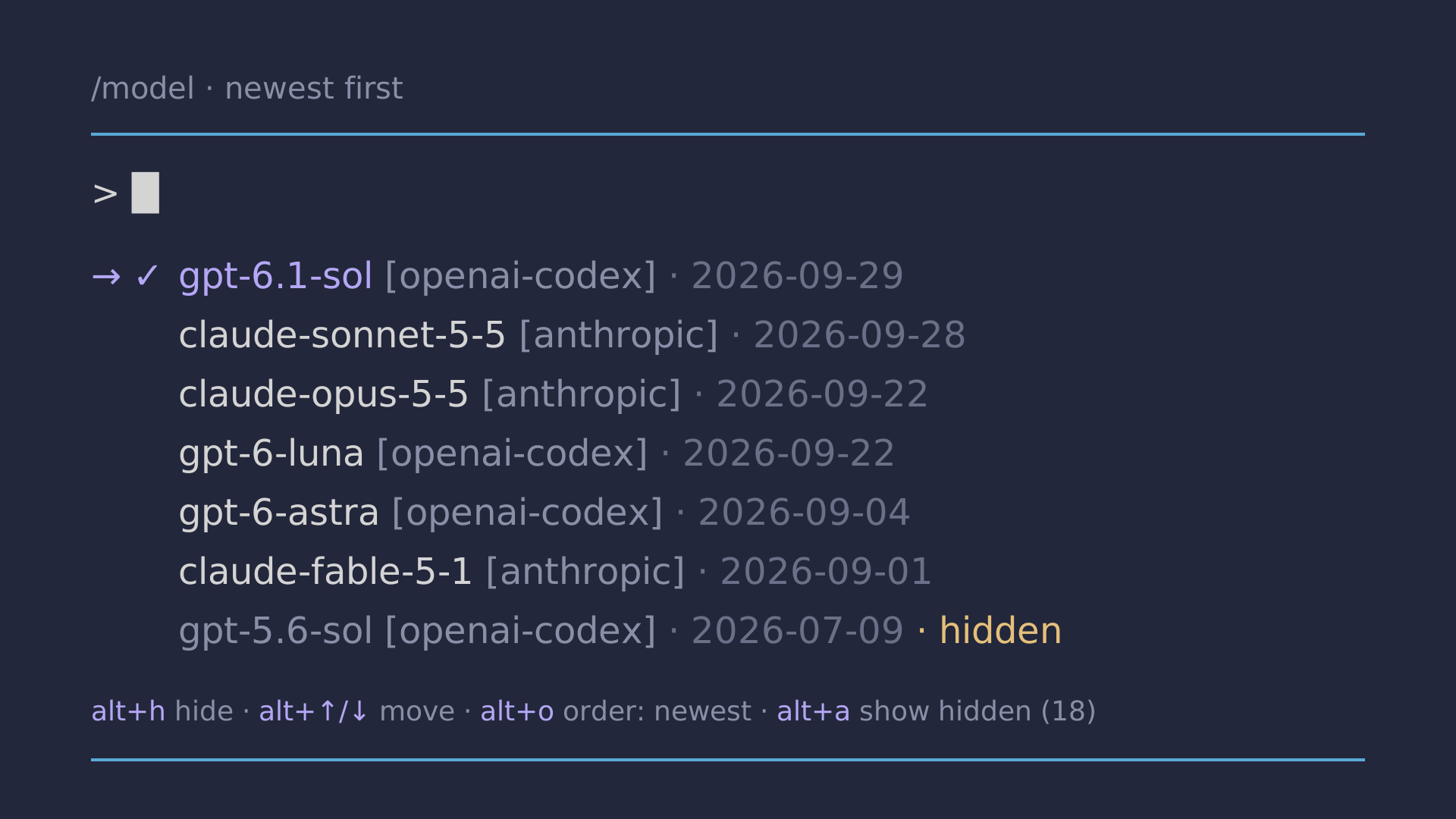
A pi package that orders the /model list by release date (newest first)
instead of by provider name, and lets you hide the models you never use.


Install
pi install npm:pi-model-release-sort
Try it for a single run without installing:
pi -e npm:pi-model-release-sort
What it does
/model(and its keyboard shortcut) list the newest models first. Models with no known date go to the end.- Your current model and default model stay at the top, as in plain pi. They are never hidden.
- The "scoped" tab is sorted and filtered the same way.
- You can arrange the list by hand, one row at a time.
- You can hide single models, whole providers, or every model older than N months.
In the /model window
Open /model as usual. Each model shows its release date, and three extra keys work:
→ ✓ gpt-5.5 [openai-codex] · 2026-04-23
    gpt-6-astra [openai-codex] · 2026-09-04 · hidden
    gpt-5.6-luna [openai-codex] · 2026-07-09
  alt+h hide/unhide · alt+o order: newest · alt+a show hidden (3)
| Key | What it does |
|---|---|
alt+↑ |
Move the highlighted model one row up |
alt+↓ |
Move the highlighted model one row down |
alt+h |
Hide the highlighted model (or unhide it, when hidden models are shown) |
alt+o |
Switch the order: newest → oldest → pi's order |
alt+a |
Show hidden models (marked hidden) or hide them again |
The first move switches the order to custom: the list stays exactly as you arrange it. alt+o switches
back to date order, and your arrangement is kept for the next time you pick custom. Models you haven't placed
yet (for example a newly released one) appear at the top, marked new, so you can move them where you want.
Typing still searches, and every other key works as in plain pi. If your search only matches hidden models, the window tells you so. The keys can be changed in the settings file (see below).
Settings panel
Run /model-sort to open the settings panel. It has three tabs (switch with tab) and saves every change at once.
 Model list  [Models]  Providers   Options    12 of 40 hidden
> claude

→ shown   anthropic/claude-sonnet-5-5  2026-09-28
  hidden  anthropic/claude-opus-4-1  2025-08-05
  hidden  anthropic/claude-3-opus  2024-02-29 · by provider
  (1/18) ↓ more

  type to search · enter hide/show · ctrl+p hide/show provider
  ctrl+x hide all listed · ctrl+a show all listed · ctrl+o hide all below · tab next tab · esc close
Models: type to search, then
| Key | What it does |
|---|---|
enter |
Hide or show the highlighted model (the cursor stays where it is) |
ctrl+x |
Hide every model in the list (only the search matches, if you searched) |
ctrl+a |
Show every model in the list again |
ctrl+o |
Hide every model below the cursor, e.g. everything older than the highlighted one |
ctrl+p |
Hide or show the highlighted model's whole provider |
alt+↑ / alt+↓ |
Move the highlighted model one row, same as in /model |
Your current and default model are never hidden by bulk actions. If a model is hidden by a provider or age rule, the panel says so instead of silently doing nothing.
Providers: enter hides or shows all models of a provider.
Options: ←/→ change the order and the "hide models older than" filter (off, 3, 6, 12, 18, 24 months),
forget your custom order, refresh the release dates, or reset everything (forgetting and reset ask for a second enter).
Subcommands
For scripts and quick changes (with autocomplete):
| Command | What it does |
|---|---|
/model-sort newest |
Newest release first (default) |
/model-sort oldest |
Oldest release first |
/model-sort off |
pi's built-in order (hiding still applies) |
/model-sort hide <provider/model> |
Hide one model |
/model-sort unhide <provider/model> |
Show it again |
/model-sort custom |
Your own order (after you have moved models) |
/model-sort clear-order |
Forget your custom order |
/model-sort hide-provider <provider> |
Hide all models of a provider |
/model-sort unhide-provider <provider> |
Show them again |
/model-sort older-than <months|off> |
Hide models released more than N months ago |
/model-sort status |
Show the current settings |
/model-sort refresh |
Download release dates again |
/model-sort reset |
Restore the defaults |
Settings are saved in ~/.pi/agent/model-release-sort.json:
{
  "order": "newest",
  "hiddenModels": ["openai/gpt-4o"],
  "hiddenProviders": ["openrouter"],
  "hideOlderThanMonths": 12,
  "customOrder": ["anthropic/claude-opus-5-5", "openai-codex/gpt-6.1-sol", "…"],
  "keys": { "hide": "alt+h", "order": "alt+o", "showHidden": "alt+a", "moveUp": "alt+up", "moveDown": "alt+down" }
}
order is newest, oldest, off (pi's order) or custom (uses customOrder, top to bottom).
Defaults: order is "newest", nothing is hidden, keys as above.
Key names use pi's format (alt+h, ctrl+shift+x, …). If a key does not reach pi in your terminal,
pick another one.
Where release dates come from
pi's model data has no release dates, so they are taken from the public
models.dev catalog (https://models.dev/api.json).
- Downloaded in the background at most once a day and cached in
~/.pi/agent/cache/model-release-dates.json. - Matched by provider and model id, then by model id alone (so
openai-codex/gpt-5.5uses the date ofopenai/gpt-5.5). - Offline: the cached dates are used. With no cache at all, pi's normal order is used.
- No other data is sent anywhere.
Compatibility
pi does not let extensions replace the built-in /model command. This package wraps internal methods
of pi's ModelSelectorComponent (sortModels, loadModelsFromSnapshot, updateList, handleInput). Tested with
pi 1.4.0. If a future pi release changes those methods, the package shows a warning and pi falls back
to its normal order. Nothing breaks.
Contributing
Issues and pull requests are welcome. See CONTRIBUTING.md.