pi-kanban2.0.0
Agent development environment for the pi coding agent: run pi in a browser terminal next to its todos, subagents, and docs.
Untested on omp
This is a pi package. No one has reported whether it works on omp yet. If you try it, add your result below.
Reports 0
No reports yet.
Readme
pi-kanban

Agent PI - Agent Development Environment (ADE) for the pi coding agent.
What it is
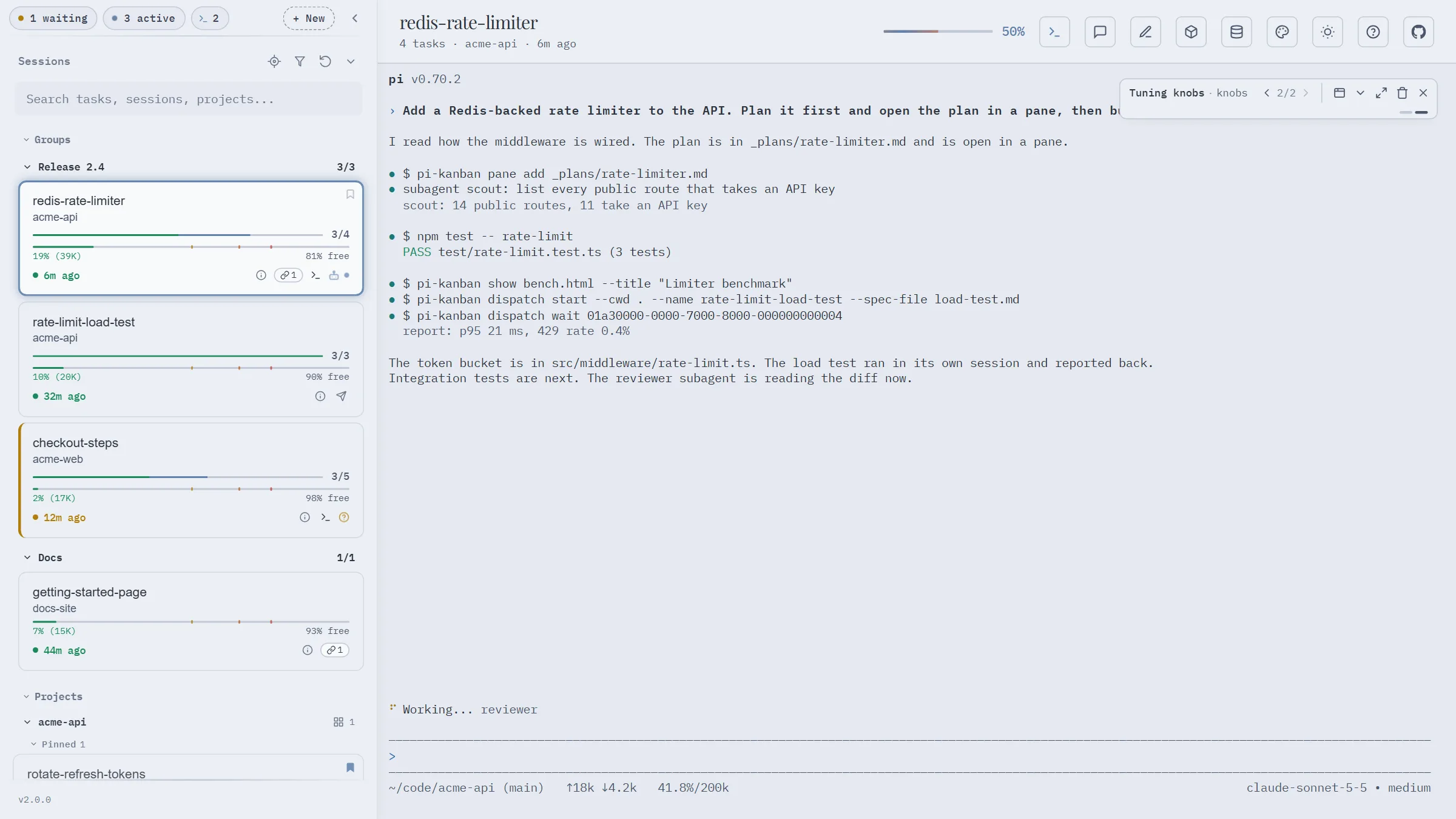
pi-kanban runs pi sessions in a browser terminal and shows each session next to its work: todos as kanban columns, subagents, linked docs, and the full session log. Its skills and its ask tool let the agent show you cards, ask you questions, open files and pages as tabs, and hand tasks to new pi sessions.
- Documentation: https://nikiforovall.blog/pi-kanban/
- Live demo: https://nikiforovall.blog/pi-kanban/demo/ (sample sessions, runs in your browser, no install)
Install
You need Node.js 20 or later and pi.
pi install npm:pi-kanban
npm install -g pi-kanban
The first command gives pi the /kanban command, the ask tool, and the skills that drive the board. The second installs the pi-kanban command, which runs the board.
Start the board
pi-kanban
The board listens on 127.0.0.1:3460 and prints its URL with the access token. Open that URL and click + New to start pi in the board terminal. Start the board with --no-terminal to only watch sessions.
When pi runs in another terminal, run /kanban open in pi to open the board with its token. /kanban session open | pin | sticky-pin | unpin | view-doc | link-doc act on the current session, and /kanban cost and /kanban inspect open pi-cost and pi-inspect for it.
The board
- Sidebar. Sessions in groups and projects, with progress, pins, linked docs, and icons for a terminal, a dispatched session, or a question that waits for you.
- Terminal. pi runs next to its board. The terminal keeps running when you close the browser tab.
- Board. Pending, In Progress, and Completed columns for the selected session. Tabs next to it hold panes and show cards.
- New session. Pick a folder or project, and set a name, a first prompt, the model, and the thinking level.
- Agents and session logs. Subagents with model, status, and run time, and every prompt, reply, and tool call.
- Review. Send review comments or card answers from the board. pi gets them as a user message.
Press ? on the board for the keyboard shortcuts.
What pi gets
pi works the board through the pi-kanban command. The package's skills tell pi which command to run, so only the skill names and descriptions sit in the system prompt until pi needs one.
| Skill | What pi does with it |
|---|---|
kanban |
Add a URL or a file as a tab next to the board (pane add, pane list, pane rm), link a file or URL to the session (doc link, doc unlink), preview a file now (doc preview), and open pi-cost or pi-inspect for the session (session cost, session inspect) |
show |
Write a markdown or HTML card and post it with pi-kanban show <file>. It shows over the board terminal, or as a tab when pi runs in another terminal. |
ask |
Write an HTML question for the ask tool |
visualize |
Write a full HTML explainer page and add it as a tab |
dispatch |
Hand a task to a new pi session in the board terminal (dispatch start) and get its report back (dispatch wait, dispatch list, dispatch end) |
| Tool | What it does |
|---|---|
ask |
Show an HTML question in a modal and wait for the answer. pi asks in its own prompt when the board is down. |
dispatch_report |
The worker's report, kept by the board until the parent reads it. Only a dispatched session has it. |
Each session also gets a scratchpad folder, given to pi in the system prompt and in $PI_SCRATCHPAD_DIR. Run pi-kanban help for every command.
Companion pi packages
pi-kanban shows data that other pi packages write:
pi install npm:pi-subagents
pi install npm:@juicesharp/rpiv-todo
pi-subagentsstarts named subagent sessions. The board shows them under each parent session.@juicesharp/rpiv-todotracks todos. The board shows them as columns.@juicesharp/rpiv-ask-user-questionasks you questions in the pi terminal. The board marks the session as waiting until you answer.
Security
The board terminal runs commands as you, so the board is locked to your machine:
- It listens on loopback (
127.0.0.1) by default.--hostchanges this. Do not expose the board to a network you do not trust. - It refuses requests whose
Hostheader is not local (--allowed-hostsadds names), and cross-site requests that change data. - Only the terminal and dispatch need the token. Anyone who can reach the board can read your pi session history, which is one more reason to keep it on loopback.
- The terminal needs a random token. The board keeps it in the URL fragment (
#t=...), which the browser never sends to a server. The browser keeps it in local storage, and the server keeps it across restarts in<agent dir>/kanban/terminal-secret.json, readable only by you. Do not share the board URL. If you did, start the board with--new-token.
License
MIT