gentle-herdr-status0.3.0
Pi extension that shows in the Herdr sidebar the running subagent ($subagent), the orchestrator phase ($phase), the running jobs ($jobs) and the panel name ($name). Pane state and notifications stay with Herdr's official Pi integration.
Untested on omp
This is a pi package. No one has reported whether it works on omp yet. If you try it, add your result below.
Reports 0
No reports yet.
Readme
gentle-herdr-status
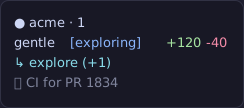
Pi extension that shows, in the Herdr sidebar, the running subagent, what the orchestrator is doing and the jobs it launched:
Quick start
Install the extension:
pi install npm:gentle-herdr-statusFrom GitHub instead:
pi install git:github.com/MiguezPablo/gentle-herdr-status(see Install).Run
/herdr-statusinside Pi and choose Sync Herdr rows, so Herdr draws the rows for Pi panes (see Sync Herdr rows).
It needs Herdr 0.9.5 or later with herdr integration install pi, and gentle-pi for
subagents, jobs and phases; the exact versions are in Requirements.
Gallery
| Plain style | Emoji style |
|---|---|
 |
 |
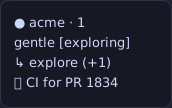
The default shape, [exploring] and ↳ explore (Configuration) |
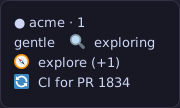
One emoji per phase, subagent and job (Emoji style) |
 |
 |
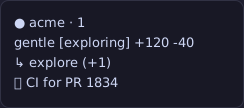
The opt-in $changes counter next to the name (PI_HERDR_STATUS_CHANGES) |
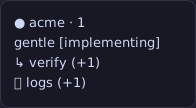
Two subagents and two jobs, each row with its (+N) counter (How it works) |
 |
|
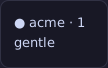
| While the agent is idle only the name row is left (How it works) |
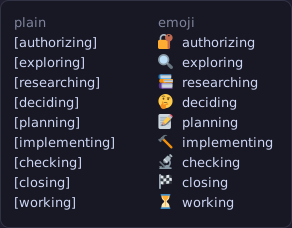
Every phase, plain on the left and emoji on the right:
The rows it publishes, as text:
● acme · 1
gentle [exploring]
↳ explore (+1)
⏵ CI for PR 1834
With the opt-in $changes token the row can also show the uncommitted lines of the
session's repo, next to the name:
gentle [exploring] +120 -40
↳ explore (+1)
⏵ CI for PR 1834
$nameis the panel name,gentleby default (Herdr rows accept only tokens, never literal text);/herdr-statusrenames it. It is published from session start, stays while the agent is idle and is cleared on shutdown.$phasefollows the orchestrator: the ODD phase gentle-pi shows in its own prompt label, as one plain lowercase word in square brackets ([exploring],[implementing],[checking], …), or[working]while no phase is reported. It disappears when the agent goes idle, so the row reads justgentle. With the emoji style the same token is an emoji plus the word, without brackets (see Emoji style).$subagentholds the↳prefix that marks the row as a subagent, the oldest running subagent's name without gentle-pi'sgentle-ai-prefix (gentle-ai-exploreshows asexplore), plus how many other subagents run alongside it, in parentheses with a+, when two or more run, e.g.↳ explore,↳ verify (+1). Names are sanitized to one line of at most 32 characters: terminal escape sequences (CSI colours and OSC titles) and control characters are dropped. It disappears when no subagent runs; the arrow never shows on its own. The emoji style replaces the arrow with an emoji per agent (🧭 explore, see Emoji style).$jobsholds the⏵prefix and the oldest running job's label, plus how many other jobs run alongside it, in parentheses with a+, when two or more run, e.g.⏵ CI for PR 1834,⏵ logs (+1). With the emoji style the prefix is🔄(🔄 CI for PR 1834). A job keeps running without a turn, so this row is published while the agent is idle too; it is cleared when no job runs, on session start and on shutdown.$changesis opt-in: only when it is turned on (in the config file, or withPI_HERDR_STATUS_CHANGES=1) it holds the lines the session's repo has without committing, as+<added> -<deleted>(e.g.+120 -40,+5 -0), so it reads next to the name. While it is off nothing is computed, git is never run and the token stays unset. Each half is published in its own token too ($changes_addedis+120,$changes_deletedis-40), because the colored row gives every cell one color and the two signs need different ones. See Configuration.
With two subagents and two jobs running, each row carries the oldest one plus how many others run alongside it:
The package is published as gentle-herdr-status. The config directory
(~/.config/pi-herdr-status/) and the managed block markers
(# BEGIN pi-herdr-status …) keep their original names, so an existing install keeps its
settings and its Herdr block without migrating anything.
Configuration
Everything is opt-in, so with no file and no variables the sidebar looks exactly as described above. There are two sources, and the two environment variables that existed before the file always win over it:
- the JSON file
$XDG_CONFIG_HOME/pi-herdr-status/config.json(or~/.config/pi-herdr-status/config.jsonwhenXDG_CONFIG_HOMEis unset), edited with/herdr-status; PI_HERDR_STATUS_STYLEandPI_HERDR_STATUS_CHANGES, which force their option (see Precedence).
The config file
{
  "style": "plain",
  "changes": false,
  "name": "gentle",
  "showSubagent": true,
  "showJobs": true,
  "colors": false
}
style is the one and only style switch: it applies to the whole sidebar at once, never
per section (there is no phaseStyle, subagentStyle or jobsStyle).
| Token | plain (default) |
emoji |
|---|---|---|
$phase |
[exploring] |
🔍 exploring |
$subagent |
↳ explore (+1) |
🧭 explore (+1) |
$jobs |
⏵ build (+1) |
🔄 build (+1) |
$name and $changes never change with the style.
| Field | Values | Default | Panel row | What it does |
|---|---|---|---|---|
style |
plain, emoji |
plain |
Style |
The style of $phase, $subagent and $jobs together (see Emoji style). |
changes |
true, false |
false |
Show changes |
Turns the $changes counter on; while it is off git never runs. |
name |
text | gentle |
Panel name |
The $name token. Sanitized to one line and capped at 32 characters; empty or blank reads gentle. |
showSubagent |
true, false |
true |
Show subagents |
false keeps $subagent unset, so its row disappears. |
showJobs |
true, false |
true |
Show jobs |
false keeps $jobs unset, so its row disappears. |
colors |
true, false |
false |
Sidebar colors |
Colors in the managed Herdr row (see Sync Herdr rows). |
A file written by an older version (with phaseStyle and subagentStyle) keeps working:
if there is no valid style, emoji in either of those fields reads as style: "emoji"
and anything else as plain. The next save writes only style, so the old fields
disappear.
A missing file, an unreadable one, invalid JSON or an invalid field never breaks the extension: that field falls back to its own default and the rest is kept. Saving writes the normalized JSON with two spaces and a trailing newline, through a temporary file in the same directory that is then renamed, so a reader never sees a half-written file, and creates the directory when it does not exist yet.
PI_HERDR_STATUS_CONFIG (a path) replaces the whole file location; the tests use it so
they never touch yours.
/herdr-status
The command opens a panel with one row per option, its current value and, for the options
a variable forces, the mark (forzado por PI_HERDR_STATUS_STYLE) or
(forzado por PI_HERDR_STATUS_CHANGES): those rows cannot be changed from the panel. The
rows are Style, Show changes, Show subagents, Show jobs, Sidebar colors and
Panel name, and then the actions Save changes and Sync Herdr rows.
Every row is explained: the description of the selected row is shown under the list, in
dim text and indented, like /tokometer, and it changes as you move. A description says
what the row does and, when the value changes the result, what that value renders, for
example Style names [exploring], ↳ explore and ⏵ build for plain and
🔍 exploring, 🧭 explore and 🔄 build for emoji; Show changes says it shows
+N -M, the uncommitted lines of the session's repo, next to the name and remeasured on
every Pi event; Sync Herdr rows says it writes the Herdr row with a backup and reloads
Herdr. A row forced by a variable says so in its description too (Fixed by …), and it is
described with the value in effect, not the one stored in the file.
In the panel a row talks about what you see in the sidebar, never about the metadata token
behind it; the token names ($changes, $subagent, $jobs, $name) are documented below
for whoever writes the Herdr row by hand. The option ids and the JSON fields (changes,
showSubagent, showJobs) keep their names, so an existing config.json needs no change.
The descriptions live in the config module (src/config.ts) next to the labels; the
panel only renders them.
| Key | Action |
|---|---|
↑ ↓ |
Move between rows. |
Enter |
Cycle the selected option (plain ↔ emoji, on ↔ off), start and confirm editing the panel name, or run the selected action (Save changes, Sync Herdr rows). |
ctrl+s |
Save: write the file and apply it live. |
Esc |
Cancel without writing. While editing the name it only leaves the edit, discarding the text. |
Saving writes the JSON and applies it at once: the extension rereads the config and
updates the sidebar at once, so it changes without waiting for the next Pi event, and
turning changes on starts the first measurement immediately. It is also the only moment
the extension reads the file besides session_start; nothing polls it.
Without an interactive TUI the command writes nothing and only reports the config in effect and the file path.
The last two rows are actions. Save changes writes the JSON and applies it live.
Sync Herdr rows saves the same draft and then writes the pi row in Herdr's own config,
inside a block this package owns (see Sync Herdr rows).
Sync Herdr rows
Herdr rows are Herdr's own configuration, not metadata an extension can publish, so
Sync Herdr rows writes the pi row into config.toml for you. It edits only a block it
owns:
# BEGIN pi-herdr-status (managed; do not edit)
[ui.sidebar.agents.rows_by_agent]
pi = [["state_icon", "machine", "workspace", "tab"], ["$name", "$phase"], ["$subagent"], ["$jobs"]]
# END pi-herdr-status
The rows follow the panel: with colors off $changes joins the name row only while the
counter is on, and with colors on it becomes two cells ($changes_added and
$changes_deleted) so each sign takes its own color. A row whose token is switched off
($subagent, $jobs) is left out.
Where the file lives, resolved from the environment: HERDR_CONFIG_PATH when it is set,
else $XDG_CONFIG_HOME/herdr/config.toml, else ~/.config/herdr/config.toml. The binary
is HERDR_BIN_PATH when it is set, else herdr.
What it does, in order:
- Reads the file. If it does not exist it stops with an error and never creates it, so a wrong path cannot invent a config.
- Replaces its own block when it is there.
- Without a block it appends one, unless a
[ui.sidebar.agents.rows_by_agent]table is already there. That table is migrated only when it is exactly the row this package used to ask you to write by hand: the comment# pi-herdr-status:, the table and a singlepi = …key. Any otherrows_by_agenttable (another tool's, extra keys, a missing comment) is refused with a notice and nothing is written, so another integration's row is never overwritten. - Backs the file up to
<config>.pi-herdr-status.bak, writes a temporary file next to it and renames it, so a reader never sees a half-written config. The backup is created only when it does not exist yet: it keeps the version from before pi-herdr-status first touched the file and a later sync never overwrites it. The temporary file inherits the mode of the original before the rename, so a664config stays664instead of falling to the umask (644). Right before the rename the file is read again: if someone edited it while the sync was running, nothing is written and the error says the file changed during the sync. - Runs
herdr config check. If it fails, the bytes read at the start of this sync — not the backup — are written back and the error reported; the reload never runs. Before restoring, the file is read again: if it no longer holds exactly what this sync wrote, someone edited it meanwhile, so it is left alone and the error names the concurrent edit and the backup path. - Runs
herdr server reload-config, so the sidebar picks up the change without restarting Herdr.
The result is reported in the panel: synced (info), refused (warning) or failed (error). The JSON config is saved before the sync, so the block always matches what the panel shows.
With colors: false (the default) every cell is a plain token string, which is the block
above. With colors: true the cells become Herdr style tables ({ token = "…", fg = "…", rules = […] }), which is where colors live: fg takes a strict hex color and rules
compare the reported value, first match wins.
| Token | Color |
|---|---|
$name |
none: the panel name keeps the terminal's default color. |
$phase |
one rule per phase, with contains and ignore_case so both styles match: exploring/researching the toolTitle role of the theme, planning/deciding/authorizing accent, implementing warning, checking success, closing dim. |
$changes_added |
the success role: the +N half in green, the same color Gentle Shell gives it. |
$changes_deleted |
the error role: the -N half in red, the same color Gentle Shell gives it. |
$subagent |
the accent role. |
$jobs |
the muted role. |
Herdr gives one fg per cell and the counter has two signs, so with colors on the row
uses the two halves of the counter instead of the single $changes token. With colors
off nothing changes: the row is still ["$name", "$phase", "$changes"].
Those roles come from the Pi/Gentle Shell theme that is active when you run the sync: the
panel reads ctx.ui.theme.colors, converts each role to hex and writes it, so the sidebar
follows the same palette as the rest of Pi instead of inventing one. Every fg has to be a
strict #RRGGBB hex, so a role the theme does not define, or one whose value does not
validate, leaves that cell on the fallback of the built-in Catppuccin Mocha palette (blue
#89b4fa for exploring/researching — and for the same group when the theme has no
toolTitle, which falls back to accent —, mauve #cba6f7 for
planning/deciding/authorizing, yellow #f9e2af for implementing, green #a6e3a1 for
checking and $changes_added, overlay #7f849c for closing and $jobs, sky #89dceb for
$subagent and red #f38ba8 for $changes_deleted). A theme that cannot be read at all
leaves the whole row on that palette, so the sync never fails over a theme. The block is a
copy, not a live link: run Sync Herdr rows again if you change the theme. Colors are off
by default, like everything else.
To undo it by hand: delete the block from # BEGIN pi-herdr-status … through
# END pi-herdr-status (or restore <config>.pi-herdr-status.bak) and run
herdr server reload-config. Nothing else in the file was ever touched.
Precedence
| Variable | Option | How it is read |
|---|---|---|
PI_HERDR_STATUS_STYLE |
style |
Defined, it forces the whole style: emoji only for that exact value, anything else (including EMOJI or an empty value) is plain. |
PI_HERDR_STATUS_CHANGES |
changes |
Defined, it forces the counter: only the exact value 1 turns it on. |
When one of them is defined, the file never applies to that option, the panel marks the row as forced and saving keeps the stored value untouched. Options without a variable always follow the file.
Emoji style
style: "emoji" turns the three tokens to their emoji shape at once, because the icon is
recognized faster than reading the word; style: "plain" (the default) is the shape
above. There is no style per section: one switch, the whole sidebar.
PI_HERDR_STATUS_STYLE=emoji pi
The variable forces the same single style and wins over the file. Only the exact value
emoji changes anything; unset, empty or any other value (including EMOJI) keeps the
plain shape, and the panel marks the row (forzado por PI_HERDR_STATUS_STYLE).
The row then reads gentle · 🔍 exploring · 🧭 explore · 🔄 build instead of
gentle · [exploring] · ↳ explore · ⏵ build:
| Phase | Emoji | Token |
|---|---|---|
authorizing |
🔐 | 🔐 authorizing |
exploring |
🔍 | 🔍 exploring |
researching |
📚 | 📚 researching |
deciding |
🤔 | 🤔 deciding |
planning |
📝 | 📝 planning |
implementing |
🔨 | 🔨 implementing |
checking |
🔬 | 🔬 checking |
closing |
🏁 | 🏁 closing |
no phase (working) |
⏳ | ⏳ working |
Every emoji is a single codepoint (no U+FE0F variation selector), so it is one glyph,
but some fonts render it two columns wide and some one: the row can shift by a cell
between terminals or themes. Nothing else about the phase changes: the word is still
lowercase, untrimmed input is still normalized, the token still clears when the agent
goes idle.
Every phase in both styles, plain on the left and emoji on the right:
Subagent and jobs emoji style
With style: "emoji" the ↳ prefix of $subagent becomes one emoji per agent, chosen
from the name after dropping gentle-pi's gentle-ai- prefix, and the ⏵ prefix of
$jobs becomes 🔄 :
| Agent | Emoji | Token |
|---|---|---|
explore |
🧭 | 🧭 explore |
worker |
🔨 | 🔨 worker |
verify |
🔎 | 🔎 verify |
| any other | 🤖 | 🤖 reviewer |
| a job | 🔄 | 🔄 build |
Nothing else changes: the counter keeps its parentheses (🧭 explore (+1), 🔄 build (+1)), the names are still sanitized and capped at 32 characters, and only the exact
agent name (explore, not explore-x) has its own emoji. Every emoji is a single
codepoint, with no U+FE0F; the jobs prefix is exactly U+1F504. With style: "plain"
the rows are byte for byte the ↳ explore and ⏵ build they always were. $name and
$changes are not a style: they never change.
PI_HERDR_STATUS_DEBUG
Opt-in diagnostic for $phase; see Debugging.
PI_HERDR_STATUS_CHANGES
The exact value 1 forces the $changes token on; unset, empty or any other value
(including 0 or true) turns it off and never runs git, even if the file says
"changes": true. It is off by default because a number that changes all the time is
noise unless you ask for it.
PI_HERDR_STATUS_CHANGES=1 pi
What it counts is deliberately the same rule as Gentle Shell's own "Changes" counter:
tracked lines against HEAD (git diff --numstat HEAD, so staged and unstaged changes
together, binary rows counting as zero) plus the lines of the untracked files that git
does not ignore (git status --porcelain=v1 --untracked-files=all -z, and only the ??
entries). Untracked lines are counted in Node: only a regular file of at most 1 MiB is
read (a symlink, a directory or anything bigger adds nothing), an empty file adds
nothing, and a file counts its \n separators without the empty line behind a trailing
newline. The token is +<added> -<deleted> with an ASCII hyphen and shows a zero part
(+5 -0); when nothing changed it disappears. The two halves are published in their own
tokens as well ($changes_added = +5, $changes_deleted = -0), always together with
$changes and cleared with it: they exist so the colored row can paint + green and -
red, but a row without colors keeps using $changes and reads exactly as before. A repo
without commits shows no token at all, because there is no HEAD to compare against.
Outside a git repo, with git
missing, on error or after a 2 s timeout the token is cleared instead of keeping the
previous value. Two differences remain on purpose: the token has no file count, and the
worktrees of the repo are not visited, only the repo of the session cwd.
When it recalculates, with no timer of its own: on session_start, agent_start, every
tool_result (any tool, so edit/write/bash and the end of a subagent are covered), the
gentle-pi jobs event and agent_end. The measurement is asynchronous (execFile, no
shell, never blocking events): at most one runs at a time, and events that arrive during
one collapse into exactly one more measurement. It is published in the same report as the
other tokens (same seq, source and TTL) and also while the agent is idle, like $jobs.
The limit is deliberate: it is event-driven, so changes made outside Pi (another terminal, an editor, a background job that is not a gentle-pi job) are reflected only on the next Pi event. Nothing polls the repo.
To show it, add the token to the row with the name:
pi = [["state_icon", "machine", "workspace", "tab"], ["$name", "$phase", "$changes"], ["$subagent"], ["$jobs"]]
What it does not do
This package only publishes presentation metadata (pane.report_metadata). It never:
- reports pane state (working, blocked, idle): Herdr's official Pi integration owns it;
- sends desktop notifications or sounds: Herdr decides them from its
[ui.toast]and[ui.sound]settings, so turning them off in Herdr turns them off everywhere; - reacts to UI prompts: opening a subagent viewer or a menu changes nothing;
- shows branches. Change counts only appear when
$changesis turned on. Colors are optional and only ever written by Sync Herdr rows, inside this package's managed block in Herdr's ownconfig.toml.
Requirements
Herdr 0.9.5 or later, with its Pi integration installed in the agent directory Pi uses:
herdr integration install pi
herdr integration status   # pi: current
Subagents and jobs from gentle-pi (
subagent_run/subagent_continue, and its background jobs). The$phasetoken additionally reads gentle-pi's ODD phase registry; without gentle-pi it shows[working]while the agent runs, and$jobsstays empty.
Install
From GitHub:
pi install git:github.com/MiguezPablo/gentle-herdr-status
From npm, once published:
pi install npm:gentle-herdr-status
Or from a local checkout:
pi install /absolute/path/to/pi-herdr-status
Then add the rows for Pi panes with the panel: run /herdr-status inside Pi and choose
Sync Herdr rows (see Sync Herdr rows). It writes the pi row
inside a block it owns, so ~/.config/herdr/config.toml never has to be edited by hand.
Manually, rows_by_agent replaces the default rows, so they are listed again:
[ui.sidebar.agents.rows_by_agent]
pi = [["state_icon", "machine", "workspace", "tab"], ["$name", "$phase"], ["$subagent"], ["$jobs"]]
["$name", "$phase"] is the gentle [exploring] line: the panel name followed by the
phase. With $changes turned on, add it to that row (["$name", "$phase", "$changes"])
to read gentle [exploring] +120 -40; on a colored row use the two halves instead
({ token = "$changes_added", fg = "#a6e3a1" } and { token = "$changes_deleted", fg = "#f38ba8" }), so the + is green and the - red, like Gentle Shell. $subagent and
$jobs live in rows of their own,
so each disappears (row and all) when its token is unset. Apply it with
herdr server reload-config. A row whose only token is unset is hidden. If you write it by
hand with the comment # pi-herdr-status:, the next Sync Herdr rows migrates that row
into the managed block.
How it works
- Blocking subagents (
mode: "task", the default) count from the tool call to its result. - The name shown drops gentle-pi's
gentle-ai-prefix (gentle-ai-worker->worker); a name without that prefix is shown as it comes, and a name that was only the prefix falls back tosubagent. - Background subagents count from their launch result (
details.gentleAgents) until gentle-pi'sgentle-pi:notification:sourcebus reports a finished status (completed,failed,cancelled,timed_out). - Only the interactive TUI session publishes; gentle-agents children
(
GENTLE_PI_AGENTS_CHILD=1,--mode rpc) never do. $nameis thenamefield of the config (gentleby default), published fromsession_startand kept while the agent is idle so the row keeps its name; it replaces theagentrow item, because Herdr rejects literal text in rows (its error is "custom tokens must start with$"). It is refreshed with the same TTL and cleared on shutdown.- Jobs come from gentle-pi's
gentle-ai:jobs-sidebarevent on Pi's event bus (pi.events.on):{ sessionId, snapshot: { jobs } }, where running jobs carry nostatusand recently finished ones carrystatus/endedAt/exitCode. Each event replaces the whole state; an event from another session id or with a malformed payload changes nothing. Only running jobs are shown, the oldest bystartedAtfirst (a tie is won by the job that comes first in the snapshot), plus how many others run in parentheses (+N) when two or more run. The label is sanitized and capped like the subagent name (one line, 32 characters, escape sequences and control characters dropped), and an empty label falls back tojob. That event and gentle-pi'sJOBS_SIDEBAR_EVENTname are internals of gentle-pi: they can change without notice, and then the row simply disappears. - The phase comes from gentle-pi's process-global ODD registry
(
Symbol.for("gentle-pi.odd-phase-registry").get(sessionId),sessionIdfromctx.sessionManager.getSessionId()). That registry is an internal of gentle-pi: it exposes no change event (its single render-request slot belongs to the prompt) and gentle-pi clears it when it settles. Polling it every second just for this token was not worth it, so the extension reads it only on the events it already handles, turn start (agent_start),tool_callandtool_result(gentle-pi's own phase reports are tool calls), and clears the token onagent_end. A missing registry, a registry withoutget, one that throws, or a value outside gentle-pi's phase list all fall back to[working]; nothing is published while idle. Since that registry is an internal,PI_HERDR_STATUS_DEBUGlogs what each event saw (see Debugging). - The style is one configuration switch for the whole sidebar, with the environment
winning over the file:
phaseToken(value, style)renders<emoji> <phase>instead of[<phase>],SubagentTracker.label(style)renders the per-agent emoji instead of↳, andJobsTracker.label(style)renders🔄instead of⏵. The default (plain, and the default argument of those three functions) is the previous shape, so no other token and no other behaviour changes. An old file withphaseStyle/subagentStyleis read asplain/emojiand rewritten with onlystylethe next time it is saved. $changesis opt-in too: turning it on (file orPI_HERDR_STATUS_CHANGES=1) creates a counter that measures the session'scwdon the events the extension already handles (session_start,agent_start, everytool_result, the jobs event andagent_end) through an injected git runner (execFile, no shell), at most one measurement in flight with a single queued re-measurement, a 2 s cap, andnullon any error. It has no timer and no poll of its own; its value travels in the same report and is cleared onsession_startand on shutdown. Turning it off disposes the counter, so git stops running at once.- The config lives in
src/config.ts(read, normalize, precedence, cycle, rename, atomic write, panel rows); the/herdr-statuspanel is a thin TUI layer on top of it and only hands the edited config back, so the handler is the one that writes the file and applies it. - The managed Herdr block lives in
src/herdr-config.ts(rows and colors, the plan for replacing or migrating, backup plus atomic write,herdr config checkandherdr server reload-config), with the filesystem and the runner injected, so tests only ever write temp files and never run the realherdr. - All tokens share source
pi-herdr-statusand oneseqstream (Herdr orders reports per source byseq), and every report carries all of them. - Every token carries a 90 s TTL and is refreshed every 30 s while shown, so they expire
even if Pi dies.
$jobsuses the same TTL and refresh; it has no poll of its own, and$phaseis still read only on Pi events. Everything is cleared on session start and shutdown. - Source
pi-herdr-status, agentpi.
Debugging
If the sidebar shows a phase it should not, point PI_HERDR_STATUS_DEBUG at a file
before starting Pi:
PI_HERDR_STATUS_DEBUG=/tmp/pi-herdr-status.jsonl pi
Every event that publishes the tokens (session_start, agent_start, agent_end,
tool_call, tool_result) then appends one JSON line with the event name and tool name,
the session id that event's ctx reported, the id the phase lookup actually used, the
typeof of the ODD registry this process sees, the sessions that registry tracks (with
their phase and source), the raw phase read and the token published. That tells apart a
session-id mismatch, a registry loaded by another module instance, and a phase that was
never reported.
The variable is unset by default and then nothing is written. Write failures are ignored, so the diagnostic never affects the sidebar.
Development
npm install
npm test
npm run typecheck
The images in this README are generated, not captured: npm run screenshots rewrites
docs/screenshots/ from the same functions that publish the tokens, and npm test fails
when a committed SVG is stale. Emoji graphics are
Twemoji by Twitter, Inc and other contributors,
licensed CC-BY 4.0; the vendored files
live in scripts/twemoji/.
License
MIT