elflodge0.10.0
Hundreds of agents working unattended. One job API. Run jobs in parallel on your own machine and get structured results.
Untested on omp
This is a pi package. No one has reported whether it works on omp yet. If you try it, add your result below.
Reports 0
No reports yet.
Readme

Elflodge
Hundreds of agents working unattended. One job API.
Website · 

Run sandboxed agents in parallel on your own machine, without a costly fleet of hosted sandboxes. Send a task or a whole batch; get structured results your code can use.
Define the agent's instructions and output schema once. Each job runs Pi with real files and shell commands in its own sandbox, returning JSON checked against your schema or a failure with its reason. The first five jobs run before the rest, and a Batch pauses itself when too many fail.
Given a folder of invoices and a JSON Schema for what you want from each, one command runs them all:
npx elflodge batches submit \
  --id invoices \
  --each invoices/*.pdf \
  --instructions "Extract the supplier, number, currency and total." \
  --output-schema invoice.schema.json \
  --wait \
  --output-dir ./results
Here it is with 500 invoices, the Runner on one 4 GB server, the model's replies replayed from a recording and the wait sped up:
Each PDF is a job. Each line of results/output.jsonl is one invoice's JSON, and each line of results/error.jsonl one that failed, with why.
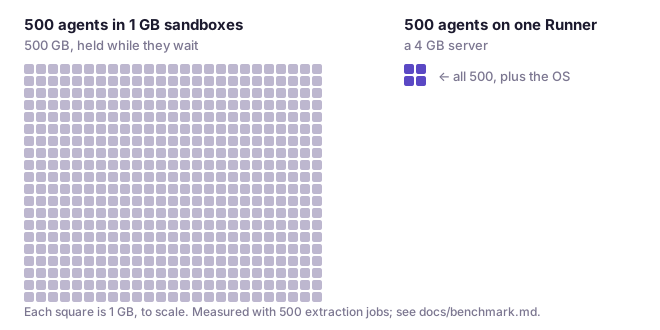
It does this without giving every job its own container, so you don't pay for agents to wait on the model. Five hundred agents in their own 1 GB sandboxes hold 500 GB of memory; on one Runner, for jobs that mostly wait on the model, they fit in a 4 GB server.
Try it on your machine with Docker and Node: npx elflodge stack start, then the first job.
Open source, MIT, TypeScript. Early: versions are 0.x.
Use with your coding agent
Install the Elflodge skill to have your agent prepare a batch, test representative inputs, and collect structured results:
npx skills add elflodge/elflodge --skill elflodge-agent-batches
Pi users can install the same skill from the npm package:
pi install npm:elflodge
The skill and worked extraction example cover setup, output schemas, failures and safe retries. Elflodge was formerly named agent-batch; both names refer to this project.
An everyday chore, done by an agent
The usual way to count the lines of a file:
$ printf 'one\ntwo\nthree\n' > notes.txt
$ wc -l notes.txt
3 notes.txt
The same chore, done by an agent in a sandbox on your machine. The answer is known in advance, so you can check the run yourself. You need Docker, Node and jq (versions, and a step for Ubuntu 24.04, in the host notes).
npx elflodge stack start
That runs a hub, a Runner and Postgres in the background, and on first run offers to sign you in to a model provider. The default is OpenRouter's free models, which still need an OpenRouter sign-in or key. Then the job:
cat > job.json <<'EOF'
{
  "customId": "quickstart-1",
  "agent": { "outputContract": { "schema": { "type": "integer" } } },
  "input": "Count the lines of this text and submit the count:\none\ntwo\nthree\n"
}
EOF
ID=$(npx elflodge jobs submit --input job.json | jq -er .id)
npx elflodge jobs wait --id "$ID"             # prints the job when it ends; exits 1 unless it succeeded
npx elflodge jobs get --id "$ID" | jq .output # 3
What happened: the agent read the input, counted, and could only finish by calling submit_output. The output was checked against the Output schema, the JSON Schema in the agent definition's Output contract. Had it submitted "3" instead of 3, the validation error would have gone back to the agent to fix; had it given up, the job would have failed with noOutput. A job never succeeds with nothing in it. The schema checks the shape, not the facts: 4 is also an integer, so read some outputs.
If you did not see 3: npx elflodge jobs events --id "$ID" prints what the agent did, and npx elflodge stack logs --follow prints the stack. Submit job.json a second time and you get the same job back, because the customId is the same. npx elflodge stack stop keeps your data; npx elflodge stack delete removes it and does not ask.
Now change the input: put your own text in input, change the schema to whatever you want back, give it a new customId, and submit. That is the whole programming model; everything below is doing it many times at once.
Why 500 fit in 4 GB
An agent job is mostly an await: the loop sends a prompt, waits on the model, runs a command, waits again. You would not give every fetch in a Node program its own virtual machine, yet agents are often run in parallel by giving each one its own sandbox. A container or VM per agent costs memory and seconds of CPU before the agent does anything: about 100 MiB even for a container running nothing but a Pi agent, and whatever you provision for a hosted sandbox, commonly 1 GB or more. Then it sits there while the agent waits on the model. An agent loop that is mostly await needs a few MiB. So in a Runner, the loops (the agent is Pi) run many to a process, and each job's shell commands and file access go into a lightweight per-job sandbox (Anthropic's sandbox-runtime: bubblewrap on Linux, Seatbelt on macOS), whose commands reach the public internet but, by default, not the Runner's host or local and private networks.
one Runner process (Node, on your machine)
├─ job 1    agent loop · waiting on the model
├─ job 2    agent loop · waiting on the model
├─ job 3    agent loop · running `wc -l inputs/notes.txt` ──► its own OS sandbox
├─ ...
└─ job 500  agent loop · waiting on the model
Measured on Elflodge 0.7.1 in November 2026, on one Hetzner CAX11: Arm, 2 vCPU, 4 GB RAM, about €7 a month. One Runner with systemd's TasksMax raised, real commands in real sandboxes, the hub on another machine. Model responses replayed from recordings of real runs: at 20× their recorded latency for the jobs held open, standing for a slow model; at their recorded timing for CPU. For 500 at once the server's Tailscale client was stopped. Server cost only, not model tokens. The baseline is the same agent (Pi, with the same tools, prompt and files) in a container of its own per job, without the Runner's per-job sandbox, crash recovery or reporting.
| One Runner | One container per job | |
|---|---|---|
| Extraction jobs open at once (read a messy invoice, CV or ticket and submit JSON) | 500, about 16× more | about 30 |
| Memory per open job | 6.3 MiB | about 100 MiB |
| CPU per job, CPU-heavy jobs (data scripts over large CSVs, code fixes with test runs) | 1.16–3.8× less; 1.16× for the heaviest, where the jobs' own work dominates | baseline |
These are particular workloads on one machine, not a capacity guarantee. Method and results: docs/benchmark.md.
A Runner runs 8 jobs at a time by default. That is the concurrency limit, and it is a setting:
RUNNER_MAX_JOBS=100 npx elflodge stack start --env RUNNER_MAX_JOBS
--env replaces the list of forwarded variables, so name every one you forward, such as --env RUNNER_MAX_JOBS --env OPENROUTER_API_KEY.
inputs.map(agent): job postings
Keep the agent, change the input. A Batch is many jobs sharing one agent definition; your first job was already a Batch of one. Say you have job postings and want, for each, what it really requires and how senior it is.
The agent is its instructions and the schema each output must match, which goes in a file of its own:
cat > postings.schema.json <<'EOF'
{
  "type": "object",
  "required": ["mustHave", "niceToHave", "seniority"],
  "properties": {
    "mustHave": { "type": "array", "items": { "type": "string" } },
    "niceToHave": { "type": "array", "items": { "type": "string" } },
    "seniority": { "type": "string", "enum": ["junior", "mid", "senior", "lead"] }
  }
}
EOF
The jobs are one posting per line, each with its own text and custom ID:
cat > postings.jsonl <<'EOF'
{"customId": "posting-0001", "input": "Software Engineer II, Example Corp\nYou will own the billing service end to end and mentor two engineers. Required: 5+ years TypeScript, Postgres. Nice: Effect, Cloudflare Workers.\n"}
{"customId": "posting-0002", "input": "Junior Developer, Example GmbH\nYou will fix bugs in our Node services with a senior engineer reviewing every change. Required: JavaScript. Nice: Docker.\n"}
EOF
npx elflodge batches submit postings.jsonl --id postings \
  --instructions "The input is a job posting. Submit the requirements it treats as mandatory, the ones it treats as optional, and the seniority it is really asking for, judged from the responsibilities rather than the title." \
  --output-schema postings.schema.json --wait --output-dir ./results
--id names the Batch, which the commands below take. Running the command again under the same ID adds only the jobs the Batch lacks; if you change the instructions or the schema, give a new ID, because the hub refuses the old one for a different agent. Once every job has ended, the command saves one line per job, in the file's order: in results/output.jsonl the output of each that succeeded, already checked against the schema, and in results/error.jsonl the failure of each that did not, exiting 1 if any did not; then it prints the Batch, or in a terminal the tokens and cost it used. A run's results/output.jsonl:
{"customId":"posting-0001","status":"succeeded","output":{"mustHave":["5+ years of TypeScript experience","Postgres"],"seniority":"senior","niceToHave":["Effect","Cloudflare Workers"]}}
{"customId":"posting-0002","status":"succeeded","output":{"mustHave":["JavaScript"],"seniority":"junior","niceToHave":["Docker"]}}
The first title said II; the responsibilities said senior.
npx elflodge <command> --help lists a command's flags, and the hub's reference at / every field of the API.
Stop watching your agents
Two postings you can watch. Five hundred you count. With five hundred, this happens:
- By default, the first 5 jobs run before the others. This is the Canary. If any fails, the Batch pauses before the rest start, so a prompt that breaks every job is caught after five, not five hundred.
- After the Canary, if more than 10% of the jobs that have ended since it began failed, the Batch pauses. This is the failure breaker. It judges from the first jobs to end, so a run of early failures pauses a large Batch quickly.
batches resume --id postingscarries on where it stopped;batches pause,cancelandgetwork the same way, as do single jobs, and ended jobs can be deleted.
The hub records every job's events (what the agent did), activity, usage in tokens and cost, and output. A Batch counts its jobs by status, and jobs can be listed by status, label, Batch and custom ID:
npx elflodge batches get --id postings | jq -c .jobCounts   # {"queued":0,"running":0,...,"succeeded":2,...}
npx elflodge jobs list --batch-id postings --status failed
npx elflodge jobs list --batch-id postings --status succeeded   # listed jobs carry no output: read one with jobs get
Jobs can be added continuously (add-jobs, jobs submit) and read continuously (jobs wait, jobs list). A job's journal is on disk, so a restarted Runner recovers its jobs where they stopped. A prompt that gives wrong but valid answers passes the Canary. Read some outputs.
Read it before you run it
Underneath, it is a plain job queue whose worker happens to think: an HTTP API on Postgres (Node or Docker, or Cloudflare Workers with Postgres through Hyperdrive), and Runners that connect out to it. The repository is elflodge/elflodge: TypeScript on Effect, oRPC, Hono and Zod, with Pi and sandbox-runtime inside. The CLI, the npm package elflodge, only calls the hub's HTTP API.
So can anything else. Your hub serves an OpenAPI 3.2 document at /spec.json and a browsable reference at /:
eval "$(npx elflodge stack env)"   # exports ELFLODGE_URL and ELFLODGE_API_KEY
curl -sS -H "x-api-key: $ELFLODGE_API_KEY" "$ELFLODGE_URL/spec.json" | jq '.paths | keys'
curl -sS -H "x-api-key: $ELFLODGE_API_KEY" "$ELFLODGE_URL/jobs?status=succeeded"
Job commands never see your model key
Model-provider credentials live in the Runner, outside every job sandbox. The Runner calls the model; the job's commands run in bubblewrap or Seatbelt, and the provider key is not in their environment. Ask an agent to look:
cat > look.json <<'EOF'
{
  "customId": "look-1",
  "agent": { "outputContract": { "schema": { "type": "object", "required": ["names"],
    "properties": { "names": { "type": "array", "items": { "type": "string" } } } } } },
  "input": "Run `env` and submit the names of the environment variables you see, names only."
}
EOF
ID=$(npx elflodge jobs submit --input look.json | jq -er .id)
npx elflodge jobs wait --id "$ID" | jq -c '.output | {keys: [.names[] | select(test("KEY|TOKEN|SECRET"))]}'
A run whose Runner held an OpenAI key printed {"keys":[]}.
The model is per Runner. stack start --provider anthropic --model claude-sonnet-5-5 picks any provider and model Pi supports; stack login --provider P adds a provider's sign-in (--with-api-key reads a key from stdin); --env NAME forwards a host variable, such as a provider key, to the Runner. For several models, run several Runners.
When not to use Elflodge
- You want to talk to the agent. Jobs run unattended and end; there is no chat.
- You want one answer to one request, right now. Submitting and reading are separate steps, and there is no push or callback.
- People who must not see each other's work share the machine. The sandbox is around each job's commands; Elflodge is for one organization, not hostile multi-tenant use.
- Every job wants a different model. The model is per Runner; run a Runner per model.
- Your jobs must move between hosts. A job's journal and Workspace stay with the Runner that took it, and each data directory takes one Runner process.
Full list: docs/release-scope.md.
Host notes
Elflodge needs Docker Engine 29+ with Compose 5+, and Node 22.19+. If you add yourself to the docker group to run Docker without sudo, log out and back in first, or stack start cannot reach Docker. On Ubuntu 24.04, run sudo sysctl -w kernel.apparmor_restrict_unprivileged_userns=0 before stack start, so the sandboxes can start, and add a file in /etc/sysctl.d to keep it. Ubuntu 25.04 and later are not supported yet. Logins, status, logs and upgrading: docs/deploy.md.
More than one machine
stack start is for one machine. For a hub that Runners on other machines connect to, the repository's compose.yaml runs the hub, Postgres and a Runner from the published images, ghcr.io/elflodge/elflodge-hub and ghcr.io/elflodge/elflodge-runner (linux/amd64 and arm64). Today you create API keys there with curl against the hub, because the CLI cannot sign in yet. Steps: docs/deploy.md.
Working on Elflodge
Issues are welcome, including ones about this page. Outside pull requests are not accepted for now; CONTRIBUTING.md explains and has the development commands. npx elflodge --help lists every command, and docs/cli.md describes them.
Elflodge was called agent-batch through 0.6; the agent-batch package still installs it and runs it under that name. Elflodge is made by lodgekeeper. MIT licence.