@singh-gur/pi-session-sync0.2.1
Pi extension: sync your pi sessions across machines through a private git repo, with per-machine path mapping and branch-preserving merges.
Untested on omp
This is a pi package. No one has reported whether it works on omp yet. If you try it, add your result below.
Reports 0
No reports yet.
Readme
pi-session-sync
Start on your laptop. Pick it up on your desktop. Keep coding.
Your pi sessions, on every machine. Push a conversation from one machine, pull it on another, and carry on exactly where you left off: same history, same /tree, with paths rewritten for the machine you're on. Everything travels through a private git repo you already own. No server, no account, no new service.
Install · Configure · How it works · npm
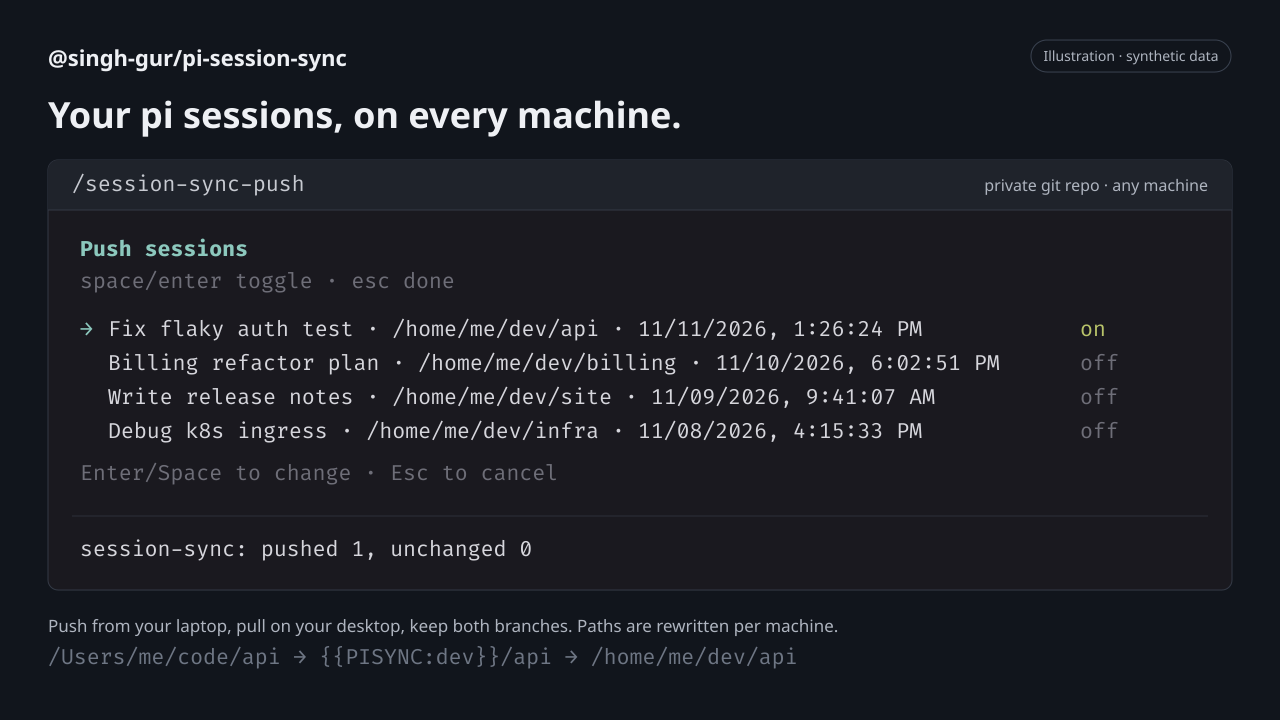
Illustration of the extension's picklist with synthetic sessions. Colors and spacing depend on your terminal and pi theme.
[!WARNING] Your sync repo must be private. Sessions contain your prompts, code, tool output (file contents, command output) and possibly secrets such as API keys or tokens. They are not encrypted or redacted.
Why you'll like it
- Pick exactly what travels.
/session-sync-pushand/session-sync-pullopen a picklist with the current session pre-selected. Nothing moves without you choosing it. - Paths that follow you.
/Users/me/code/apion your Mac becomes/home/me/dev/apion your Linux box. Named roots turn machine paths into portable placeholders, so/resumefinds the session in the right project. - Work on both machines, lose nothing. Sessions are merged entry by entry. Continue the same conversation in two places and both branches show up in
/tree, with the newest one active. - Your files stay the source of truth. Pull never deletes local sessions, and the active session only reloads when the agent is idle.
- Just git. Any remote
gitcan reach: GitHub, GitLab, Gitea, a bare repo over SSH. Authentication uses your existing git setup. - Hands-free if you want it. Optional auto mode pulls the current folder's sessions when pi starts and pushes when you quit, configurable per root or folder. Off by default; startup pulls run in the background, and network failures only show a warning.
Get started
pi install npm:@singh-gur/pi-session-sync
- Create an empty, private git repo for your sessions.
- Add the config file on each machine.
- Start pi (or run
/reload), then:
/session-sync-push     # on the machine you worked on
/session-sync-pull     # on the machine you're moving to
Requires Node.js >= 24.16, pi 1.x (tested with 1.5.2), and git on your PATH with access to your sync repo. Install the package on every machine you want to sync.
Try without installing, install from GitHub, pin, or update
# Try it for the current run only
pi -e npm:@singh-gur/pi-session-sync

# Install from GitHub
pi install git:github.com/singh-gur/pi-session-sync

# Install from a local checkout
pi install /path/to/pi-session-sync

# Update installed pi packages
pi update --extensions
To pin a release, append @<version>, for example npm:@singh-gur/pi-session-sync@0.1.0. Pinned versions are skipped by package updates.
Configure
Create ~/.pi/agent/git-session-sync.json on each machine. It is machine-local and never synced.
{
  "repoUrl": "git@github.com:me/pi-sessions.git",
  "branch": "main",
  "roots": { "dev": "/home/me/dev", "home": "/home/me" },
  "auto": { "pullOnStart": false, "pushOnShutdown": false }
}
| Key | Required | What it does |
|---|---|---|
repoUrl |
yes | Any URL git can clone. Use an empty private repo. |
branch |
no | Branch to sync. Defaults to main. |
roots |
yes | Named root directories. Names use a-z, 0-9, _ and -; paths must be absolute. Only sessions under a root are synced. |
auto.pullOnStart |
no | When pi starts, pull new or changed sessions for the folder pi was started in, in the background. Defaults to false. |
auto.pushOnShutdown |
no | Push the current session when you quit pi. Defaults to false. |
auto.overrides |
no | Per-root or per-folder auto settings; see below. |
Per-root and per-folder auto sync
auto.overrides keys are a root name (dev) or a root name plus a path under it (dev/api). Each entry sets pullOnStart and/or pushOnShutdown; unset fields fall back to the closest matching parent key, then to the global auto value. The longest matching key wins. Keys must start with a configured root name.
"auto": {
  "pullOnStart": false,
  "pushOnShutdown": true,
  "overrides": {
    "dev":         { "pullOnStart": true },
    "dev/scratch": { "pushOnShutdown": false }
  }
}
Here /home/me/dev/api pulls on start and pushes on quit, /home/me/dev/scratch pulls but never auto-pushes, and folders under home only push. Folders outside every root never auto-sync.
Same project, different paths
Give a root the same name on every machine and point it at that machine's folder:
| Machine | Config | Session cwd |
|---|---|---|
| MacBook | "dev": "/Users/me/code" |
/Users/me/code/api |
| In the repo | {{PISYNC:dev}}/api |
|
| Linux desktop | "dev": "/home/me/dev" |
/home/me/dev/api |
Every root path in a session (cwd, messages, tool calls and results) is replaced at path boundaries, with the longest matching root winning. Sessions that use a root name this machine doesn't define are skipped on pull, with a warning.
Commands
| Command | What it does |
|---|---|
/session-sync-push |
Pick sessions to push. Lists sessions from the current directory by default (Tab toggles all directories). Only the current session is pre-selected. |
/session-sync-pull |
Fetch the repo and pick from sessions that are [new] or [changed] compared to your local copies. If the current session is updated, pi reloads it. |
In the picklist: ↑/↓ move, Space checks or unchecks a session, a selects all/none of the visible sessions, Tab switches between current-directory and all-directory sessions (push only; only visible checked sessions are synced), Enter syncs the checked sessions, Esc cancels. Each run ends with a summary: synced, unchanged, new entries, conflicts and anything skipped (with the reason).
How it works
- Merging. Sessions are merged by entry id and ordered by timestamp, so the newest entry becomes the active leaf. If the same entry id has different content on each side, your local version is kept and the conflict is reported.
- Local first. Your session files are the source of truth. The clone at
~/.pi/agent/git-session-sync/repois a disposable cache, reset to the remote before every operation. Concurrent pushes from other machines are merged and retried automatically. - Safe writes. Session files are written atomically, never outside pi's sessions directory, and never deleted.
- Repo layout.
sessions/<root>/<project>/<session-file>.jsonl, readable and diffable like any other repo.
Limitations
- POSIX paths only (no Windows).
- Only pi's default session directory is supported (no custom
sessionDir). - Sessions with a different session format version are skipped.
- The repo grows without bound (sessions can include base64 images).
- Path rewriting also changes coincidental matches of a root path inside message text.
- No encryption or redaction; see the warning above.
Development
just install  # pnpm install --frozen-lockfile
just check    # typecheck + tests + pack dry run
just try      # run pi with the extension loaded
Release:
just check
just bump patch   # or minor / major: bumps version, tags, pushes
just publish      # pnpm publish to npm
Found a problem? Open an issue. Never paste session contents that may include secrets.