@ozmah/pi-permissions0.5.1
Permission prompts for Pi, for the slightly paranoid.
Untested on omp
This is a pi package. No one has reported whether it works on omp yet. If you try it, add your result below.
Reports 0
No reports yet.
Readme
pi-permissions
Permission prompts for Pi, for the slightly paranoid.
Every tool call is checked against your rules before it runs: allowed calls run, denied calls are blocked, everything else asks.
It observes and decides; it does not steer the agent. Agents chain cd, pipes and inline scripts, and that is taken as a given: it changes no prompt, instruction or tool the agent sees. Its job is to let through what is safe and make what is not easy to judge.
Install
pi install npm:@ozmah/pi-permissions@0.5.1
The @0.5.1 pins the version. From git instead: pi install git:github.com/Ozmah/pi-permissions@v0.5.1.
Create ~/.pi/agent/permissions.json (start from permissions.example.json) and run /reload. Without it, every tool call asks.
Usage
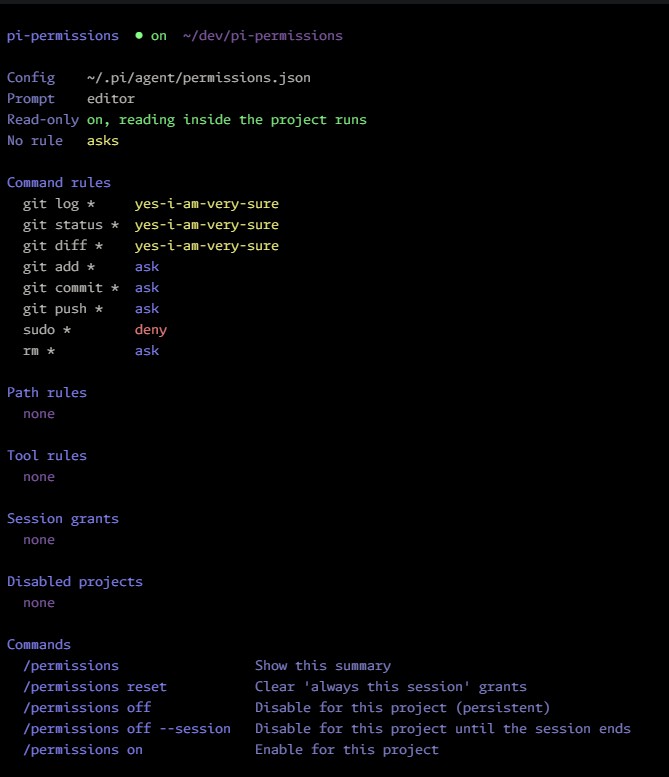
Run /permissions to see the active rules, session grants and available commands.
Configuration
Rules list what must not happen. Anything without a rule asks, and a "stfu pi" grant silences those questions for a folder until the session ends.
{
  "commands": {
    "sudo *": "halt",
    "git push --force *": "deny",
    "git add *": "ask",
    "git commit *": "ask",
    "git push *": "ask",
    "bun test *": "yes-i-am-very-sure"
  },
  "paths": {
    "~/.ssh/**": "deny",
    "**/.env": "ask",
    "~/dev/**": "yes-i-am-very-sure"
  },
  "tools": { "webfetch": "deny" },
  "readonly": true,
  "ui": { "position": "editor" }
}
| Key | Applies to |
|---|---|
commands |
Each segment of a bash command. |
paths |
Paths that any tool reads or writes: file tools, and the files read-only bash commands read. |
tools |
Tools by name: read, write, edit, ls, find, grep, MCP and extension tools. |
readonly |
Reads inside the project run without asking, with file tools and read-only bash commands. Default true. |
codemode |
codemode runs without asking, and every tool its script calls is checked on its own. Default false. |
ui.position |
editor (replaces the input), center or top. |
ui.describe_commands |
Asks the agent to describe each bash command in a few words, shown in the prompt. Default false. |
| Value | Effect | Skipped by stfu |
|---|---|---|
halt |
Blocks the call, alerts you, and tells the agent the config forbids it. | No |
deny |
Blocks the call. | No |
ask |
Asks every time. | No |
yes-i-am-very-sure |
Runs without asking. The value is long and odd so nobody writes it by accident. | n/a |
| (no rule) | Asks. Reads inside the project run when readonly is on. |
Yes |
"allow" is rejected with an error that points to "yes-i-am-very-sure". A config that still uses the keys from before 0.5 (default, external_directory, bash, readonly_commands) gets an error, and those keys are ignored.
~/.pi/agent/permissions.json is global. <project>/.pi/permissions.json applies to that project, only if it is trusted, and overrides the global file key by key. Both are read on every call; no /reload needed.
Patterns
* matches anything, including / and spaces, and ** means the same. ? matches one character. A trailing *, /* or /** also matches the bare prefix: git status * matches git status, and ~/.ssh/** matches ~/.ssh. ~/ is the home directory. Path rules are checked against the real path and the requested one, so a symlink cannot get around either.
Precedence
Every matching rule counts and the strictest one wins: halt, then deny, ask and yes-i-am-very-sure. With "git *": "yes-i-am-very-sure" and "git push *": "ask", git push asks.
Safety net
A halt, deny or ask command can show up somewhere other than the start of a segment: $(sudo …), bash -c "sudo …", env sudo, /usr/bin/sudo, or a line inside a script. When it does, the call asks and stfu does not skip it. The same applies to a strict path written in a command, such as ~/.ssh, $HOME/.ssh or .env. These cases ask instead of blocking because the text may only mention the command, as in grep sudo log. Rules whose wildcard filters the arguments, like cat *secret*, are left out.
Bash
Commands are split on &&, ||, |, ;, & and newlines, outside quotes, and every segment is checked. A # that starts a word comments out the rest of the line, as in bash: quotes, << and operators in it do nothing. Command substitution, process substitution, redirection to a file and unclosed quotes always ask. A here-document body (<<EOF, <<'EOF', <<-EOF) belongs to the command that opens it, and the prompt shows it as a block under that command. A substitution inside an unquoted here-document asks, and so does a missing delimiter.
Inline scripts (python3 - <<'EOF', python3 -c, node -e, bash -c, ruby -e, perl -e, php -r) get a label and highlighting in their language. They are arbitrary code, so they always go through the command rules; the extension shows them and makes no attempt to interpret them.
The prompt lists first what needs a decision, then folds what is already allowed into one line.
Read-only commands
With readonly on, a segment that only reads runs when every path it reads is inside the project or allowed by a path rule, so cd apps/server && grep -n foo src/*.ts | head -20 runs without asking. Command rules still decide when they match, and path rules apply to what those commands read.
- Commands:
cat,head,tail,wc,ls,cut,grep,egrep,fgrep,rg,find,sort,uniq,echo,pwd,cd. sedcounts only assed -nwith a script that prints line ranges (5p,1,60p,$p,10,$p), given as the first operand or with-e.-i,-fand any other script ask:wwrites,eruns commands andrreads other files.- Flags that write, run programs or follow symlinks disqualify the segment:
find -exec/-delete/-fprint/-L,rg --pre/-L,grep -R,sort -o,tail -f,uniq in out. Abbreviated long flags count as the flag they abbreviate (sort --o=fileissort --output=file), as GNU tools accept them. Output redirections other than/dev/nullor an fd disqualify it too. - Every operand is checked as a path, patterns included.
grep "/api" srcasks for/apiwhen it is outside the project. A wrong guess can only add a prompt, and the reason marks an operand that is no file as "no such file, checked as a path". Input redirections (< file) are checked too, and a here-document or here-string feeding a read-only command is plain input. cdis followed: later relative paths are checked against every directory the command may be in.cd -,cd $VAR,pushd,builtin,eval, a command name only known at run time ($c), andcd namewith$CDPATHset lose track, and later relative paths ask. Setting a lowercase shell variable (d=1,local x) reads and writes nothing and keeps the track.exportand uppercase names (PATH=.,LD_PRELOAD,GIT_PAGER) may change which program runs later or how, so they ask and lose track; afterHOME,~and a barecdask.- Variables,
~user, subshells, brace expansion and comments are not resolved, so the segment asks. A glob is checked by its fixed directory (src/*.ts→src)...after a wildcard asks, and so does a wildcard component that starts with a dot (.*,.?), which bash before 5.2 can expand to...
codemode
A codemode script runs JavaScript in a sandbox with no file system or network, and acts through the tools it calls and Pi's models. Pi sends each tool call through the same check as a call from the model, so with "codemode": true the script runs without asking and its calls ask, run or block on their own. A prompt for one of them says where it comes from: write requires permission (called by codemode). A tools rule on codemode still wins.
models.classify() and models.generateImages() are not tool calls and no extension sees them: they run with the session's credentials, add to its cost, and send the script's data to that provider. With "codemode": true they run without asking, as they would without this extension.
When codemode asks, the prompt shows the script as JavaScript, labeled and highlighted, instead of an escaped JSON string.
Command descriptions
With "ui": { "describe_commands": true }, the bash tool gets an optional description argument where the agent says what the command does, and the prompt shows it above the command as Agent says: …. It is the agent's claim, not something the extension checks: the command below it is what runs, and the decision ignores the description.
The extension replaces Pi's bash registration to add the argument, so it is off by default and read from the global config only. Another extension that also replaces bash conflicts with it, and Pi reports the conflict. Turning it on or off needs /reload.
Protected files
Writing the permission files or the extension's own files always asks, whatever the rules, and no grant covers it. A bash command that mentions them asks too, unless every segment is a read-only command.
Prompt
| Key | Action |
|---|---|
Enter |
Selected option (Yes by default) |
y / n |
Yes / No |
m |
Yes, and add a message to the tool result (one line, Esc goes back) |
t |
No, and tell pi what to do instead (one line, Esc goes back) |
a / d |
stfu pi on the folder / the folder and subfolders, for the rest of the session |
← → Tab |
Change selection (also ↑ ↓ when options are one per row) |
| Click an option | Select it; click it again to confirm (fullscreen mode only) |
↑ ↓ PgUp PgDn Home End, wheel |
Scroll (↑ ↓ select instead when options are one per row) |
Shift+↑ Shift+↓ |
Scroll, in any layout. In fullscreen Pi keeps PgUp PgDn for the transcript |
Esc |
No |
stfu pi on a folder
a ("stfu pi on /") gives every tool, bash included, total access to the folder the call works in until the session ends. d ("…and subfolders") covers its subfolders too. For file tools the folder is the file's. For bash it is the folder the command runs in, following its cds. No option is offered when that folder cannot be known, or when it is your home, a folder containing it (/home) or the root, where one stray keypress would silence everything. Tools without a path get a for any input.
Why folders and not commands: agents today send endless one-liners, chaining cd, pipes and inline scripts to do something complex in a single command (blame Opus 5.5 and Sol 6.1). An exact command never comes back twice, so "always this command" was useless. Trusting a folder is the decision that actually holds, for now at least.
In bash, total access allows any command that runs in the folder, whatever paths it touches. While a grant is active the status bar shows 🤫 stfu pi on <folder>/ (/** with subfolders), and /permissions reset clears every grant. /permissions stfu removes one: pick it from a list, or name its folder (/permissions stfu ~/dev/app, with completion). Grants live in memory and end with the session. They never cover protected files or halt, deny and ask rules. When an active grant touches a call but does not cover it, the prompt says why first, for example: stfu pi on ~/dev/app/ → does not cover this call: ~/dev/app/src is in a subfolder, and [d] would include subfolders.
Turning it off
/permissions off disables the extension for the current working directory: tool calls run without checks, as in Pi without it. /permissions off --session lasts until the session ends. /permissions on re-enables it. The status bar shows ⚠ permissions off while disabled.
Limitations
- It is not a sandbox. It decides whether a call runs, not what the call can reach.
- A list of what must not happen is never complete. It works because anything without a rule asks:
haltanddenycatch what you listed, and everything else still reaches you. - Bash can touch paths that cannot be detected from the command text, and the safety net only finds what is written plainly. A script can build
sudoout of pieces. - A trailing
*allows any argument, and some commands write through options (git log --output=<file>). Keep that in mind when you useyes-i-am-very-sure. - The bash scanner is not a full shell parser. When unsure, it asks.
- Read-only commands: a glob that matches a symlink inside the project can read where the symlink points.
- While disabled, the agent can write any file, including the permission files.
Development
Requires Node.js 22.18 or later.
npm install
npm run check          # format, lint (incl. anti-slop), typecheck, tests
npm run format         # apply formatting
npm run lint -- --fix  # apply spacing fixes
pi -e ./               # try a local checkout without installing
Contributing
Ok to use AI, just read your agent's crap and make sure it's good, or be forever banned if it looks vibed.
npm run check must pass.