@moejay/pi-secure0.2.0
Private secret entry, capture, local reveal/copy, and redacted shell execution for Pi. Transcript hygiene, not a sandbox.
Untested on omp
This is a pi package. No one has reported whether it works on omp yet. If you try it, add your result below.
Reports 0
No reports yet.
Readme
pi-secure
Secrets for your tools. Not your transcript.
Private secret entry, stdout capture, local reveal/copy, and redacted shell execution for Pi. Transcript hygiene—not a sandbox or secret manager.
Website · Security · Deployment & releases
Not protection against a malicious or compromised model. A model acting on a prompt injection can still use its tools to obtain or leak secrets. pi-secure reduces accidental transcript exposure; it does not prevent prompt injection or enforce secret isolation.
Watch it work
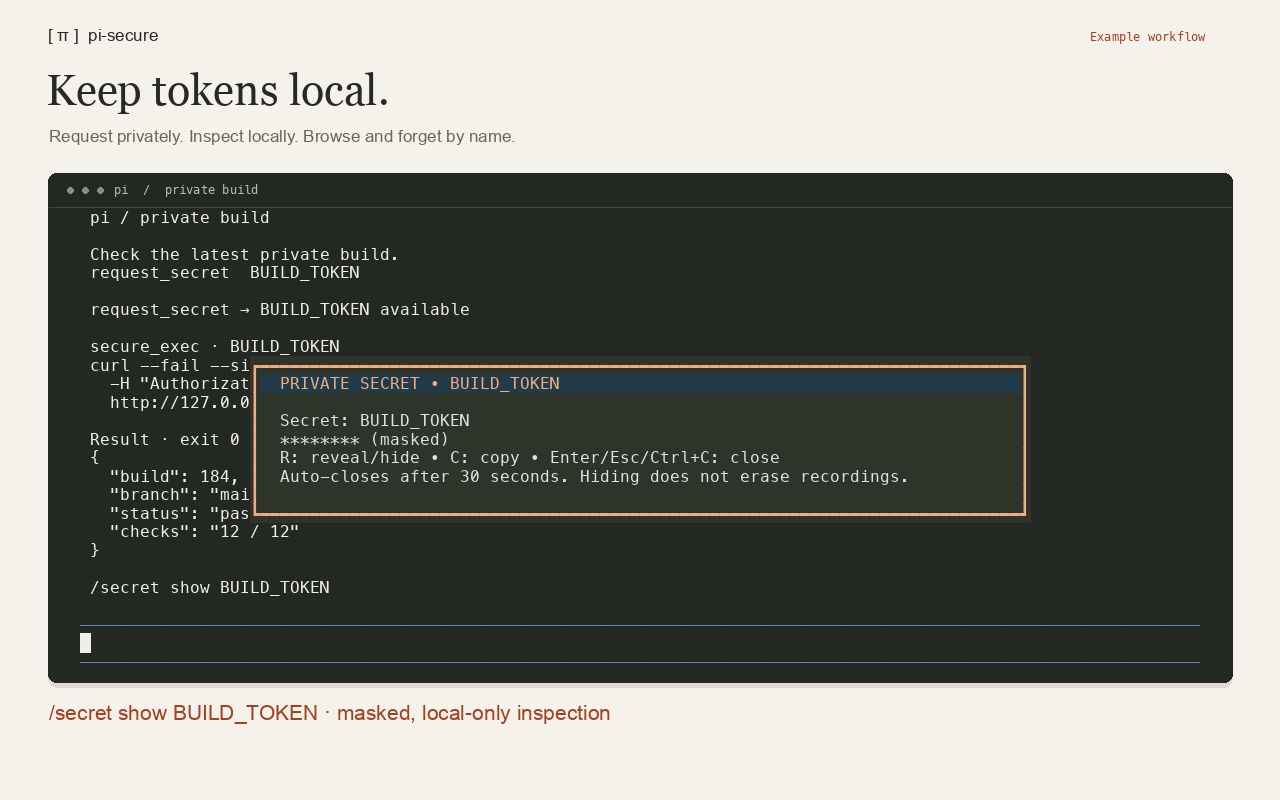
Watch the walkthrough → · Text transcript
See the bordered entry dialog with live masking, direct local reveal, and keyboard browsing with confirmed deletion. The demo uses synthetic credentials, no model calls, and no clipboard writes.
Install
Requires Node.js 22.19+ and Pi 1.4+; interactive terminal mode is required for private entry and local reveal/copy. Shell execution supports macOS and Linux, not native Windows.
Install from npm:
pi install npm:@moejay/pi-secure
Or install from GitHub:
pi install git:github.com/moejay/pi-secure
Fully restart Pi after installing or updating. On affected Pi versions, /reload refreshes the TypeScript entry point but can retain cached .mjs helpers. A full restart loads a consistent version and clears in-memory secrets. If capture reports that no secret was stored, restart before retrying; do not use real credentials to diagnose it. For local development, use pi -e ./index.ts or pi install /absolute/path/to/pi-secure.
Quick start
Ask Pi: “Ask me securely for my API token, then use it to call the service.” Enter the value only in the masked dialog—not in chat, a command, or a tool argument. The agent receives a name and availability status, never the entered value.
Then use /secret list to browse, reveal/copy, or forget stored secrets yourself, or /secret show NAME to open one directly—no AI prompt needed.
Tools
request_secret({ name, reason })
The agent requests a secret; you enter it in a centered, bordered terminal dialog with a highlighted header and background. Input stays masked, with one asterisk per character as you type or delete (revealing the input length locally). Only name/availability is returned. Enter submits; Escape/Ctrl+C cancels. Empty, NUL, and multiline input cannot be submitted. Existing names are reused.
capture_secret({ name, command, secrets?, trimNewline?, timeout? })
Capture a command's stdout directly into extension memory. Neither stdout nor stderr reaches the agent, even on failure. Use this to read files or fetch API responses without exposing the value in tool results:
capture_secret({ name: "APP_TOKEN", command: "cat /private/path/token" })
// Returns { name: "APP_TOKEN", available: true } only.
show_secret({ name: "APP_TOKEN" })
Commands and paths are logged normally: never embed literal secret values in arguments. For an authenticated API request, secrets injects already-stored credentials as environment variables. The command should output only the value you want to capture (e.g. use curl -f and jq -er .token). Nonzero exit, empty output, NUL, timeout, cancellation, and overflow fail without returning captured output. Existing names cannot be overwritten. Removes one trailing newline by default; set trimNewline: false to preserve it. This replaces the earlier generate_secret tool; a command can still generate random values if needed.
show_secret({ name })
Opens a centered, bordered local overlay with a highlighted header and background, masked by default, never a tool result:
- R: reveal or hide. Revealing requires Y confirmation.
- C: copy to clipboard, whether masked or visible. Copying requires Y confirmation.
- N/Escape: dismiss an action confirmation.
- Enter/Escape/Ctrl+C: close the dialog (Ctrl+C also closes during confirmation).
Auto-closes after 30 seconds, including while confirming or copying. Only name/shown/copied status returns to the agent. Control characters are escaped for terminal safety; large values have a truncated display but copy in full.
Clipboard support: macOS uses /usr/bin/pbcopy; Linux uses wl-copy on Wayland or xclip/xsel on X11 (install a helper separately). Values are sent through stdin, never shell arguments or terminal escape sequences. Unsupported/headless environments fail closed; there is no OSC 52, chat, or RPC fallback.
Local display and clipboard are not recording-proof: terminal recordings, screen capture, debug logging, clipboard managers, other apps, or clipboard sync may retain values. Hiding/closing does not erase them. The clipboard is not automatically cleared—clear clipboard/history yourself after pasting.
secure_exec({ command, secrets, timeout? })
Use named secrets for arbitrary user-authorized tasks, including saving files or credentials elsewhere:
secure_exec({
  command: 'curl -sS -H "Authorization: Bearer $GITHUB_TOKEN" https://api.github.com/user',
  secrets: ["GITHUB_TOKEN"]
})
Output is buffered, then exact known secret values are redacted from stdout/stderr. No streaming or raw-output temporary files. Only child processes receive the injected environment; Pi's global environment is unchanged.
Commands (no AI tool call needed)
/secret show NAMEopens the existing private, masked reveal/copy dialog directly. R reveals/hides; C copies; both require Y confirmation. Requires interactive terminal mode./secret listopens a centered, bordered browser of names only. Use ↑/↓ or j/k to select; long lists scroll within a bounded viewport. Enter/R opens the selected secret's reveal/copy dialog, then returns to the browser. D/Delete asks for Y confirmation to forget the selected secret (N/Escape backs out). Escape/Ctrl+C closes the browser. An empty vault shows a friendly empty state. Outside terminal mode, list only reports names./secret clear NAMEforgets one value;/secret clearforgets all values immediately.
Never enter secret values in slash commands. Neither command notifications nor tool results include values. Browser deletion cancels existing secure operations and queued dialogs just like /secret clear NAME, then intentionally reopens a fresh browser. External clear or session changes close the browser instead.
Storage and limits
- Values live in extension memory only, not session entries, result details, or model context. They disappear on reload, session start, shutdown, or clear. JavaScript cannot guarantee memory zeroization.
- Commands default to a 60-second timeout (configurable up to 300 seconds), with a 1 MiB combined output limit. Timeout, cancellation, and overflow discard all output.
- Concurrent private dialogs are queued. Clearing even one secret or ending the session cancels all active secure operations and invalidates queued dialogs, preventing pending captures/input from restoring forgotten values. Other stored secrets remain available after a single-secret clear. Clear does not revoke credentials or erase external copies.
- If output processing fails, output is withheld to prevent secret exposure. Redaction checks every stored secret, even ones not injected into the command; very large secrets or many accumulated secrets can exceed the regex engine's limits. Use
/secret listand/secret clear NAMEto remove unneeded large captures, or/secret clearto reset the vault. The command may already have completed: check its effects before rerunning it.
Security boundary
A malicious model—or one following a prompt injection—can still obtain or exfiltrate secrets. For example, it could use a secret-bearing command to write a value to a file and read it with another tool, send it to an external destination, or transform it to evade exact-value redaction. There is no per-command approval or policy enforcement in secure_exec; confirmations on local reveal/copy do not protect other tool paths. Use only credentials and tasks you trust the agent to handle, preferably with external sandboxing, network restrictions, and least-privilege, short-lived tokens.
Transcript hygiene, not a sandbox or secret manager. Commands can use secrets arbitrarily for authorized tasks. There are no destination or file-access restrictions. Keep values out of chat: do not read secret-bearing files through ordinary tools, include values in messages, or encode them to bypass redaction. These are agent instructions, not enforced isolation. Other tools' output is not redacted.
Names, reasons, commands, availability, and redacted execution output are logged normally. Host extensions, process inspection, terminal input/debug recording, crash dumps, and the operating system are outside this protection. Only approve credentials for trusted tasks and destinations. Prefer short-lived, least-privilege tokens. Clear does not revoke credentials or erase copies held by running subprocesses.
Development
npm ci --ignore-scripts
npm run check
npm pack --dry-run --ignore-scripts
The package ships source directly, with no build step or runtime dependencies beyond Pi. CI checks the minimum Node 22.19.0 plus current Node 22 and 24. See RELEASING.md for the manually approved OIDC publishing workflow and release checklist.
Dependency maintenance
Dependabot checks weekly. GitHub Actions updates are grouped into one PR; routine compiler/type updates are grouped separately, while compiler major upgrades get explicit review. Keep @types/node on Node 22 to match the minimum supported runtime—upgrading CI tooling does not raise the package's runtime requirement. Actions remain SHA-pinned, and dependency PRs still require passing CI and maintainer review.
Deployment and releases
- Website: merge changes under
docs/through a PR; GitHub Pages deploys automatically frommainwith no build step. - npm: bump the version in a PR, wait for CI, merge, then tag and manually dispatch
publish.ymlfrommain. Thenpmenvironment requires human approval; publishing uses OIDC and provenance, not a stored npm token.
See RELEASING.md for preview, deployment, release, verification, and recovery commands. Documentation-only website updates do not require an npm release; the npm README changes only when a new package version is published.
License
MIT. Independent community extension; not an official Pi product.