@lenard9191/pi-edit-guard0.3.0
Pi (π) coding-agent extension: blocks edits to files that changed since the agent read them, snapshots the project before each run so /undo restores it exactly, and stops repeated identical tool calls.
Untested on omp
This is a pi package. No one has reported whether it works on omp yet. If you try it, add your result below.
Reports 0
No reports yet.
Readme
pi-edit-guard
Exact /undo, stale-edit protection and a loop breaker for the π (pi) coding agent. A π extension that blocks edits to files that changed since the agent read them, snapshots the project before each run so /undo restores it exactly, and stops repeated identical tool calls.




pi install npm:@lenard9191/pi-edit-guard
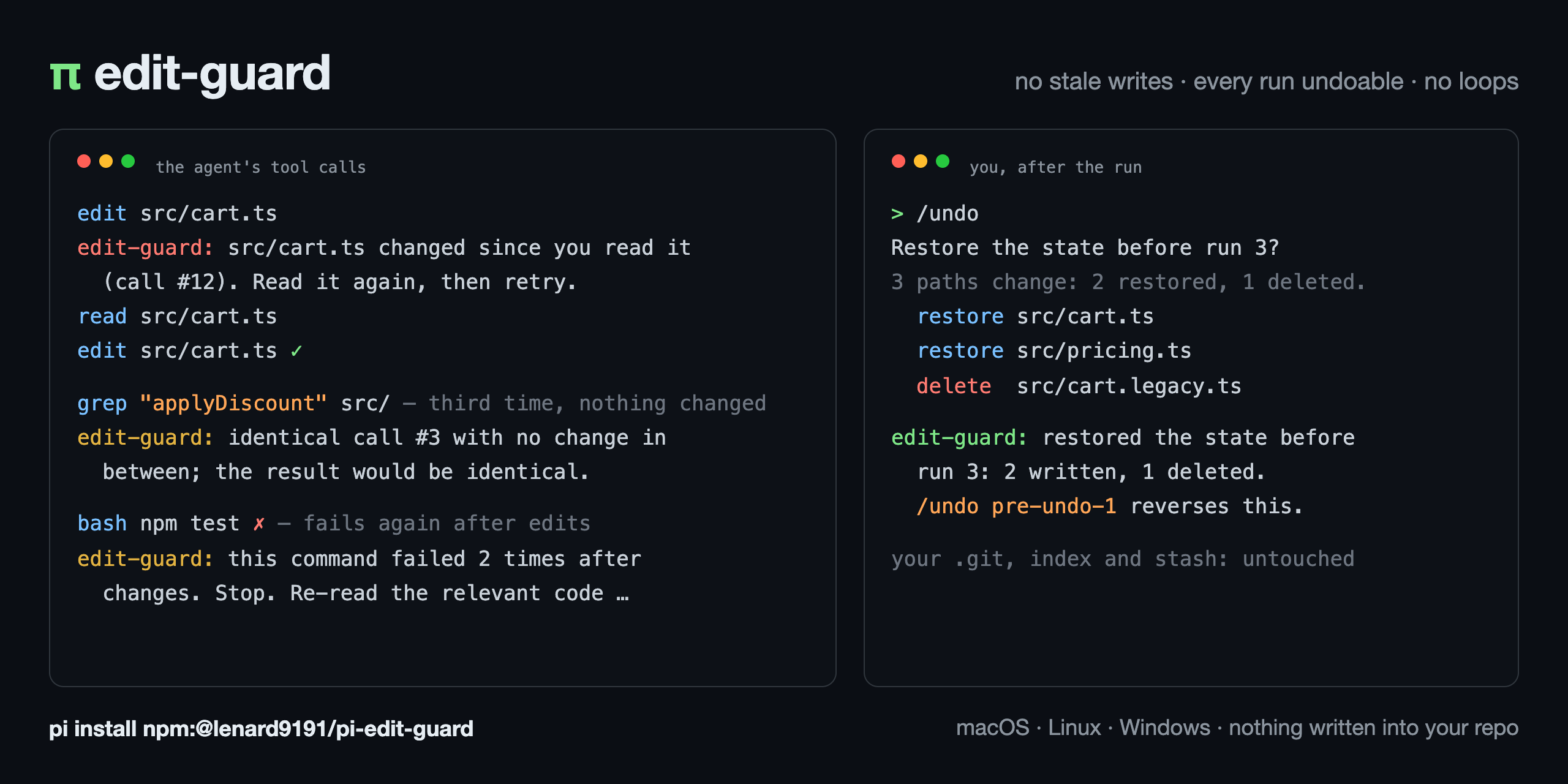
It stops three failures of an agent that edits files, mechanically:
- It writes a file it has not seen as it is now. A write to an existing file needs a read of that file whose content still matches the disk (compare-and-swap on content).
- It changes files you cannot get back. Every run that can change files starts with a snapshot, and
/undorestores it exactly. - It repeats a call that cannot help. An identical call with nothing changed in between is blocked when it depends only on the files, and flagged when it can depend on something else.
Nothing is written into your project or its .git. Everything lives under ~/.pi/agent/pi-edit-guard/.
Guarantees
| Invariant | What it means | When the guard cannot tell |
|---|---|---|
| Freshness | A write to an existing file is valid only if the file's content hash now equals the hash recorded at the agent's last read of that file that is still in the model's context. | Block. One read repairs it. |
| Reversibility | Before the first call of a run that can change files, the project is snapshotted, so the run can be undone exactly. An undo is itself preceded by a snapshot. | Allow, warn once for the run, and mark the run as not covered. |
| Progress | An identical call with nothing changed in between returns the same result. | Allow. |
What the agent sees
edit-guard: src/app.ts exists but was not read in this context. Read it, then retry.
edit-guard: src/app.ts changed since you read it (call #12). Read it again, then retry.
edit-guard: identical call #3 with no change in between; the result would be identical. Change the input or the state first.
edit-guard: identical call #3 with no change in between.                (appended to the result of a shell or web call)
edit-guard: this command failed 2 times after changes. Stop. Re-read the relevant code top-down, state which assumption was wrong, and choose a different approach before the next edit.
How it works
Freshness. The read tool's result is an observation: the guard hashes the file before the read runs and records the hash when the read succeeds. A successful edit or write is an observation too (the agent knows what it wrote). Before edit or write runs, the guard compares the file on disk with the last observation: a new file passes, an unread file or a changed file is blocked. Paths resolve exactly as π's tools resolve them, through symlinks, so ./a.ts, a.ts and a symlinked path are one file. grep, find and ls results are not observations: they do not deliver the file as the edit tool sees it.
An observation lasts while the tool result that delivered it is in the model's context. Each one is stored in the session (edit-guard/observation entries) and rebuilt from π's own projection of the branch on resume, fork, /tree, compaction and context edits: a read that compaction summarized, or that an extension pruned, must be repeated; a read that compaction kept verbatim stays valid. Changes made by you, another agent or a formatter are caught by the hash.
Snapshots. Each project root (the git top level, or the working directory outside git) has a private git object store under ~/.pi/agent/pi-edit-guard/stores/, with its own persistent index, so after the first snapshot only changed files are hashed. The project's .git is only read (rev-parse, ls-files), never written. The first call of a run that can change files (anything except read, grep, find, ls and the other read-only tools; unknown tools count as changing) records the tree as refs/runs/<session>/<n>. What the tree holds is git's view of the root: tracked and untracked files that are not ignored, plus files your project tracks although an ignore rule matches them. A file that an ignore rule matches later (a new .gitignore line, an exclude pattern) leaves the next snapshot. A project that versions ~/.pi/agent contains the stores: they are never part of its snapshots, and stores/.gitignore keeps them out of its git. Content is stored byte for byte: the project's .gitattributes (line endings, LFS and other filters) do not apply. Names keep their case, also where the file system ignores case (Windows, macOS): a file renamed from Foo.ts to foo.ts comes back as Foo.ts.
The first snapshot of a root writes every file into the store, which takes seconds on a large project. It starts in the background with the session's first prompt, while the model works, so the snapshot before the run's first change only adds what changed since.
Files a write tool changes that the snapshot does not hold (an ignored .env, a file outside the root) are copied to a journal before the first write of the run. /undo restores the snapshot and the journal together.
Loop breaker. Two calls are identical when the tool and the input match (key order and whitespace do not matter). A call to read, grep, find, ls, edit, write and the other tools that depend only on the files is blocked the third time with no change in between; any other tool (shell, web, codemode, unknown tools) gets a notice instead. Any call that can change files, a compaction and a /tree switch count as a change; a call that was blocked does not. A shell, web or check command that fails again after changes gets the failure notice from the second failure on. Nothing here ever blocks a test run.
Commands
| Command | |
|---|---|
/undo |
Restore the files to the state before the latest run that changed something. Shows the paths that change and asks first. |
/undo <n> |
The state before run n of this session. |
/undo pre-undo-<k> |
The state before undo k: this reverses an undo (there is no separate redo). |
/undo … --yes |
Skip the confirmation (required without a UI, for example in pi -p). |
/checkpoints |
This session's checkpoints and how many paths differ from now. |
/guard |
Status: the switches, the root and its store, whether the current run is covered, and what is never covered. |
/guard on, /guard off |
All three parts on or off for this session. |
/guard freshness on|off, /guard snapshots on|off, /guard loop on|off |
One part on or off for this session. |
/undo touches only the paths that differ, so your unrelated work stays. Paths you changed by hand during the run are reverted too: that is why it shows them first. Agents cannot call /undo; an agent reverts its own work with edits.
The package also ships an Agent Skill (/skill:edit-guard). The model loads it on demand to explain the guard's messages, and to point you to /undo when you ask it to revert its work, instead of running git checkout, git stash or git reset.
Coverage
Restored exactly by /undo: content, executable bit, symlink targets and the case of the names of every file in the snapshot; files a write tool changed outside it (ignored files, files outside the root); files created during the run are deleted, and directories left empty are removed.
Never covered, by design:
- changes made by shell commands outside the root, and by shell commands to files the snapshot does not hold (ignored files);
- the content of nested git repositories and submodules;
- what is behind a directory junction on Windows (git would follow it out of the project): the junction and its content stay out of the snapshot, and a write tool's edits through it are journaled;
- empty directories, and permission bits other than the executable bit of a file that has to be recreated;
- files git cannot read.
On Windows, files have no executable bit, and a symlink can be restored only with Developer Mode on or with administrator rights; without them, the /undo preview names the symlinks it cannot restore before you confirm.
A run whose snapshot failed cannot be undone; /undo says so and names the run before it. No snapshots are taken in the home directory, at a file-system root, or in a directory outside git with more than 20,000 files or 500 MB.
Configuration
~/.pi/agent/pi-edit-guard/config.json, every key optional. A wrong key is reported once and its default applies.
| Key | Default | |
|---|---|---|
freshness, snapshots, loop |
true |
Turn a part off for every session. |
repeatLimit |
3 |
The identical call that is blocked or flagged. |
readTools |
["read"] |
Tools whose result is an observation (argument path). |
writeTools |
{ "edit": "path", "write": "path" } |
Tools that change exactly one file, with the argument that names it. A value can also be { "path": "…", "when": "<argument>", "observes": false }: only calls with that argument set write, and the result does not show the new content. When lsp_fix is installed and this key is not set, it is added as { "path": "path", "when": "write", "observes": false }. |
readOnlyTools |
read, grep, find, ls, ffgrep, fffind, tool_search, vcc_recall, lsp_diagnostics |
Tools that never change files. Every other tool counts as changing. |
volatileTools |
bash, powershell, interactive_shell, agent_browser, agent_browser_code, web_search, fetch_content, codemode, run_checks |
Tools whose result can depend on more than the files: they get the failure notice. |
exclude |
[] |
More patterns the store ignores (.gitignore syntax). Files that match leave the next snapshot; their copies go when the checkpoints that hold them expire. |
keepRuns |
20 |
Run checkpoints kept per session (and as many pre-undo checkpoints). |
storeMaxAgeDays |
7 |
Checkpoints older than this are deleted with their journals, in every session, at session start and after each run. Stores not used for this long, and stores whose project was deleted, are deleted at session start. |
Outside git, the store also ignores .git, node_modules, .pnpm-store, dist, build, out, target, .venv, venv, __pycache__, .next, .nuxt, .cache, coverage and .DS_Store. In a git work tree the project's own ignore rules decide.
PI_EDIT_GUARD_DEBUG=1 writes one JSON line per decision to pi-edit-guard/debug.jsonl in the temporary directory ($TMPDIR, or %TEMP% on Windows).
Secrets
A snapshot or journal can contain secrets: an ignored .env that the agent wrote is copied to the journal so /undo can restore it. These copies exist only under ~/.pi/agent/pi-edit-guard/, in directories only you can read (mode 0700 on macOS and Linux; on Windows, the permissions of your user profile); the extension never sends them anywhere and never pushes the store. A checkpoint and its journal are deleted after storeMaxAgeDays days, or earlier when its session has more than keepRuns runs; a whole store after storeMaxAgeDays days without use. Delete ~/.pi/agent/pi-edit-guard/stores/ at any time to remove them all.
Decided out
- An undo tool the agent can call. Throwing away changes in the working tree is your decision; the agent reverts its own work with edits.
- Fuzzy ("semantic") loop detection. Uselessness is provable only for identical calls; anything fuzzier is a guess that would block legitimate work.
- Snapshots of what shell commands change outside the root, or of the whole file system. The domain would be unbounded;
/guardreports the coverage instead. greporfindresults as observations. They do not deliver the file as the edit tool sees it.- A separate redo command.
/undo pre-undo-<k>already reverses an undo. - Coordination with permission extensions. Independent gates compose in handler order; a call another extension blocks is not counted as a change.
- A second store for session state. The session transcript is the only store for observations; a side file would go out of step on fork.
Performance
Measured with npm run corpus on an Apple M3 Pro (macOS 27, Node 24, git 2.56). The first snapshot happens once per project root (the store persists); later snapshots hash only what changed. Restore is /undo of about 100 changed paths (modified, deleted, re-moded and added files, an ignored file and two files outside the root), including its pre-undo snapshot. The freshness check is one guarded write to a median-sized file, averaged over 200.
| target | language | files | first snapshot | second snapshot | restore (paths) | freshness check | store | exact | .git untouched |
|---|---|---|---|---|---|---|---|---|---|
| express | JavaScript | 214 | 127 ms | 61 ms | 235 ms (103) | 0.13 ms | 0.8 MB | yes | yes |
| flask | Python | 236 | 158 ms | 87 ms | 258 ms (103) | 0.13 ms | 1.7 MB | yes | yes |
| ripgrep | Rust | 237 | 186 ms | 93 ms | 258 ms (103) | 0.11 ms | 1.4 MB | yes | yes |
| cobra | Go | 66 | 83 ms | 72 ms | 173 ms (78) | 0.11 ms | 0.6 MB | yes | yes |
| git | C | 4,856 | 1,968 ms | 107 ms | 369 ms (103) | 0.11 ms | 15.5 MB | yes | yes |
| rails | Ruby | 5,022 | 2,206 ms | 134 ms | 452 ms (103) | 0.10 ms | 21.4 MB | yes | yes |
| django | Python | 7,089 | 3,761 ms | 232 ms | 672 ms (103) | 0.11 ms | 27.6 MB | yes | yes |
| react | JavaScript | 7,260 | 2,069 ms | 155 ms | 524 ms (103) | 0.13 ms | 16.9 MB | yes | yes |
| symfony | PHP | 16,364 | 5,553 ms | 316 ms | 875 ms (103) | 0.11 ms | 36.6 MB | yes | yes |
flask without .git |
Python | 236 | 158 ms | 110 ms | 260 ms (103) | 0.11 ms | 1.4 MB | yes | n/a |
| generated, git | - | 10,000 | 1,586 ms | 143 ms | 531 ms (102) | 0.10 ms | 6.8 MB | yes | yes |
| generated, no git | - | 10,000 | 1,507 ms | 106 ms | 407 ms (103) | 0.11 ms | 6.8 MB | yes | n/a |
Most of a first snapshot is writing one git tree object per directory (django has 3,270). The first snapshot runs in the background from the session's first prompt, so a run waits for it only when it changes something before the snapshot is done.
Compatibility
π 1.2.0 or later (tested with 1.2.0 and 1.3.0), Node 22.18 or later, and git. macOS, Linux and Windows; CI runs every test on all three. On Windows, π needs Git for Windows for its bash tool, and the guard uses the git.exe of that installation when git is not on the PATH.
FAQ
Does it work with Claude Code, Cursor or Codex?
No. It is an extension for the π coding agent only: it works through π's extension API (tool-call events, session entries and commands).
Does it write into my project or its .git?
No. Its state lives under ~/.pi/agent/pi-edit-guard/. The project's .git is only read (rev-parse, ls-files): your commits, index, branches and stash are never touched. Only /undo writes project files, and only the ones that differ.
How is /undo different from git checkout or git stash?
/undo restores the state before an agent run: every file git sees in the project (tracked, and untracked but not ignored), the ignored files a write tool changed, executable bits, symlinks and the case of names. Files the run created are deleted. It shows the paths first, touches only those, and leaves your commits, index, branches and stash alone. It takes a pre-undo checkpoint first, so /undo pre-undo-<k> reverses it.
Why was the agent's edit blocked?
The file is not as the agent last read it: the agent did not read it in the current context, or its content changed since (you, a formatter or another agent edited it). One read repairs it. The block exists so that the agent never overwrites a change it has not seen.
Does it slow the agent down?
The freshness check takes about 0.1 ms per write. A snapshot after the first takes 60–320 ms on nine public repositories, from express to symfony. The first snapshot of a project runs in the background from the session's first prompt.
Can the agent undo its own changes?
No. /undo is a command for you, because throwing away changes in the working tree is your decision. The agent reverts its own work with edits. The bundled skill tells the agent to point you to /undo instead of running git checkout, git stash or git reset.
Does it work on Windows?
Yes, with Git for Windows, which π needs for its bash tool. CI runs every test on Windows, macOS and Linux. On Windows, a symlink can be restored only with Developer Mode on or with administrator rights.
Links
- npm: https://www.npmjs.com/package/@lenard9191/pi-edit-guard
- π package catalog: https://pi.dev/packages/@lenard9191/pi-edit-guard
- Site: https://jlrrequina.github.io/pi-edit-guard/ ·
llms.txtfor language models - Changelog · Security policy · Contributing · Constraints for changes
- OpenSSF: Scorecard · Security Insights
Development
npm install
npm run check        # tsc
npm test             # unit, property (300 restore cases), integration and in-π tests
npm run e2e          # a live pi -p run with a real model (needs credentials; PI_EDIT_GUARD_E2E_MODEL picks the model)
npm run corpus       # snapshot and restore of public repositories, with timings
pi -e ./index.ts     # try the working copy
See CONTRIBUTING.md to contribute and SECURITY.md to report a vulnerability.
License
MIT