@lazco/pi-side-chat0.2.2
Pi extension: /side and /btw open a side chat beside the main thread, with its own tools, model, and approvals
Untested on omp
This is a pi package. No one has reported whether it works on omp yet. If you try it, add your result below.
Reports 0
No reports yet.
Readme
pi-side-chat
Pi extension: /side and /btw open a side chat beside the main thread, with its own tools, model, and approvals.


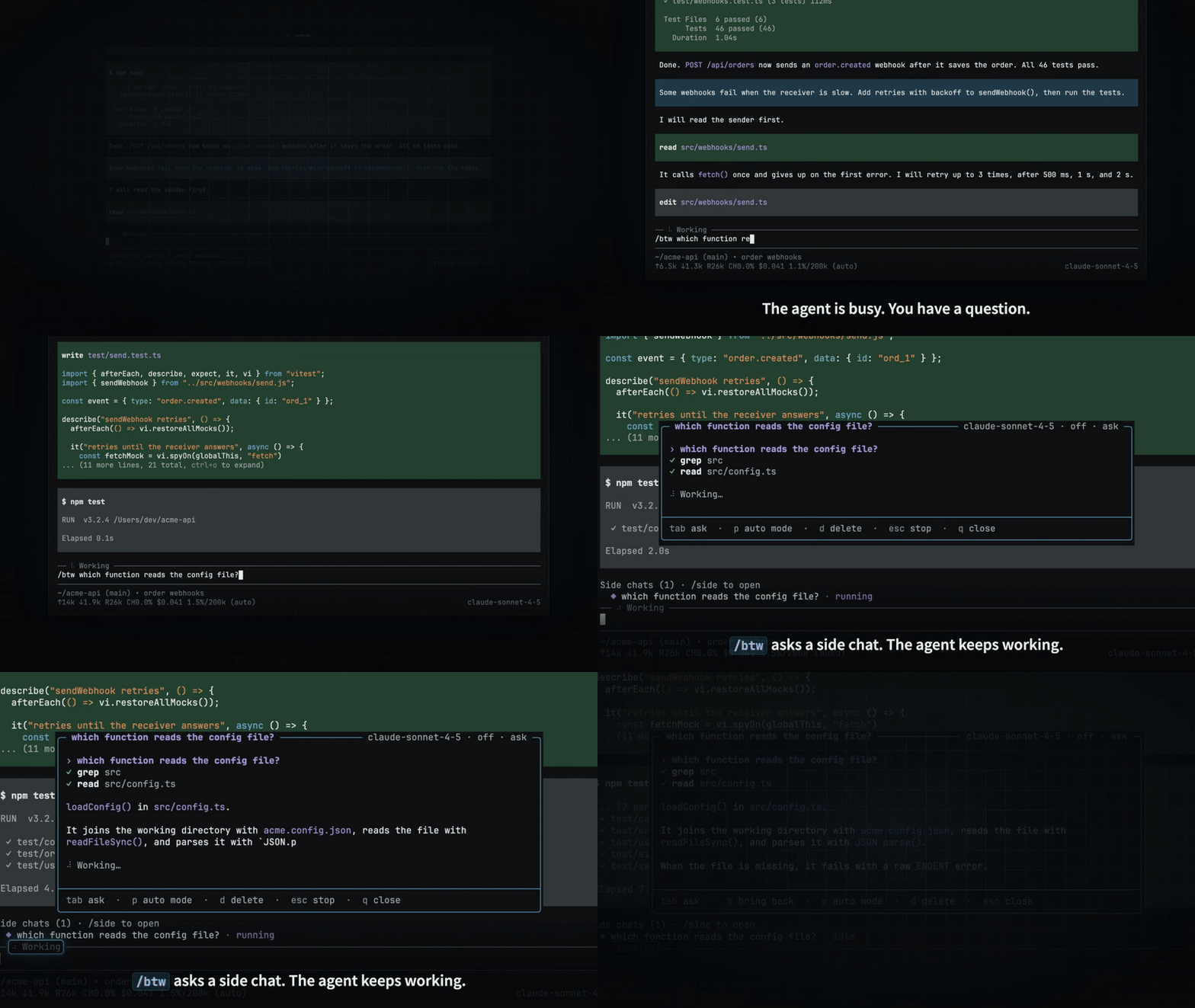
Demo video · Installation · Usage · Approvals · Bring back · Limitations
Ask a question while the main agent works, and keep the question out of the main thread. A side chat is an agent session of its own. It starts from what the main thread knows, and it can read and change files in the same directory.
Highlights
- The main agent keeps working. A side chat runs as a separate agent session, so it does not interrupt the main run.
- It starts from the main thread. It gets the main conversation, plus a digest of up to 8000 characters of what the main agent did since its last finished run. See what the side chat reads.
- Changes ask first. The side chat has
read,grep,find,ls,bash,edit, andwrite. Its first run asks before eachbash,edit, andwrite. See Approvals. - One key to bring back. Press
b, and the side chat goes into the next main message, at most 20000 characters. See Bring back. - The main agent learns what changed. It gets the names of the files that a side chat changed, and its first write to such a file is stopped. See Side chat changes.
- Several side chats, each with its own model. They run side by side, and they are saved with the main session. See Several side chats.
Demo video
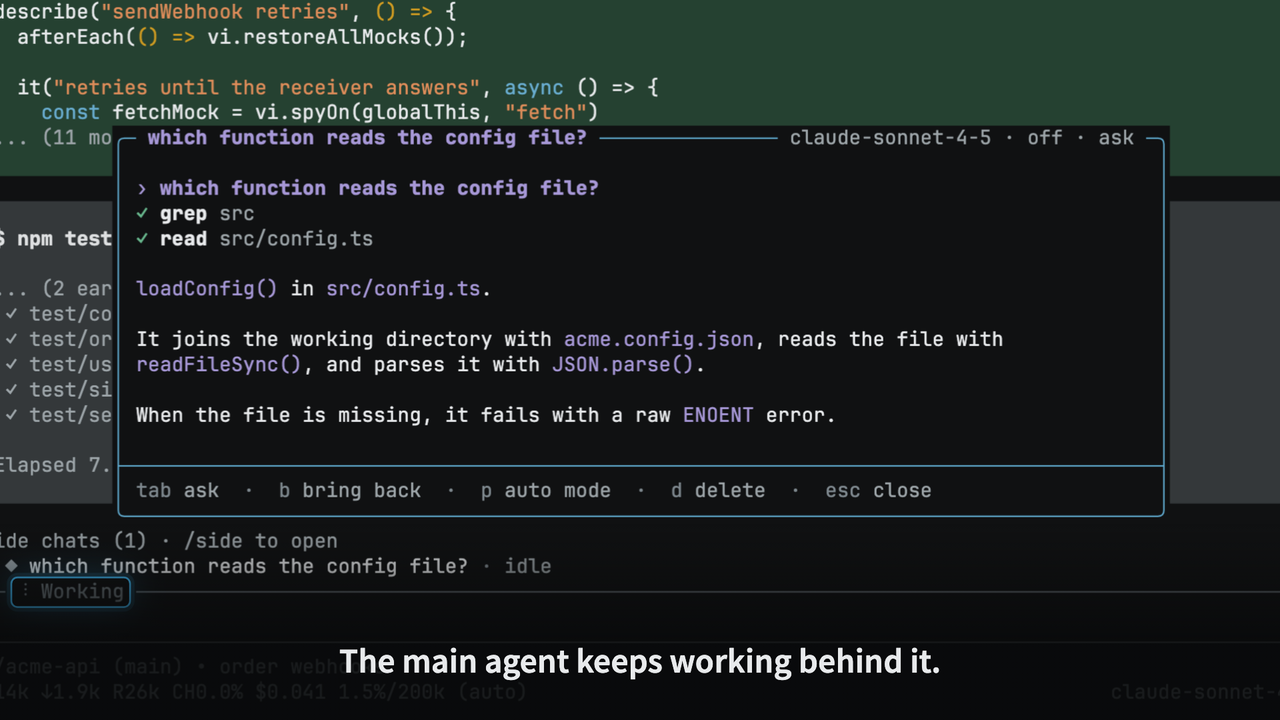
The 60-second video shows the install, /btw while the main agent works, an approval, bring back, a second side chat with its own model, and the /side list.
Click the image to play the video.
Installation
You need pi and Node.js 22.19.0 or later.
pi install npm:@lazco/pi-side-chat
Then run /reload in pi.
To check the install, run pi list.
The list of user packages shows npm:@lazco/pi-side-chat.
Usage
| Command | What it does |
|---|---|
/side <question> |
Starts a new side chat and asks the question. |
/btw <question> |
The same as /side <question>. |
/side |
Lists the side chats, so that you can open one, or start a new empty side chat. |
For example, while the main agent runs, type:
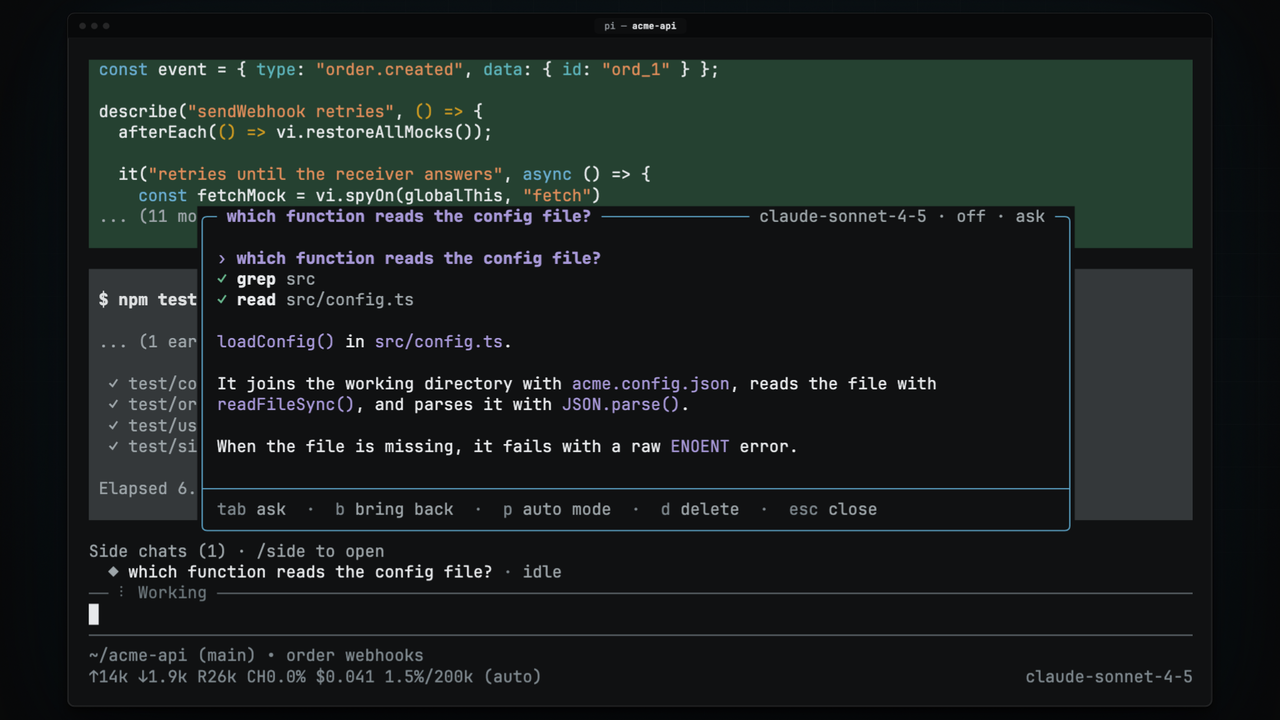
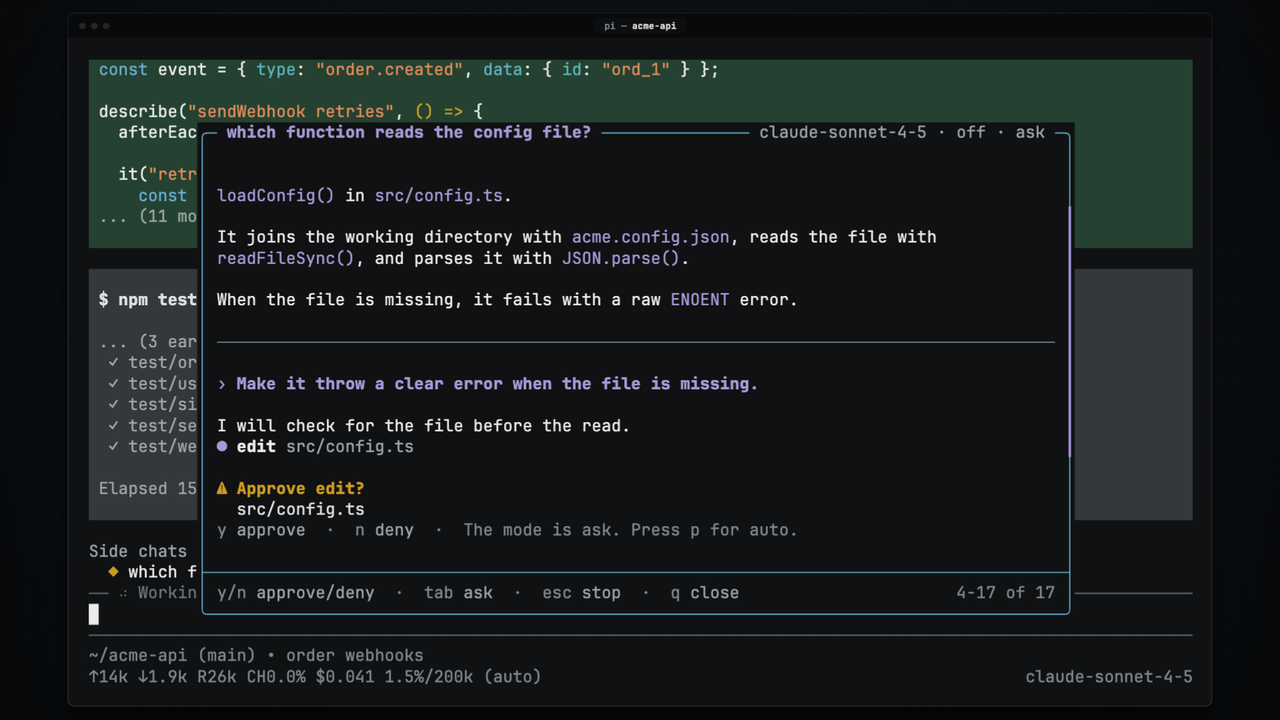
/btw which function in this repo reads the config file?
An overlay opens over the chat, and the side chat answers there. The title of the overlay is the first line of your first question. The top right corner shows the model, the thinking level, and the permission mode. The main agent continues, and your question does not go into the main session.
A side chat that never got a message goes away when you close it.
Keys
The overlay has a browse mode with one-letter keys, and an input line for typing.
| Key | Action |
|---|---|
Tab or Enter |
Open the input line |
y / n |
Approve or deny the call that waits |
b |
Bring the side chat back to the main thread |
p |
Switch the permission mode between ask and auto |
m |
Choose the model of the side chat |
t |
Step to the next thinking level |
c |
Copy the newest reply as Markdown |
d |
Delete the side chat, after a confirmation |
↑ ↓ j k, mouse wheel |
Scroll one line |
PgUp PgDn Space |
Scroll one page |
Home End g G |
Go to the top or the bottom |
| Mouse drag | Select text and copy it, in fullscreen mode |
Esc |
Stop the run, or close the overlay when nothing runs |
q |
Close the overlay, and let the run continue in the background |
In the input line, Enter sends the message, and Esc goes back to the keys with your text kept.
A message that you send while the side chat runs waits until the run ends.
Several side chats
Each /side <question> starts a new side chat, and the side chats run side by side.
/side alone lists them, with New side chat at the top.
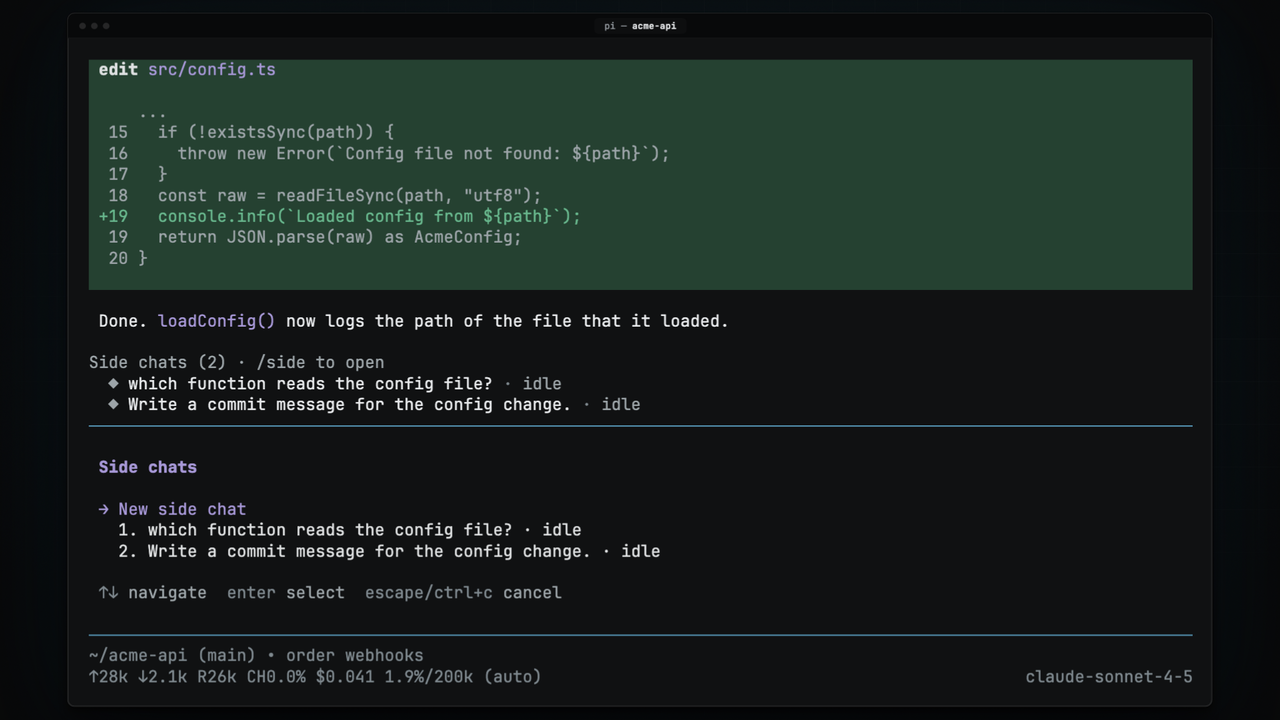
While side chats exist, a widget above the editor lists each side chat with its state:
| State | Meaning |
|---|---|
running |
The side chat works on your message. |
waits for approval |
A call waits for y or n. The footer of pi also shows this. |
new reply |
A run ended while its overlay was closed. |
idle |
Nothing is new since you last looked. |
A session switch, /reload, or quitting pi stops the side chats that run.
When the main session is saved, its side chats are saved too, and they come back when the main session starts again, for example after /resume.
See saved side chats for the files and the cleanup.
Model and thinking level
A new side chat uses the model and the thinking level of the main session at the time you open it.
- Press
mto choose another model. The list holds the models that have a key or a login. Type to filter the list, then pressEnter. - Press
tto step through the thinking levels that the model supports.
Both keys change only this side chat, from its next run.
The main session and your default model do not change.
While the side chat runs, both keys wait: let the run end, or press Esc to stop it.
To ask a cheaper model from the first question, type /side and open a new empty side chat.
Then press Esc, press m, choose the model, and ask.
Approvals
The side chat works in the same directory as the main thread.
So the calls that can change files wait for you: bash, edit, and write.
Reading tools never wait.
| Run | ask mode (default) |
auto mode |
|---|---|---|
| First run of a side chat | Asks before each call | Asks before each call |
| Later runs | Asks before each call | Runs each call |
The first run always asks, because you have not seen what the side chat does yet.
Press p to switch the mode.
A waiting call shows its command or its file above the input line.
Press y to let it run, or n to deny it.
The model gets "The user denied this call." for a denied call.
When you stop the run, every call that waits is denied.
Bring back
Press b to give the main thread what the side chat found.
Nothing goes to the main agent at once.
The note goes with the next message that you send in the main thread, so you decide what the main agent does with it.
The note holds your questions, the side chat's replies, and one line for each command and changed file. It is at most 20000 characters. Bring back is available only when both the main agent and the side chat are idle. See Bring back for the limits and the other conditions.
Side chat changes
A side chat does not tell the main agent what you asked.
It tells the main agent which files it changed with edit or write, so that the main agent does not work from an old copy.
- A change note. When a side chat run ends, the main agent gets a note with the changed files. An idle main agent gets the note with your next message, so the note never starts a run.
- A stop on stale writes. The main agent's first
editorwriteof such a file is stopped, with the reason that it must read the file again.
See Side chat changes for the details.
Limitations
- Interactive mode only. In RPC, JSON, and print mode, the commands only show a warning.
- Each first question costs a full read. The side chat has other tools than the main session, so the provider cannot reuse the prompt cache of the main session. The first run reads the whole conversation at full price.
bashchanges are not tracked. When a side chat changes files withnpm install,sed -i, orgit checkout, the main agent gets no note and no stop.- A small model can misread the main thread. In tests of pi-recap, small models sometimes reported a finished step as open. A side chat on a cheap model can describe the state of the main thread wrongly.
- A copy per side chat. Each saved side chat holds its own copy of the main conversation up to its start point, as
/forkdoes. - No extension tools. The side chat has no MCP tools, no web search, and no tools from other extensions.
Contributing
To report a bug or ask a question, open an issue on GitHub. The build, test, and release steps are in AGENTS.md.