@javimolina/rexpi0.6.0
Tiny arms, many panes. A Pi extension for Rex to multiplex the world.
Untested on omp
This is a pi package. No one has reported whether it works on omp yet. If you try it, add your result below.
Reports 0
No reports yet.
Readme
Rexpi





Tiny arms, many panes. A Pi extension for Rex to multiplex the world.

Extra capabilities for the Rex multiplexer, still in private beta. Rex already has a comprehensive API. This extension fills a few gaps for Pi users with particularly exquisite taste in panes.
Rexpi is meant to be used conversationally:
“Run a fresh review in a side split and send the findings back.”
“Open the Grafana project in a new tab.”
“Put Hunk in a floating pane.”
But it comes with batteries included. There are commands and shortcuts too; you don't need to ask an LLM to open a menu.
Capabilities
- Your tools, where you want them. Add custom commands to open Helix, Hunk, logs, or whatever else you keep running in splits, tabs, and floating panes.
- Terminals on other Rex hosts. Discover configured hosts, select one for the current conversation, and open remote sessions, tabs, splits, and floating panes over SSH Unix-socket forwarding. Remote paths and PATH stay remote, exact server identities are verified, and local agents and messaging stay local.
- Agents that report back. Ask for a fresh review and request the findings back. Related agents can exchange messages, and opted-in review results come back to the parent conversation automatically. No copy-paste courier service required. Delegated prompts include the exact tool/path grant and delivery budget, and incomplete result-return grants are rejected before launch.
- Coordinator workflows that stay inspectable. Delegate and fan out supervised subagents with visible handles, bounded result waits, compact status and inbox output, and quiet completion. Use
verbose:truefor full evidence and bounded text projection for oversized conversations. - Policy-aware model routing. Pin delegates and individual fan-out children to deep, everyday, or fast policy variants, or opt into bounded automatic selection. Rexpi revalidates the physical target before launch without changing the parent model or capability grants.
- Projects by name. Open an existing project by path or let zoxide find it. Start a fresh Pi there without changing your current conversation's directory.
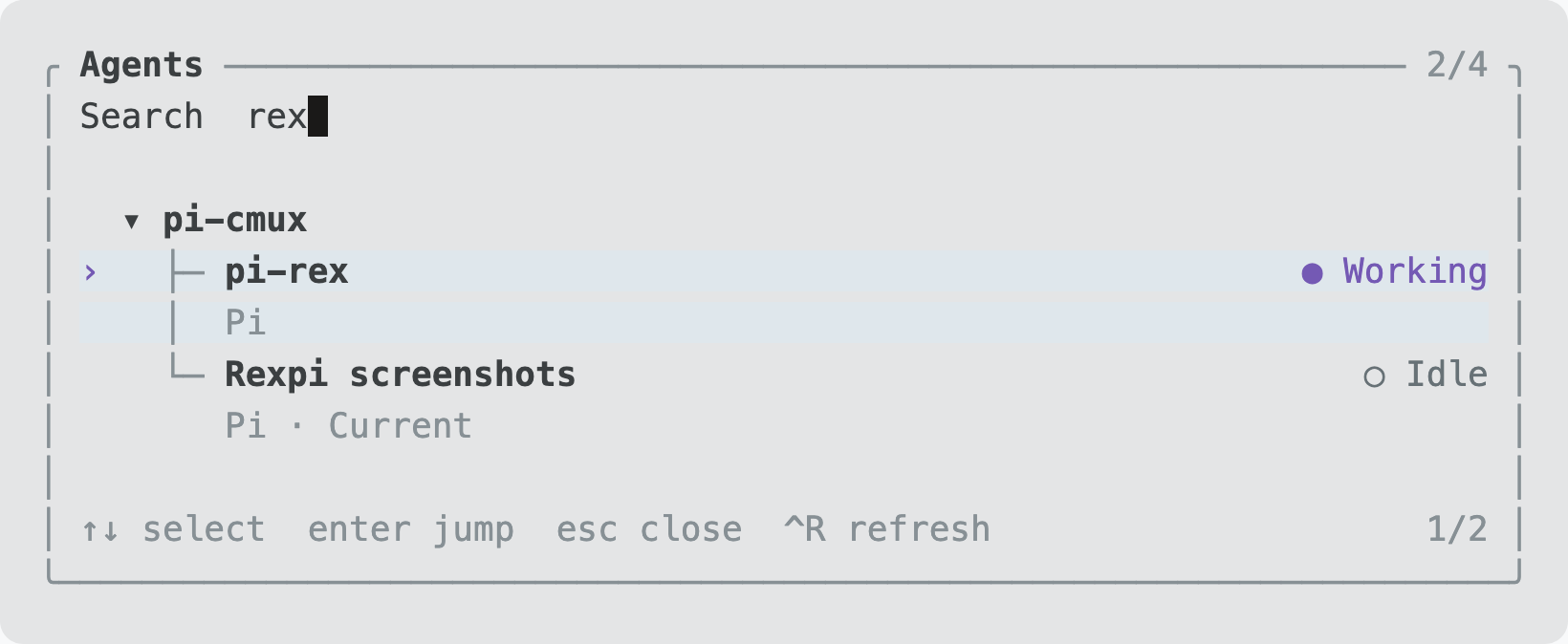
- Find the agent you lost. Every Pi conversation receives a persistent generated name such as
quiet-otter, shown in a colored widget and the agent panel. Search live Pi, Claude, Codex, OpenCode, and Gemini agents across Rex workspaces and jump to their panes. - Named layouts. Describe a workspace to Pi, save it by name, and reopen it from a read-only picker with previews. Layouts can reuse the current Pi pane without restarting its conversation.
- Worktree housekeeping. Browse a repository's Git worktrees, open one in Pi, or mark old ones for confirmed removal. Dirty worktrees and worktrees with live agents are protected; branches stay put.
New agents get fresh conversations, not a copy of yours. Returning findings is opt-in and can trigger additional model turns. Ctrl+Alt+M stops future returns without killing the agents.
How to install
You need Pi 1.5.0+, Node 24.0.0+, and Pi running inside a local Rex terminal. Keep rex and pi on PATH. Install zoxide if you want project lookup by name.
pi install npm:@javimolina/rexpi
Or install directly from GitHub:
pi install git:github.com/javiermolinar/rexpi
Then start Pi in Rex, or run /reload. Outside Rex, the extension stays out of the way.
To try it directly from a checkout without installing:
pi -e ./extensions/index.ts
List of commands
| Command | What it does |
|---|---|
/rxn [task] |
Start fresh Pi in a new Rex workspace |
/rxv [task] |
Start fresh Pi in a split on the right |
/rxh [task] |
Start fresh Pi in a split below |
/rxt [task] |
Start fresh Pi in a new tab |
/rxa or /rxagents |
Find an agent and jump to its pane |
/rxw or /rxworktrees |
Browse, open, or remove Git worktrees |
/rxl or /rxlayouts |
Browse named layouts with a read-only preview |
/rxl NAME |
Open a layout in a new tab, reusing its current-Pi slot |
/rxl save NAME [--overwrite] |
Capture and save the active Rex tab |
/rxl preview NAME or /rxl preview current |
Preview a saved layout or the active tab without opening it |
Leave out [task] for an empty conversation. These launch commands don't enable automatic result returns; ask Pi to delegate and send findings back for that.
The rexpi_start_pi tool follows the same rule: omit prompt only when you want an idle interactive session. For supervised work, use rexpi_delegate, which requires a task and an explicit capability grant instead of creating empty review sessions.
| Shortcut | What it does |
|---|---|
| Ctrl+Alt+A | Open the agent panel |
| Ctrl+Alt+B | Return to the parent Pi conversation |
| Ctrl+Alt+M | Stop future agent result returns |
In either panel, type to search, use the arrow keys to move, and press Enter to open. Esc closes and Ctrl+R refreshes. In the worktree panel, Space marks a worktree and Ctrl+D asks to remove marked entries. Removal requires confirmation; it isn't a surprise keyboard shortcut.
You can also just ask Pi to open or reuse a named workspace, choose a model for a new agent, return to its parent, or inspect incoming findings. Those use tools rather than more slash commands.
Generated agent names are assigned automatically, survive reloads, and are never reused by another retained conversation. Child conversations show the relationship as parent-name > child-name in the widget. Ask Pi to “read conclusions from quiet-otter” to read a bounded snapshot from that live local conversation without triggering model work there. Named reads work across independent tasks; UUID reads, messaging, cancellation, and stop retain their related-agent restrictions. Names are lookup aliases, not secrets or authorization tokens.
Layouts
Ask Pi:
“Create a build layout with you on the left, an editor shell at the top right, and another shell below it. Save it as
my-build.”
Pi uses rexpi_layout to validate and save a declarative spec. Saving does not open panes or run commands. Then use /rxl my-build, or /rxl to search built-in and user layouts and see a preview. Enter opens the selected layout; Esc cancels; Ctrl+R refreshes. Preview-only views close on Enter or Esc. The overlay has no editing controls. See the configuration guide for custom specs, commands, and capture behavior.
Built-ins are named for concrete workflows:
| Layout | Arrangement |
|---|---|
Build (build) |
Pi left; editor shell above another shell on the right |
Inspect (inspect) |
Pi left; review shell right |
Observe (observe) |
Pi above a shell on the left; monitor shell full-height right |
Use /rxl build, /rxl inspect, or /rxl observe to open one. Each gives Pi half the width; Build and Observe give the upper pane 65% of its column's height. All keep focus on the current Pi. New terminals start in Pi's invoking directory.
Validation
npm run test:layouts
npm run typecheck
npm run pack:check
For an explicit live check only, node scripts/layout-smoke.mjs moves the invoking Pi into a three-pane test tab using harmless cat processes, verifies its live binding and PID before and after, and closes only the confirmed test panes. It leaves Pi in the new tab. Run it from interactive Pi's shell tool inside Rex, not a standalone terminal without a live Rexpi binding. It is not part of npm test. Loading new commands into an existing Pi requires a user-initiated reload or a fresh Pi; validation never reloads automatically.
Configuration
See the configuration guide for model-routing policies, remote terminals, custom commands, floating panes, and defaults.
Screenshots
Agent panel
Worktree panel
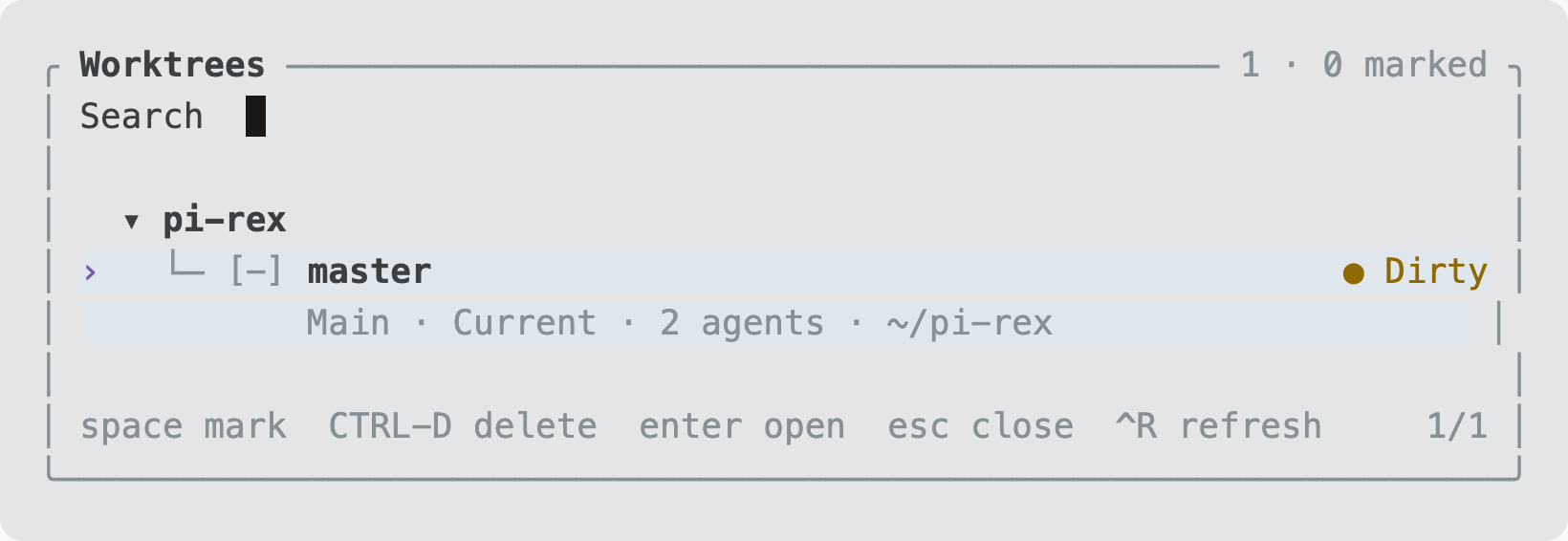
Captured from a live Rex session. The home-directory path is shortened.
License
MIT. See LICENSE.