@igor-guari/pi-watch0.2.0
Wait for anything without blocking the Pi turn: register a goal, a success/failure condition and a deadline; Pi is woken up with the result. No sleep, no polling loops in the agent.
Untested on omp
This is a pi package. No one has reported whether it works on omp yet. If you try it, add your result below.
Reports 0
No reports yet.
Readme
pi-watch
Wait for anything without blocking the turn in the Pi coding agent.
The agent registers a goal, a success condition, an optional failure condition and a deadline. It ends its turn right away — you get Pi back — and when the condition is met (or the deadline expires) the extension wakes Pi up with the goal and the observed data so it can continue.
No sleep. No for … sleep 15; done loops. No bash timeouts.
Why
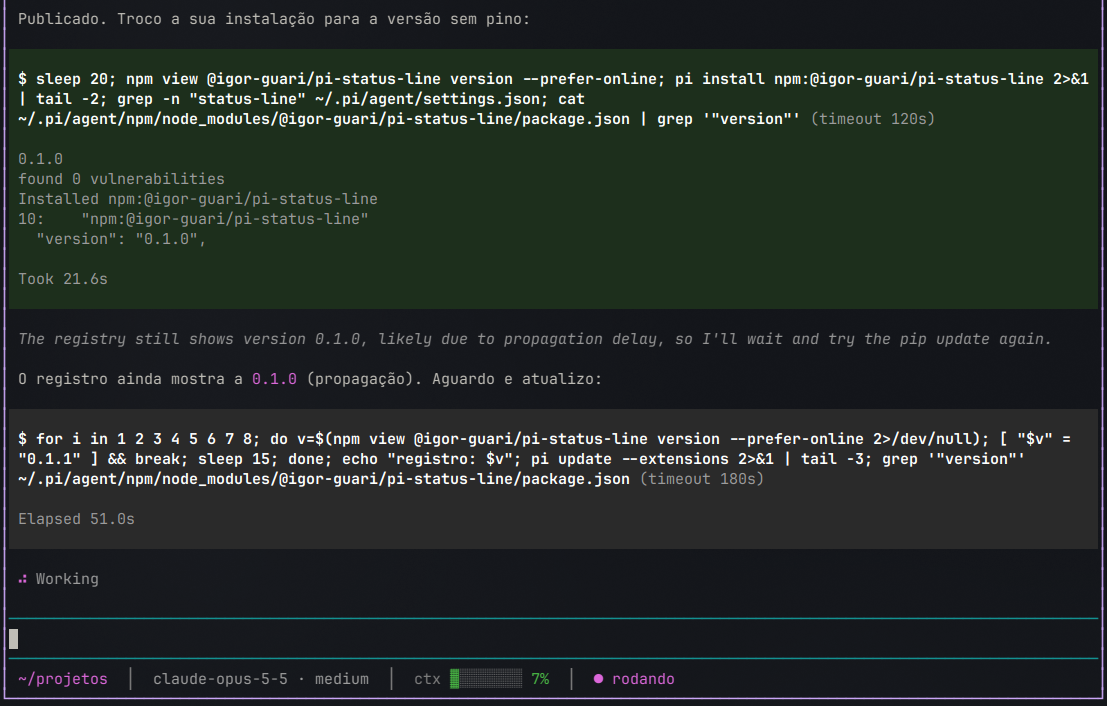
Without it, waiting looks like this — the turn is stuck on Working for minutes, the loop races the bash timeout, and you can't use Pi meanwhile:
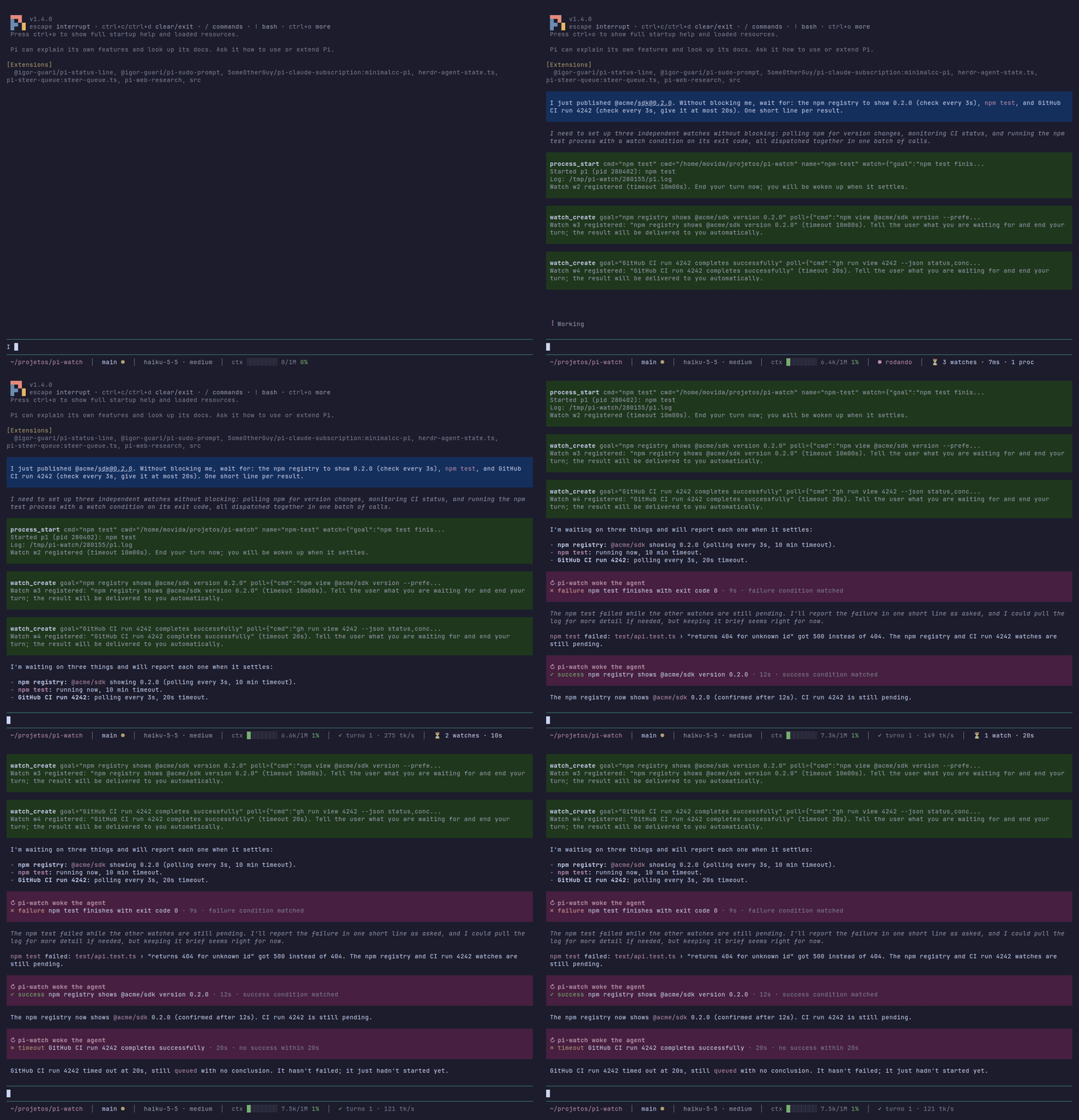
With pi-watch the same wait is one tool call; the turn ends in seconds and Pi resumes on its own when the registry shows the new version.
Install
pi install npm:@igor-guari/pi-watch
# or
pi install git:github.com/IgorGuariroba/pi-watch
Try without installing: pi -e npm:@igor-guari/pi-watch.
How it works
Every watch always ends in exactly one outcome — it can never wait forever:
| Outcome | When |
|---|---|
✓ success |
the success condition matched |
✗ failure |
the failure condition matched, or the watched process exited without matching success |
◷ timeout |
timeoutMs (required, estimated by the agent) expired — the last observation is included |
! error |
the poll command cannot run (exit 126/127) |
Watches settling within ~2s of each other are delivered in a single message. If the agent is idle it is woken up; if it is busy the result is queued as a follow-up.
Sources
- process — a command started in the background with
process_start. Conditions are checked on every output line (line,stream) and on exit (exitCode,signal). - poll — a cheap status command re-run every
intervalMs(default 15s, min 2s, optional backoff) outside the turn. Conditions seeexitCode,stdout,stderr,json(stdout parsed as JSON),attempt.
Conditions
Declarative, no eval:
{ "exitCode": { "eq": 0 } }
{ "line": { "regex": "Listening on :\\d+" } }
{ "stdout": { "eq": "0.2.0" } }
{ "all": [ { "json.status": { "eq": "completed" } }, { "json.conclusion": { "ne": "success" } } ] }
Operators: eq, ne, gt, lt, in, regex, contains, combined with all / any. A field absent from the observation never matches (an output line has no exitCode).
Examples
Tests in the background
// process_start
{ "cmd": "npm test", "watch": { "goal": "test suite passes", "success": { "exitCode": { "eq": 0 } }, "timeoutMs": 600000 } }
npm publish propagation
// watch_create
{
  "goal": "registry shows @me/pkg@0.2.0",
  "poll": { "cmd": "npm view @me/pkg version --prefer-online", "intervalMs": 15000 },
  "success": { "stdout": { "eq": "0.2.0" } },
  "timeoutMs": 600000
}
GitHub Actions run
{
  "goal": "CI run 123 finishes green",
  "poll": { "cmd": "gh run view 123 --json status,conclusion" },
  "success": { "all": [{ "json.status": { "eq": "completed" } }, { "json.conclusion": { "eq": "success" } }] },
  "failure": { "all": [{ "json.status": { "eq": "completed" } }, { "json.conclusion": { "ne": "success" } }] },
  "timeoutMs": 1800000
}
(Or process_start with gh run watch 123 --exit-status / glab ci status --live and success: { exitCode: { eq: 0 } }.)
Deploy health check
{
  "goal": "staging answers 200",
  "poll": { "cmd": "curl -s -o /dev/null -w '%{http_code}' https://staging.example.com/health" },
  "success": { "stdout": { "eq": "200" } },
  "timeoutMs": 300000
}
Tools
| Tool | What it does |
|---|---|
process_start |
Start a command in the background (log to file); optional inline watch |
process_list / process_logs / process_kill |
Inspect, read (tail, grep) and stop background processes |
watch_create |
Register a watch on a process (processId) or a poll |
watch_list / watch_cancel |
List or cancel active watches |
Sleep guard
bash calls with sleep N (N ≥ 10s) or any for/while/until … sleep … done loop are blocked with a hint to use a watch instead. Short sleeps and sleep inside quotes/comments pass.
Long bash guard
Waiting can also mean running a long command directly in bash:
- High
timeout(blocks). Abashcall whosetimeoutis abovePI_WATCH_BASH_TIMEOUT_S(120s) is blocked: the model asking fortimeout: 600already knows it will run long. The reason points toprocess_startwith an inline watch. - Slow-call hint (does not block). When a
bashcall takes longer thanPI_WATCH_SLOW_BASH_HINT_S(30s), a hint is appended to its result suggestingprocess_start+ watch next time. - Known long commands (opt-in).
PI_WATCH_LONG_COMMANDS=1also blocksnpm/pnpm/yarn/bun test,vitest,jest,stryker,cargo build|test,docker build,gh run watch. Set it to a regex to use your own list.
UI
- Status:
⏳ 2 watches · 1m12s · 1 proc /watches— list active watches and processes, pick one to cancel/kill- Wake-up messages are rendered compactly (expand to see the output tail)
Configuration
| Env var | Default | |
|---|---|---|
PI_WATCH_MAX_TIMEOUT_MS |
7200000 (2h) |
upper bound for timeoutMs |
PI_WATCH_SLEEP_THRESHOLD_S |
10 |
sleeps at/above this are blocked |
PI_WATCH_BLOCK_SLEEP |
1 |
0 disables all blocking guards (sleep, timeout, long commands) |
PI_WATCH_BASH_TIMEOUT_S |
120 |
bash calls with a larger timeout are blocked; 0 disables |
PI_WATCH_SLOW_BASH_HINT_S |
30 |
bash calls slower than this get a hint appended; 0 disables |
PI_WATCH_LONG_COMMANDS |
unset | 1 blocks the built-in list of long commands; any other value is a custom regex |
Lifecycle
Everything lives as long as the Pi session: on quit, /new, /resume, fork or reload, active watches are cancelled and background processes are stopped (SIGTERM, then SIGKILL). Logs stay in $TMPDIR/pi-watch/<pid>/.
Limits: 10 active watches, one-shot (a watch settles once).
Development
npm test                                  # node --test (Node 22.6+), no dependencies
pi -e ./src/index.ts                      # load the local extension
node scripts/rpc-smoke.mjs "<prompt>" 2   # drive a real Pi over RPC and watch it wake up
src/condition.ts, src/sleep-guard.ts, src/bash-guard.ts and src/watch-manager.ts have no Pi imports and carry the tests; src/index.ts wires them to Pi.
License
MIT