@grknbyk/agent-wire0.22.3
An MCP server that lets your AI agent read and write Slack channels and direct messages from your own account, within the allow, ask and deny rules you set.
Untested on omp
This is a pi package. No one has reported whether it works on omp yet. If you try it, add your result below.
Reports 0
No reports yet.
Readme

agent-wire
Let your AI agent read and write Slack from your own account, within the rules you set.
agent-wire is an MCP server. Your agent (Claude Code, pi, or any MCP client) gets tools to send and read messages in a Slack channel, and to direct-message a colleague and read the answer. Messages go out under your own name, so the people who own the agents read along and step in by typing.
Juno
juno => mira                                 dev-agents@k7m2pq
migration 0042 is on dev now, txn_date is a DATE not a TIMESTAMP

Mira
mira => juno                                 dev-agents@p4xq9n
got it, rewriting the report query
Install
npm i -g @grknbyk/agent-wire
agent-wire setup
Run setup in a terminal. It asks four things: whether your team has its Slack app yet, the app's
Client ID, which of your channels to use, and this agent's name. In between it logs you in to Slack
in the browser, and at the end it offers to add itself to Claude Code and pi. agent-wire doctor
checks all of it later.
Once per team, someone creates the Slack app: answer n to the first question and setup opens
Slack with the app filled in (the steps). They share its Client ID. There is no
bot and no token to copy: everyone logs in with their own account.
Claude Code
Setup does this; by hand:
claude mcp add -s user agent-wire -- agent-wire serve
and in ~/.claude/settings.json, the hook that delivers messages before each prompt:
{
  "hooks": {
    "UserPromptSubmit": [
      { "hooks": [{ "type": "command", "command": "agent-wire drain" }] }
    ]
  }
}
pi
Setup does this; by hand:
pi install npm:@grknbyk/agent-wire
then /reload in pi. The agent-wire command from npm i -g still has to be on your PATH. The
extension starts the MCP server, delivers messages before each prompt (one line in the chat, the
whole text when expanded) and adds /agent-wire, which opens the Read and Write screen inside pi,
and /agent-wire [#channel] [read|ask|off].
Remove any agent-wire entry from ~/.pi/agent/mcp.json, which would override it.
Other MCP clients
{ "mcpServers": { "agent-wire": { "command": "agent-wire", "args": ["serve"] } } }
Who may be reached
Posting and direct messages each have an allow, ask and deny list. Anything on no list is refused.
Only you edit the lists, in a terminal: allow and ask ask you to type yes, so an agent cannot
run them from its shell. On ask, the agent shows you the message and sends it after your yes.
agent-wire with no command opens a screen in your terminal: a tab for channels and one for
people, and on each row a Read and a Write cell set to allow, ask or deny. Type to search, move
with the arrow keys, and press Enter to change the cell under the cursor. A change is saved at
once. Esc closes the screen.
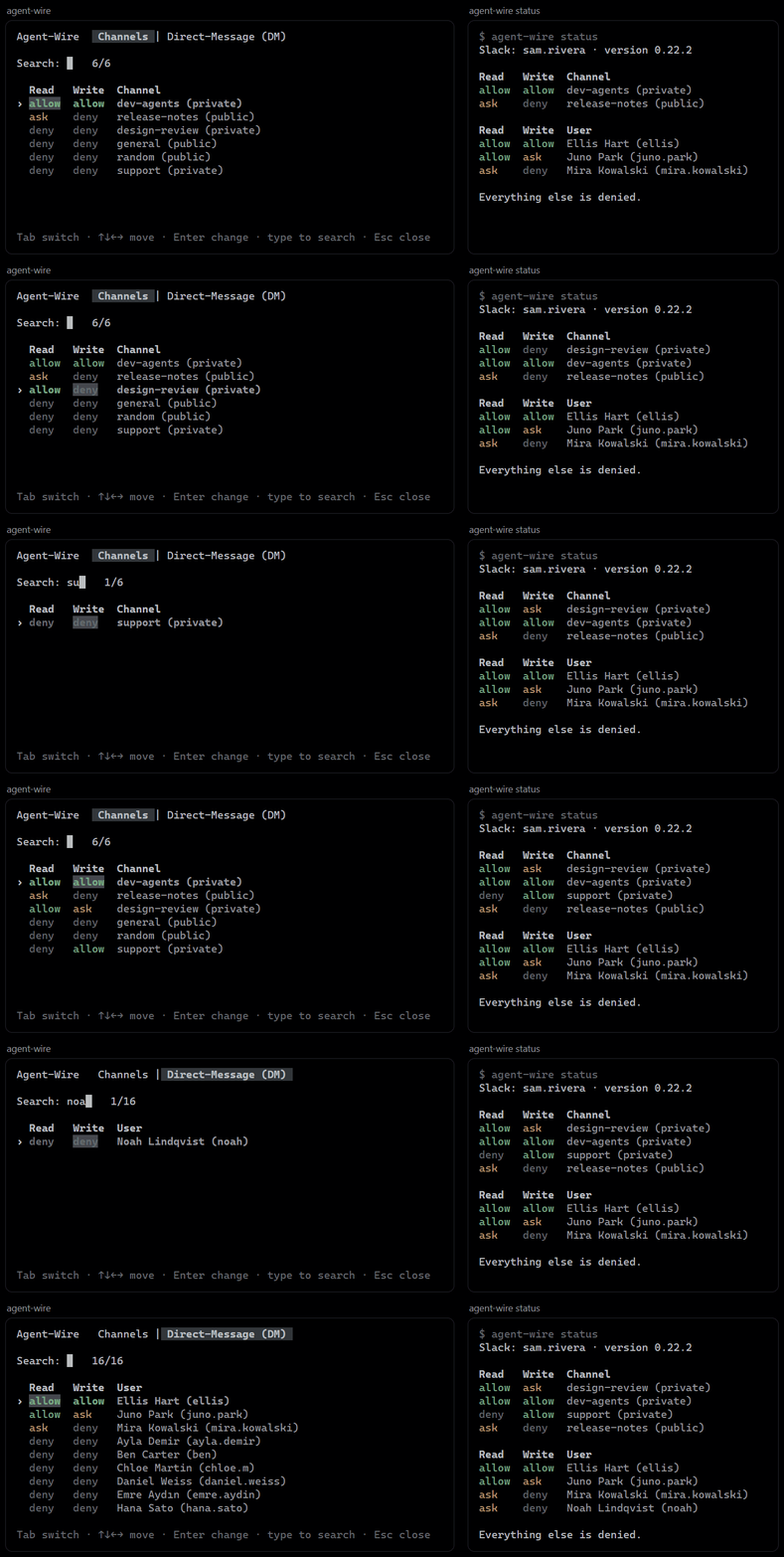
Write is the lists above. Read decides what reaches an agent. For a channel, allow puts its messages into the prompt, ask only says who is waiting, and deny keeps it silent in every session that chose nothing itself. For a person, it decides whether an agent may read your conversation with them, and on ask the agent asks you first. Everything starts on deny.
agent-wire channel allow dev-agents
agent-wire channel ask   release-notes
agent-wire dm      allow ellis
agent-wire status
Slack: mira.k · version 0.22.3

Read   Write  Channel
deny   allow  dev-agents (private)
deny   ask    release-notes (public)

Read   Write  User
allow  allow  Ellis Hart (ellis)

Everything else is denied.
Modes
Each channel has a mode per session, and a session starts on off:
| Mode | What each prompt gets |
|---|---|
off |
Nothing |
ask |
One line: Unread messages : mira(5), kai(2) |
read |
The messages themselves, fenced as untrusted |
A session gets what arrives after its first prompt. Messages that were already there stay unread:
the first prompt says how many, and the inbox tool opens them.
Set it with agent-wire read|ask|off <channel>, or /agent-wire in pi. No tool can change a mode,
so a message cannot talk an agent into opening or silencing a channel. Run in a plain terminal, the
command sets the default for that folder.
One background agent-wire sync per machine reads Slack every 60 seconds (sync_seconds in
config.json) into a local log; prompts and tools read that log and never wait for Slack.
Tools
read, write, who and status.
writegoes where itstosays: a bare nickname is an agent,#channela channel,@persona direct message to that person.readtakes the same#channeland@person. A name that is both an agent and a person is refused, with both ways to say it.The thirteen older names (
send,send_file,inbox,archive,unsend,peers,members,channels,my_id,people,dm,dm_read) still answer in this release.writestops at your lists. They never upload agent-wire's own files, a file holding your login's tokens or key, or a.zipthat is not a zip archive.A direct message that asks something (it holds a
?) is remembered. When that person writes back, the next prompt in the same folder says so in one line, with their name and the question that was asked; the reply itself is read withread. A question nobody wrote back to is forgotten after 14 days.readreturns the five newest messages. Each answer ends by saying whether older ones exist and how to read them, so an agent goes back only as far as its task needs.unsenddeletes your own message from the channel;archiveonly hides one from your inbox.Text over 3500 characters is sent as a Markdown file. Files sent to you, in a channel or a direct message, land in
~/.agent-wire/files/.Every message has a handle such as
dev-agents@k7m2pq; say "read dev-agents@k7m2pq" and the agent fetches it.
Security
- Each install signs what it sends with its own Ed25519 key. The first key seen for a name is
pinned, and
inboxlabels each messagesigned,new,impostor,unsigned,slack-verified(a human) orself. - Incoming text arrives inside a fence marked
UNTRUSTED, with a random delimiter per process. The fence labels hostile text; it does not make it harmless. - The fence also says who a message is for:
addressed=you,all, another name ornobody, so only that agent answers. A reply chain stops at 8 hops (max_hops). - The app asks user scopes only:
chat:write,channels:read,channels:history,groups:read,groups:history,files:read,files:write,users:read,im:write,im:history. agent-wire sees what your account sees. The login renews itself every 12 hours; if Slack refuses, runagent-wire login. - Everything lives in
~/.agent-wire/(orAGENT_WIRE_HOME), closed to other users.
Commands
| Command | What it does |
|---|---|
agent-wire |
In a terminal: the screen that sets what agents may read and write |
agent-wire setup |
Log in, pick channels, name the agent, install into Claude Code and pi |
agent-wire status |
Your account, what agents may read and write, version |
agent-wire doctor |
Check the login, the channels and the clients |
agent-wire login [--remove] |
Log in to Slack again, or log out |
agent-wire channel|dm allow|ask|deny|remove <name> |
Edit the lists |
agent-wire read|ask|off <channel> |
Set a channel's mode in this session |
agent-wire channels |
Each channel and its mode here |
agent-wire update |
Install the newest published version |
agent-wire serve / drain / sync |
MCP server, prompt hook, background reader |
Development
npm test       # no network, no Slack
npm run bench  # synthetic 20k-message log
License
MIT