@ghosthvj/gentle-canvas-lan0.1.2
Fixed LAN endpoint for the Gentle Design canvas: guarded proxy, stable short link and copyable URLs for the Pi coding agent.
Untested on omp
This is a pi package. No one has reported whether it works on omp yet. If you try it, add your result below.
Reports 0
No reports yet.
Readme
Gentle Canvas LAN
Open the Gentle Design canvas from your phone or laptop on the same network while Gentle Shell runs on a headless machine. No tunnels, no Tailscale, one stable address.
What it does
- Keeps one fixed LAN address for a canvas whose real port and token change every time you reopen it.
- Shows a short, stable link (
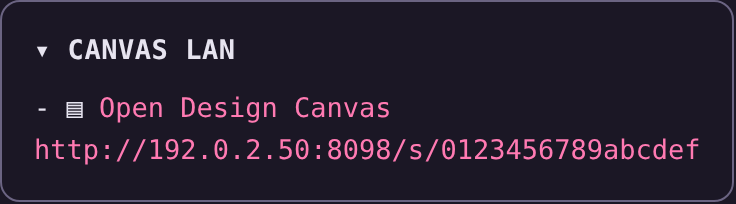
http://LAN_IP:PORT/s/<16-hex>) in the sidebar card that redirects to the current canvas. The full tokenized URL is still printed by/canvas-lan:statusand in tool output. - Proxies the canvas over the LAN with guarded upstream forwarding: exact Host/Origin rules, token paths, SSE streaming, and no forwarded-header trust.
- Never advertises a dead link. The registration is probed before a link is shown; a canvas that stopped answering is revoked.
- Explains an empty port. With nothing live, a request shows a short page saying the canvas is not running instead of a bare
Bad Gateway.
Requirements
- Gentle Shell (
gentle-pi) and Node.js 22+. - Gentle Design running in that session — the canvas it serves locally is what gets exposed.
- The other device on the same trusted network.
Install
pi install npm:@ghosthvj/gentle-canvas-lan
From a git checkout instead:
pi install git:github.com/ghosthvj/gentle-canvas-lan
To try it once without touching your settings: pi -e npm:@ghosthvj/gentle-canvas-lan.
Configure
Run /canvas-lan:setup.
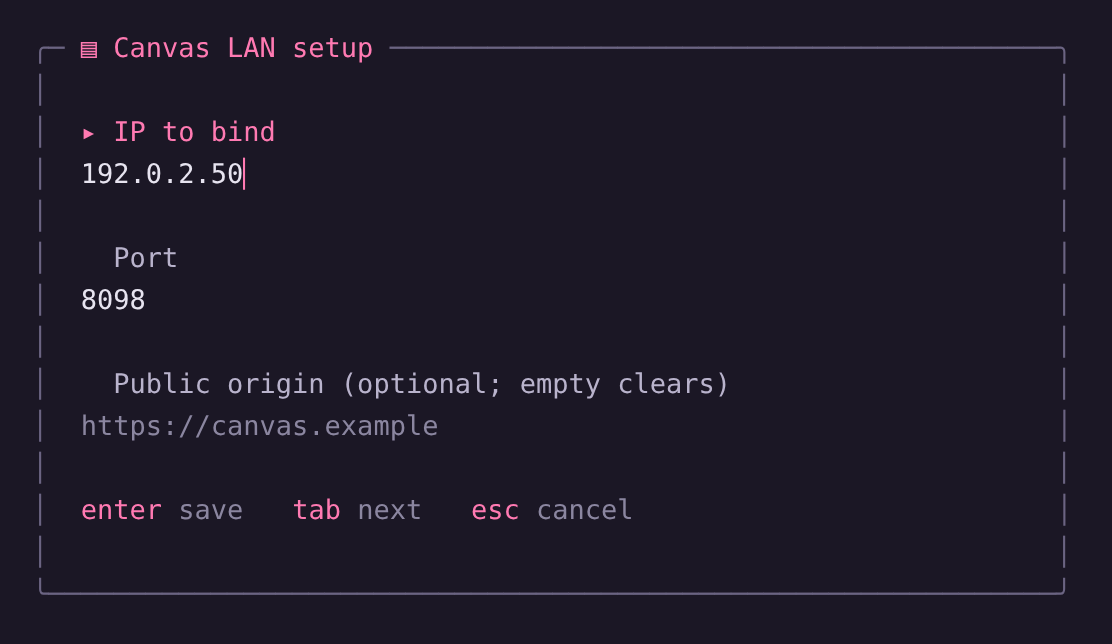
It writes ~/.config/gentle-canvas-lan/config.json (mode 0600, atomic replace) and rebuilds the proxy. The two optional caps can also be saved there as plain JSON keys, e.g. { "ip": "192.168.1.20", "port": "34316", "maxBodyBytes": "10485760" }.
| Setting | Environment variable | Notes |
|---|---|---|
| Bind IP | GENTLE_CANVAS_LAN_IP |
Required. A concrete IPv4/IPv6 address of this host, never 0.0.0.0, :: or a hostname. |
| Port | GENTLE_CANVAS_LAN_PORT |
Defaults to 34316. |
| Public origin | GENTLE_CANVAS_LAN_PUBLIC_ORIGIN |
Optional exact http(s)://host[:port] origin when a reverse proxy terminates TLS. |
| Max body size | GENTLE_CANVAS_LAN_MAX_BODY_BYTES |
Optional cap in bytes for request bodies forwarded to the canvas. Defaults to 52428800 (50 MB). |
| Max connections | GENTLE_CANVAS_LAN_MAX_CONNECTIONS |
Optional cap on concurrent client connections. Defaults to 64. |
Environment variables win per key over saved values.
Commands
| Command | What it does |
|---|---|
/canvas-lan:setup | Configure the bind IP, port and optional public origin. |
/canvas-lan:start | Enable the listener. The card appears only while the registered canvas answers. |
/canvas-lan:status | Show the effective IP and port with their source (env/saved), the listener state and the current LAN link. |
/canvas-lan:stop | Stop listening and disable automatic start until you start it again. |
In the TUI, command results and errors stay in the transcript instead of the one-line status slot that the next notification would replace.
Troubleshooting
- The browser shows "Gentle Design canvas is not running". The port is still reserved but the local canvas stopped. Open a design in Gentle Shell and reload the page.
- No card, and
statussays the proxy is running with no URL. There is no live canvas registration yet; opening a design registers it and starts the listener. - Port already in use. Pick another port in
/canvas-lan:setup; a conflict is reported without killing the other process.
Security
Traffic is plain HTTP and there is no authentication. Tokenized URLs and the short link are capabilities: anyone on your network who has one can view the canvas and send comments to the agent. Use it only on a trusted network, never forward the port to the internet, and stop the listener when you are done.
Docs
Configuration · Public origin trust · Proxy · Controller · Sidebar adapter · Card · Changelog
License
MIT. See LICENSE and THIRD_PARTY_NOTICES.md for the upstream attribution.