@fazibear/pish0.8.6
Shell-inspired prompt UI for pi
Untested on omp
This is a pi package. No one has reported whether it works on omp yet. If you try it, add your result below.
Reports 0
No reports yet.
Readme

A shell-inspired terminal UI for pi: colored ▌ markers,
a borderless editor, and a right-aligned status prompt instead of a separate footer.
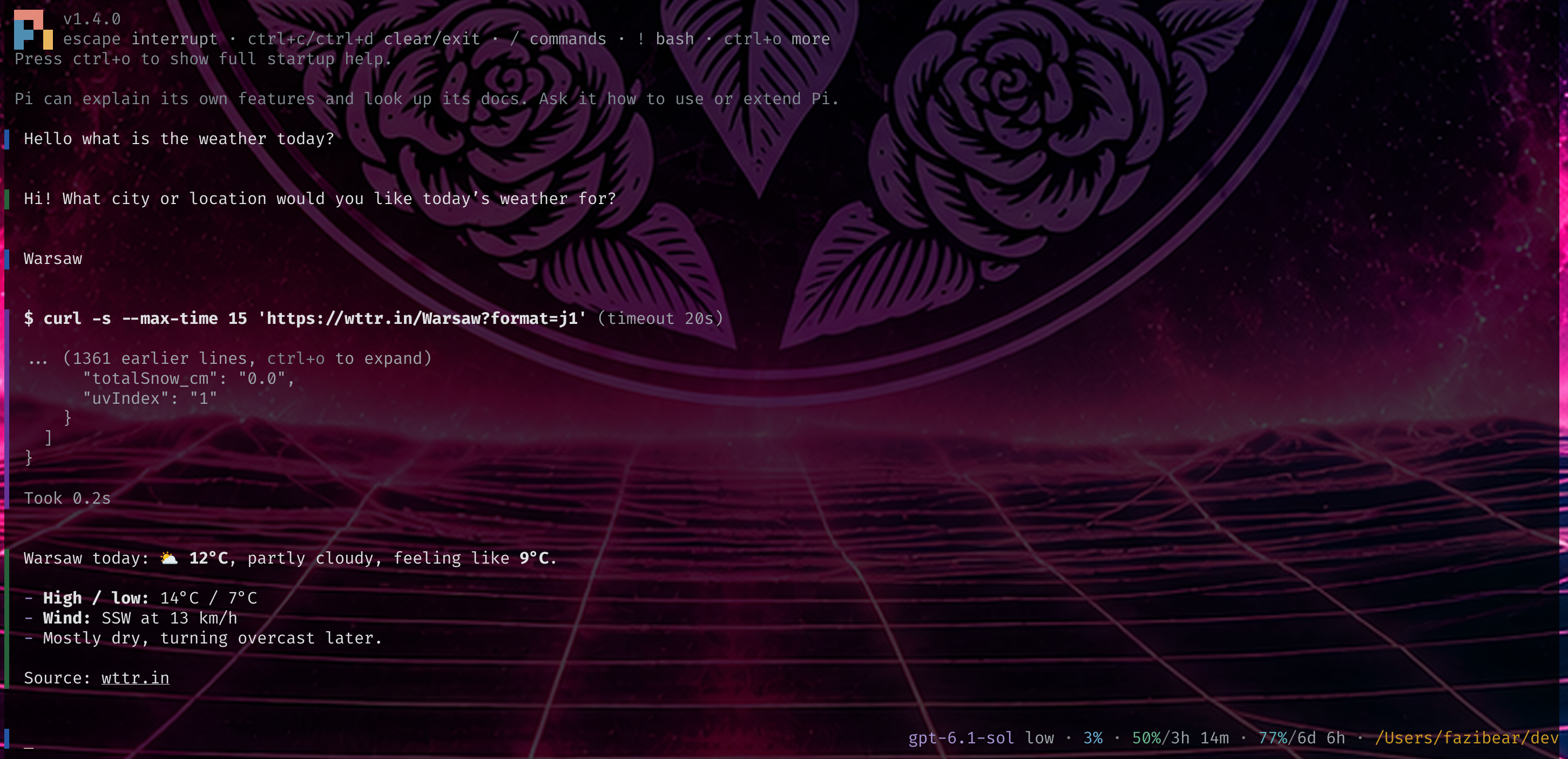
- Distinct markers for user messages, replies, thinking, code, tools, and errors.
- Bars on shell output, compaction and branch summaries, skill invocations, extension messages/entries, and cache, billing, and project-trust notices.
- Markdown, syntax highlighting, expandable tools, and editor shortcuts remain available.
- An animated input marker shows when the agent is working.
- Configurable colors, cursor appearance, and status placeholders.
- Optional subscription-quota display through pi-usage.
Pish changes presentation only—not session messages or model context.
Install
pi install git:github.com/fazibear/pish
Restart pi after installing. To try it without installing:
pi -e git:github.com/fazibear/pish
Quick start
Run /pish-init inside pi to create a configuration file with all current defaults.
Edit the file, then run /pish-reload to apply your changes.
The default location is ~/.pi/agent/pish.json. Set PISH_CONFIG to use another
path. Both commands respect it; /pish-init creates missing directories and
never overwrites an existing file.
| Command | Purpose |
|---|---|
/pish-init |
Create a configuration file with current defaults |
/pish-reload |
Reload appearance settings |
/pish-indicator [name] |
Pick a working animation for this session |
/pish-usage |
Refresh quota data and show integration diagnostics |
Configuration
All fields are optional. Omitted settings use defaults; omitted marker colors
inherit their defaults. Colors must use six-digit RGB hex (#rrggbb).
A small configuration to start with:
{
  "marker": "▌",
  "marerColors": {
    "user": "#2456a6",
    "assistant": "#27633b",
    "input": "#2456a6",
    "right": "#808080"
  },
  "rightPrompt": "{model} · {thinking} · {context_percent_used} · {dir}"
}
The setting is spelled marerColors, not markerColors.
Each block has its own marker color under marerColors; text colors are unchanged.
| Keys | Blocks |
|---|---|
user, assistant, thinking, code |
Conversation content |
tool, error |
Tool output and errors |
bash, bashError |
Shell commands and failed shell commands |
skill |
Skill invocations |
summary, compaction |
Branch and compaction summaries |
custom, entry |
Extension messages and session entries |
status, warning, bugReport |
Status, warning, and bug-report hints |
cacheWarming, cacheMiss, thinkingDrop |
Provider/cache notices |
compactionCost, projectTrust |
Billing and project-trust notices |
pending, update |
Queued messages and update notifications |
input, right |
Input marker and default right-prompt text |
For example:
{
  "marerColors": {
    "skill": "#a798d7",
    "bash": "#68b78d",
    "compaction": "#69add0",
    "custom": "#de8d5a"
  }
}
Apply marker color changes with /pish-reload.
Right prompt
The status appears at the right edge of the first input line. It is truncated
to at most half the terminal width and hidden on narrow terminals. When input
needs its space, it disappears rather than forcing input to wrap early.
Set rightPrompt to "" to hide it entirely.
| Placeholders | Values |
|---|---|
{model}, {provider} |
Current model ID and provider |
{thinking} |
Thinking level |
{cwd}, {dir} |
Full working directory or its final path component |
{branch} |
Git branch |
{status} |
idle or working |
{elapsed} |
Current task runtime, e.g. 42s or 2m 15s; empty while idle |
{context_used}, {context_limit}, {context_left} |
Context-window tokens |
{context_percent_used}, {context_percent_left} |
Context-window percentages |
{usage} |
Status published by pi-usage, when available |
Use {#rrggbb} to color part of the right prompt and {#} to restore
marerColors.right:
{ "rightPrompt": "{#223344}{model}{#} · {thinking} · {#87afff}{dir}{#}" }
Color tags can wrap placeholders or literal text. Colors apply until the next
color tag or the end of the right prompt; {#} resets to the default, not the
previous color. Invalid color tags are displayed literally.
Context measurements are not subscription quotas or rate limits. Unknown
context values display ?. See below for subscription-quota placeholders.
Working indicator
While the agent is busy, the input marker becomes a spinner. It returns to the normal marker when idle and remains visible even when long input hides the right prompt.
workingFrames is an object of named animation sequences. workingAnimation
selects the active name. Each Unicode character is one frame, played every 100 ms.
{
  "workingAnimation": "bounce",
  "workingFrames": {
    "pulse": "▌▋▊▉█▉▊▋▌▍▎▏▎▍",
    "bounce": "▏🭰🭱🭲🭳🭴🭵▕🭵🭴🭳🭲🭱🭰"
  }
}
Run /pish-indicator for a list with live animated previews beside every name,
or /pish-indicator bounce to select by name. Use ↑/↓ to move, Enter to select,
and Escape to cancel. The current animation is marked with ●.
Command selections last for the session; set workingAnimation in your config
to persist your choice. /pish-reload restores the configured selection.
Legacy single-string workingFrames configurations still work.
All animations below, plus pulse and bounce, are included in the defaults.
The default selection is pulse ("▌▋▊▉█▉▊▋▌▍▎▏▎▍"). Avoid repeating the first frame at the end
unless you want a pause at the loop boundary. Newer Unicode block glyphs require
font support. Multi-code-point emoji sequences are not supported as single frames.
Apply changes with /pish-reload.
Animation examples
Add any sequence below as a named entry in workingFrames. Each starts and ends with the
idle ▌ marker; the repeated endpoints add a short resting beat between loops.
| Animation | workingFrames |
|---|---|
| Smooth pulse | ▌▋▊▉█▉▊▋▌▍▎▏▎▍▌ |
| Double heartbeat | ▌▋█▋▌▌▋█▋▌▍▎▍▌ |
| Shimmer | ▌▐▌▐░▒▓█▓▒░▐▌ |
| Slow breathing | ▌▌▋▋▊▊▉▉██▉▉▊▊▋▋▌▌▍▍▎▎▏▏▎▎▍▍▌ |
| Spark | ▌▍▎▏·✧✦✧·▏▎▍▌ |
| Scan | ▌▐▌▐▌▐█▐▌▐▌ |
| Travel and return¹ | ▌▍▎▏🭰🭱🭲🭳🭴🭵▕🭵🭴🭳🭲🭱🭰▏▎▍▌ |
| Sweep and reverse¹ | ▌▋▊▉█🮋🮊🮉▐🮈🮇▕🮇🮈▐🮉🮊🮋█▉▊▋▌ |
¹ Requires a font supporting newer Unicode block glyphs.
For example, to use the double heartbeat:
{
  "workingAnimation": "heartbeat",
  "workingFrames": {
    "heartbeat": "▌▋█▋▌▌▋█▋▌▍▎▍▌"
  }
}
Use a sequence of "▌" for a static marker while busy.
Cursor
{
  "cursorShape": "bar",
  "cursorBlink": false,
  "fakeCursorEnabled": true,
  "fakeCursorAlways": false
}
cursorShape:bar(default),block,underline, ordefaultfor pi's normal cursor.cursorBlink: enable hardware cursor blinking.fakeCursorEnabled: enable pish's custom fake-cursor styling.fakeCursorAlways: hide the hardware cursor and use the fake underline cursor in both idle and working states. The fake cursor underlines the current character, or a space at the end of input.
Cursor behavior depends on terminal support. Apply changes with /pish-reload;
shutdown restores the terminal's default cursor shape.
Text colors
Markers and text are configured independently. The default text palette uses soft gray text with lavender, blue, green, and gold accents. The default right prompt also includes inline colors, elapsed time, and optional usage quotas.
Set "textColors": {} to inherit the active pi theme instead. Providing a
textColors object replaces the default text palette; tokens omitted from that
object inherit pi's theme.
{
  "textColors": {
    "text": "#dddddd",
    "userMessageText": "#87afff",
    "thinkingText": "#808080",
    "toolTitle": "#d7af87",
    "toolOutput": "#cccccc",
    "error": "#ff5f5f",
    "warning": "#ffd787"
  }
}
Any pi foreground theme token can be overridden, including mdCode,
mdCodeBlock, syntaxKeyword, syntaxString, and diff tokens. Overrides also
apply to menus and other components using those tokens. Markdown and
syntax-specific colors take precedence over base text colors.
Subscription usage with pi-usage
With @narumitw/pi-usage installed, use {usage} for its combined status:
{ "rightPrompt": "{model} · {usage}" }
Enable the statusline display in pi-usage's settings so it publishes that status.
If no status is published, {usage} is empty.
For structured quotas, use a pi-usage version exposing the read-only
usage:query:v1 API:
{
  "rightPrompt": "{model} · ctx {context_percent_used} · 5h {usage_5h_percent_left}/{usage_5h_reset} · 7d {usage_7d_percent_left}/{usage_7d_reset}"
}
{usage_provider} gives the provider name. Each reported bucket exposes:
{usage_<key>_label}         {usage_<key>_unit}
{usage_<key>_used}          {usage_<key>_left}
{usage_<key>_limit}         {usage_<key>_percent_used}
{usage_<key>_percent_left}  {usage_<key>_reset}
{usage_<key>_reset_at}
Keys are normalized bucket IDs. Window aliases such as 5h and 7d are also
available when the provider reports a window duration. _reset is a countdown
such as 2h 15m; _reset_at is an ISO timestamp.
Available buckets and measurements depend on the provider. Missing or expired
reports produce empty placeholders; unknown measurements within a report show
?. Pish queries the API every 60 seconds when a usage_ placeholder is
configured and stops on shutdown. Pi-usage owns provider access and fetching.
Use /pish-usage to inspect the integration and available fields.
Compatibility and limitations
Pish uses the @earendil-works distribution of pi.
- Extensions that also replace the editor or footer may conflict.
- Transcript styling uses internal pi components, so pi updates may require pish updates too.
- Images keep their native rendering. Code markers follow fenced Markdown blocks.
/pish-reloadapplies configuration changes. Restart pi after updating pish.
Development
Source lives in src/; tests live in test/. The pi extension entry point is
src/index.js.
Install development tools without downloading pi's runtime peer dependencies:
npm ci --ignore-scripts --legacy-peer-deps
npm run format    # Format JavaScript and JSON
npm run lint      # Check formatting, imports, and lint rules
npm run lint:fix  # Apply safe formatting and lint fixes
npm run validate  # Syntax-check every source, test, and tooling script
npm test          # Run tests
npm run check     # Run lint, syntax validation, and tests
Biome enforces consistent formatting and recommended lint rules. Control-character regexes are allowed because pish handles terminal escape sequences.