@andreypopp/pi-infer-questions0.1.1
A pi extension that finds the questions in the agent's replies and lets you answer them
Untested on omp
This is a pi package. No one has reported whether it works on omp yet. If you try it, add your result below.
Reports 0
No reports yet.
Readme
pi-infer-questions
A pi extension that finds the questions in the agent's replies and lets you answer them with a click. A small local model reads each reply. It makes no tool call and no network request.
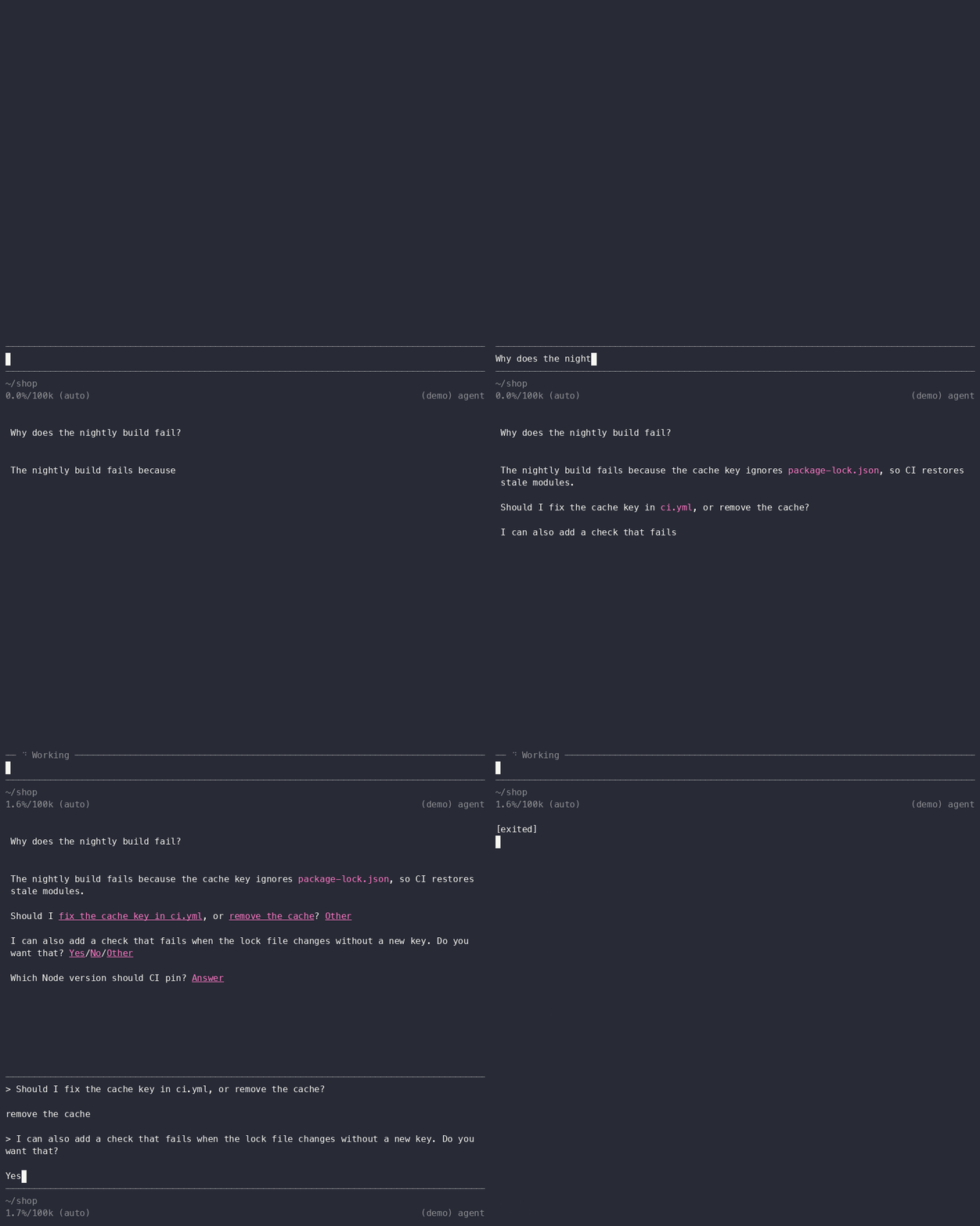
After each question in a completed reply, the extension adds controls:
| Question | Controls |
|---|---|
| A choice ("Should I push now, or wait for CI?") | each option in place, then Other |
| A choice with one option | the option, then Yes / Other |
| A yes/no question or a proposal ("I recommend X. Say the word.") | Yes / No / Other |
| An open question ("What should the name be?") | Answer |
A click sends nothing. It puts the question, as a quote, and your answer in the editor:
> Should I push now, or wait for CI?

wait for CI
You can answer several questions, edit the text, and then submit. A second click on the same question replaces its answer.
The extension also adds five short rules to the system prompt that tell
the agent to ask its decisions as clear questions at the end of the
reply. The model finds these more reliably. Start pi with
--no-question-guide to turn the rules off.
Install
pi install npm:@andreypopp/pi-infer-questions
Then restart pi. The extension needs:
- pi in fullscreen mode (
"tuiMode": "fullscreen"in~/.pi/agent/settings.json). Clicks work only in fullscreen mode. - macOS 15 or later on Apple silicon (the model runs on the Neural Engine), or Linux with glibc on arm64 or x64 (the model runs on the CPU). On x64, CPUs without AVX-512 VNNI can give less accurate options.
npm downloads only the package for your platform: about 120 MB on macOS, 80 MB on Linux. On other platforms, pi shows one notice and renders replies as usual.
How it works
When a reply is complete, a native module (Swift) does these steps in the pi process:
- It splits the Markdown into paragraphs and lists.
- It skips the parts without
?and without a decision word. - A question tagger (a 32M-parameter encoder) marks each question sentence and its kind: yes/no, open or choice.
- An option tagger marks the options of each choice question.
A reply takes a few milliseconds. See docs/design.md.
Quality
Held-out evaluation on 3,060 parts of real coding-agent replies, with whole-sentence spans:
Questions with ? found |
87% |
Proposals without ? found |
67% |
| Question F1, exact / overlapping span | .741 / .828 |
| Kind accuracy | .963 |
| Option F1, end to end | .579 |
| Parts without a question that get one | 3.3% |
The shipped Neural Engine and ONNX models are within .02 of these
numbers. Parts with neither ? nor a decision word never reach the
model, and the table does not count their questions.
Development
To build, you need Node 24 or later with its headers, Swift 6, cmake and curl.
make          # builds the native module and links it into node_modules
make smoke    # the native module against the golden file
make e2e      # pi in fullscreen on a private tmux server
make npm      # npm tarballs for this platform into build/npm-dist
make demo     # records docs/demo.gif (needs asciinema and agg)
To use the checkout in pi, add "<checkout>/extension.ts" to
extensions in ~/.pi/agent/settings.json. If data/ has no models,
make takes them from the published npm package. On Linux,
linux/Containerfile gives a build environment.
Train your own model
The pipeline is in pipeline/. The training data is not published: it comes from your own pi and Claude Code transcripts, and DeepSeek labels it (an API key and a few dollars).
cd pipeline
uv sync
export DEEPSEEK_API_KEY=...
uv run corpus                     # units from ~/.pi and ~/.claude transcripts
uv run label-corpus --take question=all --take pool=all
uv run synth --calls 100 --batch base     # optional synthetic messages
uv run train --synth base         # seeds 0-2, selects one on dev
uv run train --eval               # once, on the held-out split
uv run convert-ane && uv run parity-ane && uv run golden-ane     # macOS
uv run convert-onnx && uv run parity-onnx && uv run golden-onnx  # Linux
uv run pytest
uv run extract FILE prints the questions in a file with the PyTorch
model. uv run label FILE prints DeepSeek's labels.
corpus copies every assistant message under ~/.pi/agent/sessions
and ~/.claude/projects into data/messages.jsonl, which is not in
git. Before anything goes to DeepSeek, it replaces your user name, home
paths, email addresses and the secrets that it recognizes. It does not
know the names of your private projects. The published models are
trained on the author's transcripts after this redaction. The golden
files contain only fixtures and synthetic messages.
License
Apache-2.0. The models are fine-tuned from jhu-clsp/ettin-encoder-32m (MIT); see NOTICE.