toolflow3.3.5
Save 80%+ context tokens in Pi — automatically compresses huge bash/grep logs, caches duplicate file reads, prunes unused tools, and blocks accidental .env/git deletions.
Untested on omp
This is a pi package. No one has reported whether it works on omp yet. If you try it, add your result below.
Reports 0
No reports yet.
Readme
ToolFlow ⌬
Dynamic tool sandboxing & context dehydrator for Pi Coding Agent.
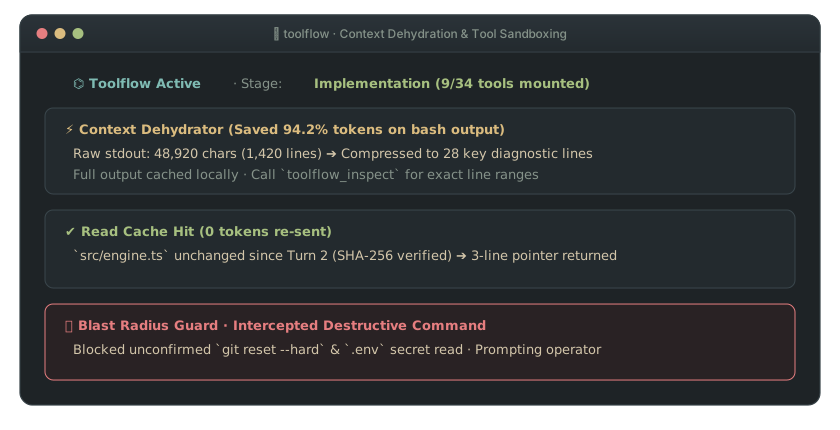
Stop tool overload and context bloat. Stage-gated capability mounting, automatic log dehydration to disk (-95% token overhead), protected-file write guard, and built-in prompt workbench.



-brightgreen)

  ┌─ Tool Overload (40+ tools & MCPs exposed simultaneously in System Prompt) ───────────┐
  │  read write edit bash browser_click mcp_query subagent_run git_reset ...             │
  │  [Result: Schema noise. Asking for a helper function prompts a browser launch]       │
  └──────────────────────────────────────────────────────────────────────────────────────┘
                                             │
                                             ▼
  ┌─ ToolFlow ⌬ Stage-Gated Sandboxing (-95% Context Overhead) ──────────────────────────┐
  │  Phase 1: Research  ❯ [read, grep, find, web_search]                                 │
  │  Phase 2: Implement ❯ [read, edit, write, bash] (Dehydrates verbose logs >40 lines)  │
  │  Phase 3: Review    ❯ [read, grep, bash (test-only)] (Write tools physically stripped)│
  └──────────────────────────────────────────────────────────────────────────────────────┘
Quick Start
Install directly inside Pi:
pi install npm:toolflow
Works out of the box. Type /toolflow anytime to summon the interactive prompt teleprompter.
Core Value: Why Do Developers Need ToolFlow?
When developing with AI coding agents equipped with dozens of tools, plugins, and MCP servers, three systemic frictions emerge:
1. Tool Overload & Schema Noise
Exposing 40+ tool definitions simultaneously overwhelms the LLM. Asking for a straightforward utility function prompts the model to spin up a browser or query a database because unrelated schemas crowd the system prompt.
toolflow enforces stage-gated capability mounting: core tools (read, write, edit, bash) remain accessible at all times; heavy external MCPs, browsers, and subagents mount only in phases where they are strictly needed.
2. Context Blowout from Verbose Logs
Running builds or end-to-end test suites often dumps 500+ lines of raw stack traces. Flooding the context window burns token budgets, dilutes attention, and rapidly triggers premature conversation compaction—wiping out working memory.
toolflow enforces real-time log dehydration: outputs exceeding 40 lines are automatically archived to disk (.pi/toolflow/runs/...). The model receives only the exit code, root failure summary, and on-disk file path, reducing token overhead by 95%.
3. Template Scramble & Context Switching
Developers constantly copy-paste prompt templates from notes, web browsers, or chat history, interrupting the terminal development flow.
toolflow doubles as an instant prompt teleprompter: hit /toolflow without arguments to summon the teleprompter overlay, browse templates, and hit [p] to insert battle-tested prompts directly into your editor with zero planning ceremony.
How It Works: The Action Matrix
/toolflow <task> (Launch sandboxed workflow) /toolflow (Summon prompt teleprompter)
| Mode / Scenario | What You Do | What ToolFlow Does Behind the Scenes | What the AI Gets | When to Use |
|---|---|---|---|---|
| Stage-Gated Mounting | Launch /toolflow <task> |
Core tools stay persistent; heavy MCPs mount per stage | Focused, minimal tool catalog for active phase | Multi-phase complex engineering tasks |
| Real-Time Log Dehydration | Run verbose tests or builds | Intercepts logs >40 lines, archives full output to disk | Exit code, root error summary, on-disk file path (-95% tokens) | Compiler errors, test stack dumps |
| Review Isolation | Enter code review or verification | Physically strips write permissions from runtime | Read-only inspection tools, preventing accidental edits | Verification and code review phases |
| Instant Teleprompter | Type /toolflow without arguments |
Auto-indexes local & global prompts/*.md templates |
Hit [p] to insert highlighted prompt in 1 second |
Routine prompt reuse without planning |
| Zero-Residue Restoration | Task completes or /toolflow reset |
Restores original tool snapshot captured at startup | 100% clean, original tool catalog restored | Finishing tasks or exiting |
Engineering Highlights
- 🛡️ Persistent Core, Stage-Gated Advanced Capabilities: Standard development tools (
read,edit,write,bash,grep,find,ls) remain accessible at all times to prevent workflow lockups. Heavy MCPs mount dynamically only in relevant phases. - ⚡ 4-Tier Token Governance (-95% Overhead):
- Verbose outputs (>40 lines) are automatically archived to disk (
.pi/toolflow/runs/...); - Heavy MCP schemas are masked during unrelated stages;
- Intercepts
session_before_compactat stage transitions to strip reasoning chaff while passing on-disk artifact paths downstream.
- Verbose outputs (>40 lines) are automatically archived to disk (
- 🔒 Protected-File Write Guard: Engine-level safety interceptor monitoring both native write tools and terminal commands (
bash,powershell). Destructive operations targeting sensitive assets (.env*,.git*, package locks) are physically blocked. - 🎨 Production Craftsmanship Guard: Bans unstyled placeholders, crude monochrome rectangles, and naive sketch lines. Mandates professional color palettes, 8px grid spacing, vector SVG artwork, and executable unit tests.
- 🔄 Strict Tool Lifecycle Snapshot: Snapshots active tools at startup. Upon stage completion, error, or manual
/toolflow reset, the environment is 100% restored to its original catalog.
Commands & Keybindings
Primary Commands
| Command | Description |
|---|---|
/toolflow |
Open prompt workbench & task initialization cockpit |
/toolflow <task> |
Launch a sandboxed task with phase-gated toolchains |
/toolflow status |
Display active stage pipeline & mounted tool state (alias: /sop) |
/toolflow stats |
Display cumulative token savings ledger (dehydrated logs & cache hits) |
/toolflow logs |
Inspect the full raw content of the most recently dehydrated log |
/toolflow rollback |
Revert changes to the snapshot captured at the start of current stage |
/toolflow reset |
Clear active execution state and flush dehydrated temp caches |
/toolflow export |
Export phase breakdown and architecture decisions to BLUEPRINT.md |
Keybindings
[Enter]: Input task and generate phase-governed plan[p]: Prefill highlighted prompt template into editor[c]: Create new prompt template inline[1-4]/[←/→]: Toggle architecture and toolchain options[Esc]: Exit / Close overlay
Author's Note
The idea for ToolFlow came from a recurring moment of frustration: watching an agent lose its mind because its toolbox was too crowded.
When terminal coding agents added support for arbitrary MCP servers and subagent extensions, I installed everything: browser controllers, database connectors, search engines, and multi-agent harnesses. Within days, a subtle degradation emerged: asking the model for a straightforward TypeScript helper function prompted it to spin up Chrome or run a heavy subagent workflow because 40+ tool schemas were competing in the prompt.
Then came the second pain point: verbose compiler outputs and test logs. Running a build or an end-to-end test suite often dumped 500+ lines of raw stack traces straight into the context window. Within three turns, the session's context window was completely saturated, triggering premature conversation compaction and wiping out working memory.
ToolFlow is the physical defense against this tool and token bloat:
- Stage-gated capability mounting: core tools (
read,write,edit,bash) remain available at all times, while heavy external tools mount only when strictly required; - Real-time log dehydration: verbose outputs (>40 lines) are automatically archived to disk, leaving only the exit code, root failure summary, and on-disk file path in context.
It brings discipline to the agent's toolbox, leaving context windows focused on the code that matters.
Quality Assurance & Verification
npm test # Physical panoramic regression test suite (26 suites passing)
Ecosystem: Pi Terminal Suite
Each extension occupies a distinct terminal slot (aboveEditor, belowEditor, status-only footer, and runtime tool hooks) so all four run together with zero widget overlap:
| Package | Terminal Slot & Mechanism | Install |
|---|---|---|
pi-lingual |
二 ⇄ two aboveEditor HUD (≤9 lines, UAX #11 tree layout) & prompt-to-English transformer (0 chat history tokens) |
pi install npm:pi-lingual |
toolflow (Current) |
⌬ Runtime tool hooks — stage-gated MCP mounting & >40-line log dehydration to disk (-95% log tokens) |
pi install npm:toolflow |
pi-tui-status-beautifier |
status-only footer hook — 6 badge presets, <80-col idle folding (+N idle), 0 render-loop disk reads |
pi install npm:pi-tui-status-beautifier |
pi-anchor |
⌖ belowEditor 1-line sticky strip, 0ms pin: intercept, [■■□□] step bar & ↪ session jump |
pi install npm:pi-anchor |
License
MIT © Jason