pi-xray0.1.1
See what fills your pi context window, which package each piece comes from, and turn skills, extensions and prompts on or off from one view.
Untested on omp
This is a pi package. No one has reported whether it works on omp yet. If you try it, add your result below.
Reports 0
No reports yet.
Readme
pi-xray
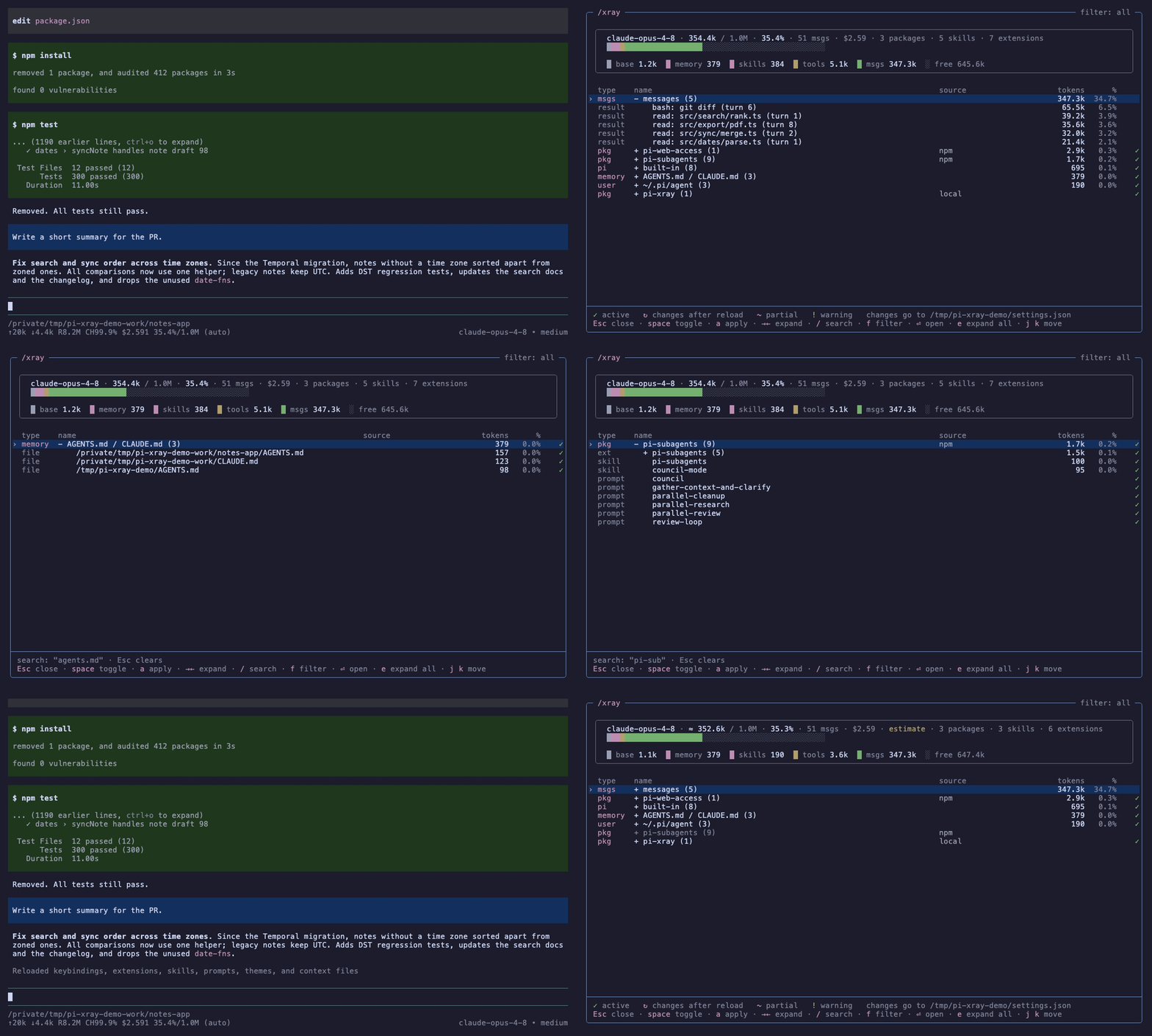
What is filling your pi context window, which package put it there, and how do you turn it off? /xray answers all three in one view, without sending anything to the model.
Install
pi install npm:pi-xray
Then type /xray in any session.
What you see
The card at the top is the context window: one stacked bar for the pi base prompt, your AGENTS.md/CLAUDE.md files, skills, tool schemas and messages. The segments add up to the total pi reports in its footer.
Below it, one row per group, biggest first:
- each installed package (
npm,gitor a local path) ~/.pi/agent: your own skills, extensions and promptsbuilt-in: pi's own tools and built-in extensionsMCP: servers frompi-mcp-adapterAGENTS.md / CLAUDE.md: the context files pi loadedmessages: the conversation, with the five heaviest tool results and the command or file behind each one
Expand a group to see its skills, extensions and prompts, and expand an extension or MCP server to see its tools. Every token is counted in exactly one place, so the groups plus the base prompt add up to the total.
Rows marked ! have a load warning, for example a skill whose description is longer than the 1024 characters the Agent Skills spec allows.
Turning things off
Press space on a skill, an extension or a prompt to mark it. On a package row, space marks everything in the package. Nothing changes until you press a: pi-xray writes your user settings.json and reloads pi. The footer shows how many tokens the change removes.
The entries are the same ones pi config writes, so you can mix both tools. A package stays installed when you turn all of it off; only its filters change:
{ "source": "npm:some-package", "skills": ["-skills/heavy-skill/SKILL.md"] }
Turning it back on writes +skills/heavy-skill/SKILL.md, as pi config does.
Keys
| Key | Action |
|---|---|
↑ ↓ / j k, g G, PgUp PgDn |
move |
→ ← / l h |
expand, collapse (or jump to the parent) |
e |
expand or collapse every group |
space |
mark a change |
a |
apply: write settings.json and reload |
u |
discard marked changes |
/ |
search names and sources |
f |
filter: skills, extensions, tools, prompts, memory, mcp, warnings |
⏎ |
open the file in a tmux pane, or expand a group |
Esc |
clear the search, or close (asks first if there are unsaved changes) |
Where the numbers come from
- The total and the window size come from pi (
ctx.getContextUsage()), so they match the footer. - The system prompt is split with
ctx.getSystemPromptOptions(): context files, skills and the rest. - Each skill is measured on its own
<skill>entry in the prompt pi actually sends, not on theSKILL.mdfile. - Tool schemas and messages are estimated at 4 characters per token, then all rows are scaled so they add up to pi's total. Before the first reply there is no total yet, and the card says
estimate. - Right after you apply changes, pi's total still describes the prompt from before the reload, until the next reply. pi-xray then computes the total on the new configuration, with the same scale as before, and marks it
≈. - What will load after a reload comes from pi's own package resolver, the same one
pi configuses. pi-xray never installs anything.
MCP servers
With pi-mcp-adapter, each server shows how it reaches the model:
proxy · 45 tools: only a small proxy tool is in the context; the model finds tools through it.direct · 3 tools: every tool schema is in the context on every turn.direct 5/45: some tools are direct.disabled.
The connection state is added when the server is not usable (failed, blocked, not-connected). MCP is read-only here: ⏎ on a server closes pi-xray and puts /mcp in the editor.
Compared with
| Context breakdown | Where each piece comes from | Turn things off | Persists | |
|---|---|---|---|---|
pi config |
no | yes | yes | settings.json |
pi-context-usage |
yes | no | no | |
pi-loadout |
no | grouped by source | tools and skills | per session, with presets |
| pi-xray | yes, per resource | yes | skills, extensions, prompts, packages | settings.json |
Limitations
- Writes user settings only. Project settings (
.pi/settings.json) are shown but not changed. - Opening files needs tmux. Outside tmux, pi-xray shows the path.
- MCP status needs
pi-mcp-adapter. pi's built-in MCP support is not read yet. - Applying reloads pi, which invalidates the prompt cache for the session. That is why changes are batched.
- Needs a terminal of at least 40×17.
Compatibility
Tested with pi 1.2.0. pi-xray uses public exports of @earendil-works/pi-coding-agent (SettingsManager, DefaultPackageManager, loadSkills) and the extension API. CI runs the tests against the pinned version and, every week, against the latest pi release.
Development
npm install
npm test
To try a local checkout without installing it: pi -e ./pi-xray. Design notes and the rendering rules the tests enforce are in DESIGN.md.
License
MIT