pi-webman0.2.1
A futuristic web cockpit for Pi — live transcript, telemetry, models, tools and command uplink.
Untested on omp
This is a pi package. No one has reported whether it works on omp yet. If you try it, add your result below.
Reports 0
No reports yet.
Readme
π Webman — Pi // Cockpit
A futuristic browser cockpit for the Pi coding agent. It puts a live flight deck around the Pi session already running in your terminal: streaming transcript, token flux, context pressure, model core, thinking level, tool loadout, activity log, command uplink and a keyboard-driven command palette.
Inspired by the terminal flight deck and telemetry of its sibling HUD extension
pi-cockpit-hud, rebuilt as a
zero-dependency local web UI served by a Pi extension.
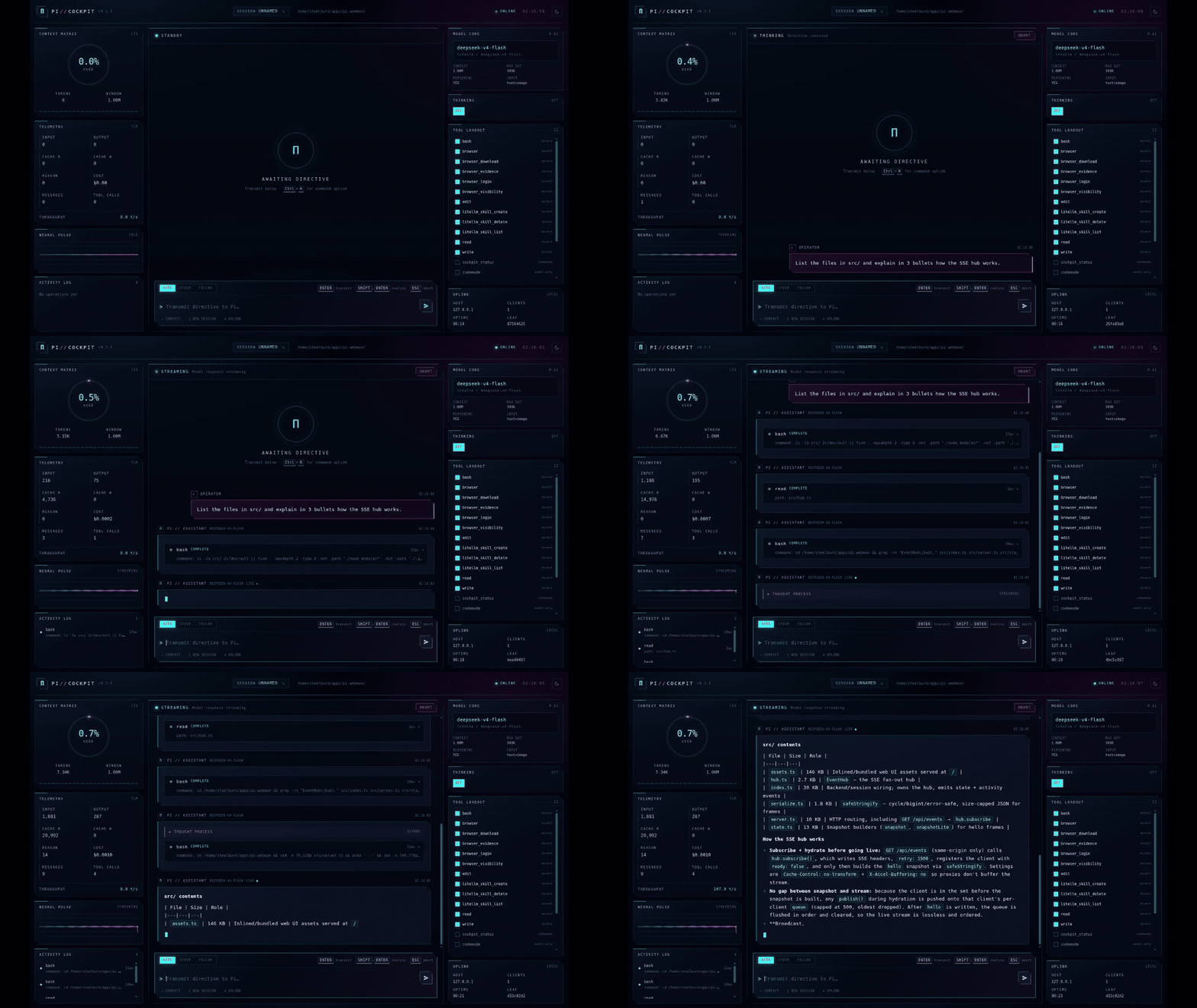
A real run: directive in, tool calls, a streamed answer and live telemetry — full-resolution MP4.
Highlights
- Live stream — user directives, assistant text, hidden reasoning, tool calls and tool output arrive over Server-Sent Events. Reconnects hydrate from a full session snapshot.
- Flight telemetry — context gauge, input/output/cache tokens, reasoning tokens, cost, throughput, message and tool-call counters, mission uptime and session leaf.
- Tool operations — expandable HUD cards for every tool call, including input, output, status, duration and coloured diffs when a tool returns a patch.
- Control surface — send, steer or follow up; abort; switch model; change thinking level; enable/disable tools; rename the session; compact context; start a new session (interactive mode); switch between light and dark mode.
- Command uplink —
Ctrl/Cmd+Kpalette for actions, models, Pi slash commands and tools. /completion — type/in the composer for fuzzy command search with argument completion for models and thinking levels, matching Pi's terminal editor.- Extension popups — dialogs an extension opens in the terminal are mirrored as a native modal in the cockpit, and extensions that opt in through the popup bridge get the answer back (see Extension popups).
- Light & dark modes — toggle from the top bar or the command uplink. The cockpit follows the OS preference on first visit, remembers your choice, and recolours the HUD, transcript and background canvases together.
- Retro-futurist HUD — neon grid, starfield, scanlines, context ring, neural pulse and status LEDs. Reduced-motion preferences are respected.
- No runtime dependencies — only Node built-ins. The UI is bundled into the extension.
Install
From the Pi package catalog:
pi install npm:pi-webman
From a checkout of this repo:
pi install "$(pwd)"
Or load it for a single run while developing:
pi -e ./src/index.ts
Pi loads TypeScript extensions directly through jiti; there is no compile step.
Start the cockpit
Inside Pi's terminal UI:
/web                 start on http://127.0.0.1:4747/
/web 5000            start on a custom port
/web open            start and open the default browser
/web status          show the URL and connected clients
/web restart         restart the server
/web stop            stop the server
/webman              alias for /web
The URL is also printed as a Pi notification and shown in the footer as ◈ WEB :4747.
Use Ctrl+C in the browser or leave the tab open; the server follows the Pi session.
Start automatically
pi --web
pi --web --web-port 5000
pi --web --web-open
The cockpit is restored automatically after /reload when it was running.
Flags
| Flag | Default | Meaning |
|---|---|---|
--web |
off | Start the cockpit when a session starts |
--web-port |
4747 |
Listening port (0 picks a free port) |
--web-host |
127.0.0.1 |
Bind interface |
--web-token |
empty | Require a bearer token / cookie for access |
--web-open |
off | Open the default browser on start |
Environment equivalents: PI_COCKPIT_PORT, PI_COCKPIT_HOST, PI_COCKPIT_TOKEN.
Cockpit guide
| Area | What it does |
|---|---|
| Top bar | Brand, session callsign, working directory, uplink state, wall clock |
| Context Matrix | Context-window ring, used/window tokens, segment bar |
| Telemetry | Input, output, cache read/write, reasoning, cost, messages, tool calls |
| Neural Pulse | Live waveform fed by streamed text/thinking deltas |
| Activity Log | Running and recently completed tools with duration |
| Transcript | Markdown messages, collapsible thoughts, expandable tool cards |
| Composer | AUTO / STEER / FOLLOW delivery modes, prompt history, quick actions |
| Model Core | Current model and a searchable model palette |
| Thinking | Supported thinking levels for the active model |
| Tool Loadout | Toggle active tools on the next model request |
| Uplink | Host, SSE clients, uptime, branch leaf |
Keyboard
| Key | Action |
|---|---|
Enter |
Transmit directive, or run the highlighted command |
Shift+Enter |
Newline |
Tab |
Accept the highlighted command or argument |
↑ / ↓ |
Move through the / menu, or the command uplink |
Esc |
Dismiss the / menu or palette, otherwise abort the active run |
Ctrl/Cmd+K |
Open or close the command uplink |
↑ (empty composer) |
Recall previous directive |
AUTO sends immediately when idle and queues a follow-up when Pi is busy. STEER enters
after the current assistant turn and its tool calls. FOLLOW waits until the run settles.
Commands
Typing / in the composer opens the same command surface as Pi's terminal editor:
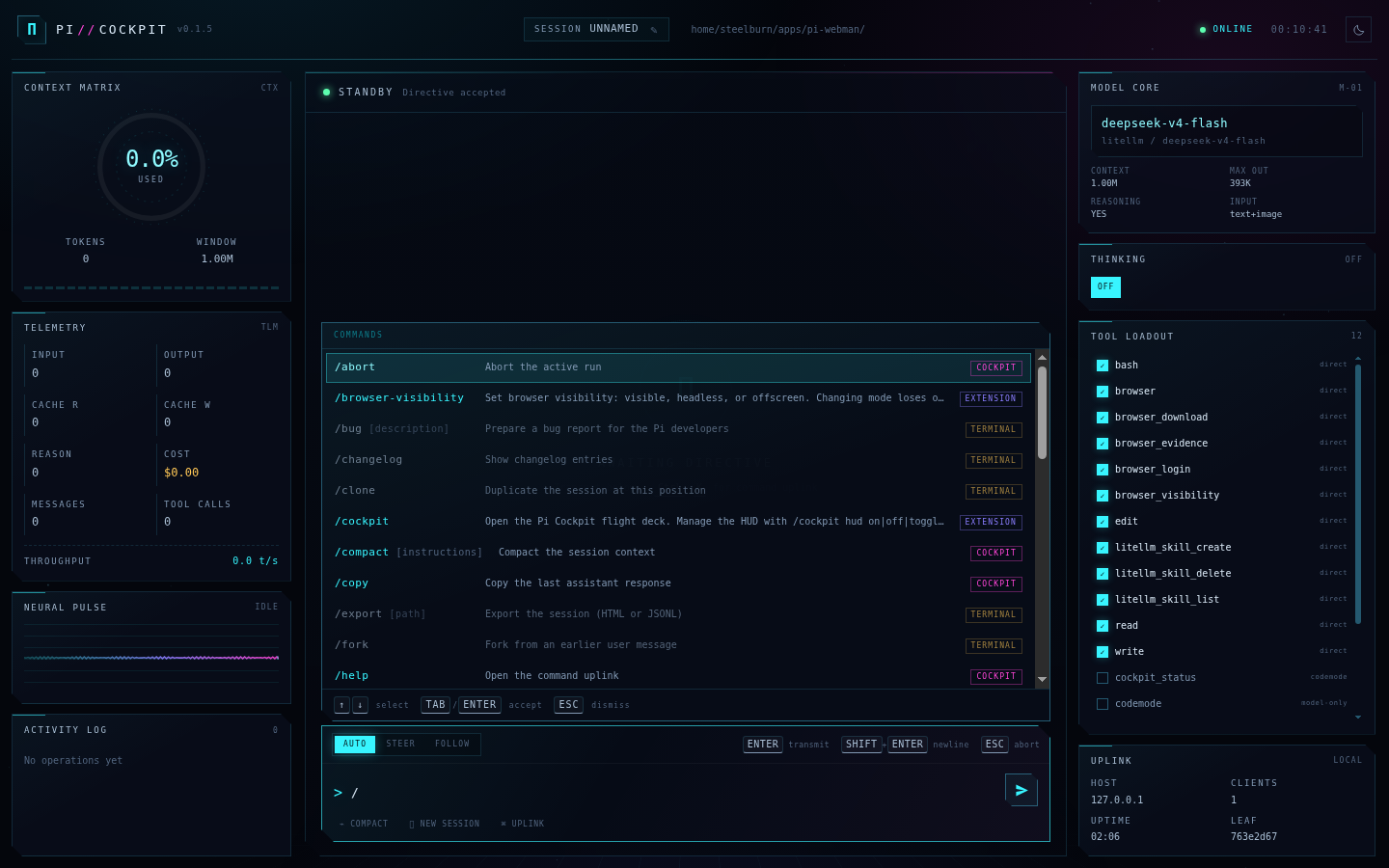
Each entry is tagged with where it runs:
| Badge | Meaning |
|---|---|
COCKPIT |
Executed by the browser against the cockpit API — never sent to the model |
EXTENSION, PROMPT, SKILL |
Real Pi commands, forwarded to the session |
TERMINAL |
A Pi builtin that only the interactive editor can run |
Cockpit commands:
| Command | Effect |
|---|---|
/compact [instructions] |
Compact the context, optionally with custom instructions |
/model [provider/model] |
Switch the model core (argument completion) |
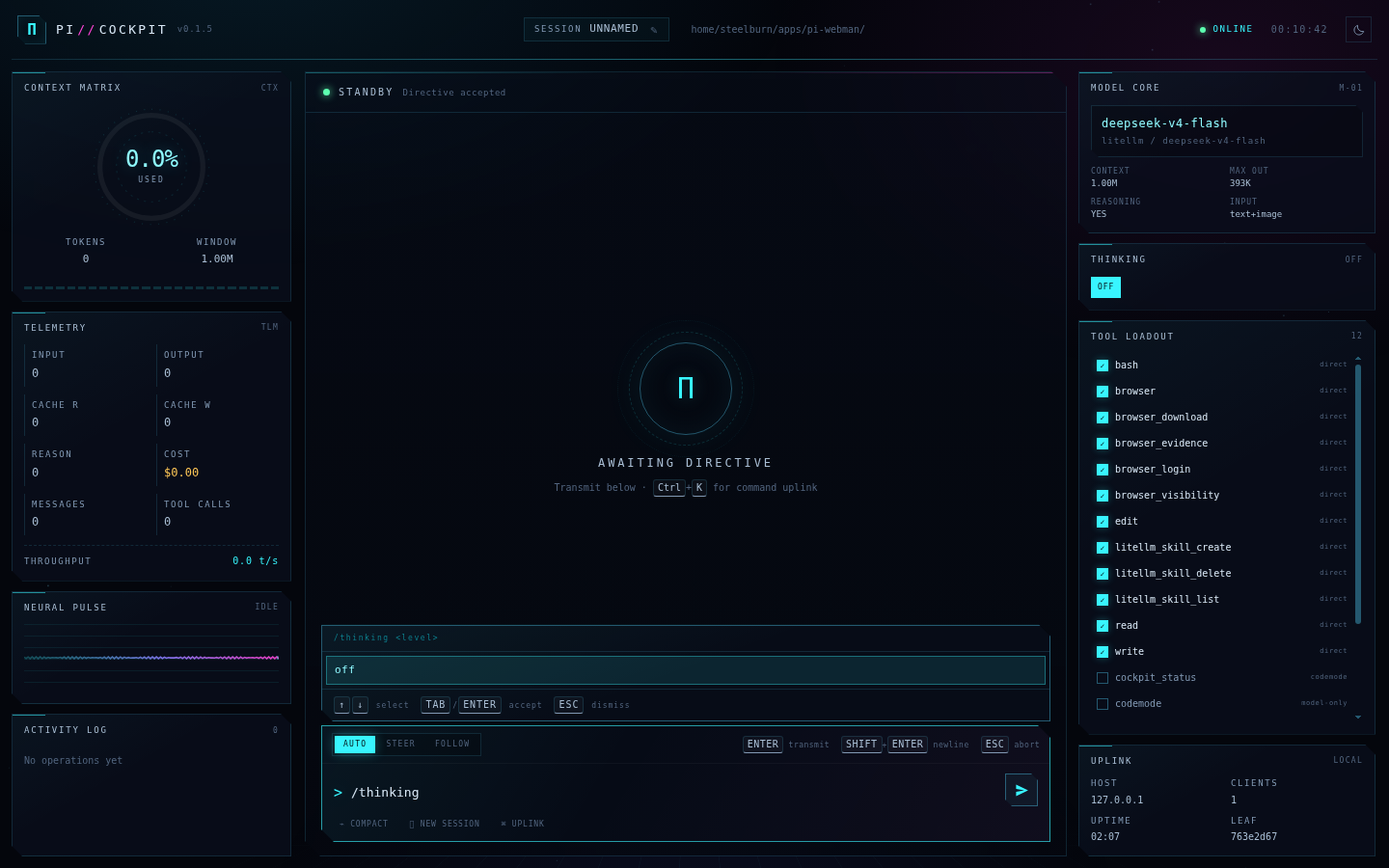
/thinking <level> |
Set the thinking level (argument completion) |
/name <callsign> |
Rename the session |
/new |
Start a new session |
/abort |
Abort the active run |
/theme [light|dark] |
Toggle or set the cockpit theme |
/copy |
Copy the last assistant response |
/status |
One-line session summary |
/help |
Open the command uplink |
TERMINAL commands are listed so the surface is honest, but they are refused rather than
forwarded: Pi handles its builtins in the interactive editor, so sending /quit or
/thinking low as a prompt would otherwise be billed to the model as text.
Extension popups
Pi renders extension dialogs in the terminal, and the extension API does not let one extension read or answer another's dialog — it only reports that a prompt is waiting. The cockpit therefore covers both cases:
- Nothing to install. While any extension dialog is open, the composer shows a
TERMINAL PROMPTbanner with the prompt kind and title, so the browser never looks frozen and you know to answer in the terminal. - Popup bridge. Extensions can render their popup in the browser instead and receive
the answer, over the shared
pi.eventsbus:
import type { ExtensionAPI } from "@earendil-works/pi-coding-agent";

export default function (pi: ExtensionAPI) {
  pi.events.on("webman:popup:answer", (answer) => {
    console.log(answer); // { id, value } or { id, cancelled: true }
  });

  pi.registerCommand("hud", {
    description: "Open the HUD",
    handler: async (_args, ctx) => {
      pi.events.emit("webman:popup:open", {
        id: `hud-${Date.now()}`,
        kind: "select", // select | confirm | input | notice
        title: "DOCKER HUD",
        message: "3 containers running",
        options: [
          { value: "api", label: "api-7f9c", description: "up 3 hours · :8080" },
          { value: "db", label: "postgres-1a2b", description: "up 3 hours · :5432" },
        ],
        source: "my-extension",
      });
    },
  });
}
Channels:
| Channel | Direction | Payload |
|---|---|---|
webman:popup:open |
extension → cockpit | popup spec (id, kind, title, message?, options?, placeholder?, allowCancel?, source?) |
webman:popup:answer |
cockpit → extension | { id, value? , cancelled? } |
webman:popup:close |
either way | { id } — dismiss without an answer |
webman:popup:ping / pong |
extension ⇄ cockpit | { id } → { id, url, version, clients }, to check whether a browser is listening |
webman:popup:ready |
cockpit → extensions | { url, version, clients } when the server starts |
A runnable extension that implements all of it — including falling back to a terminal
dialog when no browser is connected — lives in
examples/popup-bridge-demo.ts:
pi -e ./examples/popup-bridge-demo.ts --web
/hud-demo      # select popup, answered in the browser
/hud-notice    # notice popup
/hud-terminal  # counter-example: terminal-only dialog, mirrored as a banner
Security
- The server binds to
127.0.0.1by default. - Binding to a non-loopback host automatically generates a random token. Open the URL that
Pi prints; it contains the token and sets an
HttpOnly,SameSite=Strictcookie. --web-tokenforces token auth even on loopback.- Responses carry a restrictive CSP,
nosniff,X-Frame-Options: DENYand no-referrer. - POST endpoints check the request origin.
- For remote access prefer an SSH tunnel or Tailscale instead of exposing plain HTTP:
ssh -L 4747:127.0.0.1:4747 your-host
The cockpit has the same operating-system permissions as the Pi process. Anyone who can reach it can send prompts and change the active model/tools, so protect the token.
How it works
src/index.ts     extension entry: flags, /web command, lifecycle events, runtime
src/server.ts    HTTP server, auth, JSON API, SSE endpoint, static assets
src/hub.ts       SSE fan-out with a hydrate-before-stream barrier
src/state.ts     branch-aware session snapshot, telemetry, command catalog
src/popups.ts    extension popup bridge: registry, validation, channels
src/serialize.ts cycle-safe JSON with bounded string sizes
src/assets.ts    generated UI bundle (do not edit)
ui/              source for the HTML/CSS/JS cockpit
scripts/         UI asset bundler
examples/        runnable popup-bridge extension
The extension subscribes to Pi lifecycle events (message_*, tool_execution_*,
agent_*, model_select, compaction, session changes) and forwards them to the browser.
The browser receives a full snapshot in the SSE hello frame, then applies live events.
Session state is persisted as a branch-scoped custom entry (pi-webman) so the cockpit can
come back after a runtime reload without polluting model context.
Coexistence with pi-cockpit-hud
pi-cockpit-hud (npm:pi-cockpit-hud) is a
separate terminal HUD extension and owns the /cockpit command. Webman uses /web,
/webman and /web-session, its own footer status key (webman) and its own custom
session entry type (pi-webman), so both extensions can be installed at once.
Note: the unrelated pi-cockpit package on npm is not part of this project.
Development
npm install
npm run build       # bundle ui/* -> src/assets.ts
npm run typecheck
npm run check       # build + typecheck
npm run watch       # rebuild UI on change
After changing UI files, rebuild the bundle and restart Pi (or run /web restart).
In a separate terminal, a minimal smoke test:
curl -s http://127.0.0.1:4747/api/health
curl -s http://127.0.0.1:4747/api/state | head -c 400
Releasing
Publishing runs in CI (.github/workflows/publish.yml) through
npm Trusted Publishing, so there is no
NPM_TOKEN secret to store or rotate and every tarball is published with a provenance
attestation.
# 1. bump the version
npm version patch --no-git-tag-version   # or minor / major
git commit -am "chore(release): $(node -p "require('./package.json').version")"
git push

# 2. cut the release: GitHub → Releases → Draft a new release → tag v<version> → Publish
Publishing the GitHub release triggers the workflow, which checks out the tag, verifies
that it matches package.json, runs npm run check, and publishes. The job is idempotent —
if the version is already on npm it reports that and exits cleanly, so re-running a release
or a failed job is safe. workflow_dispatch publishes an existing tag by hand.
One-time setup, on https://www.npmjs.com/package/pi-webman → Settings → Trusted
publishing: publisher GitHub Actions, organization steelburn, repository
pi-webman, workflow publish.yml.
ci.yml runs the same checks on every push and pull request, and fails if
src/assets.ts was not rebuilt after a UI change.
Limitations
- New sessions are only available when Pi runs in interactive (TUI) mode; RPC/JSON/print hosts own their session lifecycle.
- Image attachments and file uploads are not implemented yet.
- The cockpit exposes the current session only; use Pi's session picker to switch sessions.
- Throughput is estimated from streamed deltas; authoritative usage comes from provider responses.
License
MIT