pi-web-skills0.3.0
PI WEB panel for managing the agent skills Pi loads from ~/.agents/skills
Untested on omp
This is a pi package. No one has reported whether it works on omp yet. If you try it, add your result below.
Reports 0
No reports yet.
Readme
pi-web-skills
A PI WEB panel for managing the agent skills that Pi loads from ~/.agents/skills.
Status: implemented (v1). The package ships a browser panel and a session-daemon
server entry. Upstream skills.sh behavior is the contract; the panel never runs the
skills CLI at runtime.
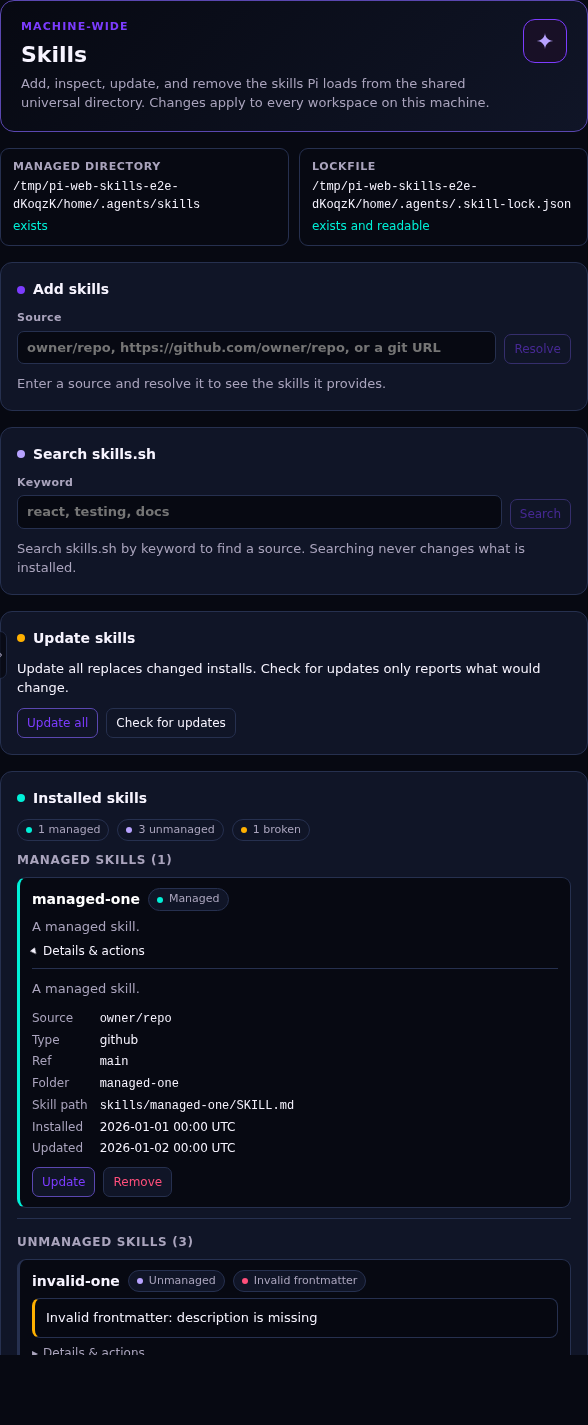
What the panel does
The panel is hosted in a workspace but manages machine-wide state; it never reads or writes workspace files. PI WEB's public plugin API has no Settings-pane contribution, so a Settings tab would require a PI WEB core change.
It shows a machine-wide notice and the resolved managed directory and lockfile:
- managed directory: the session-daemon user's
~/.agents/skills; - lockfile:
$XDG_STATE_HOME/skills/.skill-lock.jsonwhenXDG_STATE_HOMEis set, otherwise~/.agents/.skill-lock.json.
Five operations:
- List every present skill as managed, unmanaged, or broken, with source, ref, plugin, and update time for managed rows. A skill with invalid frontmatter is marked, not hidden. The list is read-only and re-reads state on every page load.
- Add from a GitHub shorthand, a GitHub or GitLab URL, or a generic git URL. Resolve the source first, then select one, several, or all discovered skills. Replacing an existing folder requires an explicit overwrite confirmation.
- Search skills.sh by keyword and start an Add from a result. Results can be dismissed.
- Update every managed install by comparing the remote folder hash at the locked ref. Check for updates is a read-only preflight: it reports available, unchanged, skipped, deleted, and failed entries without copying or writing anything. Its results can be dismissed, and the available skills are ticked so you can Update selected or Update all. An update asks first and states that a remote change replaces the installed folder and can overwrite a local edit. Changed and relocated skills are replaced; unchanged, skipped, deleted-upstream, and failed entries are reported separately.
- Remove a managed install and its lock entry, or remove only the stale lock entry for a broken skill. Remove always asks first.
Unmanaged skills are read-only for Update and Remove. Add may replace an unmanaged folder only after the overwrite confirmation. Every operation is safe to retry: cancelling Add or Update stops the work, and an Update that fails during a copy leaves the install it was replacing intact.
After an install, update, or removal that changed a directory, the panel shows a
dismissible reminder to run /reload in each idle Pi session. The panel never
reloads sessions itself.
Install
Requirements
- PI WEB with browser and server plugin API v5. Both first shipped in
@jmfederico/pi-web1.202610.5; tested against 1.202610.6. - Node.js 22.20 or newer to build the package.
git, plus a PI WEB session daemon running as the user whose skills you want to manage.
The package is published to npm after a maintainer approves each staged release. Install it as a Pi package:
pi install npm:pi-web-skills@0.3.0 # x-release-please-version
Or install it from a source checkout:
git clone https://github.com/elementalvoid/pi-web-skills.git
cd pi-web-skills
npm install
npm run build
Register the built checkout with PI WEB in one of two ways.
A. Pi package (recommended for a stable install)
Open Settings → Pi packages and add the absolute path to this checkout.
Or from a shell:
pi install "$PWD"
B. Local plugin directory (fastest for development)
PLUGIN_DIR="${PI_WEB_DATA_DIR:-$HOME/.pi-web}/plugins"
mkdir -p "$PLUGIN_DIR"
ln -s "$PWD" "$PLUGIN_DIR/pi-web-skills"
The symlink name must match ^[a-z][a-z0-9.-]*$; pi-web-skills qualifies. PI WEB
reads local plugins from $PI_WEB_DATA_DIR/plugins, which defaults to
~/.pi-web/plugins.
Then:
- Restart the session daemon once so the server entry loads. On a native systemd
user install, that is
systemctl --user restart pi-web-sessiond. For other deployments, see Restarting the session daemon. - If skills is not enabled, turn it on under Settings → PI WEB plugins.
- Reload the browser page. Open a workspace and select the Skills tab, or run Open Skills from the action palette.
The panel manages the home directory of the user running the session daemon:
~/.agents/skills and the global lock. If the daemon runs in a container, that is
the container user's home; mount or persist it if installed skills should survive
container replacement.
For a development loop with local changes, see docs/local-development.md.
V1 limits
- Global only. One managed directory and one lockfile. No project installs, no
skills-lock.json, no workspace-scoped skills. - No new install model. Add, list, update, and remove follow upstream skills.sh semantics. No pinning, candidate scanning, drift detection, sidecars, or extra lock fields. Unknown lock fields are preserved.
- Pi-only. Installs target the shared universal directory and create no symlink into another agent's directory.
- No restore. A broken entry is cleaned up by removing its stale lock entry; there is no global restore.
- No adoption. Unmanaged skills cannot be updated, removed, or adopted.
- No automatic reload. Skill changes need
/reloadin each idle session; server-module changes need a session-daemon restart. - No local directory sources, well-known skill URLs, archives, direct file downloads, or hosted artifact URLs.
- No telemetry and no network calls except git operations, GitHub tree lookups,
and skills.sh search. GitHub authentication comes from the daemon environment
(
GITHUB_TOKENorGH_TOKEN) and, for tree lookups, theghCLI; there is no token UI.
How it runs
A PI WEB plugin package with:
- a server entry in the session daemon, which owns filesystem and git work and exposes peer requests and Add/Update channels;
- a browser entry contributing one machine-scoped workspace panel. The browser
bundle uses the host-provided
htmltemplate tag; it does not bundle Lit.
The plugin has no settings in v1. See Install for setup.
| Change | Action |
|---|---|
| Browser bundle / panel | Rebuild and reload the page |
Server module (dist/server.js) |
Rebuild, restart the session daemon, reload the page |
package.json piWeb metadata |
Restart the session daemon, reload the page |
| Installed skills | /reload in each idle Pi session |
Development
npm install
npm run build
npm run typecheck
npm test
npm test runs the Node test suite: path resolution, list classification,
lockfile, add, update, remove, search, parity against the real skills CLI, and
the panel adapters. Tests use temporary HOMEs and local git fixtures; they never
touch the real ~/.agents state or the network.
The real-browser smoke test is separate:
npm run test:e2e
Install Chromium first if Playwright does not have it cached
(npx playwright install chromium). The command builds the package, starts an
isolated PI WEB instance (temporary HOME, PI_CODING_AGENT_DIR,
PI_WEB_DATA_DIR, session socket, and free port), opens the panel in Chromium,
and exercises list states, Add from a local file:// git fixture, Remove, broken
cleanup, and Update's confirmation. It never touches a running PI WEB instance or
its data directory. See docs/local-development.md for
prerequisites and the manual checklist.
The vendored subset comes from
vercel-labs/skills (MIT, Copyright (c)
2026 Vercel, Inc.); see docs/upstream-parity.md for the
pinned commit and file list. skills@1.7.4 is a dev dependency used only for
parity fixtures.
Contributing
See CONTRIBUTING.md for development setup, the session-daemon restart guide for native and container installs, and the manual UI checklist.
Decisions
- ADR 0001: Global installs only
- ADR 0002: Upstream parity through a thin reimplementation
- ADR 0003: "Pi-only" means the universal directory
- ADR 0004: Update follows upstream
- ADR 0005: Check for updates is read-only
- Vocabulary
- Verified upstream behavior and vendoring plan
- Local development and testing