pi-web-casual0.3.0
⁂ Casual — a long-running, project-free chat for PI WEB, opened with the Asterism button.
Untested on omp
This is a pi package. No one has reported whether it works on omp yet. If you try it, add your result below.
Reports 0
No reports yet.
Readme
pi-web-casual
A PI WEB plugin that adds one long-running conversation that is not attached to a repository.
Status: implemented (v1). Browser-only plugin: one project-free chat, opened from the Casual tab or the action palette. It has no server entry and needs no session-daemon restart.
What Casual does
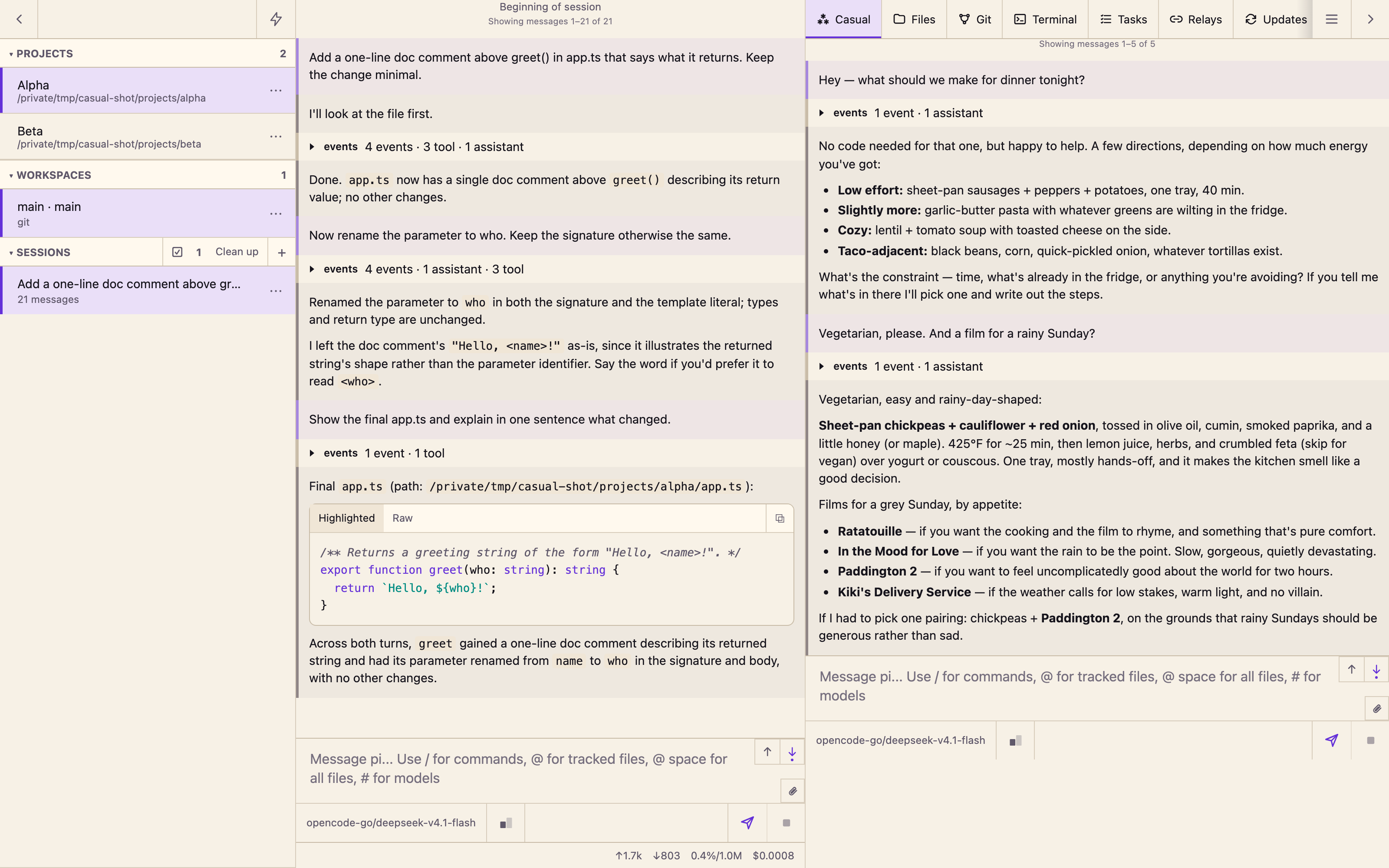
PI WEB organizes conversations around projects and workspaces. That is the right shape for code and a poor fit for the rest of the day: what to cook, naming a playlist, explaining an article, planning a weekend. Casual gives those conversations one home by reusing PI WEB's own project machinery: a hidden project at ~/.casual-pi-web and a normal session inside it.
The chat is PI WEB's native chat, not a plugin reimplementation. Streaming, Markdown, tools, images, model selection, and compaction behave exactly as they do anywhere else, and the conversation is stored where PI WEB stores every other session.
It contributes:
- a Casual application tab;
- four palette actions: Open Casual Chat, Open Casual Chat in Its Own Tab, New Casual Chat, Set Up Casual Chat.
It behaves like this:
- One conversation. The Casual tab and Open Casual Chat reopen the remembered session from any project.
- The Casual tab is only a chat. The tab embeds the real PI WEB chat in a same-origin frame with that frame's navigation, header, and workspace column trimmed away, so a project chat in the main column keeps working next to it. There is no toolbar and no card around it; every control lives in the palette.
- Hidden home. The
Casualproject is filtered out of the Projects sidebar, including its row, the project count, and the collapsed-heading summary. It remains a real project for PI WEB: it appears in the Change home chooser, and its sessions appear in Sessions while it is selected. - The tab shows what the agent is doing. The Casual tab's ⁂ uses PI WEB's own status colors, the ones a project row would have shown: green while the agent works in the home, accent while a finished reply is still unread, untinted when nothing is in flight. The tab's tooltip and accessible name say the same thing.
- New chat keeps history. New Casual Chat creates another session in the same home and makes it the remembered one. The previous conversation stays in Sessions; Casual never deletes.
- Self-repair. Opening Casual resolves the home's workspaces and sessions and prefers the remembered session, so a stale or archived pointer is replaced by the newest live casual session instead of failing.
- Automatic first run. The first Open chat or palette open creates and trusts
~/.casual-pi-web, starts a session, and reloads the page once into it. There is no Add Project step.
Install
Requirements
- PI WEB
1.202610.3or newer (browser plugin API v4). Tested against@jmfederico/pi-web1.202610.3. - Node.js 22.19 or newer only if you build from source. Installing the published package needs no toolchain.
- No session-daemon restart at any point.
PI WEB has no install-time version gate for plugins, so an older host installs the package and then refuses it at activation. The browser console shows PI WEB Casual requires PI WEB 1.202610.3 or newer, and no Casual tab is registered.
From GitHub
- Open PI WEB → Settings → Pi packages.
- Install
https://github.com/paradise-runner/pi-web-casual. - Enable Casual under Settings → PI WEB plugins if it is not already on.
- Reload the browser page.
From a release tarball
Download pi-web-casual-0.1.0.tgz from Releases and install that file under Settings → Pi packages, then enable Casual and reload.
From npm
The package is prepared as pi-web-casual but is not published yet. Use GitHub or a tarball until it is. Maintainers: see docs/how-it-works.md.
From source
See CONTRIBUTING.md. PI WEB does not compile TypeScript for local packages, so a checkout must be built before it is linked.
First run
- Open the Casual tab, or Actions → Casual → Open Casual Chat.
- Casual creates and trusts
~/.casual-pi-web, starts the first session, and reloads the page once into the chat. - Type in the normal composer.
The reload is one-time. PI WEB has no plugin API for registering a project, so Casual uses the host's own same-origin project and session endpoints for setup (docs/how-it-works.md).
If those requests are unreachable, the panel shows a setup card instead: add ~/.casual-pi-web yourself through Add Project, or choose an already-registered project as the home.
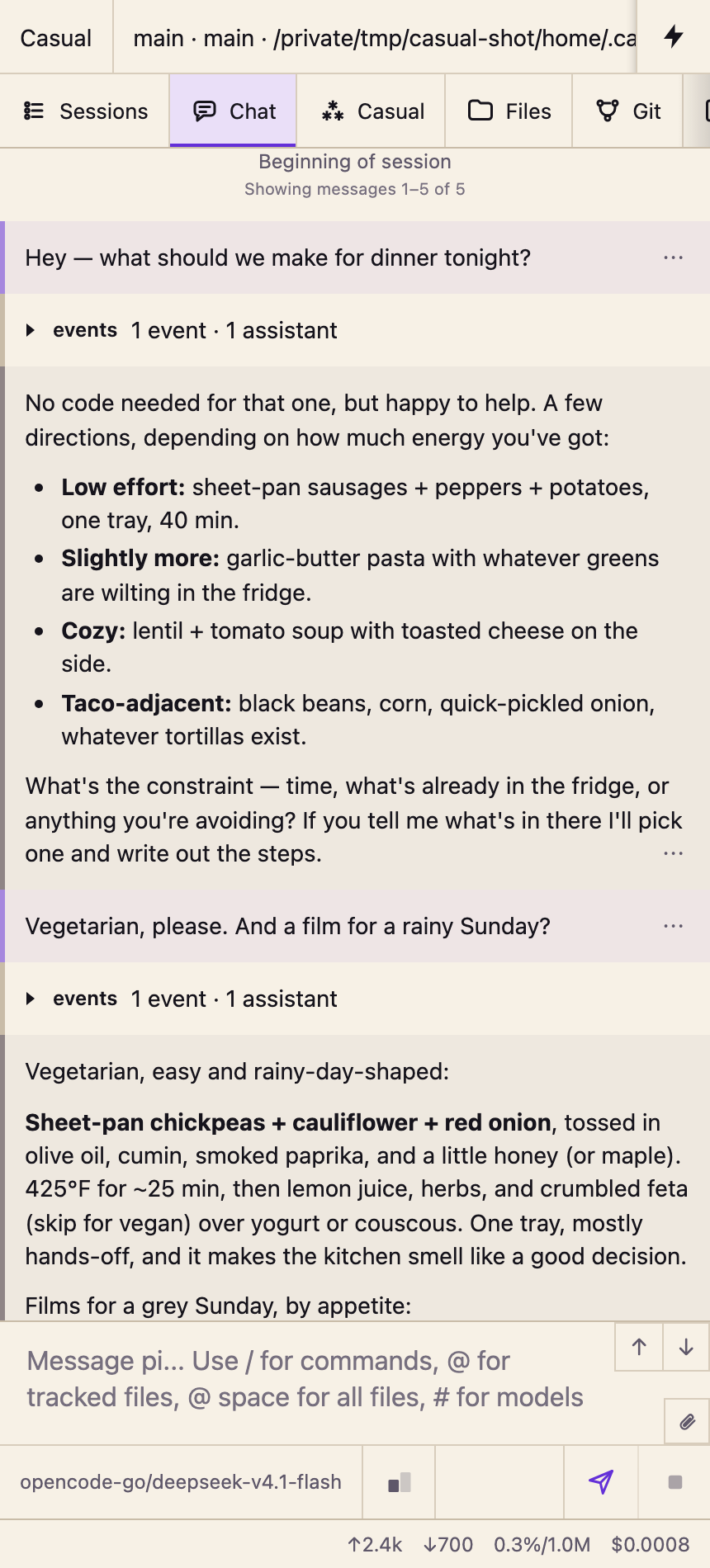
Use
| Task | Where |
|---|---|
| Chat casually next to your project | The Casual tab — it embeds the chat and leaves the project column alone |
| Keep a project chat and Casual open as separate tabs | Actions → Casual → Open Casual Chat in Its Own Tab |
| Open the conversation in this tab, full view | Open chat on the Casual card, or Actions → Casual → Open Casual Chat |
| Start a new conversation | Actions → Casual → New Casual Chat, or New chat on the Casual card |
| Recover a stale link | Reset link on the Casual card |
| Pick a different home folder | Change home on the Casual card |
The Casual tab never redirects you into the host chat view. It shows the card, and once a conversation is remembered it embeds that conversation directly. Setup and error states keep their own card with the controls needed to recover.
The Casual tab is a view of its own: it always shows the card and never redirects you into the chat. Nothing opens the conversation except Open chat on the card or a palette action. The card reports where you left off — the remembered session's name and location — and carries the controls that only make sense there.
While the conversation is open, the Casual project is the selected project, so its sessions are visible in Sessions like any other project's.
Limits (v1)
- One conversation. No topics, folders, pins, or per-topic sessions. A new chat is a sibling session in the same home, not a new space.
- The separate window is a browser tab. The palette action opens a named window and reuses it; a popup blocker, or no casual session yet, falls back to opening the conversation in the current tab, and the window is closed like any other tab.
- One home per machine. The home folder is fixed at
~/.casual-pi-webunless you run Change home, and the remembered project/workspace/session pointer is stored per machine inlocalStorageunderpi-web-casual:store:v2. A second machine finds or creates its own casual session. - No settings pane. PI WEB's plugin API has no Settings contribution, so the home folder and pointer are changed through the card's controls, not through configuration.
- Controls live in the palette. Once a conversation is remembered the Casual tab has no buttons at all, so Open, Open in Its Own Tab, New, Reset Casual Link, Change Casual Home, and Set Up are palette actions. The card's buttons appear only in the states that show the card.
- The embedded chat is framed, not native to the panel. PI WEB's plugin API exposes no transcript component, so the Casual tab embeds the app's chat route in a same-origin frame and hides that frame's chrome. The frame is supervised, not trimmed once: it boots its own SPA, so the chrome keeps being hidden as the frame renders. A frame is also a second client instance with its own daemon connection.
- Best-effort chrome. PI WEB has no contribution point for hiding a project row, for a chat-only layout, or for a status color on an application tab, so the hidden row, the embedded frame's chrome trimming, and the tab's state depend on PI WEB's private shadow DOM and its machine status snapshot. Every render after activation is covered; on a cold page load the row can be painted for the moment before the plugin loads. If an update changes that markup, the Casual tab and the palette keep working, without the tint, and the selectors need work in
src/browser/dom.ts. - Project registration and status are not public API. First run uses the host's own endpoints, and the tab's status color reads the host's machine status snapshot (
api/machines/<machineId>/status) every four seconds while the page is visible. If PI WEB changes them, first run falls back to the setup card and the tab keeps the last state it painted rather than showing a wrong one. - API v4 only, PI WEB
1.202610.3or newer. Older hosts accept the package but Casual refuses to activate, because they lack application panels, the selection service, and project discovery. PI WEB1.202610.6+logs a deprecation warning for every API-v4 plugin, including its own bundled plugins. Moving to API v5 would drop1.202610.3support. - No deletion. Casual does not delete sessions, workspaces, or the home project. Manage history in Sessions.
- No telemetry. No analytics, no third-party calls, no server process. Messages go to the model provider you configured for PI WEB.
How it runs
A browser-only PI WEB plugin package. There is no server entry, no Pi extension, and no agent client: the plugin resolves the home project, remembers a session for each side of the toggle, and navigates into PI WEB's native chat.
- Browser bundle in
dist/browser, served by PI WEB directly from the installed package. - Browser API v4, with the public catalog used on
1.202610.6+and the selection service on1.202610.3; activation throws on hosts that lack the selection service. - Per-machine pointer in
localStorage(pi-web-casual:store:v2), holding the casual project, workspace, and session. - Shadow-DOM integration isolated in
src/browser/dom.ts.
| Change | Action |
|---|---|
| Browser bundle or panel | npm run build, reload the page |
package.json piWeb metadata |
Reload the page; no daemon restart |
| Separate Casual window | Already open — reload it, or close it and open Casual again |
| Home folder or remembered session | Nothing to rebuild — use the card controls or localStorage |
Detail, including the bootstrap requests, discovery order, explicit-open intent, and shadow-DOM selectors: docs/how-it-works.md.
Development
npm install --ignore-scripts
npm run typecheck
npm run build
--ignore-scripts skips building the native dependencies of the PI WEB host package; this project only consumes its TypeScript declarations. There is no test suite yet; the manual checklist lives in CONTRIBUTING.md.
The generated dist/browser files are committed because PI WEB serves them from the installed package. CI verifies they match source.
Contributing
Issues and pull requests are welcome. Start with CONTRIBUTING.md, follow the Code of Conduct, and report security issues as described in SECURITY.md.
Decisions
- ADR 0001: One long-running conversation
- ADR 0002: The chat is PI WEB's native chat
- ADR 0003: Browser-only, with first-run bootstrap through host endpoints
- ADR 0004: Stay on browser plugin API v4
- ADR 0005: Best-effort private shadow-DOM integration
- ADR 0006: The Asterism toggles between the project chat and Casual (superseded)
- ADR 0007: Casual opens in its own browser tab
- ADR 0008: The Casual panel embeds the chat in a same-origin frame
- ADR 0009: The Casual tab replaces the header button
- ADR 0010: The Casual tab reports agent activity
- Vocabulary
- Using Casual
- How Casual works
Related
- PI WEB — the web UI that hosts Casual.
- PI WEB plugin documentation — supported contracts, installation, and reload rules.
- Pi coding agent — the agent that powers PI WEB conversations.
License
MIT © 2026 Edward Champion.