pi-tidy0.4.14
Tool folding for the pi agent — a reply's tool calls collapse to one clickable line; failures, edit diffs and running jobs stay visible
Untested on omp
This is a pi package. No one has reported whether it works on omp yet. If you try it, add your result below.
Reports 0
No reports yet.
Readme
pi-tidy
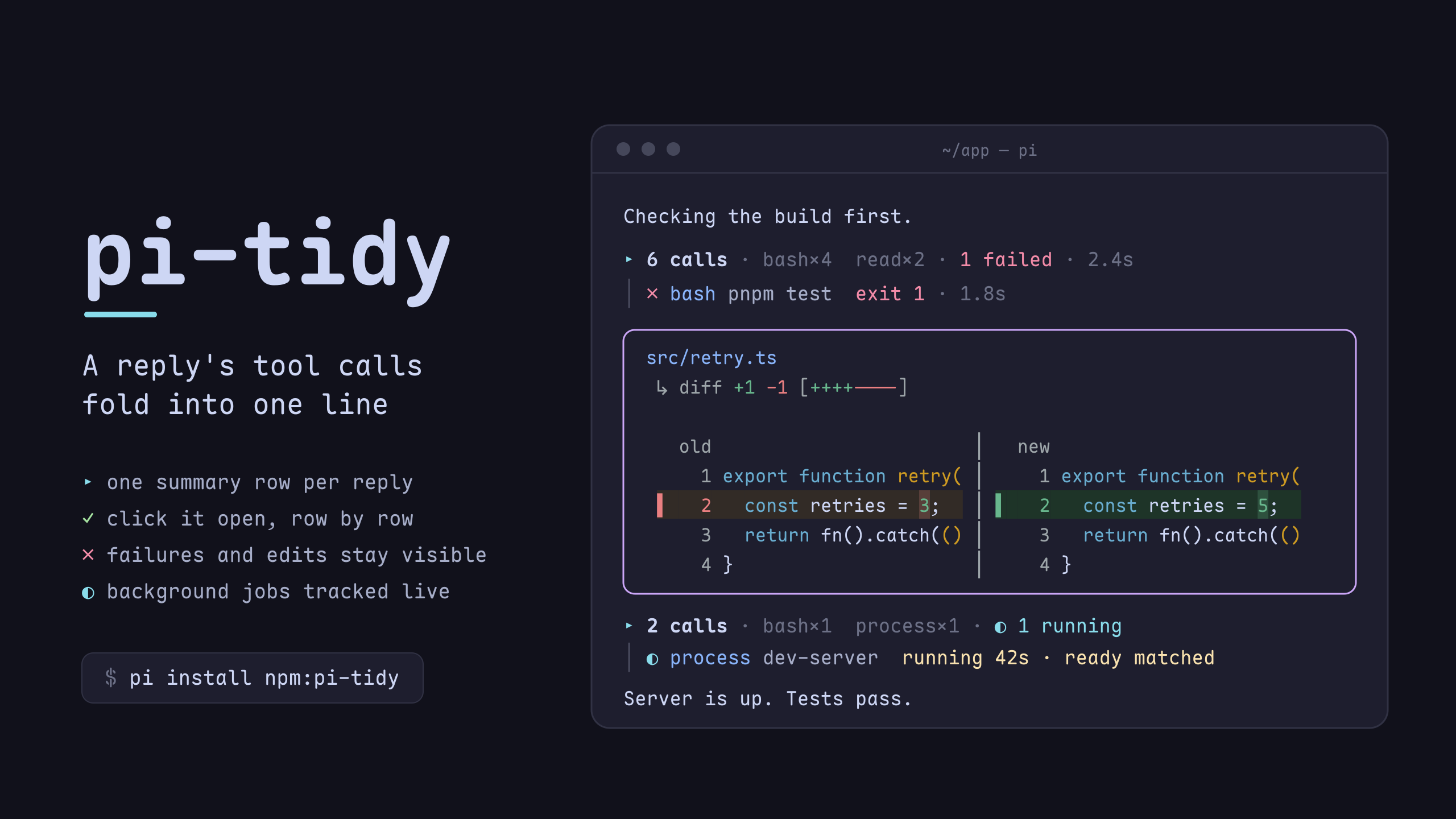
Tool folding for the pi coding agent: a reply's tool calls fold into one line you can click open, while edits, failures and background jobs stay in view — and every box gets a rounded transparent frame.
Features
- Rounded borders — ╭╮╰╯ box drawing instead of pi's default ┌┐└┘
- Every tool box — built-in tools, MCP calls (pi-mcp-adapter), subagents, and any other extension's tools all get the same frame
- Every message box — compaction and branch summaries, skill invocations, and extension custom messages get the same frame, each kind in its own border color (user messages are left to pi-starline by default)
- Per-tool border colors — successful boxes take their tool's color (bash/read/edit/write/… configurable); pending stays grey, errors stay red
- Nerd Font icons — every box gets a kind icon; file tools show the target file's nvim-web-devicons glyph right in front of the path (
write /tmp/x.tsrenderswrite /tmp/x.ts) - Side-by-side edit diffs — an edit's diff renders as two panes (
old │ new) with line numbers on both sides, a coloured bar and tinted row per changed line, and the changed word emphasised inside the line. Removed and added blocks pair up row by row, so a replaced block reads as before/after instead of two stacked runs. BelowsplitDiffMinWidth(or while the preview is still being computed) it falls back to pi's unified diff - Transparent background — no solid background fill, works with terminal transparency
- Grouped tool calls — every tool call between two pieces of assistant text collapses to one line
(
▸ 4 calls · bash×3 read×1 · 🧠 5 thoughts · 1.2s). Click it and it turns into a▾header with one row per call under a│gutter; click a row to open that call's output underneath it — the row stays put and takes a├─tick off the rail, because inside a group the rail already frames it and a box there was a frame inside a frame. The▾header folds the whole group. The assistant's text always shows and is what separates groups, so you can still see a reply drifting; tool-only model steps don't split a group. Edits and writes never fold — their diff shows like any normal box (alwaysShowTools), clipped todiffLineswhile collapsed. Steps are separated by one blank rail row, so a long group reads as blocks rather than a wall. A folded group is one line: only a running call keeps a row, and a failure is reported once, as3 failedin red (✗per row once you open it). Every row says what the call produced (12 lines,3 matches,exit 1), andctrl+ostill expands everything (and collapses back to the summary) - Thinking, folded in — a model step that only thinks and calls a tool used to leave a bare
Thinking...behind; now it is athinkingrow inside the group: a brain, the word, then one line of what the model actually thought, in order above the call it belongs to. The summary counts the runs and carries the same brain (🧠 5 thoughts), and a click opens that step's thinking full length — the same rounded box a tool result gets, in the newthinkingColor(yellow by default). While a run is still arriving the summary's marker spins (outside a group, the row's own glyph does, since there is no summary to carry it) and the preview slides over the newest words; once it stops, the row settles to a short head preview capped at 56 cells — a glance, not a paragraph. pi'shideThinkingBlocksetting is ignored on purpose: the row is the same whether thinking is configured on or off, and the click is the one way to read it. A message that both thinks and writes gets the same row for its label (clicking it opens the same box), and its run stays out of the group's count — it renders above the text, not as a row in the list - Background jobs — a call that starts a long-running process (pi-processes'
process start) shows the process's state on its row:◐ process ticker running 12s · READY matched, then✓ … exited 0 · 20s/✗ … exit 1/⊘ … killed SIGTERM. The summary spins while one runs (◐ 1 running), and the[process] …notification messages are folded into the row — pi-processes still delivers them to the model, pi-tidy just doesn't draw them twice. Starts inside codemode get independent process rows under the script, even when it starts several jobs or fails afterward. Each nested process has its own hover and expand target: click to see its command, working directory and the last 20 output lines without expanding the script. Open logs update as output arrives; processes whose logs are no longer retained still show their saved status - One-line boxes — collapsed boxes keep a single row of output (
bashResultLines), and a multi-line command plus(+N more lines, ctrl+o to expand), so a long tool call no longer owns the screen;ctrl+orestores the whole command - Bash syntax highlighting — commands get token-level coloring (commands, flags, strings, variables, operators, etc.)
- Click a box to fold it — clicks land on pi's own expand toggle at the right row, for every tool
including
renderShell: "self"ones (edit, MCP) - Scroll-safe caching — an unchanged box costs one line comparison per frame, nothing is re-framed
What it looks like
A reply's tool calls, folded:

A background process (pi-processes), tracked on the row that started it:

Click ▸ 5 calls and it becomes a ▾ header with one row per call, each step's thinking above it:
 ▾ 5 calls ·  bash×3  read×2 · 4 thoughts · 1 failed · 2.4s
 │ 🧠 thinking  测试挂了,先确认是哪一个断言炸的,再看是不是我们这边的问题
 │ ✓  bash git status --short  4 lines · 0.1s
 │ 🧠 thinking  看一眼改了什么
 │ ✓  read src/app.ts  120 lines · 0.0s
 │ ✗  bash pnpm test  exit 1 · 1.8s
 │ 🧠 thinking  …
Installation
pi install npm:pi-tidy
Requires pi ≥ 1.1.0 (component mouse events, tool durations); on an older pi it
says so at session start. Bash highlighting and the custom write preview also need
pi.registerToolRenderer() (pi 1.3.0). Without that API they are skipped and Tidy
says so once, rather than falling back to a tool override that would stop another
extension from loading.
Or straight from the repo:
pi install git:github.com/Andy8647/pi-tidy
Restart pi to activate.
Coming from pi-toolbox
pi-tidy is @andy8647/pi-toolbox renamed (from 0.4.2). Swap the package, and
remove the old one first so the two aren't loaded side by side:
pi remove npm:@andy8647/pi-toolbox
pi install npm:pi-tidy
Your "toolbox" settings keep working; rename the key to "tidy" when convenient.
The old package re-registered bash and write as its own tools so it could draw
the highlighted command row and the write preview. pi treats a second registration
under a built-in name as a hard failure, so Tidy could not be loaded alongside an
extension that sandboxes or gates those tools, in either load order. Since 0.4.5
both previews travel as pi.registerToolRenderer() resolvers instead, which is why
there is nothing left to conflict with (see How it works).
Releasing
.github/workflows/publish.yml publishes to npm on a published GitHub Release,
using npm's Trusted Publisher (OIDC) — no NPM_TOKEN secret. Bump version in
package.json, tag vX.Y.Z, and publish the release; the workflow fails fast
if the tag and the manifest version disagree.
Configuration
Add a tidy key to your ~/.pi/agent/settings.json; changes apply on /reload:
{
  "tidy": {
    "enabled": true,
    "highlightBash": true,
    "frameMessages": true,
    "frameUserMessages": false,
    "icons": true,
    "bashResultLines": 1,
    "writeLines": 10,
    "diffLines": 20,
    "thinkingColor": "warning",
    "groupTools": true,
    "alwaysShowTools": ["edit", "write"],
    "backgroundJobs": true,
    "hideJobNotifications": true,
    "toolColors": {
      "bash": "bashMode",
      "read": "toolTitle",
      "edit": "syntaxVariable",
      "write": "syntaxVariable",
      "grep": "syntaxOperator",
      "find": "syntaxOperator",
      "ls": "syntaxOperator",
      "mcp": "customMessageLabel"
    },
    "messageBorderColors": {
      "user": "toolTitle",
      "compaction": "customMessageLabel",
      "branch": "mdCode",
      "skill": "accent",
      "custom": "warning"
    }
  }
}
| Key | Type | Default | Description |
|---|---|---|---|
enabled |
boolean | true |
Enable/disable the extension |
highlightBash |
boolean | true |
Syntax-highlight bash commands |
frameMessages |
boolean | true |
Frame compaction/branch/skill/custom-message boxes like tool boxes |
frameUserMessages |
boolean | false |
Also frame user messages — off by default because pi-starline already restyles UserMessageComponent, and two render patches on one prototype fight over the output. Enable only without pi-starline |
icons |
boolean | true |
Nerd Font icons on every box. Requires a Nerd Font; set false otherwise |
groupTools |
boolean | true |
Fold the tool calls between two assistant text blocks (or a user message) into one summary line; click it for one row per call, click a row to open its output beneath it (no box inside the group), click the ▾ header to fold the group. false renders every call as its own box |
backgroundJobs |
boolean | true |
A call that started a background job (pi-processes) shows the job's live state on its row and in the summary. A running job keeps its row while folded; a finished one folds away (the summary counts it). The spinner turns once a second for a job's first 5 minutes, then stands still (a dev server can run for hours) |
hideJobNotifications |
boolean | true |
Don't draw a job's notification messages ([process] "ticker" matched stdout: READY) once its row shows them. Only drawing — the model still receives them. Jobs without a row keep their messages |
alwaysShowTools |
string[] | ["edit", "write"] |
Tools that never fold: they keep their own box (with the diff) and end the group before them, so later calls start a new one. Set [] to fold edits and writes into the group like everything else — click their row for the box |
splitDiff |
boolean | true |
Render an edit's diff as two panes (old │ new) with line numbers, a bar and a tinted row per changed line. false keeps pi's unified diff |
splitDiffMinWidth |
number | 72 |
Box width below which the split is dropped for pi's unified diff — two panes need room to stay readable |
thinkingColor |
theme color | warning |
Colour of the brain, the N thoughts count and an expanded thinking box. Any theme color name or #rrggbb |
diffLines |
number | 20 |
Diff rows drawn while an edit box is collapsed. The window is anchored at the first changed line (a third of the budget of context above it), with … (N more lines, M total, ctrl+o to expand) under it — pi's own edit renderer has no budget at all, so this is the only thing keeping a long diff from owning the screen. ctrl+o draws all of it, 0 keeps just the summary row |
bashResultLines |
number | 1 |
Visual lines of bash output shown while collapsed. pi's renderer hard-codes 5 with no setting; raise this for more context, 0 to hide output until you expand |
writeLines |
number | 10 |
Visual lines of a written file shown while the box is collapsed (pi's own number, now adjustable). 0 keeps just the header until you expand. Requires Pi's registerToolRenderer API |
toolColors |
object | see above | Border color per tool name for successful executions (pending stays grey, errors stay red, unlisted tools take accent). When set, the map replaces the defaults — {} disables per-tool colors |
messageBorderColors |
object | see above | Per-kind message-box border colors; merged over the defaults |
All color values are theme fg color names (ThemeColor), so they follow the
active theme. Default palette rationale: tool boxes reserve green/red/grey for
execution status, so message kinds get hues that don't collide —
customMessageLabel (mauve, matching the [compaction] label) for
compactions, mdCode (peach) for branch summaries, accent (sky) for skill
invocations, warning (yellow) for extension notices.
How it works
pi builds one ToolExecutionComponent per tool call, no matter which extension
registered the tool. pi-tidy patches that component's render to frame the whole
box — which is why MCP and subagent boxes are framed too. Message boxes (compaction, branch
summary, skill invocation, extension custom message) never go through that
component; their own prototypes get the same treatment, with two exceptions
that keep their native styling: custom messages rendered by an
extension-provided renderer, and ! bash-mode executions, which already draw
their own border. User messages are skipped by default because pi-starline
patches the same prototype.
Tidy registers no tools at all. Everything it changes about bash and write
(the highlighted command row, the collapsed output budgets, the write preview)
travels as a pi.registerToolRenderer() resolver, so the tool that is actually
installed keeps its execution, schema, shell and result renderer, and next()
hands Tidy whatever is downstream — pi's built-in renderers when an extension
defines none. Registering a tool under a built-in name is a hard failure in pi
(Tool "write" conflicts with …), which is why an extension that sandboxes
bash/write used to be mutually exclusive with Tidy no matter which loaded
first. It no longer is (issue #7, PR #8 and the bash follow-up).
An unchanged box returns its cached line array outright: pi re-renders the whole transcript on every frame, including every mouse packet while scrolling. Measured against unpatched pi at 300 boxes / 2400 lines: +0.03 ms per full render.
Grouping
Groups are derived at render time from transcript order — nothing is
persisted, so a reloaded session folds the same way. A boundary is a user
message or an assistant message with visible text; pi gives every model step its
own assistant message, and steps that only call a tool don't split a group.
ctrl+o and pi's own box clicks both arrive through setExpanded, which is how
the group levels stay in step with pi's per-box expand flag.
Background jobs
pi has no notion of a job that outlives its tool call, so background-jobs.ts
has a small provider interface. pi-processes is the one provider: its
processes:* events on pi's shared extension bus keep a row live, its persisted
ad-process:notification messages rebuild a reloaded session, and a process it
no longer knows reads not running. If that protocol changes, rows fall back to
plain tool rows.
Mouse
Clicks come from pi's own fullscreen mode (tuiMode: "fullscreen", pi ≥ 0.86
component mouse events); pi-tidy never turns on mouse reporting itself. Only left
clicks on its own rows are taken — presses and drags pass through, so text
selection works as usual. Without fullscreen there are no clicks: ctrl+o still
toggles every box.
The transcript's scrollbar is pi's, and with fullscreenScrollbar: "auto" (the
default) pi paints it over the rightmost column — the one these frames put their
border in, so it covers the border while it is on screen. Set "always" and pi
reserves that column instead, drawing the frames one cell narrower; "hidden"
works too if you never want it. Nothing to configure on this side either way.
Compatible themes
For the best transparent experience, set tool background colors to "" in your theme:
{
  "toolPendingBg": "",
  "toolSuccessBg": "",
  "toolErrorBg": ""
}
License
MIT