pi-subagents-hub2026.10.18-r4
A pi extension that brings Claude Code-like sub-agents and workflow orchestration to pi — parallel execution, live widget, fleet view, custom agent types, mid-run steering, dynamic workflows, Claude Code compatibility, look and feel.
Untested on omp
This is a pi package. No one has reported whether it works on omp yet. If you try it, add your result below.
Reports 0
No reports yet.
Readme
pi-subagents-hub
A pi extension that brings Claude Code-style autonomous sub-agents and workflow orchestration to pi. Spawn specialized agents that run in isolated sessions — each with its own tools, system prompt, model, and thinking level. Run them in the background (the default) or block on them, steer them mid-run, resume completed sessions, and define your own custom agent types. When the orchestration shouldn't be improvised, hand a deterministic JavaScript script to the SubagentWorkflow tool — agent(), parallel(), pipeline() — and scripts written for Claude Code's Workflow tool run here unchanged.
This is a fork of tintinweb/pi-subagents, carrying UI-layer enhancements and functional additions upstream does not have — most notably global
/pauseand/continue, which park every running agent across a quit and reload. See What this fork adds. Install instructions for the fork are in Install.
NOTE Respecting upstream contribution guidelines, AI assisted large un-reviewed changes were not submitted upstream.
| Windowed View (90% × 70%) | Full-Screen View (f) |
|---|---|
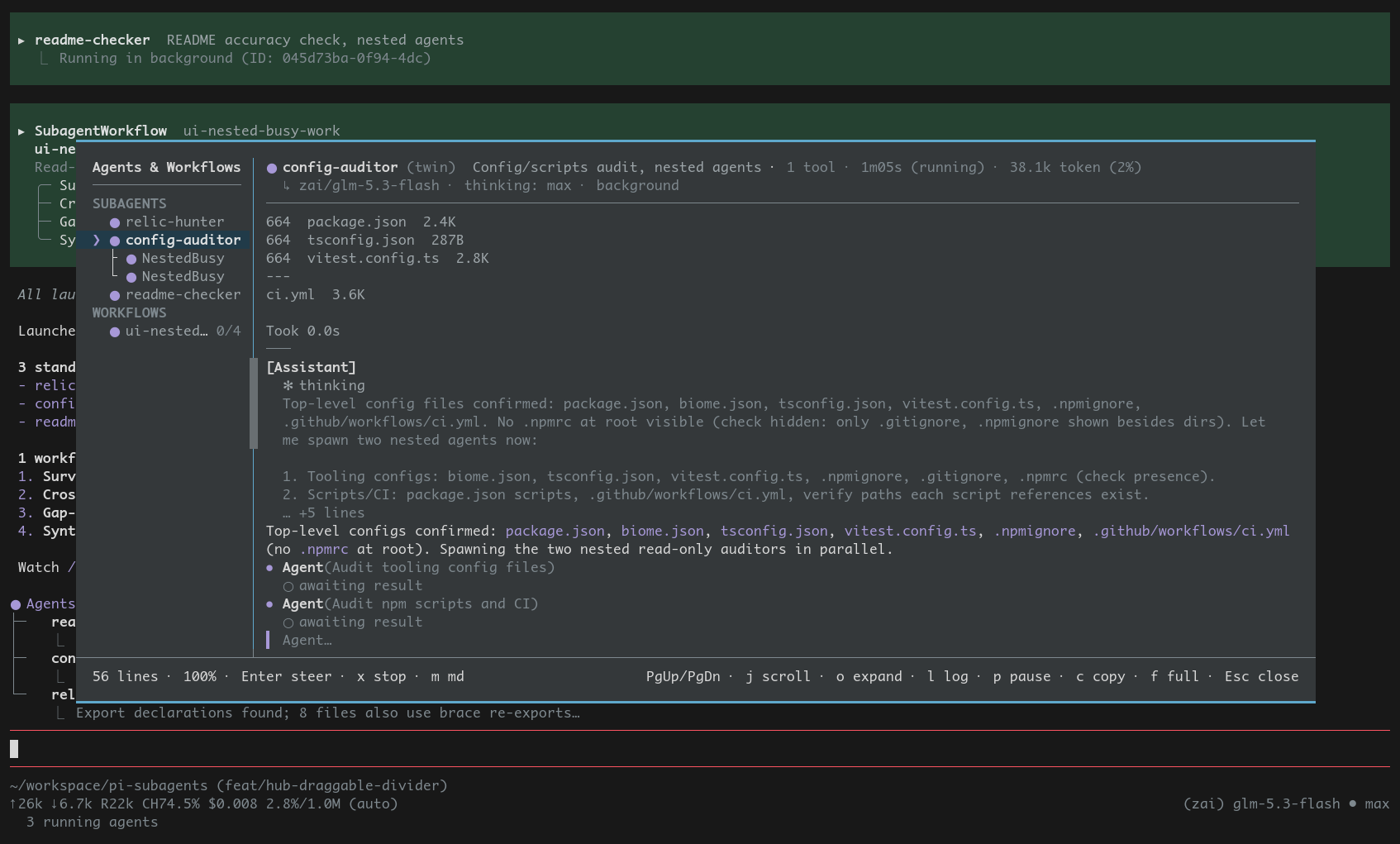 |
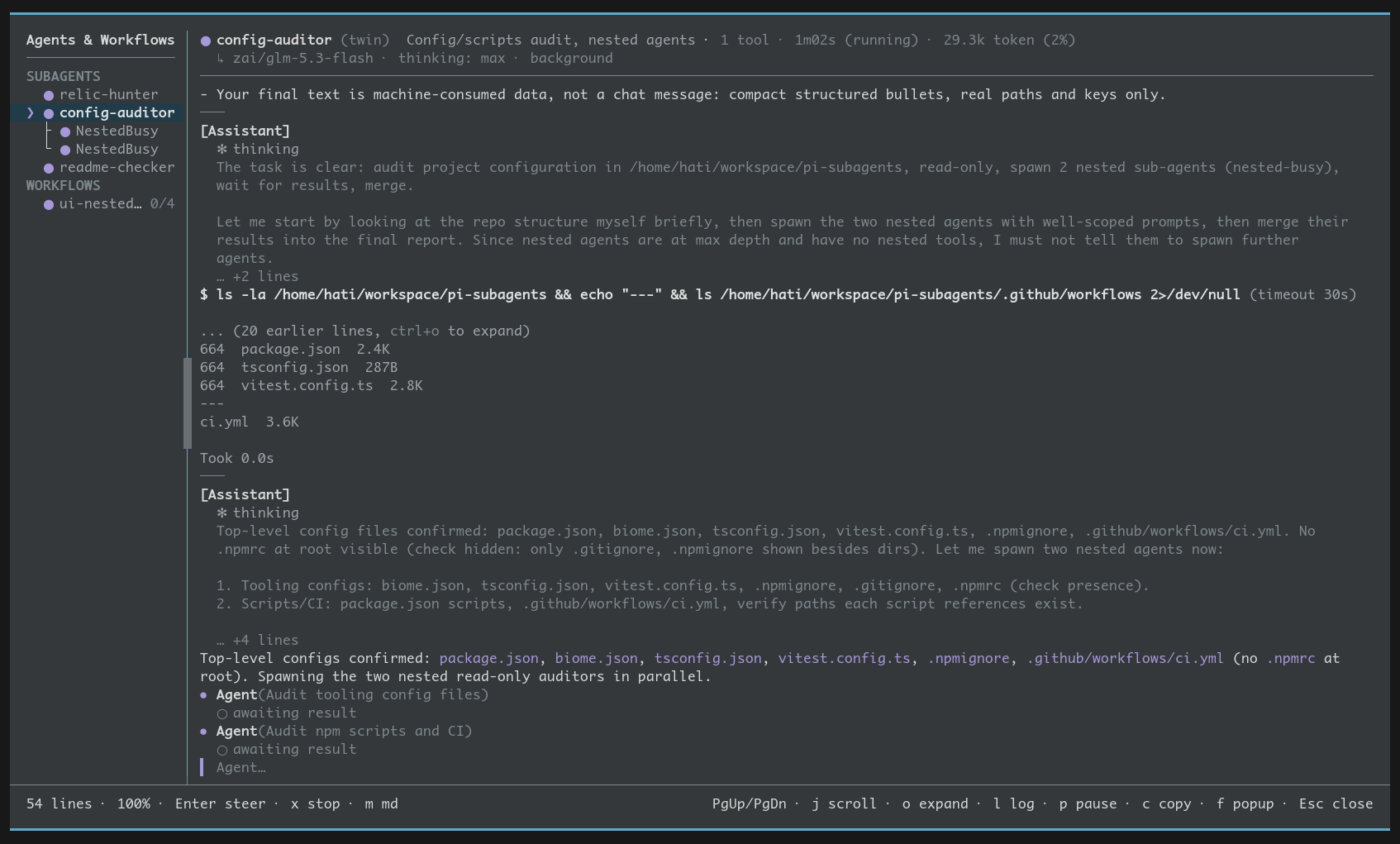 |
What this fork adds
Functional additions
- Global
/pauseand/continuethat survive quitting pi —/pauseparks the main agent's turn at its next boundary (before a pending tool call or the next model request — nothing in flight is killed), every active top-level agent, and active workflow runs, writing one row per agent and workflow run to a per-session manifest at<cwd>/.pi/subagent-pauses/<sessionId>.json— its session file when it has one, otherwise a respawn recipe (the original prompt plus the invocation the record held), or the workflow script and journal path — so the session can be exited right after;/continue— which never sends a prompt — reopens the gates and resumes paused runs in this session, or — after the session is loaded again — continues the parked main turn (pending tool calls execute first), revives session-backed agents from their persisted session files, re-runs session-less ones from scratch, and relaunches workflow runs from their journal replay with handles and aliases reclaimed. Loading a session with parked work hintsN subagents paused hereand/orN workflow runs paused here — /continue to resume. Upstream has no pause, resume, or revive at all — the whole family, and everything that crosses a process boundary, is fork-only.
Visual support for nested agents
- Nested subagent hierarchy in Agent Hub — Child subagents spawned by custom agents via
allowed_subagentsare fully visible and manageable in the hub roster (upstream filtered them out):- Tree hierarchy: Immediate child agents render indented beneath their parent with
├─/└─branch glyphs, displaying their live transcript, state glyphs, and tool activity upon selection. - Direct child control: Steer a child agent inline with
Enter, terminate with two-pressx(ork), and inspect its execution stream vial(ppause is gracefully refused with an explanatory note since children are lifecycle-bound to their parent). - Deep delegation drill-down: Deeper descendants (grandchildren and beyond) display a flush-right delegation badge (
↳N). Pressing→drills down into that child's scope (windowing the roster to its hierarchy), while←orEscascends back up.
- Tree hierarchy: Immediate child agents render indented beneath their parent with
Improved Agent Hub (Agents & Workflows)
- Unified multi-page window — Replaces fragmented popups and detached inspector overlays with a cohesive, deep-linked multi-page hub:
- Page grammar: Seamlessly navigate between the grouped roster (R), workflow run overviews (W), workflow agent conversations (WA), and detailed execution logs (SL / SAL / L).
- Draggable pane divider: Click and drag the split divider horizontally with the mouse to adjust the master list and detail pane widths. The center of the divider features shaded grip handles (
▒idle,▓while actively dragging in accent color), clamped between 18 columns (MASTER_LIST_WIDTH) and 50% window width, persisting your chosen width across views and reloads. - Comprehensive mouse support: Interactive mouse wheel scrolling and divider dragging work across both TUI modes — native event dispatching in fullscreen mode, and automatic terminal mouse reporting capture/restore in regular TUI mode.
- Pi-native styling: Edge-to-edge rules without outer box rails and native token highlights (
uiStyle: "pi", the default) or Claude Code-compatible rounded box frames (uiStyle: "claude"). - Live activity streaming: Tool executions stream live subtext (
editing src/auth.ts,searching 'cleanup') with output lines preserved between model turns, rather than raw unformatted tool dumps. - Popup and full-screen twins: Press
fat any time to toggle between the 90%×70% centered popup twin and the full-screen window, preserving active page, scroll offsets, selection, and filter state. - Detailed agentic log: Tool calls render as
⏺ name(key-arg)with results paired inline (✓/✗plus a preview;o/ctrl+oexpands rich blocks in place,mcycles full/preview), thinking blocks as receded✻previews, and pending calls marked. - Main-window-quality tool rendering: Tool calls and results render with pi's own per-tool renderers (edit diffs, highlighted reads, bash command blocks), wired identically to the main transcript.
- FleetView mirror key:
→closes the FleetView, mirroring←/↓.
Codebase maintainability & architectural refactoring
- Centralized window chrome (
src/ui/window-frame.ts) — Consolidated four redundant implementations of border rendering, layout arithmetic, split rules, and footer fittings into a single layout engine shared across the hub, conversation viewer, and menus. - Decomposed hub architecture (
src/ui/hub/) — Refactored the monolithic agent hub into specialized, decoupled modules:hub-data.ts: Roster grouping, stable sort order, and child tree derivationhub-panes.ts: Left and right pane line builders and split row assemblyhub-input.ts: Input routing, filter interaction, and mouse event dispatchinghub-headers.ts: Standardized 3-row identity blocks across pageshub-footer.ts: Two-slot adaptive footer bands that drop hints cleanly when narrowhub-log-view.ts: Dedicated event log viewer integrationhub-types.ts: Strongly-typed interfaces for state, geometry, and events
- Consolidated redundant surfaces — Retired the standalone ~1,660-line
WorkflowDialogand legacy detached chat overlay in favor of the unified page model. - Unified terminal input handling — Standardized raw SGR mouse event parsing in
terminal-mouse.tsand user-configurable viewer keys inviewer-keys.ts.
Regular TUI mode has no mouse support of its own — pi only parses mouse input in
tuiMode: "fullscreen"(in regular mode the terminal owns the wheel for its scrollback). The panel therefore enables mouse reporting itself while it is open and restores the terminal when it closes.
Features
- Claude Code look & feel — same tool names, calling conventions, and UI patterns (
Agent,get_subagent_result,steer_subagent) — feels native - Parallel background agents — spawn multiple agents that run concurrently with automatic queuing (configurable concurrency limit, default 10) and completion notifications that reach the parent at its next boundary, several at once when they finish together
- Live widget UI — persistent above-editor widget with animated spinners, live tool activity, token counts, and colored status icons. Configurable via
/agents → Settings → Widget:all(every agent),background(default — hides foreground runs, which already render inline as theAgenttool result), oroff - FleetView — Claude Code-style navigable list of
main+ every running subagent rendered below the editor (earliest-launched first). Press↓(or←) at an empty prompt to jump in,↑/↓to move the selection,Enterto open the selected agent's live, auto-updating conversation,Escto return. Finished agents linger briefly before dropping out, and a viewer stays open through completion so you can read the final output. Toggle via/agents → Settings → Fleet view - Conversation viewer — select any agent in
/agentsto open a live-scrolling overlay of its full conversation (auto-follows new content, scroll up to pause). In pi's fullscreen mode it is a borderless, full-terminal observer with mouse support. Steer a running agent inline by pressingEnterto open a composer, typing, thenEnterto send (Escor an empty submit returns) — the message appears as a user message and redirects the agent after its current tool. Pressbon a running foregroundAgentcall to hand that run to the background (see Sending a foreground agent to the background). Stop a still-running agent by pressingx(thenxagain to confirm) — steer and stop both work for background agents too. Assistant text renders as Markdown;mcycles that between off, assistant-only and everything (see Viewer markdown) - Custom agent types — define agents in
.pi/agents/<name>.mdor.agents/agents/<name>.md(project) or globally, with YAML frontmatter: custom system prompts, model selection, thinking levels, tool restrictions, and Claude Code-compatible colored name badges - Package-shipped agents — a pi package can declare its own subagents (and workflow scripts) with
"pi": { "subagents": { "agents": ["./agents"] } }in itspackage.json, sopi installis the whole setup: no copying files into.pi/agents/on every machine or container start. Only packages pi has actually installed are read (nevernode_modules), package definitions rank below every agent you wrote, and/agentsshows them read-only with Eject and Disable. Narrow or switch it off withpackageAgents/packageWorkflows. Full guide - Nested subagents — opt-in, default-off delegation: a custom agent that sets
allowed_subagentsgets its own ownership-scopedAgent,get_subagent_result, andsteer_subagenttools, depth-capped from the main session (default 2). It can control only its own children, they are stopped when it finishes, and their transcripts and token spend roll up to it. The allowlist is a privilege boundary — a child runs with its own tools, so pick it as carefully astools:itself - Agent mentions — subagents are first-class: type
@explore also check the RPC pathat the prompt and it goes to that agent instead of the main model, without a word of it entering the chat. One syntax covers the whole lifecycle — message it while it runs, resume it once it has finished, reopen its session from disk long after that, or start it if it never ran. Mentioning an agent that isn't running spawns it through an off-screen clone of the conversation, so it gets Claude Code's context-written prompt and a realAgenttool call without a word of it reaching the chat;directmode starts it here from your text instead, with no model call at all. The orchestrator cannamean agent so you address it as@auth-audit, and handles work insteer_subagent/get_subagent_resulttoo.@completes live agents, resumable ones, and startable types alongside pi's file completion;@mainforces text back to the main model. Toggle via/agents → Settings → Agent mentions - Scripted workflows — a
SubagentWorkflowtool that runs a deterministic JavaScript script orchestrating many subagents:agent(),parallel(),pipeline(),phase(),log()andargs, with a pure-literalmetablock declaring the phases.pipeline()has no barrier between stages, so one item can be in a later stage while another is still in the first — unlikeparallel(), which idles every fast agent until the slowest finishes. Runs in the background with a live card, inspectable via/agents → Workflowsor by selecting the run in FleetView.agent()also takesgate: "npm test"to verify a child by running a command (inside its worktree, when isolated) rather than asking another model, andresume: "<label>"to continue a child instead of re-paying its context. Scripts run in anode:vmsandbox on a worker thread whereDate.now(),Math.random()andevalthrow. On by default, but it stands down for company: if another extension already provides aWorkfloworSubagentWorkflowtool, this one warns and disables itself for the session rather than offering the model two orchestrators. Pin it either way with"workflowsEnabled"insubagents.jsonor/agents → Settings → Workflows. A script written for Claude Code'sWorkflowtool runs here unchanged: same globals,schemareturns a validated object exactly as it does there,budgetis present and always reports no token target (pi has no such directive) so itsbudget.total-guarded patterns still take the branch they were written for, and nestedworkflow()composes saved workflows one level deep. Full guide - Mid-run steering — inject messages into running agents to redirect their work without restarting
- Pause, resume, revive —
/agents pause [handle]parks active agents at their next run boundary while keeping their records and sessions (no argument: every active top-level agent),/agents resume [handle]reopens their gates — no continuation prompt is ever sent (no argument: all of them, re-queued through the concurrency pool), and/agents revive [handle]reopens an evicted agent's conversation from disk (no argument: a newest-first picker). A parked agent hands its concurrency slot back for as long as it is parked, so a wall of them cannot starve the queue, and a resume re-takes the slot before reopening the gate — if the pool has filled up it waits its turn in the queue. Foreground agents a caller is blocked on, worktree-isolated runs, and agents owned by another agent or a workflow refuse to pause; paused agents render‖, are exempt from the 10-minute record GC, and are swept on/newlike every other agent. All three also appear in the/agentsmenu when they have something to act on, andpin FleetView and the agent hub pauses/resumes the selected (or viewed) agent. The global/pause//continuepair adds the cross-restart dimension: park everything, quit pi, reload the session, and continue the parked agents there - Session resume — pick up where an agent left off, preserving full conversation context. Resumes detached by default and notifies you on completion, just like a fresh spawn; pass
run_in_background: falseto block and get the result inline - Graceful turn limits — agents get a "wrap up" warning before hard abort, producing clean partial results instead of cut-off output
- Case-insensitive agent types —
"explore","Explore","EXPLORE"all work. A type that doesn't resolve to exactly one enabled agent — unknown, disabled, or ambiguous between two agents differing only by case — falls back to general-purpose with a note, or is refused outright underfallbackSubagent: none - Fuzzy model selection — specify models by name (
"haiku","sonnet") instead of full IDs, with automatic filtering to only available/configured models - Context inheritance — optionally fork the parent conversation into a sub-agent so it knows what's been discussed
- Persistent agent memory — three scopes (project, local, user) with automatic read-only fallback for agents without write tools
- Git worktree isolation — run agents in isolated repo copies; changes auto-committed to branches on completion
- Skill preloading — inject named skills into agent system prompts, discovered from
.pi/skills/,.agents/skills/, and global locations (Pi-standard<name>/SKILL.mddirectory layout supported) - Tool denylist — block specific tools via
disallowed_toolsfrontmatter - Styled completion notifications — background agent results render as themed, compact notification boxes (icon, stats, result preview) instead of raw XML. Expandable to show full output. Group completions render each agent individually
- Event bus — lifecycle events (
subagents:created,started,completed,failed,steered,paused,resumed,compacted) and a per-message spend ledger (subagents:usage) emitted viapi.events, enabling other extensions to react to sub-agent activity - Cross-extension RPC — other pi extensions can spawn, stop, steer, pause/resume, and join subagents via the
pi.eventsevent bus (subagents:rpc:ping,subagents:rpc:spawn,subagents:rpc:stop,subagents:rpc:pause,subagents:rpc:resume,subagents:rpc:consume,subagents:rpc:steer). Standardized reply envelopes with protocol versioning; thepingreply advertises acapabilitiesarray naming the request channels this build answers. Emitssubagents:readyon session start. Full reference - Schedule subagents — pass
scheduleto theAgenttool to fire on cron / interval / one-shot. Session-scoped jobs with PID-locked persistence; results land via the samesubagent-notificationpath as manual background completions; manage via/agents → Scheduled jobs - Model scope enforcement — opt-in validation that subagent model choices stay within your pi
enabledModelsallowlist (sourced from/scoped-models, with both global and project-local pi settings honored). Caller-supplied out-of-scope → hard error to orchestrator; frontmatter-pinned out-of-scope → warning + runs anyway (frontmatter authoritative). Toggle via/agents → Settings → Scope models
Install
Install this fork (git source, tracks master):
pi install git:github.com/ahati/pi-subagents-hub@master
Update later with pi update git:github.com/ahati/pi-subagents-hub@master.
A prepare script compiles dist/ during that install, and pi loads the compiled ./dist/index.js entry instead of transpiling ./src/index.ts on every boot (tintinweb/pi-subagents#279 — thanks @tobymao). The path-derived extension name is [dist]; refer to this extension as [pi-subagents-hub] in extensions: lists.
Upstream release (npm package, without the fork's UI additions):
pi install npm:@tintinweb/pi-subagents
Or load directly for development:
pi -e ./src/index.ts
Requires pi 1.1.0 or newer: pi 0.86 and 0.87 moved the system prompt and conversation history into the session transcript, and the @handle conversation clone and the agent transcript files are built on that model. The peerDependencies range declares it, so npm flags an older pi at install time.
Other hosts
This extension is developed and tested against pi.
Third-party adapters report running it elsewhere. These are maintained independently of this project: not tested here, not covered by our CI, and compatibility may break with any release.
- DeepSeek Harness (
dsh) — via an adapter that maps pi's host API onto native DSH agents. Details and reports: #258
Quick Start
The parent agent spawns sub-agents using the Agent tool:
Agent({
  subagent_type: "Explore",
  prompt: "Find all files that handle authentication",
  description: "Find auth files",
  run_in_background: true,
})
Agents run in the background by default: the call returns an ID immediately and notifies you on completion, carrying a preview of the result (use get_subagent_result for the full text). Pass run_in_background: false to block until the agent finishes and get its full output inline; while it blocks, ctrl+b hands it to the background (see below).
Sending a foreground agent to the background
Press ctrl+b while a foreground Agent call is running to hand it to the background, as in Claude Code. The same run keeps going — same session, in-flight turn, transcript and worktree — and the blocked call returns the agent ID with the same result a run_in_background: true spawn gets. Completion then arrives as the normal background notification, naming the original tool call. After 2 seconds the running call's row shows (ctrl+b to run in background).
ctrl+bhands off every running foregroundAgentcall at once. To hand off just one, pressbin its conversation viewer (FleetView or/agents → Running agents).- The key is claimed only while such a call is running and the prompt editor has focus; the rest of the time — and in dialogs or the viewer's steering composer —
ctrl+bis still pi's cursor-left. With FleetView disabled the extension cannot see which component has focus, so it claims the key whenever a call is running. - One hint shows per batch of parallel calls, on the earliest one still running.
- Esc in the parent no longer reaches a handed-off agent. Stop it from
/agents → Running agentswithx. - It is one-way: there is no way back to foreground.
- Other tool calls in the same assistant message still hold the model's next turn until they finish; pi runs a message's tool calls as one batch.
- Not offered for a foreground call still queued for a slot, a foreground
resume, a workflow's agents or nested children. There is no automatic timeout.
Scheduling
Add a schedule field to register the agent to fire later instead of running now:
Agent({
  subagent_type: "Explore",
  prompt: "Look at recent commits and summarize what changed since last week",
  description: "Weekly commit review",
  schedule: "0 0 9 * * 1",   // 9am every Monday (6-field cron)
})
Schedule formats:
- Cron — 6-field (
second minute hour day-of-month month day-of-week), e.g."0 0 9 * * 1"for 9am every Monday,"0 */15 * * * *"for every 15 minutes. - Interval —
"5m","1h","30s","2d". Fires repeatedly at that interval. - One-shot relative —
"+10m","+2h","+1d". Fires once at that future time. - One-shot absolute — full ISO timestamp, e.g.
"2026-12-25T09:00:00.000Z".
When a schedule fires, the spawn runs in background and its completion notification arrives the same way as a manually-spawned background agent's — your parent agent reasons about the result the same way.
Schedules are session-scoped: they reset on /new and restore on /resume. List and cancel via /agents → Scheduled jobs (creation is the Agent tool's job — there is no parallel manual-create wizard). Storage at <cwd>/.pi/subagent-schedules/<sessionId>.json with PID-based file locking for cross-instance safety.
Disable the feature entirely: /agents → Settings → Scheduling → disabled removes schedule from the Agent tool spec (no LLM-context cost), hides the menu entry, and stops any active scheduler. The schema-level removal takes effect on the next pi session; the runtime kill is immediate. Re-enable from the same menu.
Restrictions:
schedulecannot be combined withinherit_context(no parent conversation exists at fire time) orresume(schedules create fresh agents).run_in_background: falseis refused — scheduled jobs always run in the background. Omitting it, or passingtrue, is fine.- Scheduled fires bypass the
maxConcurrentqueue so a 5-minute interval cannot be deferred behind long-running manual agents. - Headless
pi -pdoesn't wait for scheduled subagents.
UI
The extension renders a persistent widget above the editor showing active agents. By default it shows background runs only (widgetMode: background) — foreground agents already render inline as the Agent tool result, so the widget would otherwise double-render them. Switch to all (every agent) or off (hide the widget) via /agents → Settings → Widget:
● Agents
├─ ⠹ Agent  Refactor auth module · ↻5≤30 · 5 tool uses · 33.8k token (62%) · 12.3s
│    ⎿  editing src/auth.ts…
├─ ⠹ Explore  Find auth files · ↻3 · 3 tool uses · 12.4k token (8%) · 4.1s
│    ⎿  searching 'auth'…
├─ ⠹ Agent  Long-running task · ↻42 · 38 tool uses · 91.0k token (84% · ⇊2) · 2m17s
│    ⎿  reading docs/plan.md…
└─ 2 queued
The token field is annotated with two optional signals inside parens:
NN%— context-window utilization (color-coded: <70% dim, 70–85% warning, ≥85% error). Omitted when the model has no declaredcontextWindow, or briefly right after compaction.⇊N— number of times the session has compacted, when > 0. Stays dim; the percent's color carries urgency.
FleetView
While subagents are running, a Claude Code-style navigable list renders below the editor:
  esc to interrupt · ← for agents · ↓ to manage

  ● main
  ○ workflow         audit-src                    12/40 agents · 32s · ↓ 26.4k tokens
  ○ general-purpose  Sleep then report 1                                11s · ↓ 13.1k tokens
  ○ general-purpose  Sleep then report 2                                11s · ↓ 13.1k tokens
                                                                                   ↓ 3 more
Running workflows appear as a single workflow row above the agents, carrying their agent counts in place of a description. In the agent hub roster the two kinds are grouped instead: a SUBAGENTS section (its agents in stable launch order — a settling agent never reshuffles the list under the cursor) and a WORKFLOWS section below it, each run row led by the same run-state glyph the agents use (● running, ‖ paused, ✓ completed, ✗ failed) and tailed with a right-aligned done/total counter; the master cell is identity-only, so the name truncates before the counter does. The section headers take a line but no cursor slot, so ↑/↓ crosses them seamlessly. Enter on a run opens that run's page inside the hub — its phases and agents in the right pane — with Esc back to the roster, rather than a second overlay; /agents → Workflows opens the same page directly. A run's own agents are not listed separately — they belong to the run, which reports for them, so they are filtered out of the fleet list, the above-editor widget, the /agents menus and @handle resolution exactly as nested children are. They are also outside the maxConcurrent pool: the run has its own concurrency cap, and routing a fan-out through the session pool as well would let one workflow starve everything else. The agents are ordered earliest-launched first, and only agents you can actually open are shown (pending/queued agents with no session yet appear once they start). At an empty prompt, press ↓ (or ←) to move focus from the prompt into the list — the selected row is marked ●, the rest ○. The selected row renders in the theme's primary text color rather than the muted/dim treatment of the others; an agent with a configured color shows its badge there too, bolded. Each row names the agent itself — its tool-call name alias, else its type-derived handle (general-purpose-2), else the type's display name — so siblings of one type are distinguishable at a glance; the badge color is still the type's. ↑/↓ move the selection, Enter opens the selected agent's live conversation overlay (it auto-updates as the agent works), and Esc (or ↑ above main) returns to the prompt. → is ←'s mirror: it dismisses the list entirely — bar included — until ↓/← recall it or fresh agent activity re-shows it. Selecting main returns to the normal view. Inside the overlay, press Enter to steer the running agent — type a message and Enter to send it (Esc or an empty submit returns), and it redirects the agent the same way the steer_subagent tool does. On a running foreground Agent call, press b to hand that run to the background. A viewer stays open when its agent finishes so you can read the final output, and finished agents linger in the list for a few seconds before dropping out. Typing anything at a non-empty prompt behaves normally — the list only captures arrow keys when the prompt is empty. Opening the agent hub from the list — Enter on an agent or workflow, or from /agents — collapses the bar for as long as the hub is up, popup and full-screen alike; it comes back exactly as it was (dismissal included) when the hub closes. p pauses the selected agent (or resumes a paused one — the same toggle the hub's roster offers) and is inert on settled rows. Disable it entirely via /agents → Settings → Fleet view.
Agent mentions
Subagents are addressable. Every agent has a typeable handle — the agent type, lowercased, numbered when instances collide (explore, explore-2) — and @handle <message> at the prompt talks to that agent, whatever state it happens to be in. Type @ to pick one:
❯ @
  @auth-audit     send message · Explore · running · audit the auth flow
  @explore-2      send message · running · find flaky tests
  @code-review    resume · code-review · check the diff
  @plan           start agent · Software architect agent for designing implementation plans.
  index.ts        src/index.ts                        ← pi's own file rows, still there
  index.d.ts      dist/index.d.ts
The handle names the agent, not one process, so a single syntax covers its whole lifecycle:
| State | @explore fix the flaky test does |
|---|---|
| running or queued | sends the message into its conversation, exactly as steer_subagent would |
| finished | resumes it in the background from its existing session, continuing where it left off |
| finished long ago, record gone | reopens its session from disk and continues there |
| never started | starts it — by default, through a clone of this conversation (below) |
No turn is ever spent in the main conversation, and nothing about the mention enters the chat. The answer comes back as the ordinary background-completion notification, so the main model can relay it.
Starting a new agent
Claude Code does not start a mentioned agent itself. @agent-<type> becomes an attachment appending a <system-reminder> to your prompt — "the user has expressed a desire to invoke the agent X; please invoke the agent appropriately, passing in the required context to it" — and the main model makes the tool call. There is no tool forcing and no allowed-tools narrowing: the mention constrains which agent, not what it is told. So the model writes the agent's prompt, giving it the conversation context a cold spawn lacks.
The cost is a visible turn — the model's reasoning and its tool block, narrating a decision you already made by typing the handle. This extension keeps the mechanism and moves it off-screen. The conversation is copied into a throwaway in-memory session, that clone takes the turn holding only the Agent tool, and what it starts is an ordinary top-level agent:
@cyan whats your favorite color        →  (nothing in the chat)
  └─ clone of this conversation, off-screen
       └─ Agent(subagent_type: "cyan", prompt: …)
            ▸ Cyan Agent   favorite color        ← widget, fleet row, handle
It is a literal clone — the session's own entries and the same system prompt, not inherit_context's text rendering of them — taken from memory and compaction-aware, so what the copy reads is what the main model is working from. The clone gets one tool and one job; it cannot read, write or run anything, because an invisible turn with the full toolset could do invisible work. The agent it starts is attributed to the real session, so its transcript and rootSessionId land where they would have anyway, and it carries no tool-use-id — the main conversation never issued one.
| Mode | @plan sketch the migration, with no Plan agent running |
|---|---|
model (default) |
a clone of this conversation takes the turn off-screen and calls Agent, so the agent starts with a prompt written from the conversation. Nothing reaches the chat but a Prompting @plan… toast — the wording marks the wait for that turn, where direct's Started @plan means it is already running |
direct |
the agent starts here, immediately, with your message verbatim as its prompt. No model call at all, so no latency before it begins |
off |
@ means only "attach a file" again |
Either way the started agent honours its own frontmatter — model:, thinking:, max_turns: all apply, since neither path passes them and the agent's config wins. Mentioning something as the very first thing in a session works: there is simply no history to carry, and the clone still runs on your model and system prompt. If it cannot deliver at all — a model can always answer in prose instead of calling the tool — the agent is started directly with your text and the toast says so, rather than leaving you with nothing running.
model is also the only mode that works outside the TUI: pi -p '@plan the migration' clones, spawns, and reports through the normal completion path, where a direct start would have detached the agent and printed nothing. Messaging and resuming stay TUI-only for that reason, in both modes.
Two things to weigh against direct: the clone re-sends the whole conversation, and the agent does not start until that turn finishes.
Named agents. The Agent tool takes an optional name, so the orchestrator can call one auth-audit instead of leaving you to tell @explore-2 from @explore-3. The alias leads every roster surface — FleetView, the above-editor widget, the agent hub (roster page and its conversation pane), the conversation viewer header and the Agent tool call header — with the type-derived handle as the fallback and the type's display name last, so two same-type agents no longer render under one identical label; the badge color stays the type's. A name is additive: the type-derived handle is still assigned, so @explore keeps reaching that agent rather than starting a second one beside it. Both names share one namespace — an alias can never shadow a live handle or the reverse — and the popup shows one row per agent, under its alias, with the type moved into the description. steer_subagent and get_subagent_result accept a handle too, so you and the model address agents the same way.
Resuming much later. Because subagent sessions are persisted by default (rememberAgents), a handle keeps working after the agent's in-memory record is evicted: @explore anything else? reopens the conversation from disk. Only the definition is re-resolved, so a continuation runs under the agent type's current frontmatter, not the one the first run used. If the type has since been deleted or disabled, the resume is refused rather than falling back to another agent — re-enable it and the handle works again. Names from an evicted agent stay reserved, so a later Explore becomes explore-2 rather than shadowing something you can still reach; the 100 most recent are kept, and all of them are forgotten on /new and session switch. A resumed agent takes those names back, so @explore keeps meaning the same conversation. An agent whose session was only ever in memory leaves nothing to reopen, and the mention starts a fresh one instead; if the session file has since been deleted, the mention says so and frees the handle rather than silently sending your message to a new agent.
The grammar mirrors Claude Code's, and is deliberately narrow so nothing gets swallowed by accident:
| Input | Goes to |
|---|---|
@explore fix the flaky test |
the explore agent |
@agent-explore fix the flaky test |
the same agent — Claude Code's manual spelling, accepted as a synonym |
@main @explore is not a mention |
the main model, with @main stripped — the escape hatch |
@explore (no message) |
the main model — a bare handle is never a send |
hey @explore look at this |
the main model — only a leading mention is routed |
@src/index.ts summarize this |
the main model, with pi's normal file attachment |
@nosuchagent hello |
the main model, verbatim — no agent, no type, no interception |
While an agent is live its handle addresses it, so @explore never starts a second Explore alongside a running one — use the Agent tool for deliberate parallelism. @<agent-id> works too. main is reserved and can never be an agent's handle (a type slugging to it gets main-2); handles are capped at 64 characters. A handle written as typed always wins over the @agent- form, so an agent genuinely called agent-explore stays reachable. Nested subagents are not addressable — they are hidden from every top-level surface and only their owner may steer them, so a handle that would name one starts a fresh top-level agent instead of reaching through that boundary. Suggestions list live agents first, then resumable ones, then startable types — and then pi's own file rows, in the same popup: @ stays the file picker it always was, and the handles are added to it rather than replacing it. Disable the whole thing via /agents → Settings → Agent mentions.
A direct-mode start takes the non-tool spawn path shared with the scheduler and cross-extension RPC, so — like those — it writes no .output transcript. That is the trade for skipping the model call: a model-mode start goes through the real Agent tool and keeps everything. Live tool activity and the turn counter are not part of that trade — a direct start renders them like any other agent. A mention-resumed agent goes through the full resume wiring and keeps both in either mode.
Individual agent results render Claude Code-style in the conversation:
| State | Example |
|---|---|
| Running | ⠹ ↻3≤30 · 3 tool uses · 12.4k token (8%) / ⎿ reading src/auth.ts, searching 'token'… |
| Completed | ✓ ↻8 · 5 tool uses · 33.8k token (62%) · 12.3s / ⎿ Done |
| Wrapped up | ✓ ↻50≤50 · 50 tool uses · 89.1k token (84% · ⇊2) · 45.2s / ⎿ Wrapped up (turn limit) |
| Stopped | ■ ↻3 · 3 tool uses · 12.4k token (8%) / ⎿ Stopped |
| Error | ✗ ↻3 · 3 tool uses · 12.4k token (8%) / ⎿ Error: timeout |
| Aborted | ✗ ↻55≤50 · 55 tool uses · 102.3k token (95% · ⇊3) / ⎿ Aborted (max turns exceeded) |
Completed results can be expanded (ctrl+o in pi) to show the full agent output inline. The conversation viewer honors the same toggle for the agent's own tool output: rich-rendered blocks collapse to a preview with pi's own "ctrl+o to expand" hint, and the key — resolved through the user's app.tools.expand binding — flips them to full output; plain o is bound as the same toggle, which is what the hub's band advertises (o expand / o collapse). Blocks rendered as text carry an o/ctrl+o for full hint and answer both keys; m still cycles full/preview.
By default, foreground and background agents each stream their full conversation to a per-subagent transcript — a JSON-lines file at <os-tmpdir>/pi-subagents-<uid>/<cwd>/<session>/tasks/<agent-id>.output (owner-only 0700, cleared on reboot). Set output_transcript: false on a custom agent to write no transcript path or file for it, or set outputTranscript: false in subagents.json to make transcripts opt-in for the whole project (frontmatter overrides the project default). This governs only the transcript: it is independent of persist_session (the pi session on disk), and it does not affect isolation: worktree (which commits the agent's work to a git branch) or memory: (durable files) — set those accordingly if the goal is to keep a run off disk entirely. Background agent completion notifications render as styled boxes:
✓ Find auth files completed
  ↻3 · 3 tool uses · 12.4k token · 4.1s
  ⎿  Found 5 files related to authentication...
  transcript: /tmp/pi-subagents-501/home-user-project/sess-1/tasks/agent-abc123.output
Group completions render each agent as a separate block. The LLM receives structured <task-notification> XML for parsing, while the user sees the themed visual.
Default Agent Types
| Type | Tools | Model | Prompt Mode | Description |
|---|---|---|---|---|
general-purpose |
all 7 | settings default → inherit | append (parent twin) |
Inherits the parent's full system prompt — same rules, CLAUDE.md, project conventions |
Explore |
read, bash, grep, find, ls | haiku (falls back to inherit) | replace (standalone) |
Fast codebase exploration (read-only) |
Plan |
read, bash, grep, find, ls | inherit | replace (standalone) |
Software architect for implementation planning (read-only) |
The general-purpose agent is a parent twin — it receives the parent's entire system prompt plus a sub-agent context bridge, so it follows the same rules the parent does. Explore and Plan use standalone prompts tailored to their read-only roles.
Default agents can be ejected (/agents → select agent → Eject) to export them as .md files for customization, overridden by creating a .md file with the same name (e.g. .pi/agents/general-purpose.md), or disabled per-project with enabled: false frontmatter.
Custom Agents
Define custom agent types by creating .md files. The frontmatter name: is the subagent_type and dispatch identity, falling back to the filename when absent; display_name only changes the UI label. Claiming a default agent's name overrides it.
Agents are discovered from four locations (higher priority wins):
| Priority | Location | Scope |
|---|---|---|
| 1 (highest) | .pi/agents/<name>.md |
Project — pi's config dir; authoritative, and where /agents writes |
| 2 | .agents/agents/<name>.md |
Project — the shared cross-tool .agents workspace (same convention as .agents/skills/) |
| 3 | $PI_CODING_AGENT_DIR/agents/<name>.md (default ~/.pi/agent/agents/<name>.md) |
Global — available everywhere |
| 4 (lowest) | Paths declared by an installed pi package | Package — see Shipping agents in a pi package |
Project-level agents override global ones with the same name, so you can customize a global agent for a specific project. If both project locations define the same name, .pi/agents/ wins — .pi stays the project authority; .agents/agents/ is an additional read location for projects that keep their agent assets in the .agents workspace. The global location follows the upstream PI_CODING_AGENT_DIR env var — set it to relocate all pi-coding-agent state (agents, skills, settings) to a custom directory. An agent's name is its frontmatter name:, falling back to the filename, so two files can now claim the same one — the later load wins, and the warning below names the file that took over.
An unreadable or unparseable agent file is skipped, not fatal — a warning names the file and the error. If it was overriding a same-named agent, a second line names the file that loads instead. Set strictAgentFiles: true in subagents.json (or /agents → Settings → Strict agent files) to fail startup on a broken file instead; mid-session reloads still only warn.
Example: .pi/agents/auditor.md
---
color: red
description: Security Code Reviewer
tools: read, grep, find, bash
model: anthropic/claude-opus-4-6
thinking: high
max_turns: 30
---

You are a security auditor. Review code for vulnerabilities including:
- Injection flaws (SQL, command, XSS)
- Authentication and authorization issues
- Sensitive data exposure
- Insecure configurations

Report findings with file paths, line numbers, severity, and remediation advice.
Then spawn it like any built-in type:
Agent({ subagent_type: "auditor", prompt: "Review the auth module", description: "Security audit" })
Frontmatter Fields
All fields are optional — sensible defaults for everything.
| Field | Default | Description |
|---|---|---|
description |
the agent's name | Agent description shown in tool listings |
name |
filename | The agent's type — what subagent_type and @handle address. Claude Code's rule: the filename doesn't have to match, so blubb.md with name: code-review dispatches as code-review. Omit it and the filename is used. Any value works except one containing :, which Claude Code reserves for plugin-scoped identifiers — such a file is skipped with a warning. Two files may declare the same name; the later load wins, as a filename clash always did |
display_name |
the type | Label shown in the UI (widget, agent list, badges) when an instance has no name alias or handle — cosmetic only, and independent of name. Claude Code has no equivalent; a file that sets only name badges as its type, unchanged |
color |
— | Background color for the agent name badge in the Agent tool header, widget, FleetView, and conversation viewer. Supports Claude Code's red, blue, green, yellow, purple, orange, pink, cyan (the values its own default theme uses); quoted six-digit hex such as "#8B5CF6"; and Agency Agents aliases (amber, teal, indigo, gold, neon-green, neon-cyan, metallic-blue, violet, rose, lime, gray/grey, fuchsia, slate, navy). Badge text is black or white, whichever clears 4.5:1 against the rendered background — Claude Code uses one inverse color for every badge. Invalid values render no badge and preserve each surface's existing theme foreground |
tools |
all 7 | Which tools the agent can call. Built-in names (read, grep, …), * / all (all built-ins), none, and ext:<extension> / ext:<extension>/<tool> selectors for extension tools. See Tool & extension scoping below |
extensions |
true |
Which extensions to load for the agent. true (all defaults), false (none), or an explicit list: [mcp, "/abs/path.ts", "*"]. See Tool & extension scoping below |
exclude_extensions |
— | Extension denylist applied after extensions: — exclude wins. Plain names only (case-insensitive), no paths or *. Useful with extensions: true to drop one extension (e.g. pi-notify) |
skills |
true |
true inherits the parent's skills; false inherits none. A comma-separated list preloads only those skills into the system prompt and does not inherit the rest (see Skill Preloading for discovery locations) |
memory |
— | Persistent agent memory scope: project, local, or user. Auto-detects read-only agents |
disallowed_tools |
— | Comma-separated tools to deny even if extensions provide them |
isolation |
— | Set to worktree to run in an isolated git worktree, or off to refuse one even when the caller passes isolation: "worktree" (frontmatter is authoritative). Workflow scripts are the exception: as in Claude Code, only their agent() option decides. none, no, and false are accepted spellings of off |
model |
the session's configured default, else the parent's model | Model — provider/modelId or fuzzy name ("haiku", "sonnet"). Resolved tolerantly (./- and a trailing date stamp are interchangeable) and falls back to the same model under another provider if the named one doesn't have it. Precedence: this pin → the subagent session's own pi settings default (defaultProvider/defaultModel) → the spawning session's model |
thinking |
inherit | off, minimal, low, medium, high, xhigh, max — actual availability depends on your pi version and model; pi clamps unsupported levels down |
max_turns |
unlimited | Max agentic turns before graceful shutdown. 0 or omit for unlimited |
persist_session |
subagents.json rememberAgents (default true) |
Persist this subagent as a normal pi session instead of keeping the session in memory only; overrides the rememberAgents project default in both directions. It records its spawning session as parent, so it nests under it in /resume. The subagent's .output transcript is still written either way unless output_transcript: false |
output_transcript |
true (or subagents.json outputTranscript) |
Write this subagent's .output transcript; when set, overrides the subagents.json outputTranscript default. Set false to write no transcript file or path. Governs only the transcript — independent of persist_session, isolation: worktree, and memory: |
session_dir |
pi default | Optional session directory when persist_session: true; omitted uses pi's normal session location, and relative paths resolve from the agent cwd. A session outside the parent's session directory (this override, or isolation: worktree) is listed separately, so it shows as a root instead of nesting |
allowed_subagents |
none | Opt in to scoped nested Agent, get_subagent_result, and steer_subagent tools. Omitted / empty / none / false = no nesting; all (or "*" / true) = any enabled agent; comma-separated list = only those agent types |
prompt_mode |
replace |
replace: body is the full system prompt (no AGENTS.md / CLAUDE.md inheritance). append: body appended to parent's prompt (agent acts as a "parent twin" — inherits parent's AGENTS.md / CLAUDE.md) |
inherit_context |
false |
Fork parent conversation into agent |
run_in_background |
— | Pin this agent to background (true) or foreground (false). Omit to follow backgroundByDefault |
isolated |
false |
Hermetic specialist mode: forces extensions: false + skills: false + drops ext: selectors. Only built-in tools. Distinct from isolation: worktree (filesystem) |
enabled |
true |
Set to false to disable an agent (useful for hiding a default agent per-project) |
Frontmatter is authoritative. If an agent file sets model, thinking, max_turns, inherit_context, run_in_background, isolated, or isolation, those values are locked for that agent. Agent tool parameters only fill fields the agent config leaves unspecified. Other spawn paths differ per field:
isolatedholds on every spawn path, including@handlementions, workflows and cross-extension RPC.isolationholds on every path except workflows: as in Claude Code, only the script'sagent()option decides there.inherit_contextapplies only toAgenttool and nested spawns, including default-mode@handlementions, which spawn through theAgenttool. As in Claude Code, where only a fork inherits the conversation, every other spawn starts fresh unless its caller asks: workflow children and scheduled runs never inherit, and an RPC caller opts in withinheritContext.
Forgiving model: resolution. A model: pin is matched against pi's model registry tolerantly, so cosmetic id variations don't silently drop the agent back to the parent's model: . and - are treated as equivalent in version numbers (claude-haiku-4.5 ≡ claude-haiku-4-5), a trailing -YYYYMMDD date stamp is optional (anthropic/claude-haiku-4-5-20251001 matches an undated registry id and vice-versa), and a provider/modelId whose named provider doesn't carry that model retries the bare id against every provider. Precedence is exact → fuzzy under the named provider → same model under any provider → unavailable, so an exact match always wins and dated snapshots aren't conflated. If nothing resolves, the pin can't run and the agent inherits the parent model — /agents → Agent types flags this case as (unavailable, fallback: inherit) and shows the resolved target (→ provider/id) when resolution lands on a different provider or version than configured. (This is distinct from Model Scope enforcement, which matches the enabledModels allowlist by exact entry.)
Nested subagents
Nested delegation is default-off. Set allowed_subagents only on a non-isolated custom agent that owns a real fan-out responsibility:
---
tools: read, grep, find
extensions: false
allowed_subagents: support-file-finder, support-callsite-tracer   # or `all`
---
The allowlist is a privilege boundary, not just a routing hint. A child runs with its own tools:, extensions:, and isolated: — the parent's restrictions are not inherited — so delegation grants the parent the union of what the listed agents can do. The read-only agent above can write and run commands through any listed agent that can, and all reaches every enabled agent including general-purpose. Choose the list as carefully as you would choose tools: itself; that is the main reason this is default-off.
allowed_subagents is runtime-enforced. A comma-separated list restricts nesting to those types; all (or "*" / true, matching how extensions: and skills: take booleans) allows any enabled agent; omitted, empty, none, or false means no nested tools are injected at all. Unknown, disabled, and out-of-list types are rejected rather than falling back — regardless of the project's fallback agent setting, so a configured fallback can never hand a nested caller an agent outside its allowlist — and a nested model: is validated against Model Scope exactly like a top-level spawn. Result, resume, and steering operations are ownership-scoped, so a parent can control only its own children. Nested records remain internal to that parent and do not appear in top-level tools or lifecycle events — though in this fork they are visible and manageable within the Agent Hub with tree hierarchy and scope drill-down — so when a parent finishes, is stopped, or ends a resumed turn, its nested children are stopped with it. They do write their own .output transcript (subject to the same output_transcript gate), filed under the root session's directory alongside their ancestors', so a nested run can still be inspected after the fact. Their token usage is folded into every ancestor's totals up to the top-level agent (lifecycle events, completion notifications, /agents), so nested spend stays attributable at any depth even though the children themselves stay hidden from outer tools. A nested result that ends stopped, aborted, or steered is labelled as partial, the same guarantee top-level results carry.
The hard cap is depth 2 by default: main session (0) → subagent (1) → nested child (2). Change it project-wide with maxSubagentDepth in subagents.json (or /agents → Settings → Nested depth); 0 or 1 turns nesting off everywhere. An agent already at the cap gets no nested tools at all — not even get_subagent_result, since it can never own a child. A child must independently set allowed_subagents to delegate again; isolated agents never receive nested tools.
Nested children occupy no concurrency slot, in either pool — their parent already holds one, and queueing them behind it would deadlock a parent waiting on its own child. The depth cap bounds how deep nesting goes, not how wide: a parent's only limit on concurrent children is that each spawn costs it a turn. Pair allowed_subagents with a max_turns on that agent if you want a hard ceiling on its fan-out.
Because a subagent session never activates this extension (that is what keeps a child from building a second agent manager, and it is why nested tools are injected directly instead), a subagent also gets none of the extension's other surfaces: no /agents command, no cross-extension RPC handlers, no subagents:ready event.
Tool & extension scoping
extensions: decides which extensions load, tools: decides which tools surface to the LLM. They compose:
# Default (both omitted): all extensions load, all 7 built-ins surface

tools: read, grep, find           # narrow to listed built-ins; extensions still load
tools: "*"                        # all 7 built-ins (alias: `all`)
tools: none                       # zero built-ins (alias: `""`)
tools: "*, ext:mcp/search"        # built-ins plus one extension tool

extensions: false                 # no extensions load
extensions: [mcp]                 # only mcp loads
extensions: [builtin:mcp, builtin:codemode]  # pi's built-in MCP + codemode
extensions: ["*", "/abs/foo.ts"]  # all defaults plus one path-loaded extension

exclude_extensions: pi-notify     # everything except pi-notify (with extensions: true)
exclude_extensions: builtin:mcp   # everything except pi's built-in MCP

# Specialist: load one extension, expose only one of its tools, keep built-ins
extensions: [mcp]
tools: "*, ext:mcp/search"

isolated: true                    # hermetic: built-ins only, no extensions/skills/context
A few rules the examples don't make obvious:
extensions:is the sole loading authority.ext:foointools:narrows what surfaces; it can't loadfooon its own. Mismatches fireextension-error:…warnings.- Any
ext:entry flips extension tools to an explicit allowlist — unnamed extensions still load (handlers fire) but expose no tools. Sotools: "*, ext:mcp/search"exposes onlysearchfrommcp, nothing from any other extension. - Extension names match case-insensitively (
[Mcp]=[mcp]); tool names inext:foo/barstay case-sensitive. - pi's built-in extensions (
builtin:mcp,builtin:codemode,builtin:tool-search) load in subagents as they do in the main session, so withextensions: trueevery subagent starts its own set ofmcp.jsonservers, which stay up until the subagent's session is disposed (on quit, or ~10 minutes after it finishes). Address them by the fullbuiltin:name — bare[mcp]matches a third-party extension namedmcp, not the built-in — and narrow their tools withext:builtin:mcp/<tool>. MCP tools are reached through codemode (ortool_searchfordeferredservers), so anext:allowlist must name that bridge too, as pi's--tools read,codemode,'mcp__*'does:tools: "read, ext:builtin:codemode, ext:builtin:mcp/mcp__radius__search". Opt out per agent withexclude_extensions: builtin:mcp, or everywhere with-builtin:mcpin pi'sextensionssetting; starting pi with--no-mcpkeeps MCP out of subagents too, and--no-extensionskeeps all three built-ins out. MCP tools stay undeclared until codemode ortool_searchreaches them, as in the main session, and a codemode script can only call tools inside the agent's scope. Out-of-scope tools are blocked but can still appear in codemode'ssearchTools()andtool_searchresults. - Subagents inherit the parent session's project trust: in a project you did not trust, a subagent loads none of its
.piextensions or settings and never starts the servers in its.pi/mcp.json. A subagent spawned into another directory (RPCcwd) treats that directory as untrusted. - Extensions that register tools lazily work too. MCP-backed extensions typically can't enumerate their tools until their servers connect, so they register from
session_startorbefore_agent_startrather than at load. Subagent scoping is re-derived as tools appear, so these surface normally — including underext:selectors, which keep narrowing correctly no matter when a tool shows up. - pi's built-in
codemode,tool-searchandmcpextensions load in subagents as they do in the main session (pi names thembuiltin:<name>, but the bare name matches).extensions: falseandisolatedleave them out. Each subagent connects its own MCP servers, which close with its session. Subagents follow the main session's project trust: in an untrusted project they skip its.pi/extensions, packages, skills and.pi/mcp.json. Scoping limits which tools a subagent may use, but doesn't switch on tools pi keeps off:codemodeandtool_searchstay inactive until a configured MCP server needs them, and MCP tools keep theirmcp.jsonexposure. Naming a tool withext:mcp/<tool>activates it. - Extensions bound into a subagent see both ends of that session's lifecycle:
session_startwhen the agent starts,session_shutdown(reasonquit) when its session is disposed — on quit, and when its record is evicted ~10 minutes after it finishes. Release per-session resources there; anything left armed outlives the session it belongs to. Handlers are given three seconds on quit, after which teardown proceeds regardless. - An installed package extension matches by its package short name (
@scope/pi-subagents→[pi-subagents]), in addition to its path-derived name (a package whose entry issrc/index.tsalso answers to[src]). Prefer the package name — the path-derived one is incidental. - Plain
tools:typos fail loudly:tools: reed, grepfirestools-error:…instead of silently producing an under-tooled agent. exclude_extensions:wins overextensions:and overext:selectors — an excluded extension never loads and atools: ext:entry can't pull it back. Plain names only (no paths, no*); a name matching nothing fires anextension-error:…warning.exclude_extensions:is not a sandbox: excluded extensions' factory code still executes once during loading. Exclusion suppresses their tools and their bound lifecycle hooks (pi.onhandlers likesession_startonly fire for extensions bound to the session), but not other load-time side effects — a factory that subscribes directly to the sharedpi.eventsbus stays live. Don't rely on it to contain an untrusted extension.- Array and string forms are equivalent:
[a, b]=="a, b".
How an agent's scope is advertised. The Agent tool description lists every available agent with a (Tools: …) suffix, and that suffix is what the orchestrator reads when deciding where to route work. It describes built-in scope only — extension tools are resolved when the agent runs (extensions may register lazily, see above), so they can't be enumerated when the description is built:
tools: |
suffix |
|---|---|
omitted, *, or all |
* |
| a list of built-ins | that list, e.g. read, grep |
none with isolated: true or extensions: false |
none |
none, or only ext: entries, with extensions loading |
no built-ins, extension tools only |
The last two rows are separate because zero built-ins is not zero tools: tools: none alongside extensions: still surfaces every extension tool, so calling it none would understate what the agent can do. Note * doesn't enumerate extension tools either — an agent with tools: "*, ext:mcp/search" advertises *.
Shipping agents in a pi package
A pi package can ship subagents the same way it ships skills, so a reusable agent travels with the package that needs it instead of being copied into every project's .pi/agents/ (#109). Declare the paths in the package's package.json:
{
  "name": "my-subagents",
  "keywords": ["pi-package"],
  "pi": {
    "subagents": {
      "agents": ["./agents"],
      "workflows": ["./workflows"]
    }
  }
}
Users get the agents by installing the package with pi — no copy step:
pi install npm:my-subagents # or git:…, or a local path; -l for project scope
Four rules define the feature:
- Declaration is required. Pi falls back to convention directories (
skills/,prompts/, …) for a package with nopikey at all; this extension never does. A package carrying anagents/folder for some other tool contributes nothing until it names it — the author's half of the agreement, where installing is yours. - Only pi's own packages count. Discovery reads
packages[]from pi'ssettings.json, global and project, through pi's package manager.node_modulesis never scanned, and a package listed only by an untrusted project stays invisible until you trust it. - Package agents rank last. Any
.pi/agents/,.agents/agents/or global file of the same name wins, so a package can offer areviewerbut never take the name away from you. Same tier pi gives package-provided skills, and Claude Code plugin agents. - They are read-only in
/agents, badged▪, offering Eject (an editable copy that shadows the original) and Disable (anenabled: falsestub that does the same).
packageAgents and packageWorkflows in subagents.json default to true; set either to false or to a list of package names to narrow it. Installing a package is already the trust decision — pi runs that package's extensions/ and puts its skills/ in the system prompt with no furthe