pi-sixel-math0.1.2
Real LaTeX math in the Pi agent TUI as SIXEL images, built for Windows Terminal
Untested on omp
This is a pi package. No one has reported whether it works on omp yet. If you try it, add your result below.
Reports 0
No reports yet.
Readme
pi-sixel-math
Real LaTeX math in the Pi agent TUI, rendered as SIXEL images on Windows Terminal. No browser, no WezTerm/Kitty, no WSL, no TeX install.


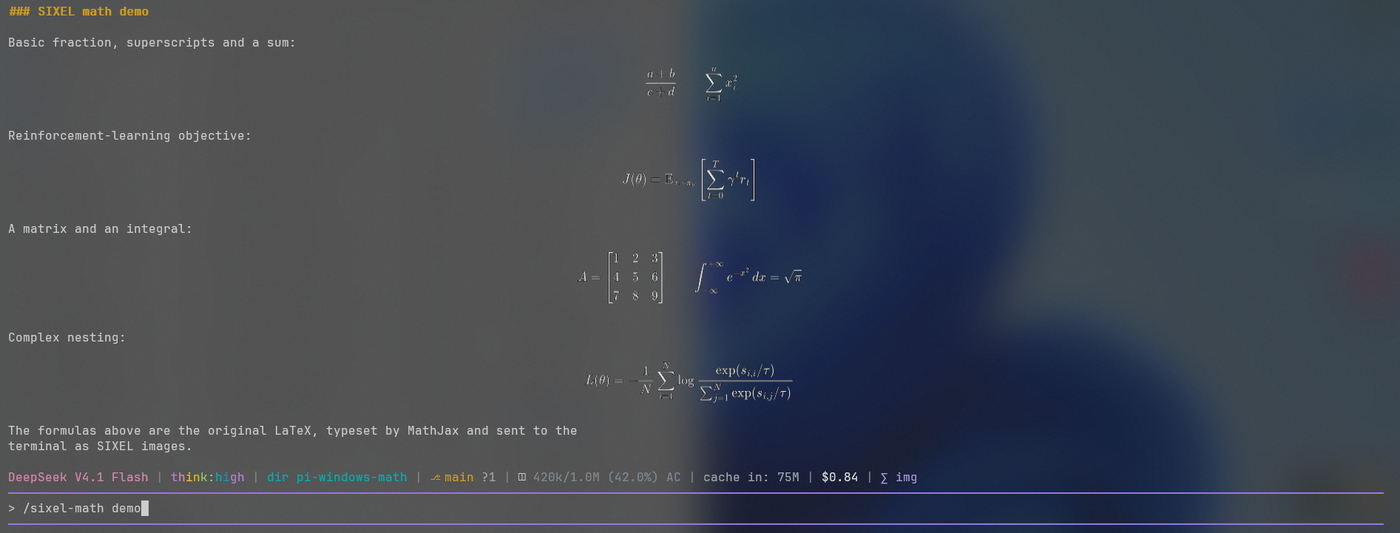
Pi renders inline images through the Kitty and iTerm2 protocols only, and Windows Terminal implements neither — so image-based math extensions silently do nothing there. Windows Terminal does implement SIXEL. This extension typesets formulas with MathJax, rasterizes them with resvg, and sends them to the terminal as SIXEL, sized to the terminal's cell grid.
The transcript, the session and the model context keep the original LaTeX. Only the rendering changes.
Requirements
| Windows Terminal | 1.22+ (SIXEL), tested on 1.24 |
| Pi | @earendil-works/pi-coding-agent 1.0+, tuiMode: "regular" |
| Node.js | 22.19+ (tested on 24) |
Nothing else — MathJax and resvg are npm dependencies. chafa is not required.
Install
pi install npm:pi-sixel-math
Restart Pi, then /sixel-math status. Other install routes:
pi -e npm:pi-sixel-math                  # try it for one session
pi install D:\path\to\pi-sixel-math      # from a checkout
pi remove pi-sixel-math                  # uninstall
Usage
Write math as usual — display math becomes an image automatically.
$$
L(\theta)=-\frac{1}{N}\sum_{i=1}^{N}\log\frac{\exp(s_{i,i}/\tau)}{\sum_{j=1}^{N}\exp(s_{i,j}/\tau)}
$$
| Command | |
|---|---|
/sixel-math on · off · toggle |
enable or disable images |
/sixel-math demo |
render the six demo formulas into the transcript |
/sixel-math status |
state, colors, grid, cache sizes |
/sixel-math clear |
drop caches |
/sixel-math bg #1e1e1e |
background used to blend glyph edges (auto, transparent) |
Configuration lives in ~/.pi/agent/sixel-math.json or in PI_SIXEL_MATH_*
environment variables; see src/config.ts.
Supported syntax
- Display math:
$$…$$,\[…\] - Inline math:
$…$,\(…\)— rendered by Pi's built-in Unicode math renderer (inline images are experimental,PI_SIXEL_MATH_INLINE=1) - Whole TeX package set from MathJax: fractions, roots, scripts, limits, big
operators,
\mathbb, matrices,cases,align,\text, … - Fenced code blocks, indented code, inline code and escaped
\$are never touched - A formula that cannot be typeset falls back to its LaTeX source
Limitations
tuiMode: "fullscreen"(alt screen) is not supported; the extension stays off there. Use"tuiMode": "regular".- Formula baselines align to the row grid, not to the text baseline.
- Formula backgrounds are left unpainted, so the terminal background — wallpaper
or acrylic included — shows through. Glyph edges are blended against the
background color from OSC 11 /
/sixel-math bg; withtransparentthey are thresholded instead of blended. - Formulas taller than
maxRows(12 by default) are scaled down, not split. - Copying a formula out of the terminal is not possible — the LaTeX in the transcript is the source of truth.
Development
npm ci
npm test              # 51 tests, including a terminal emulator for TUI layout
npm run build
npm run probe         # measure Windows Terminal's SIXEL behaviour
npm run visual-test   # the six acceptance formulas
npm run tui-experiment # pi-tui renderer with streaming and redraws
See docs/how-it-works.md for the rendering pipeline and
the terminal-specific details, and docs/testing.md for what
each test covers.
License
MIT