pi-session-switch0.4.1
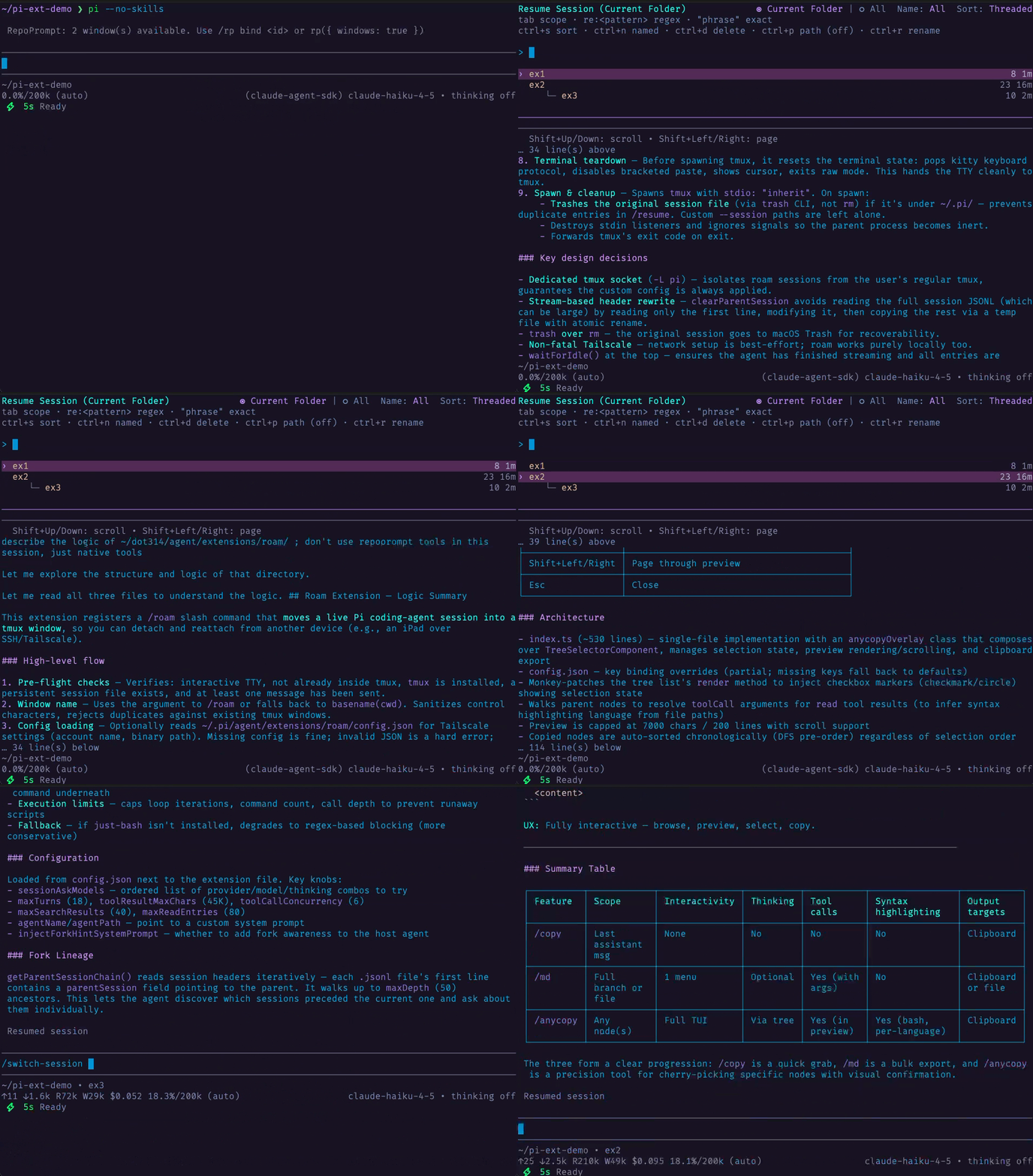
Preview each session before switching in a mirror of Pi's native `/resume`-picker UI
Untested on omp
This is a pi package. No one has reported whether it works on omp yet. If you try it, add your result below.
Reports 0
No reports yet.
Readme
Session Switch for Pi (pi-session-switch)
Switch between Pi sessions with /switch-session, or open the same picker after interactive startup with pi --switch-session, using the same layout and affordances as Pi's native /resume picker plus a live preview of the currently highlighted session beneath the picker.
Install
From npm:
pi install npm:pi-session-switch
From the dot314 git bundle (filtered install):
{
  "packages": [
    {
      "source": "git:github.com/w-winter/dot314",
      "extensions": ["extensions/session-switch/index.ts"],
      "skills": [],
      "themes": [],
      "prompts": []
    }
  ]
}
Command
/switch-session
Startup flag
pi --switch-session
Opens the same picker after interactive startup, then relaunches Pi into the selected session.
This is an extension-only workaround for startup switching. Unlike native pi --resume, it does not provide missing-cwd recovery for sessions whose recorded cwd no longer exists, and it does not reuse Pi's normal in-process session-switch lifecycle or guarantee the same shutdown-hook cleanup semantics.
Behavior
/switch-sessionstays on Pi's native in-process session switch pathpi --switch-sessionreuses the same picker UI, then relaunches Pi into the selected session- Uses the native
/resumepicker layout and keybindings - Search edits select the top result in both Current Folder and All scopes. By default, search results are ranked by relevance. As more sessions load, selection follows the top result until you navigate with the arrow or page keys.
- Shows a live preview of the highlighted session below the picker
- Shows the selected session's latest message time at the right edge of the preview
Shift+Up/Shift+Downscroll the preview by lineShift+PageUp/Shift+PageDownpage the preview- Preserves the native inline rename and delete-confirmation flows
Optionally replacing native --resume
If you want pi -r and pi --resume to use this extension's picker instead of Pi's built-in resume, add this wrapper to your .bashrc or .zshrc:
pi() {
  local -a args=()

  while (($#)); do
    case "$1" in
      --)
        args+=("$@")
        break
        ;;
      -r|--resume)
        if (($# > 1)) && [[ "$2" != -* ]]; then
          args+=(--session "$2")
          shift 2
        else
          args+=(--switch-session)
          shift
        fi
        ;;
      --resume=*)
        args+=(--session "${1#--resume=}")
        shift
        ;;
      *)
        args+=("$1")
        shift
        ;;
    esac
  done

  command pi "${args[@]}"
}
This rewrites:
pi -r/pi --resumetopi --switch-session(opens the picker)pi -r <path>/pi --resume <path>topi --session <path>(opens that session directly)
Compared with upstream
Derived from Damian Pedroza's pi-thread-switcher. This version has a few additions that I found helpful for readability: the session preview lives in a dedicated pane below the picker with syntax-highlighted Markdown rendering, and Shift+PageUp / Shift+PageDown are also offered for paging through the preview. The picker itself uses Pi's native SessionSelectorComponent, matching the /resume interaction model.
See THIRD-PARTY-NOTICES.md for full attribution.