pi-session-profile-selector0.1.2
Pi extension that asks which session profile to use and selects the matching model and thinking level.
Untested on omp
This is a pi package. No one has reported whether it works on omp yet. If you try it, add your result below.
Reports 0
No reports yet.
Readme
pi-session-profile-selector


Pick a Pi model profile when a new session starts.
pi-session-profile-selector is a small Pi Coding Agent package that asks what kind of session you are starting, then switches Pi to the model and thinking level for that profile. It is useful when you regularly move between contexts such as personal projects, work projects, cheap/fast models, or high-reasoning models.
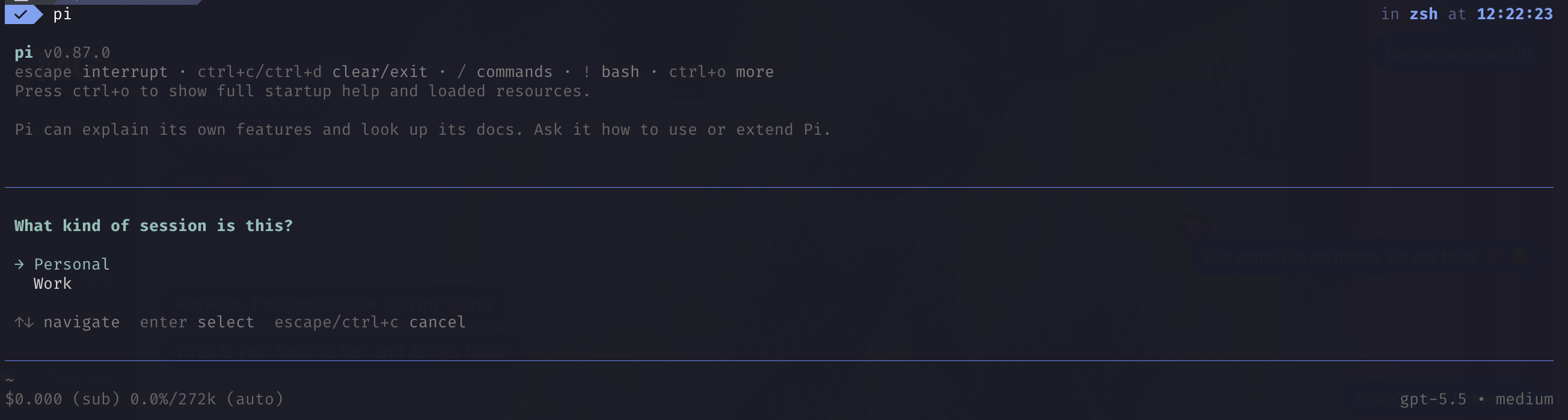
By default, it asks whether the session is Personal or Work:
| Profile | Provider | Model | Thinking |
|---|---|---|---|
| Personal | opencode-go |
mimo-v2.6-pro |
high |
| Work | openai-codex |
gpt-5.6-sol |
high |
The prompt appears for Pi startup sessions and /new sessions. It does not prompt when resuming, forking, or reloading existing sessions unless you configure it to do so.
Why use this?
Pi already lets you save one default model and thinking level. This package is for people who want a quick startup choice instead:
- keep personal sessions on one provider or account
- use a separate work provider/model only when needed
- switch between cheap, fast, and deep-thinking profiles
- make the choice explicit at the beginning of each new session
Scope
This package does one thing: it asks which model you want when a session starts, and then sets that model and its thinking level for the session.
In scope
- Interactive profile picker at Pi startup and
/new - Setting the active model and thinking level for the session
- Custom profile labels, providers, models, thinking levels, and trigger events via a JSON config
- A first-run setup wizard for people who prefer not to edit JSON
Out of scope
- Managing skills, extensions, MCP servers, or tool selection — Pi handles those separately, and this package never touches them
- Switching profiles mid-session — use Pi's built-in
/modeland/thinkingfor that - Modifying Pi's global defaults (
defaultProvider/defaultModel/defaultThinkingLevel) — the change here is per-session only - Wrapping or relaunching the
pibinary — this is a normalpi installextension, not a CLI
If you need per-workflow bundles of skills, tools, extensions, or MCP servers, this package is not designed for that.
Security note
Pi packages run with your local user permissions. Review package source before installing any third-party Pi package, especially packages that include extensions.
This package only registers a Pi extension that:
- reads an optional JSON config file from
~/.pi/agent/session-profiles.json - prompts you to choose a profile
- calls Pi's model and thinking-level APIs for the current session
Installation
Install from npm:
pi install npm:pi-session-profile-selector
Pin to a specific version:
pi install npm:pi-session-profile-selector@0.1.0
Or install directly from GitHub:
pi install https://github.com/unairada/pi-session-profile-selector
For a pinned tag or commit:
pi install https://github.com/unairada/pi-session-profile-selector@v0.1.0
To try the package for a single run without installing it:
pi -e npm:pi-session-profile-selector
From a local clone, install by path:
git clone https://github.com/unairada/pi-session-profile-selector.git
pi install ./pi-session-profile-selector
Usage
Start Pi or create a new session with /new. Choose a profile from the prompt.
On first run, if ~/.pi/agent/session-profiles.json does not exist, the package asks whether you want to set up profiles:
- Configure profiles: guided TUI setup for two profiles, defaulting to
PersonalandWorklabels. - Use built-in defaults: writes the built-in Personal/Work defaults to
~/.pi/agent/session-profiles.json. - Skip for now: does nothing for this session and asks again next time.
If the selected model is available and authenticated, the extension sets:
- the active model for this session
- the thinking level for this session
- a footer status showing the chosen profile alongside Pi's current model and thinking level
Status line
The footer status looks like:
Personal: opencode-go/mimo-v2.6-pro:high
That is <profile label>: <provider>/<model id>:<thinking level>.
The model and thinking level shown are Pi's current values, not the ones baked into the profile. The profile's model is only the model the session starts with. If you change model (/model or Ctrl+P) or thinking level (/thinking) later in the session, the status line updates to match — the profile label stays the same so you can still tell which profile the session was opened with.
The level shown is Pi's effective thinking level, so if a model clamps the level you requested, the status reflects what is actually in use.
If the model is missing or unauthenticated, Pi shows an error and leaves the current model unchanged.
To see the provider/model IDs available in your Pi installation, run:
pi --list-models
Custom profiles
To customize the prompt, session reasons, labels, models, or thinking levels, edit:
~/.pi/agent/session-profiles.json
You can create this file manually, or let the first-run TUI setup create it for you.
Example:
{
  "prompt": "What kind of session is this?",
  "askOn": ["startup", "new"],
  "profiles": [
    {
      "label": "Personal",
      "provider": "opencode-go",
      "model": "mimo-v2.6-pro",
      "thinkingLevel": "high"
    },
    {
      "label": "Work",
      "provider": "openai-codex",
      "model": "gpt-5.6-sol",
      "thinkingLevel": "high"
    },
    {
      "label": "Cheap",
      "provider": "opencode-go",
      "model": "mimo-v2.6-flash",
      "thinkingLevel": "medium"
    }
  ]
}
Config fields
| Field | Type | Description |
|---|---|---|
prompt |
string | Text shown above the profile picker. |
askOn |
string[] | Session events where the picker appears. |
profiles |
object[] | Profiles shown in the picker. |
profiles[].label |
string | Display name for the profile. |
profiles[].provider |
string | Pi provider ID, from pi --list-models. |
profiles[].model |
string | Pi model ID, from pi --list-models. |
profiles[].thinkingLevel |
string | Pi thinking level to use after selecting the profile. |
Supported askOn values:
startup, new, resume, fork, reload
Supported thinkingLevel values:
off, minimal, low, medium, high, xhigh, max
If the config file is missing, the built-in Personal/Work defaults are used. If the config file is invalid, Pi shows a warning and falls back to the built-in defaults.
Requirements
The default profiles require these models to be available in Pi:
opencode-go/mimo-v2.6-proopenai-codex/gpt-5.6-sol
The providers also need working authentication where required. Use Pi's /login command to configure provider auth.
Custom profiles can use any provider/model pair shown by:
pi --list-models
Development
Run tests:
npm test
Check the package tarball contents:
npm pack --dry-run
This package is structured as a Pi package with:
- the
pi-packagekeyword inpackage.json - a
pi.extensionsmanifest entry pointing atsrc/index.js
Requirements for contributors
- Node.js 20 or newer
- A Pi installation that can see your chosen providers (
pi --list-models)
Run the test suite before opening a pull request. CI runs the same suite on every push and pull request.
See CONTRIBUTING.md for project layout and the release checklist, and CODE_OF_CONDUCT.md for community expectations.
Reporting security issues
Please see SECURITY.md. Do not file security issues publicly.
License
MIT — see LICENSE.