pi-scoped-models-extra-info1.2.4
Pi coding agent extension — interactive table of your scoped models with pricing, context window, thinking levels, modalities, and coding benchmarks
Untested on omp
This is a pi package. No one has reported whether it works on omp yet. If you try it, add your result below.
Reports 0
No reports yet.
Readme
pi-scoped-models-extra-info
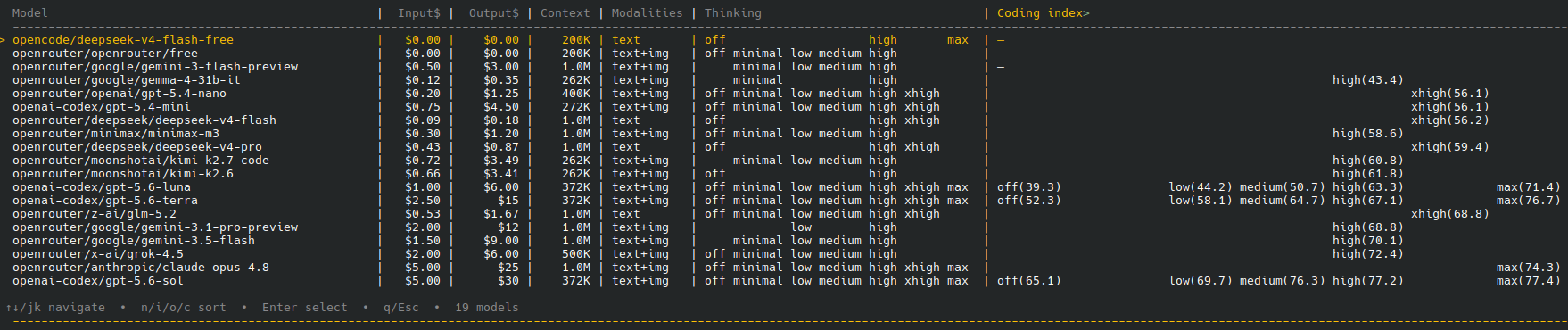
Interactive table of your pi coding agent's scoped models — pricing, context window, thinking levels, modalities, and optional coding benchmarks.
Features
- Rich model table — shows all your enabled (scoped) models in one view
- Columns: model slug, input price, output price, context window, input modalities, thinking levels, and coding benchmarks
- Sortable — press
m(model),i(input price),o(output price),c(coding index) - Model switching — press Enter on any row to switch to that model
- Keyboard navigation —
↑↓/jkto move,Home/Endto jump,q/Escto close - Optional coding benchmarks — per-thinking-level coding index from Artificial Analysis (if
AA_API_KEYis set)
Installation
Via git (pi package manager)
pi install git:github.com/kdejaeger/pi-scoped-models-extra-info
Then reload pi (/reload) or restart.
Via local clone
Clone the repo and add to ~/.pi/agent/settings.json:
{
  "extensions": [
    "~/pi-scoped-models-extra-info/index.ts"
  ]
}
Usage
Run the command:
/scoped-models-extra-info
Or use the keyboard shortcut: Alt+E
Navigation
| Key | Action |
|---|---|
↑ / k |
Move selection up |
↓ / j |
Move selection down |
Home |
Jump to first model |
End |
Jump to last model |
PageUp |
Page up through the model list |
PageDown |
Page down through the model list |
Enter / Space |
Switch to selected model |
m |
Sort by model |
i |
Sort by input price |
o |
Sort by output price |
c |
Sort by coding index |
f |
Toggle free-models-only filter |
q / Esc |
Close table |
Configuration
Coding benchmarks (optional)
The extension can show Artificial Analysis coding index scores per thinking level. To enable this:
- Get an API key from artificialanalysis.ai
- Set the environment variable before starting pi:
export AA_API_KEY="aa_your_key_here"
pi
Or add to your ~/.bashrc / ~/.zshrc:
export AA_API_KEY="aa_your_key_here"
Without this variable, the extension works perfectly — it just omits the coding index column.
What it shows
The table displays only the models you have enabled/scoped in your pi settings.json (enabledModels). If you haven't scoped any models, it shows all available models.
Pricing comes from pi's built-in model registry — it's accurate for all providers pi supports (OpenAI, Anthropic, Google, OpenRouter, Groq, etc.).
Thinking levels are resolved from each model's capabilities, with smart fallback for OpenRouter-proxied models.
Package structure
pi-scoped-models-extra-info/
├── index.ts              # Extension source
├── package.json          # Pi package manifest
├── screenshot.png        # Table screenshot
└── README.md             # This file