pi-runway0.2.5
The editor frame tells you everything: where you are, the model, a context runway, and whose turn it is. Zero config, fast.
Untested on omp
This is a pi package. No one has reported whether it works on omp yet. If you try it, add your result below.
Reports 0
No reports yet.
Readme
pi-runway
The editor's frame tells you everything — and nothing you don't need.
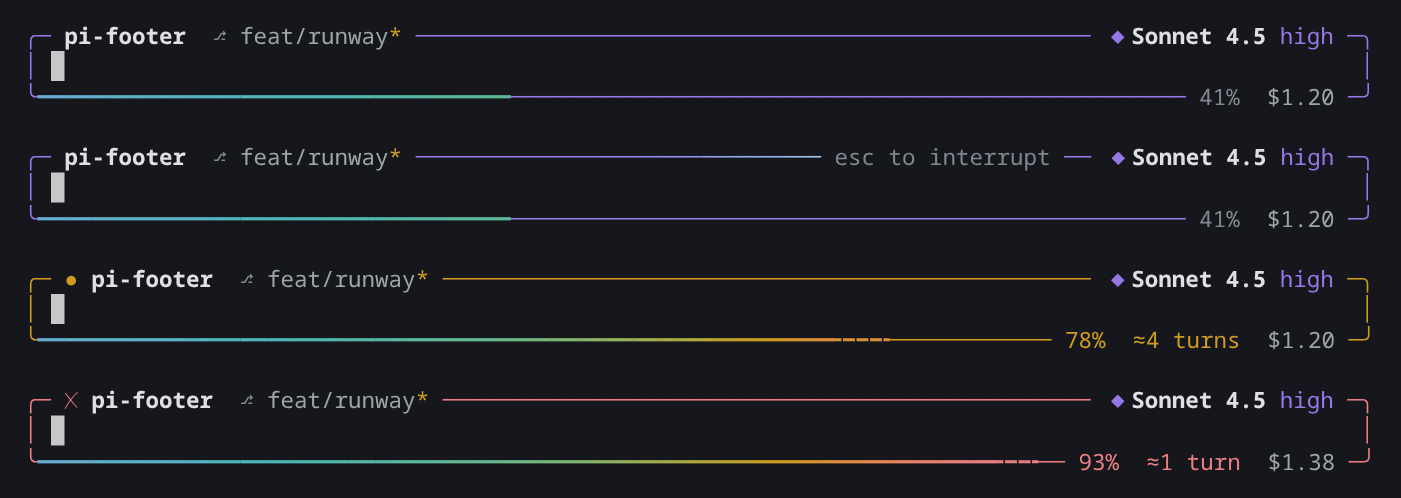
An editor frame for pi. The top edge shows where you are and which model you're talking to. The bottom edge is your context: it fills up like a runway. The frame's color and motion tell you whose turn it is. It replaces pi's footer, so you get those rows back for the conversation.
Install
pi install npm:pi-runway
There is nothing to configure.
To get pi's own footer and editor back for a while, run /runway (or /runway off, /runway on). The choice lasts until pi exits.
Reading it
╭─ pi-footer  ⎇ feat/x* ─────────────────────── esc to interrupt ── ◆ Sonnet 4.5 high ─╮
│ make it pop█                                                                          │
╰━━━━━━━━━━━━━━━━━━━━━━━━━━━━━━━━━━━━━━━━━━━━━━━━━╍╍╍╍────────── 78%  ≈4 turns  $1.20 ─╯
Top edge
pi-footer |
Repo name, plus the subdirectory if you're in one (pi-footer/src). Outside git: the folder name. |
⎇ feat/x |
Git branch. Its presence also tells you the folder is a repo. |
* |
Uncommitted changes. |
mcp 3 |
Status text from other extensions (ctx.ui.setStatus()). |
esc to interrupt |
Only while the agent works: the one thing you can do then. |
◆ Sonnet 4.5 high |
The model, followed by the thinking level, both in the level's color (the same color pi gives the editor border). Models that can't think show no level. A provider prefix appears only when the same model is available from more than one provider. A routed virtual model shows as auto → model. |
Bottom edge
━━━━━━ |
Context used. Cool colors while there's room, warmer as it fills. |
╍╍╍╍ |
From 70%: how much the next prompt will probably use. |
78% |
Context used. Dim below 70%, yellow from 70%, red from 90%. |
≈4 turns |
From 70%: prompts left before the window is full, from how much your last three prompts grew it. |
$1.20 |
Session cost, pay-per-token only. Hidden on subscriptions and when there is no price. |
The frame itself
| Thinking-level color, still | Idle. Your turn. |
| A light running along the top | The agent is working — however long it takes. |
Yellow, with ● |
An extension is waiting for your answer. |
Red, with ✗ |
The last run failed. Stays until your next prompt. |
pi's own retry and compaction messages show as usual.
Design rules
- Color only for signals. Everything is quiet until something needs you.
- Your theme's colors. Every color comes from the active pi theme.
- No Nerd Font needed. Only standard Unicode symbols.
- Works with every provider. Nothing that only some providers report.
- Graceful when narrow. Things step aside one at a time; the context reading and the run-state mark always stay.
- Fast. Nothing is computed while you type. The frame is built from cached strings; session data is read on events (end of a message, end of a run, compaction, model change), and git only after a tool may have touched files.
Development
bun install
bun run link-pi      # symlink the host-provided pi packages for type checking
bun run check        # tsc + bun test
pi -ne -e ./index.ts # try it in isolation