pi-prompton0.8.1
Intent-aware prompt rewriter and execution-contract compiler for Pi
Untested on omp
This is a pi package. No one has reported whether it works on omp yet. If you try it, add your result below.
Reports 0
No reports yet.
Readme

pi-prompton
Prompt-rewriting extension for Pi. Takes a rough draft in the Pi editor and turns it into a cleaner, stronger prompt without leaving the editor.
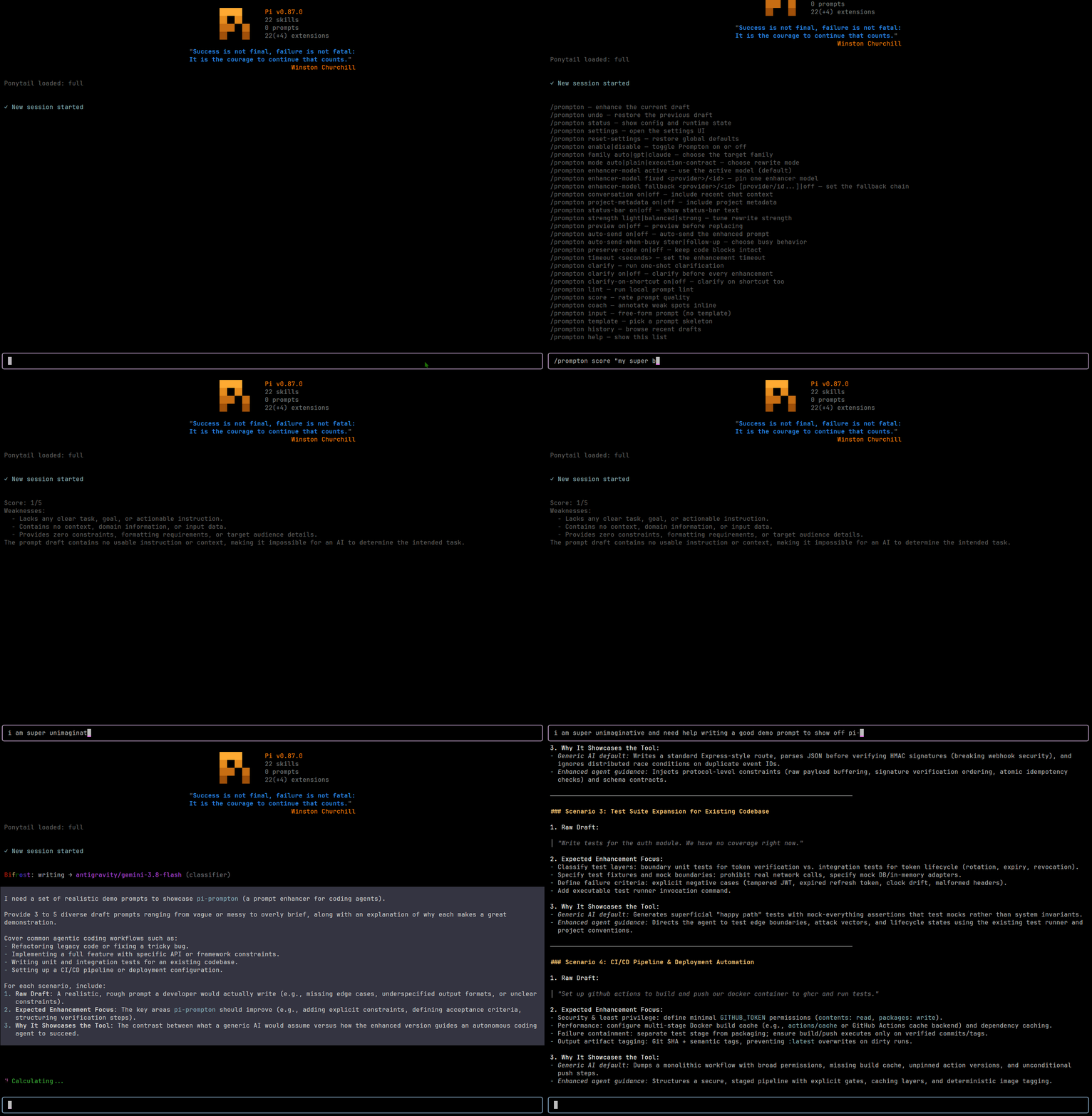
Fork of ayagmar/pi-promptsmith — original work by @ayagmar. This fork is maintained separately and may diverge.
Two output styles:
- Plain rewrite — tighten and clarify the prompt
- Execution contract — turn a rough task into a compact, agent-executable spec
Comparison: pi-promptsmith vs pi-prompton
pi-prompton is an enhanced fork of ayagmar/pi-promptsmith. Below is a comparison of key features, architecture, and capabilities:
| Feature / Aspect | pi-promptsmith (Upstream) |
pi-prompton (This Fork) |
|---|---|---|
| Package Name | pi-promptsmith |
pi-prompton |
| Command Prefix | /promptsmith |
/prompton |
| Settings File | ~/.pi/agent/promptsmith-settings.json |
~/.pi/agent/prompton-settings.json (auto-migrates legacy settings) |
| LLM Prompt Strategy | Dual-strategy (gpt.ts & claude.ts) |
Unified strategy (unified.ts) with target-family awareness |
| Prompt Coaching Suite | None | /prompton lint, score, coach, clarify, template, history + auto-clarify toggle |
| Clarify Mode | None | Single-dialog lint + intent clarification before enhancement |
| Prompt Linting | None | Local instant linting (/prompton lint) for missing verbs, scope, subjects |
| Prompt Quality Scoring | None | LLM-based 1–5 score with top 3 weaknesses (/prompton score) |
| Inline Annotations | None | [category: suggestion] annotations without rewriting (/prompton coach) |
| Starter Templates | None | 4 intent-based skeletons (/prompton template) |
| Empty Editor Action | Opens settings dialog | Opens template picker dialog (both command & shortcut) |
| Draft History / Undo | Single-entry undo (/promptsmith undo) |
10-entry ring buffer history (/prompton history) + /prompton undo |
| Token Estimation | None | Token estimate (~N tokens) in enhancement notifications |
| CLI Auto-Completions | Subcommands only | Subcommands + value completions (auto-clarify on/off, family auto/gpt/claude, etc.) |
| Settings Migration | N/A | Backward-compatible fallback for legacy promptsmith-settings.json |
Installation
Requires Pi 1.x (tested with Pi 1.0.0).
Run once without installing:
pi -e npm:pi-prompton
Install as a Pi package:
pi install npm:pi-prompton
Install from git:
pi install git:github.com/the-matt-moo/pi-prompton
Quick start
Enhance the current editor draft
- Type a rough prompt in the Pi editor.
- Press
Alt+Por run/promptonas a slash command. - Review the rewritten prompt, then submit it normally.
When the editor is empty, /prompton and Alt+P open the template picker instead. Choose a template, fill in its [brackets], then enhance again. Choose /prompton input when you want a blank editor instead of a template.
Enhance or inspect a one-off prompt
Pass the draft in matching double quotes, single quotes, or backticks:
/prompton "rough prompt"           # enhance
/prompton lint "rough prompt"      # lint locally
/prompton coach 'rough prompt'     # add inline coaching
/prompton score `rough prompt`     # score quality
/prompton clarify "rough prompt"   # append a clarification
Quoted input becomes the current editor draft. Run these through Pi's slash-command interface; text merely pasted into the editor is prompt content, not an executed command.
Undo and history
/prompton undorestores the draft from before the last editor-changing action./prompton historyrestores one of the last 10 drafts changed in the current Pi session.- Pi's normal
Ctrl+Zeditor undo also remains available.
Rewrite modes
Configured in ~/.pi/agent/prompton-settings.json.
auto (default)
Uses TypeSafe Jev Choice to classify the draft when the shared pi-bifrost/jev-api-key Windows Credential Manager entry is available, then picks the output style. It falls back to local heuristics when Jev is unavailable or uncertain. It chooses execution-contract for coding tasks (implement, debug, refactor, review, research, docs, tests), and plain for explanations, brainstorming, prose cleanup, and open-ended chat.
plain
Always produce a stronger prompt — no execution contract structure.
execution-contract
Always produce a compact task spec. Includes what is useful from: goal, context, constraints, files to inspect, expected change, verification steps, output expectations. Not a fixed template — keeps concrete user details, avoids invented requirements.
Unified prompt strategy
Prior versions maintained separate GPT and Claude prompt-construction paths. In v0.5.0 these were collapsed into a single unified strategy, co-designed through a Claude (Anthropic) and ChatGPT (OpenAI gpt-5.6-sol) review cycle:
- Claude drafted the unified prompt and implementation.
- gpt-5.6-sol reviewed for regressions, identified five issues (underspecified target-family semantics, dropped guidance lines, conflicting XML rules, implicit setting behavior, and missing test coverage).
- Both models converged on the final prompt and code.
The result:
- One request builder (
strategies/unified.ts) replaces the formerstrategies/gpt.tsandstrategies/claude.ts. - The best GPT-specific guidance (outcome-first structure, decision rules over step stacks, evidence/tool boundaries for agentic work) was promoted to universal instructions in the shared system prompt.
- The enhancer still sees
resolved_target_familyin the context payload and adapts output structure when it materially improves execution for the target model — but the enhancer prompt itself is model-agnostic. rewrite_strengthandpreserve_code_blocksnow have explicit behavioral semantics in the system prompt rather than relying on implicit interpretation.- XML-like sections are governed by one consistent rule: use them only when the draft already does or when they materially improve reliable execution or parsing.
Examples
Plain rewrite
Input:
can you rewrite this prompt so it sounds better and asks for a short explanation of how model routing works
Output:
Explain how Prompton model routing works. Keep the explanation concise and practical. Focus on how the active model, explicit overrides, and fallback rules determine the final target family.
Execution contract
Input:
add rewrite mode support for prompton and make status show what mode it picks
Output:
Goal
Add rewrite mode support to Prompton and update status reporting so it shows both the configured mode and the resolved mode for the current editor draft.

Constraints
- Preserve current preview, undo, timeout, and cancellation behavior.
- Keep settings persisted globally across Pi sessions.
- Do not add extra model calls.

What to inspect
- command handling and persisted settings
- enhancement request shaping
- status reporting
- settings UI

Verification
- update or add tests for mode persistence, command handling, and status output
- run the relevant project checks
Prompt coaching tools
Prompton includes optional tools beyond the core rewriter. Editor-changing actions save the previous draft for /prompton undo.
Lint
Local, instant, no LLM call. Flags structural weaknesses before enhancement: missing verbs, vague subjects, unbounded scope, bare questions, drafts that are too short or too long.
/prompton lint
/prompton lint "rough prompt"
Score
LLM-based quality rating (1–5) with up to 3 concrete weaknesses. Read-only, cancellable, and governed by the configured enhancement timeout.
/prompton score
/prompton score "rough prompt"
Coach
Inline annotations on weak spots. The model inserts [category: suggestion] brackets directly into your draft without rewriting it. Invalid model output fails closed and leaves the draft unchanged.
/prompton coach
/prompton coach "rough prompt"
Annotation categories: vague, missing-context, unbounded, no-verification, missing-constraint, ambiguous.
Clarify
A single dialog shown only when local lint finds missing information. Choose an intent-aware suggestion or Type something to add your own clarification.
/prompton clarify                       clarify the current draft once
/prompton auto-clarify on|off           clarify before `/prompton` enhancement
/prompton clarify-on-shortcut on|off    clarify before shortcut enhancement
One-shot clarification appends the selected detail to the editor; run /prompton afterward to enhance it. Auto-clarify continues directly to enhancement. If local lint finds no issues, the dialog is skipped. Press Esc to cancel without changing the draft.
Templates and blank input
When the editor is empty, both /prompton and the shortcut (Alt+P) open the same picker with Implement, Debug, Refactor, and Review templates.
/prompton template        open the template picker
/prompton input           clear the editor for free-form input
If the editor already contains text, either command asks before replacing it and saves the old draft to history. Inline drafts can be wrapped in double quotes, single quotes, or backticks for /prompton, /prompton coach, /prompton lint, /prompton score, and /prompton clarify.
History
Prompton keeps the last 10 drafts changed during the current Pi session. Browse and restore any of them; the replaced editor text remains available to undo.
/prompton history
Token estimate
After every enhancement, the success notification includes an approximate token count for the enhanced prompt (e.g. Prompton enhanced the current draft. (~85 tokens)). No extra command needed.
Commands
/prompton                    enhance current editor draft
/prompton undo               restore pre-enhancement draft
/prompton status             show configuration and runtime state
/prompton settings           open interactive settings UI
/prompton reset-settings     restore global defaults
/prompton lint               local prompt lint (instant, no LLM)
/prompton score              LLM-based quality rating (1-5)
/prompton coach              inline annotations on weak spots
/prompton clarify            single-step clarification dialog
/prompton auto-clarify on|off     toggle clarify before enhancement
/prompton clarify-on-shortcut on|off   toggle clarify on shortcut
/prompton template           pick a prompt skeleton
/prompton input              clear editor for free-form prompt entry
/prompton history            browse and restore past drafts
/prompton help               show commands with short descriptions
Quick config:
/prompton enable
/prompton disable
/prompton family auto|gpt|claude
/prompton mode auto|plain|execution-contract
/prompton enhancer-model active
/prompton enhancer-model fixed <provider>/<id>
/prompton enhancer-model fallback <provider>/<id> [provider/id...]|off
/prompton enhancer-model family-linked <gpt-provider>/<gpt-id> <claude-provider>/<claude-id>
/prompton map active <gpt|claude>
/prompton map set <provider>/<id> <gpt|claude>
/prompton map add <pattern> <gpt|claude>
/prompton map remove <pattern>
/prompton conversation on|off
/prompton project-metadata on|off
/prompton status-bar on|off
/prompton strength light|balanced|strong
/prompton preview on|off
/prompton auto-send on|off
/prompton auto-send-when-busy steer|follow-up
/prompton preserve-code on|off
/prompton timeout <seconds>
Interactive settings UX
- Lists wrap at top and bottom; large lists are paginated
- Press
/to search in compact selector;PageUp/PageDownto page - Shortcut row: toggle on/off, remap, or reset to
Alt+P - Auto-send toggle: submit refined prompt immediately after rewriting
- Auto-send when busy:
steerorfollow-up - Remapping: press new combo directly;
Esccancels,Backspaceresets
Settings
Stored at ~/.pi/agent/prompton-settings.json. On first use after upgrading from Promptsmith, Prompton also reads the legacy promptsmith-settings.json file as a fallback.
| Setting | Default |
|---|---|
| keyboard shortcut | Alt+P |
| rewrite mode | auto |
| rewrite strength | balanced |
| status bar | off |
| recent conversation | off |
| project metadata | off |
| preview before replace | false |
| auto-send | false |
| auto-send while busy | steer |
| preserve code blocks | true |
| enhancer fallback chain | off |
| enhancement timeout | 45s |
| clarify before enhancing | off |
| clarify on shortcut | off |
Context
Always included: current editor draft, rewrite mode, target-family routing, and intent detection. Intent detection uses Jev when available and falls back to local heuristics.
Optional (off by default):
- Recent conversation — recent chat history from the current session branch
- Project metadata — working directory and git branch
Does not read repo files, AGENTS.md, or README by default.
Routing
Target-family resolution order:
- Forced family (when not
auto) - Exact model overrides
- Pattern overrides
- Built-in defaults
- Fallback family
Built-in defaults: OpenAI GPT/o-series → gpt, Anthropic Claude → claude, Kimi-style → claude.
Enhancer model modes: active, fixed, family-linked. Optional fallback models run in order after primary format or provider failures; each fallback is tried once.
Safety
- Editor not mutated on failure or cancellation
- Hung requests time out; only one enhancement runs at a time
- Preview mode: review before replace
- Output must contain exactly one sentinel block; bad primary output is retried once, then configured fallback models are tried in order on format or provider failures
- Invalid output reports whether the model missed the sentinel, emitted multiple blocks, added extra text, or returned empty
- GPT calls request concise output where the provider supports verbosity controls
- Collapsed Pi paste markers recovered from clipboard where possible; multi-marker drafts fail closed
- Oversized drafts fail clearly instead of silent truncation
- Intent detection uses Jev when configured, with deterministic local fallback and no added enhancement model call
jevScoringEnabled(default off): score command uses Jev's typed Score judgment for the 1-5 rating, falling back to the enhancer model's own parsed rating when unset, unconfigured, or unavailablejevVerificationEnabled(default off): enhanced rewrites are checked with Jev for dropped/contradicted intent before acceptance; unavailable or uncertain Jev fails open (never blocks a structurally valid rewrite). Both are opt-in since they call an external service and must not activate just because an unrelated tool's Jev credential exists on the machine
Runtime support
| Mode | Support |
|---|---|
| Interactive TUI | Full |
| RPC | Status and settings commands only; in-place enhancement blocked (no editor buffer access) |
| print/json | Editor-dependent actions unsupported |
Development
git clone https://github.com/the-matt-moo/pi-prompton.git
cd pi-prompton
pnpm install
pnpm run check
Load local extension in Pi:
pi -e ./src/index.ts