pi-private-input0.2.0
Private credential input and explicit SSH/sudo helpers for Pi.
Untested on omp
This is a pi package. No one has reported whether it works on omp yet. If you try it, add your result below.
Reports 0
No reports yet.
Readme
pi-private-input
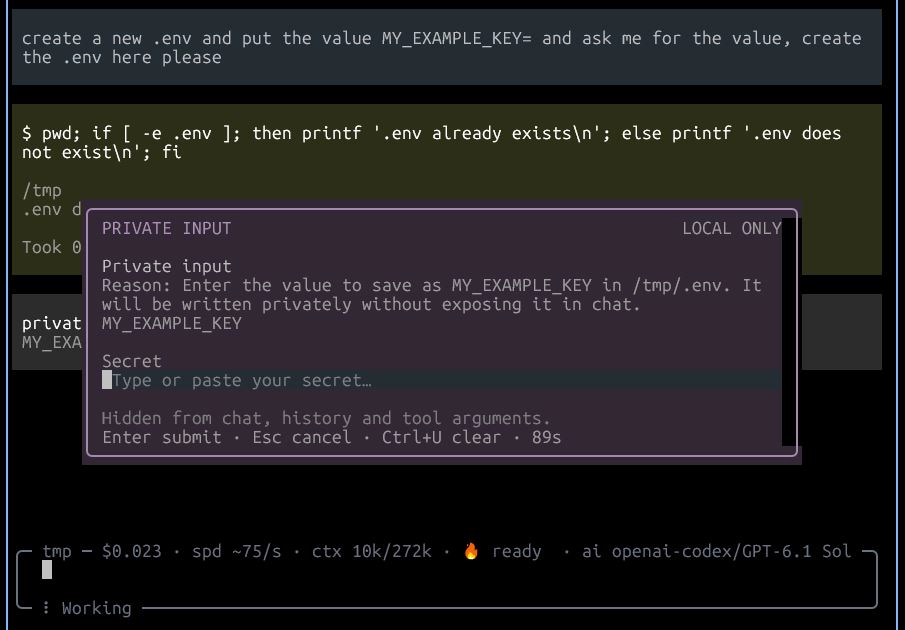
Private credential input and explicit SSH/sudo helpers for Pi. Secrets stay out of chat, history and tool arguments.
The model never sees the secret. It receives a one-use opaque handle and consumes it only with explicit user confirmation: writing an env variable to a dotenv file, injecting it into a single command's environment, or piping it to stdin.
Install
From npm:
pi install npm:pi-private-input
From GitHub:
pi install git:github.com/dirop1/pi-private-input
From a local checkout:
pi install /path/to/pi-private-input
Requires Node.js 22+ and Pi interactive terminal mode. Package metadata includes pi-package for discovery in the Pi package gallery.
Tools
| Tool | Purpose |
|---|---|
private_input |
Ask the user for a secret in a private masked terminal modal. Returns a one-use opaque handle, never the secret. Do not ask the user to paste credentials into chat. |
private_apply |
Use a one-use handle with user confirmation: write-env (dotenv file, mode 0600), run-env (single command environment), or run-stdin (secret plus newline to stdin). Never interpolates the secret into shell source or prints it for the model. |
ssh_unlock |
Select and load a local SSH key for Git/SSH. A private modal sends the passphrase only to ssh-add. Reuses an accessible ssh-agent when available; otherwise starts a Pi-owned ssh-agent. |
sudo_exec |
Run an explicitly user-approved sudo command locally or on a POSIX SSH host. Credentials are entered privately and not cached by this extension. |
Model calls to private_input, ssh_unlock, and sudo_exec require a non-blank public reason (maximum 200 characters). Explain why the credential or permission is needed and what it will be used for; never include credentials. The explanation is shown in the request and masked authentication modal.
Commands
/private-input [label]     Collect a private one-use input (or /private-input forget to discard retained inputs)
/ssh-unlock                Select and load an SSH key without putting the passphrase in chat
/sudo-auth [SSH host]      Privately authenticate sudo; cache scope follows the machine policy
Slash commands show their results only as UI notifications; they do not send a result to the model or trigger an assistant response. For example, /ssh-unlock lets you load a key manually without sending a new message to the assistant. Model-called tools such as ssh_unlock return success or failure directly to the assistant. After /private-input, share only the displayed handle with the assistant if you want it to use the input.
sudo_exec with a host requires non-interactive SSH authentication first (use ssh_unlock for keys). Remote commands run through a fixed bootstrap that consumes the password before the approved command starts.
ssh-agent lifetime
An ssh-agent holds unlocked keys and performs authentication without asking for the passphrase each time.
- If Pi can access an
ssh-agentalready running when it starts (viaSSH_AUTH_SOCK), it reuses thatssh-agent, even if it has no keys yet. Other terminals or programs connected to the samessh-agentcan also use the loaded key. Closing Pi does not unload it or stop thatssh-agent; its lifetime follows your existingssh-agentsetup. - If no
ssh-agentis accessible, Pi starts its ownssh-agent. SSH/Git launched by Pi can use it, and it is stopped when the Pi process exits. Reloading extensions or switching conversations does not stop it.
The passphrase is sent only to ssh-add; it is never returned to the model.
Security model
- Masked modal shows only a character count, never the secret. The secret is held in zeroed buffers and cleared on use, cancel, session change or shutdown.
- Handles are single-use, random (
private:<hex>), capped at 32 retained inputs. - Tool results are redacted (raw, base64, URL-encoded and JSON-escaped forms) before returning. Oversized output is withheld rather than partially returned.
- Dotenv writes are atomic with
0600permissions and reject symlinks or non-regular files. Secrets containing single quotes are rejected for dotenv writes; use environment injection instead. - The askpass bridge uses a private socket (
0600) with a random token, a 2-minute prompt timeout and a 3-attempt limit.
This is not a sandbox: the approved command receives the secret and its output is only redacted on a best-effort basis. Review the destination and command before confirming.
Development
npm test
npm run check
npm pack --dry-run --ignore-scripts
Tests use synthetic secrets and mocked ingestion; they never touch real credentials, keys or agents. Pi loads the TypeScript entrypoint directly; no build or dependency installation is needed.
License
MIT. See LICENSE.