pi-minimalist-ui0.1.3
An open-source minimalist editor UI extension for Pi.
Untested on omp
This is a pi package. No one has reported whether it works on omp yet. If you try it, add your result below.
Reports 0
No reports yet.
Readme
Pi Minimalist UI
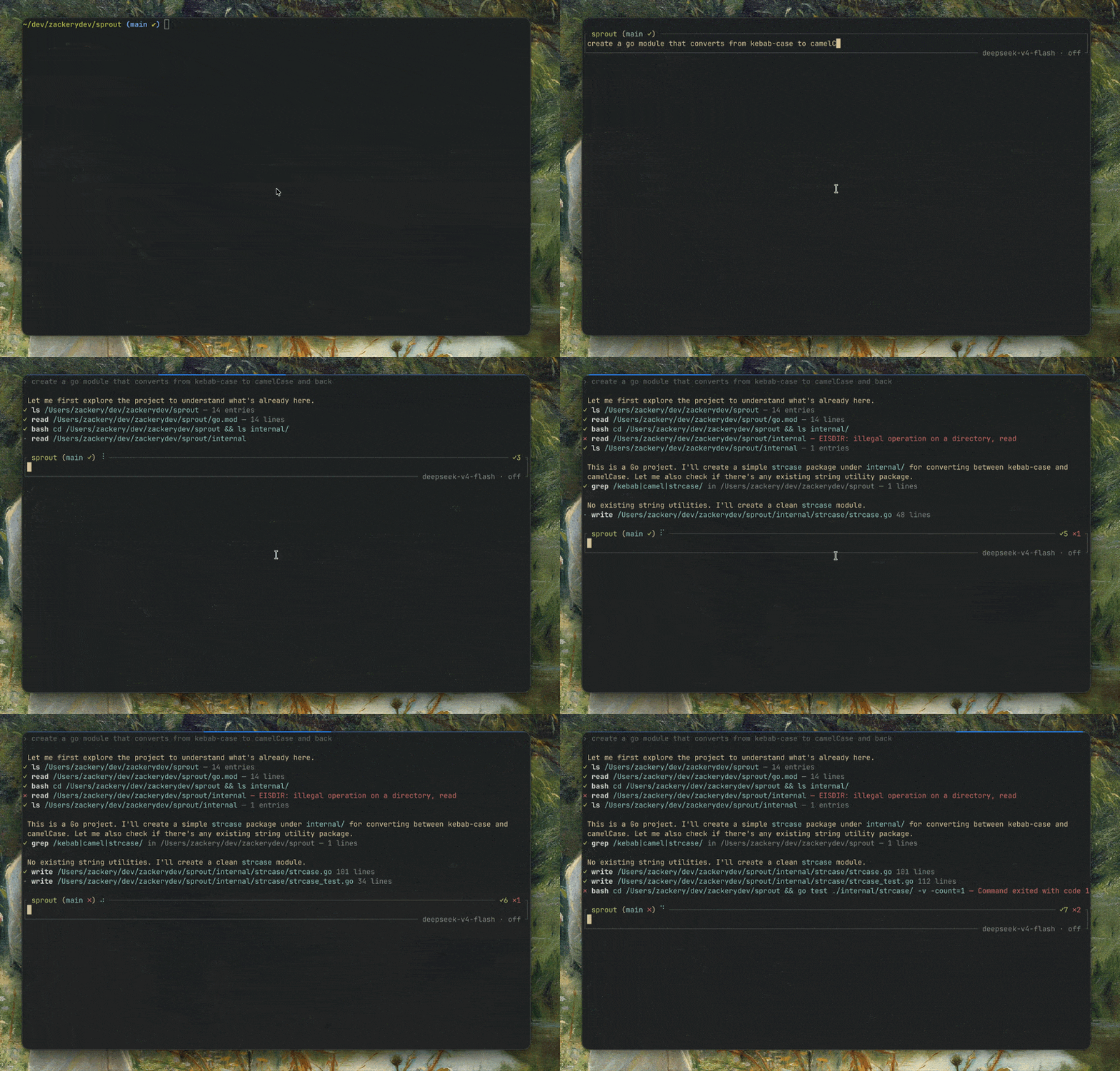
A visual-only plugin for pi that reduces noise.
A small, open-source editor UI extension for Pi. It replaces the default editor frame and footer with the project status you need, then stays out of the way.
The editor frame is inspired by Jan-Oliver Jahner's original simple theme for Oh My Zsh.
Features
- Clears the terminal viewport when Pi starts
- Project name, Git branch, and working-tree status inside the prompt box
- Thinking/working shows as a simple spinner
- Visible thinking traces collapse to a single
Thinking — opening textrow, clipped to terminal width - Tightly stacked, single-line summaries for built-in tools, MCP tools, and
codemode/ tool discovery - Dimmed
›user prompts without background blocks - Compact abort notices without surrounding blank rows
- Full tool output, diffs, and inline images remain available when expanded (
C-o) - Successful and failed tool counts for the current run
- Active model and thinking level in the frame without transient change notices
- ANSI-aware framing across narrow and full-width terminals
- No user configuration required and no application network requests
Installation
Review the source, then install the latest release from npm:
pi install npm:pi-minimalist-ui
Pi stores npm packages in its managed package directory and registers them in Pi settings. It does not copy files into ~/.pi/agent/extensions/ or modify project source code.
To pin this release, use pi install npm:pi-minimalist-ui@0.1.3.
Compatibility
- Node.js 22.19 or newer
- Pi with extension package support
The extension uses Pi's extension APIs plus small component-rendering patches and declares Pi's bundled core packages as peers. Development and release checks currently run against Pi 1.3.0.
Use a Nerd Font for the brain icon. Thinking previews show the first non-empty line, without Markdown heading or emphasis markers; they do not generate an AI summary. Pi's thinking-visibility toggle still hides these rows. In fullscreen mode, click a thinking row to expand or collapse the full trace. Tool expansion (C-o) is unchanged.
Development
Requirements: Node.js 22.19 or newer, npm 10, and Pi.
npm ci
npm run check
pi install "$PWD"
Pi loads src/index.ts directly from the checkout. After editing, run npm run check, then use /reload in Pi. Restart Pi when testing startup or shutdown behavior.
Other useful commands:
npm run build      # create and validate dist/
npm run format     # format tracked source and documentation
pi -e .            # one-off test without changing Pi settings
pi remove "$PWD"  # remove the local package reference
Performance
Tool-completion bursts share a trailing 250 ms Git refresh rather than spawning Git for every tool. Run completion refreshes immediately, and shutdown cancels pending work. During a burst, Git metadata can briefly lag behind tool results.
Unchanged tool rows cache their most recent width and rendered output. Text updates, resizing, and invalidation rebuild the cache; each row retains only one layout. Border helpers avoid redundant terminal-width measurements, and line counting avoids per-line arrays.
Run npm run bench for a reproducible warm-cache tool-layout microbenchmark. It compares the previous uncached layout with cached layout at the same width and verifies identical output. It does not measure end-to-end Pi performance or cold renders.
Structure
assets/               README and gallery preview
src/index.ts          Pi extension and lifecycle handling
src/index.test.ts     editor, Git, and lifecycle regressions
src/layout.ts         terminal-safe frame helpers
src/layout.test.ts    layout width regressions
src/messages.ts       compact user and abort message rendering
src/messages.test.ts  message rendering regressions
src/tools.ts          compact built-in and MCP tool renderers
src/tools.test.ts     built-in tool rendering regressions
src/mcp-tools.test.ts MCP, codemode, and discovery rendering regressions
dist/                 generated release output
Security and privacy
Pi extensions execute with the user's permissions, so source review matters. This extension does not make network requests, collect telemetry, read credentials, or construct shell commands from user input. It runs time-limited, read-only Git branch/status queries in the active project directory and renders the results after neutralizing terminal control characters.
See SECURITY.md for vulnerability reporting.
Contributing
Keep changes focused and the interface small. See CONTRIBUTING.md for the short development checklist.