pi-live-log0.1.1
Pi extension: live log tail inside running shell tool rows, plus a stall/max-runtime watchdog that stops hung builds and summarizes why.
Untested on omp
This is a pi package. No one has reported whether it works on omp yet. If you try it, add your result below.
Reports 0
No reports yet.
Readme
pi-live-log
A Pi extension that shows the live log of long-running shell commands inside the tool row, and a watchdog that stops hung commands, tells you why, and asks the agent for a short summary before it tries to fix anything.
Why
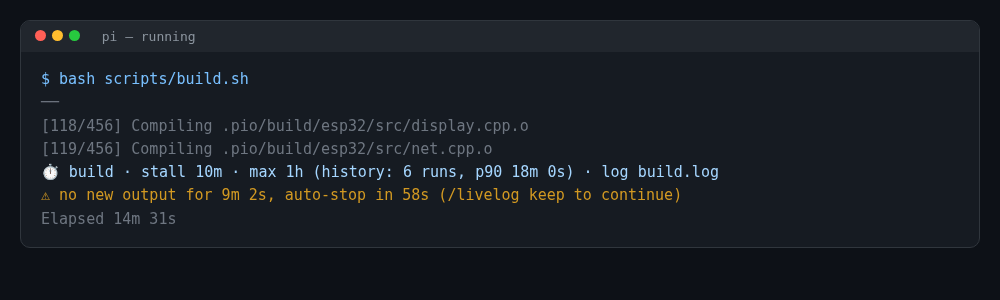
Long builds often write to a log file (make > build.log 2>&1, a script that runs pio run > /tmp/build.log, a Start-Job + poll loop…). In Pi you then only see Elapsed 11m 49s, and a hung build runs until the tool timeout. pi-live-log finds the log file the command writes to, tails it inside the running row, and stops the command when it goes silent for too long.
 $ bash scripts/build.sh
 ──
 [118/456] Compiling .pio/build/esp32/src/display.cpp.o
 [119/456] Compiling .pio/build/esp32/src/net.cpp.o
 ⏱ build · stall 10m · max 1h (history: 6 runs, p90 18m 0s) · log build.log
 ⚠ no new output for 9m 2s, auto-stop in 58s (/livelog keep to continue)
 Elapsed 14m 31s
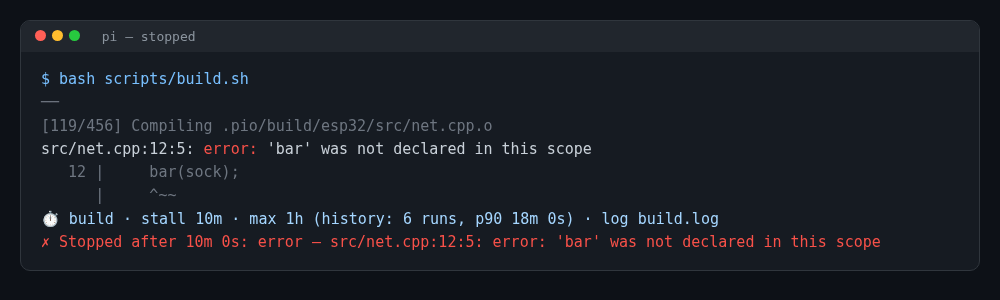
After a stop, the finished row ends with a verdict such as:
✗ Stopped after 10m 0s: error — src/net.cpp:12:5: error: 'bar' was not declared in this scope
Install
pi install npm:pi-live-log
Try it for one session without installing:
pi -e npm:pi-live-log
Then /reload (or restart Pi). Requires a Pi version with registerToolRenderer for the in-row view; without it, the widget above the editor is used instead.
Commands
| Command | What it does |
|---|---|
/livelog |
Status, current settings, running commands and their limits |
/livelog <path> |
Tail any file in the widget (/livelog off stops) |
/livelog lines <n> |
Number of log lines shown (1–40, default 8) |
/livelog widget on|off |
Also show running commands in a widget above the editor |
/livelog auto on|off |
Turn automatic tailing on/off |
/livelog watchdog on|off |
Turn the watchdog on/off |
/livelog stall <min>|auto |
Global stall limit override (0 = off, auto = per command) |
/livelog max <min>|auto |
Global max-runtime override (0 = off, auto = per command) |
/livelog limits |
Category limits and learned history |
/livelog forget <sig>|all |
Forget learned history for matching signatures |
/livelog keep |
Disable the watchdog for the running command |
/livelog stop |
Stop the running command now (with analysis) |
/livelog last |
Show the report of the last stopped command |
/livelog lang auto|en|vi |
Language of the extension's own texts |
Configuration
Settings are changed with the commands above and saved to live-log.json in the Pi agent directory.
| Key | Default | Meaning |
|---|---|---|
enabled |
true |
Tail shell commands automatically |
lines |
8 |
Log lines shown |
widget |
false |
Also use the widget above the editor |
watchdog |
true |
Watchdog on/off |
stallMin |
null |
Global stall override in minutes (null = per command, 0 = off) |
maxMin |
null |
Global max-runtime override in minutes |
warnSec |
60 |
Warn this many seconds before stopping (at most half the stall limit) |
lang |
"auto" |
auto follows the conversation (Vietnamese or English), or en / vi |
Files (all in the Pi agent dir):
| File | Content |
|---|---|
live-log.json |
Settings |
live-log-history.json |
Last 10 successful run durations per command signature (max 200 signatures) |
live-log-last-stop.md |
Report of the last stopped command |
Environment variables:
PI_CODING_AGENT_DIR— Pi's agent directory (default~/.pi/agent); the files above live there.LIVE_LOG_SETTINGS— full path of the settings file; history and last-stop files go next to it.
Watchdog limits
Each command gets a category from its text and from the scripts it runs:
| Category | Examples | Stall | Max |
|---|---|---|---|
| build | make, cmake, ninja, cargo build, npm run build, gradle, pio run, idf.py |
10m | 60m |
| test | npm test, pytest, vitest, jest, cargo test, go test, pio test |
5m | 30m |
| install | npm i/ci, pip install, apt install, git clone, curl, winget install |
5m | 20m |
| quick | git status, ls, rg, cat, Get-ChildItem… |
2m | 5m |
| default | anything else | 5m | 30m |
After two or more successful runs of the same signature (e.g. pio run @ /home/me/firmware), limits are raised from history: max = max(category, 2 × p90 duration), stall = max(category, 1.5 × longest silent gap). Global overrides win over both. If the tool's own timeout is shorter than the max limit, the header shows ⚠ tool timeout.
"Activity" means new streamed stdout or a change in the log file's size/mtime.
How log detection works
Sources, in priority order: a log file written since the command started → the streamed stdout → an older log file (marked old).
A log file is detected from:
> f,>> f,2> f,*> f,| tee [-a] fOut-File,Tee-Object,Add-Content,Set-Content,-RedirectStandardOutput/-RedirectStandardError*.log/*.txt/*.outfiles named inGet-Content,cat,type,tail,Remove-Item,rm,del,Test-Path(common in poll loops)- redirects inside
.sh/.bash/.ps1scripts the command runs (script blocks such asStart-Job { … }included)
Relative paths resolve against a leading cd / Set-Location / pushd, else the session cwd. Paths with variables or globs ($LOG, *.log) are skipped.
Windows and WSL
On Windows only, POSIX paths are mapped so logs written inside WSL can be read:
/mnt/d/proj/build.log→D:\proj\build.log/tmp/build.log→\\wsl.localhost\<distro>\tmp\build.log(fallback\\wsl$\...)
The distro comes from wsl -d <name> in the command, else the default distro from the registry, else Ubuntu. On Linux and macOS (including inside WSL) paths are used as-is.
Stopping uses Pi's own abort (same as Esc). On Windows, Pi kills the process tree, which also ends the Linux processes started by a wsl.exe child.
When a command is stopped
- A warning appears in the row (and as a notification)
warnSecseconds before. - On stop, the turn is aborted and a local analysis of the last log lines runs: error lines, or a hint such as waiting for input, a repeating line, downloading packages/toolchain, still compiling (progress [119/456]), no output at all.
- The verdict is appended to the tool row, written to
live-log-last-stop.md, and the agent receives a follow-up message asking for a short summary in the language of the conversation before fixing anything.
A normal failure (non-zero exit) is never touched; only the watchdog or /livelog stop triggers this.
Subagents
With subagent extensions that run child sessions in the same process (e.g. @tintinweb/pi-subagents), each child's shell commands appear in the main session's widget as ⤷ <agent name>: <elapsed> · <command> with their log tail and warnings. A watchdog stop aborts only that child (its Agent call returns as aborted); the main session gets the summary message and continues.
Limitations
- With several subagents running at once, child rows are labelled
subagent (N running)instead of each name. - A stopped subagent cannot summarize its own work; the main session does it.
- Detection is regex-based: log paths built at runtime (variables, string concatenation) are not found; streamed stdout is used instead.
- Scripts larger than 256 KB are not inspected. At most 6 log candidates are tracked per command.
- The analysis is heuristic and English-pattern based; it is a hint, not a diagnosis.
- Built-in texts exist in English and Vietnamese only.
Privacy
No network access and no telemetry. The extension only reads the log files and scripts referenced by commands, and writes its three files in the Pi agent directory. The follow-up message (including the last ~40 log lines) is sent to your model like any other message in the session.
Development
npm test # node:test, Node >= 22.19 (type stripping), no dependencies
Source layout: src/index.ts (wiring), detect.ts (log detection), wsl.ts (path mapping), watchdog.ts (limits + timing), analyze.ts (stop analysis + messages), render.ts (row/widget), i18n.ts, subagent.ts, config.ts, format.ts.
License
MIT © Nguyễn Hồng Đức (hongducdev)