pi-lingual0.6.0
Bilingual developer companion & declarative Prompt Optimizer for Pi — Mode as Configuration, Dual-Core Golden Defaults, Zero-Residue First-Run Handshake, and S-Tier Prompt Architect.
Untested on omp
This is a pi package. No one has reported whether it works on omp yet. If you try it, add your result below.
Reports 0
No reports yet.
Readme
pi-lingual
A bilingual terminal HUD and prompt transformer for Pi Coding Agent.
Code in your native language. See real-time Silicon Valley spoken phrasing and formal technical prose—or transform prompts into clean technical English to keep your code, comments, and commits consistent.



-brightgreen)

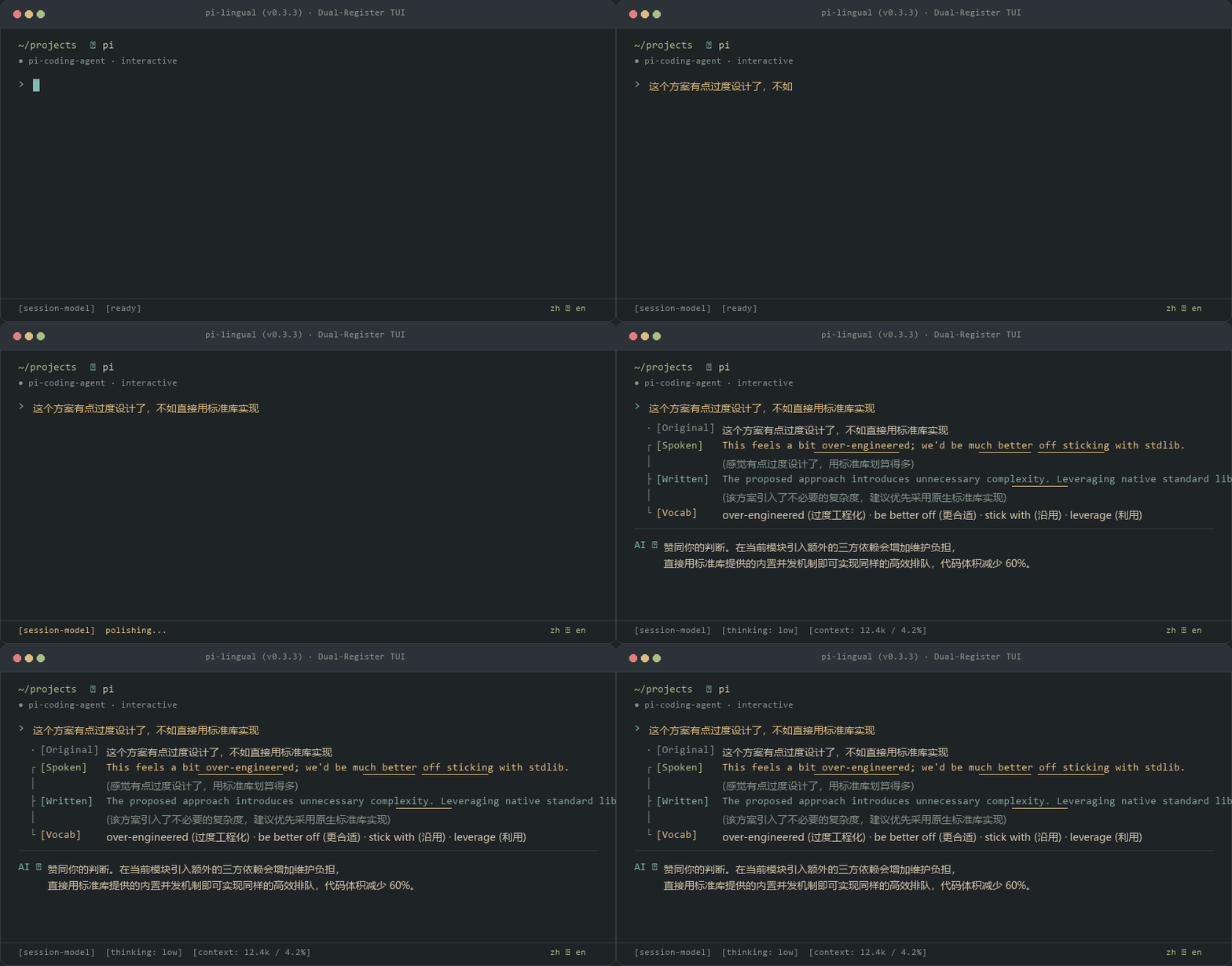
  · [Source]   这个方案有点过度设计了,不如直接用标准库实现
  ┌ [Spoken]   This feels a bit over-engineered; we'd be much better off sticking with the standard library.
  │            (感觉有点过度设计了,用标准库划算得多)
  ├ [Written]  The proposed approach introduces unnecessary complexity. Leveraging native standard library implementations is preferred.
  │            (该方案引入了不必要的复杂度,建议优先采用原生标准库实现)
  └ [Vocab]    over-engineered (过度工程化) · be better off (更合适) · stick with (沿用) · leverage (利用)
Quick Start
Install directly inside Pi Coding Agent:
pi install npm:pi-lingual
Works out of the box with your current session model credentials. Automatically follows your system language (e.g. zh ⇄ en, ja ⇄ en) on cold boot with zero interactive setup dialogs. No extra API keys or setup required.
💡 Recommended Terminal Mode:
For companion learning and historical review, we recommend configuring"tuiMode": "regular"in~/.pi/agent/settings.json. Translation and vocab cards flow naturally with your conversation stream, allowing you to scroll back up anytime to review past expressions without sandbox barriers.⚡ Latency Profile: In factory default Companion mode, prompt delivery is 0ms (pass-through directly to the coding agent without delay). In rewriting modes (
direct,live-flow), prompt transformation executes a single model call depending on provider speed.
Core Value: Why Do Developers Need This?
Pairing with terminal AI coding agents creates four acute frictions for developers:
1. Global & Team Repositories Require Clean English
In open-source projects or cross-border teams, code comments, commit messages, and PR descriptions must be strictly in English.
When you prompt an AI agent in your native language, the model frequently generates code with native-language comments and explanations. You have to manually review and clean them up before every push.
In Logical Spec mode (direct / lazy): You type naturally in your native language. pi-lingual automatically rewrites your instruction into standard technical English before passing it to the AI. All generated code, comments, and documentation remain uniformly in clean English.
2. Catching the 5-Second Generation Gap
After hitting Enter, an LLM typically takes 5 to 15 seconds to synthesize code or execute refactorings.
That window is too short to switch to a browser, yet long enough for your focus to drift into idle staring.
pi-lingual creates a low-cognitive-load window right above your prompt. During that brief generation gap, glance at how the same thought maps between daily engineering chat (Slack / standups) and formal documentation (RFCs / PRs), cultivating authentic fluency effortlessly.
3. Zero Context Pollution & Zero Token Waste
Standard translation tools append English translations directly onto your prompt.
Across multi-turn conversations, this clutters chat history with redundant text, burning token budgets and diluting the model's reasoning focus.
pi-lingual operates as an ambient TUI sidecar overlay. Your prompts to the AI remain completely clean; no translation tokens are injected into your conversation history.
4. Rock-Solid Terminal Layout (No More Border Tears)
East Asian full-width (CJK) characters occupy 2 visual columns.
Traditional closed rectangular boxes (│ ... │) fracture when character widths are miscalculated, causing ghost lines, wrapping tears, and cursor desync.
pi-lingual discards closed borders entirely, using an open left-rail tree branch (· ┌ ├ └) built on Unicode UAX #11 metrics. It stays visually solid even on narrow split panes.
Three-Core Golden Defaults & Declarative Mode Architecture (Mode as Configuration)
pi-lingual ships with Three-Core Golden Defaults and supports infinite customization via its declarative state machine engine. Press /lingual to cycle sequentially through enabled modes and off, or jump directly via /lingual <id|index> (mode numbers follow your current local registry order; mode IDs such as /lingual companion, /lingual direct, and /lingual live-flow are permanent and always resolve):
| State | CLI ID & Aliases | What You Type | What the Engine Does | Status & UI Feedback | Best For |
|---|---|---|---|---|---|
[1] Companion |
companion (alias: original) |
Native Language | Passes your text through untouched at 0ms and renders the bilingual card above the prompt | zh ⇄ en · 4s · Companion + 4-slot tree card |
The 5-15 s generation gap becomes a low-load window to pick up authentic phrasing |
[2] Logical Spec |
direct (alias: lazy) |
Native Language (e.g. Chinese / Japanese) | Restructures thoughts into imperative engineering specs with active verbs | zh ⇄ en · Logical Spec + Clean preview |
1-to-1 imperative prompt structuring on Enter, keeping codebases & commits 100% pure English |
[3] Live Flow |
live-flow (alias: raw) |
Foreign Draft / Raw Venting | Surgically patches typos & prepositions, preserves profanity/heat, sends to AI | zh ⇄ en · Live Flow + Adaptive takeaway card |
Taking the steering wheel directly in English with zero tone-sanitization and native takeaway diffs |
[0] Off |
off |
Any Text | Hides status bar badge (undefined), detaches resize listeners & strips skill block |
0 pixels, 0 listeners, 0 tokens — completely invisible inside Pi | Pure coding or screen recording with zero visual or context footprint |
Zero-Config Cold Boot (Detected Pair, Zero Writes)
When a developer installs pi-lingual on a fresh system, session_start auto-detects the native OS locale without any setup dialogs or input interruptions:
- Detected Language Pair: Automatically activates the detected native language with standard abbreviation notation (e.g.
zh ⇄ en,ja ⇄ en). - Zero-Disk-Write Contract: No configuration file is written on cold boot; settings materialize only when you explicitly customize them (via
/lang,/lingual,/slots, or/tuner).
Declarative Mode Registry & CLI Commands (/lingual mode)
Developers can customize modes via natural language using lingual-tuner or manage the registry directly via the CLI:
/lingual mode list: Print the active mode registry, flow directions, actions, and slot counts./lingual mode add <id> <name> [flow] [action] [hud]: Register a custom workflow mode./lingual mode rm <id>: Remove a mode by ID./lingual mode toggle <id>: Enable or disable a mode from the/lingualcycle./lingual mode reset: Restore factory dual-core golden defaults.
Tactical Loadouts Catalog (/lingual loadout)
Beyond the dual-core factory defaults, pi-lingual provides 4 pre-configured battle-tested tactical loadouts that can be applied with one command or customized via /lingual tuner:
spec(Brain-Dump to Spec):flow: "translate"·action: "transform"·target: "agent"·hud: "preview"
Casts raw, messy thoughts into structured engineering specifications (Objective, Constraints, Edge Cases, and Do Not Touch clauses) for agent plan mode.commit(Commit Dehydrator):flow: "translate"·action: "transform"·target: "clipboard"·hud: "preview"
Transforms plain-language explanations or commit drafts into strict Conventional Commits (first line $\le 72$ chars, imperative verbs, Root Cause & Impact body) and copies directly to clipboard.oss(OSS Peer Comms):flow: "translate"·action: "transform"·target: "clipboard"·hud: "tree"
Turns blunt technical feedback into objective, peer-level GitHub issue/PR comments using authentic maintainer idioms (nit:,under contention,race condition,repro:). Copies directly to clipboard.yap(Indie Shipper):flow: "translate"·action: "transform"·target: "clipboard"·hud: "tree"
Distills technical milestones into cold, high-density developer posts ($< 280$ chars) for X and Hacker News. Strict 0-Emoji rule, zero corporate marketing hype. Copies directly to clipboard.
Hybrid Intent Grafting (Code Stays Untouched)
In prompt transform mode, pasting code blocks or error logs never translates the code:
- Translates intent only: Converts natural language instructions into crisp technical English (or your active target language, reflecting symmetric bidirectional parity).
- Keeps code untouched: Grafts your original code block or stack trace right back onto the prompt.
- The result: Clean English instructions paired with complete technical context in full bidirectional parity.
In Action: Dual-Register Philosophy
Memorizing isolated vocabulary lists does not build expressive capability. Real software engineering naturally divides into two distinct registers:
  · [Source]   这个方案有点过度设计了,不如直接用标准库实现
  ┌ [Spoken]   This feels a bit over-engineered; we'd be much better off sticking with the standard library.
  │            (感觉有点过度设计了,用标准库划算得多)
  ├ [Written]  The proposed approach introduces unnecessary complexity. Leveraging native standard library implementations is preferred.
  │            (该方案引入了不必要的复杂度,建议优先采用原生标准库实现)
  └ [Vocab]    over-engineered (过度工程化) · be better off (更合适) · stick with (沿用) · leverage (利用)
[Spoken] (Conversational Register): High-frequency phrasing used by Silicon Valley engineering teams. Includes daily standups, Slack huddles, pair-programming chats, and common phrasal verbs.[Written] (Architecture Register): Formal technical prose. Built for RFC proposals, pull request descriptions, architecture reviews, and issue trackers.[Vocab] (Collocations): Extracted engineering collocations. Automatically highlighted with non-destructive ANSI underline formatting when matched in sentences.
Form Factors: Full Tree vs. Single-Line Capsule
Two layouts designed to protect your editor workspace:
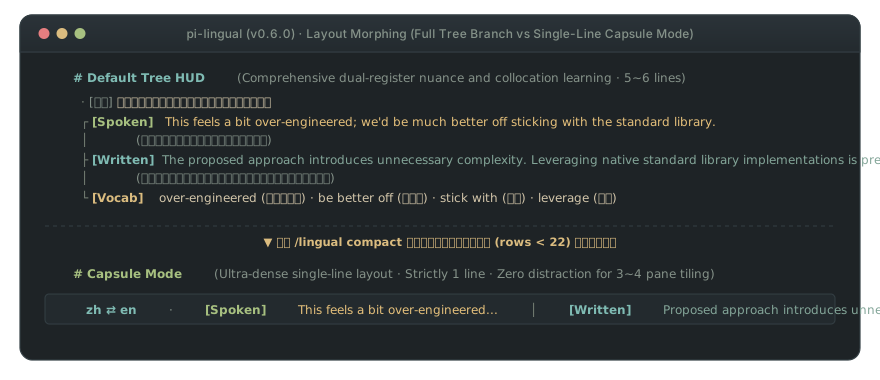
- Left-Rail Tree HUD (Default): Open-branch layout (
· ┌ ├ └) using Unicode UAX #11 metrics. Eliminates closed borders to prevent terminal wrapping tears. Stays strictly within 9 lines to avoid host widget truncation warnings. - Single-Line Capsule Mode (
/lingual compact): Compresses the HUD into a dense single-line stream:
Saves over 80% vertical space in tight split panes (tmux, WezTerm). Activates automatically when terminal height is $< 22$ lines.zh ⇄ en · [Spk] This feels over-engineered... │ [Wrt] Proposed approach introduces unnecessary complexity...
Real-World Multilingual Matrix
Translating into English is the primary focus, but major languages are supported bidirectionally:
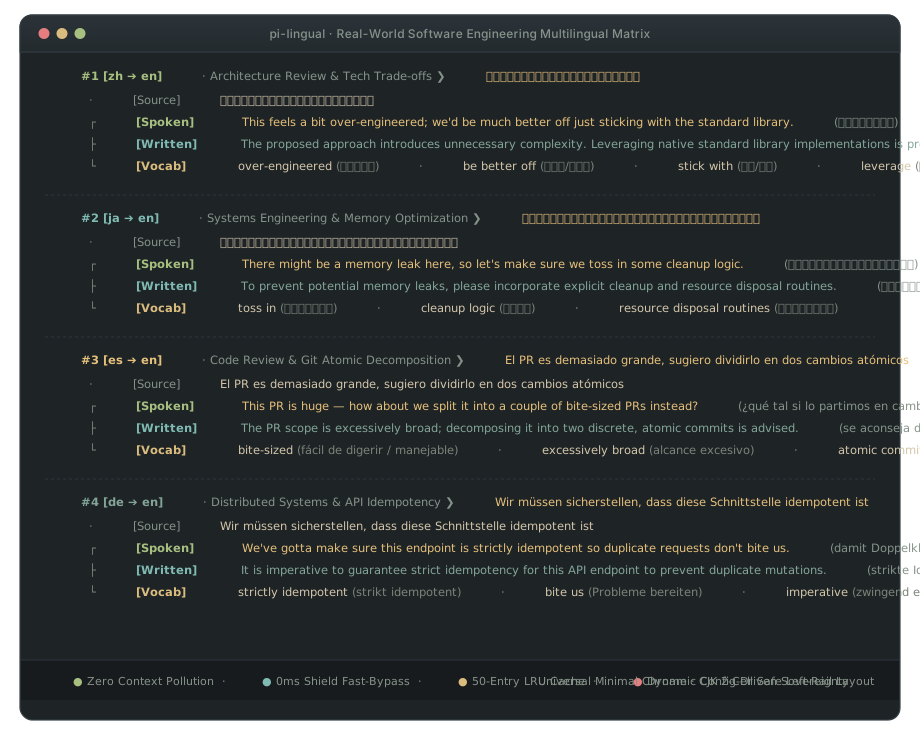
| Source | Scenario | Input Prompt | [Spoken] Daily Standup / Slack | [Written] RFC / PR Review |
|---|---|---|---|---|
| 🇨🇳 zh | Architecture | 这个方案过度设计了,不如直接用标准库 |
This feels a bit over-engineered; let's stick with the standard library. |
The proposed approach introduces unnecessary complexity. Leveraging native standard library implementations is preferred. |
| 🇯🇵 ja | Systems | メモリリークの可能性があるので、クリーンアップ処理を追加してください |
There might be a memory leak here, so let's make sure we toss in some cleanup logic. |
To prevent potential memory leaks, please incorporate explicit cleanup and resource disposal routines. |
| 🇪🇸 es | Code Review | El PR es demasiado grande, sugiero dividirlo en dos cambios atómicos |
This PR is huge — how about we split it into a couple of bite-sized PRs instead? |
The PR scope is excessively broad; decomposing it into two discrete, atomic commits is advised. |
| 🇩🇪 de | Distributed | Wir müssen sicherstellen, dass diese Schnittstelle idempotent ist |
We've gotta make sure this endpoint is strictly idempotent so duplicate requests don't bite us. |
It is imperative to guarantee strict idempotency for this API endpoint to prevent duplicate mutations. |
Switch language pairs anytime:
/lingual lang ja en      # Japanese to English (or: /l lang ja en)
/lingual lang es en      # Spanish to English
/lingual lang de en      # German to English
/lingual lang en ja      # English to Japanese
/lingual lang zh ja      # Chinese to Japanese
/lingual lang 日语       # Natural language aliases supported
Primary Language Sovereignty: Switching languages updates status badges, command hints, and UI chrome with zero hardcoded residues.
Engineering Highlights
- 🎯 Smart Language Sensor (0ms Auto-Bypass): Automatically detects when you are already typing in your target language (e.g. English in
zh ⇄ en) and passes through at 0ms without redundant translations or token waste. In Direct Spec mode, prompts starting with active verbs (Fix,Add,Refactor) pass through instantly. - 🧭 Interactive Capsule Mode Picker: Simply type
/lingualor/lto pop up an in-line capsule picker. Tap1,2,3, or0for instant hotkey switching without pressing Enter, or navigate with arrow keys and cancel withEsc. - 🛡️ Zero Context Pollution: Runs as an ambient TUI sidecar. Never injects translation tokens into your LLM chat history.
- ⚡ Instant & Non-Blocking: Press Enter to clear cards immediately. Stale background requests abort on the fly via
AbortController. - 📐 Rock-Solid Terminal Layout: Open tree branches (
· ┌ ├ └) using Unicode UAX #11 metrics. Never breaks borders or wraps awkwardly on wide characters. - ⚡ Command Pass-Through Shield: 40+ common CLI prefixes (
git,docker,npm,cargo) and code blocks bypass translation with zero token spend. - 🧠 In-Memory LRU Cache: Frequent affirmations (
继续,认同,开始吧) return instantly at 0ms from a 50-entry cache. - 🧹 Noise Filtering: Automatically strips clipboard screenshot paths (
pi-clipboard-*.png) and folds compiler logs before translation. - 🪶 Model Isolation: Runs on your session model by default, or pick a lightweight model to protect high-tier reasoning quota.
Two-Tier Cognitive Model: Everyday Simplicity + AI-Driven Customization
pi-lingual strictly adheres to a core developer philosophy: "Master basic usage in seconds; delegate all configuration to your AI Agent." You never need to be a JSON configuration engineer or memorize complex CLI subcommands:
1. Tier 1: Everyday Usage (5 Seconds to Master)
During normal daily coding, you only ever need two actions:
- Switch Mode: Type
/lingualor ultra-short alias/lto pop up an interactive capsule picker. Tap1(Companion),2(Logical Spec),3(Live Flow), or0(Off) for instant 0ms switching without Enter (or jump directly with/lingual 1,/lingual 2, etc.). - Switch Language: Type
/lang jaor/lingual lang jato switch your target language on the fly. - Smart Auto-Bypass: Type your native tongue for rich companion cards; type pure English (0 CJK) for instant 0ms pass-through directly to your coding agent without artificial translation friction.
2. Tier 2: Zero-Manual Configuration via AI Skill
For any advanced custom requirements, simply speak to your Pi Coding Agent in plain conversational language. The built-in lingual-tuner architect skill understands your intent, inspects your configuration safely, and updates it on demand:
- "Configure a Conventional Commit mode for me" ➔ Automatically attaches commit dehydrator loadout.
- "The companion card is too tall, simplify it into a single-line capsule" ➔ Automatically sets dense layout.
- "Change target language to German with English explanations" ➔ Automatically updates language pair and cognitive explainLang.
- "Clean up unused modes and keep only Companion and Logical Spec" ➔ Safely inspects installed modes and trims them.
Streamlined Command Architecture (Single Super-Command /lingual & /l)
To prevent autocomplete pollution in Pi's / menu, pi-lingual registers strictly 2 top-level commands (/lingual and its ultra-short alias /l, with /lang preserved as an ergonomic bridge) and routes all sub-functions through a unified command bus:
| Command | Subcommands / Arguments | Description |
|---|---|---|
/lingual or /l |
(no arguments) | Open interactive capsule mode picker (hotkeys 1/2/3/0, arrows, Esc) |
| ↳ Direct Switch | /lingual 1 | 2 | 3 | 0 |
Instant mode switch by positional number or ID (companion, direct, live-flow, off) |
| ↳ Quick Toggle | /lingual on | off |
Quickly enable companion mode or turn off (0 pixels, 0 listeners, 0 tokens) |
| ↳ Language Pair | /lingual lang [pair] or /lang |
Switch language direction (e.g. /lang ja, /lingual lang ja en) |
| ↳ Replay Card | /lingual last | replay |
Replay the most recent companion or rewrite card |
| ↳ Default Mode | /lingual default [1|2|3|0|id] |
View or pin default mode for all new sessions (defaultMode in lingual.json) |
| ↳ Layout Mode | /lingual compact |
Toggle dense single-line capsule mode vs open Left-Rail Tree HUD |
| ↳ Mode Lock | /lingual lock | unlock |
Lock active mode to prevent external process drift (human commands always 100% priority) |
| ↳ Reasoning Effort | /lingual reasoning [low|medium|high] |
Switch model reasoning depth (low for responsive execution, medium for complex spec) |
| ↳ Prompt Architect | /lingual tuner [request] |
Launch on-demand Bilingual Prompt Architect wizard directly |
| ↳ Status & Diagnostics | /lingual status |
Comprehensive diagnostics and in-memory LRU cache statistics |
Keyboard shortcuts: Alt+. (next page), Alt+, (previous page). Standalone CLI: lingual "prompt".
Universal Dynamic Slot Pipeline (Fully Movable Slots)
Never get locked into rigid, hardcoded templates. Every slot on your companion card—including the source text—is a decoupled building block:
- Hide original source text:
Run/lingual slots rm sourceto completely remove the source text row. Cards will display clean translation branches directly. - Add custom tone & style slots:
Run/lingual slots add twitter Tweet Short punchy tweet under 280 chars. The LLM JSON schema and Tree HUD layout adapt dynamically in real-time. - Toggle or reset slots:
Run/lingual slots toggle <id>to temporarily mute a slot; run/lingual slots resetto restore default initial slots anytime.
💡 Agent Confirmation Protocol: When asking your Agent to configure companion slots, your Agent will proactively confirm two things: your desired slot count, and the specific style and role for each slot (including whether you want to keep or suppress the original text).
Dedicated Models & Privacy
Configurable Reasoning Effort (/lingual reasoning)
Instead of swapping models for different tasks, pi-lingual dynamically adjusts the reasoning effort level per mode:
/lingual reasoning low       # Fast low-latency execution for daily rewriting (provider-dependent)
/lingual reasoning medium    # Deeper structural thinking for complex loadouts (e.g. Brain-Dump to Spec)
/lingual reasoning high      # Maximum reasoning depth for intricate multi-constraint requirements
- Daily modes (
direct/lazy,live-flow/raw,commit,oss,yap) default to"low"for responsive execution (provider-dependent). - Complex architectural loadouts (
spec) default to"medium"to structure exhaustive specifications without hallucinating.
Protecting High-Tier Reasoning Quotas
By default, pi-lingual runs securely in-process using your active Pi session model.
When pairing with high-tier reasoning models, delegate companion duties to a lightweight model to save quota:
/lingual model <lightweight-model-id>    # Delegate to a lightweight model
/lingual model auto                      # Revert to follow-session mode
Local Ollama or custom OpenAI-compatible endpoints can also be configured in ~/.pi/agent/lingual.json:
{
  "endpoint": "http://127.0.0.1:11434/v1/chat/completions",
  "model": "qwen2.5:3b"
}
🔒 Absolute Privacy Guarantee:
pi-lingualhas zero external dependencies (dependencies: {}), zero telemetry, and zero tracking. Requests go only to your authenticated model endpoints.
Author's Note
The system prompts for the translation model are currently tailored by me, but you can deeply customize them to fit your own needs at any time using the /lingual tuner command or the built-in lingual-tuner skill.
Beyond just tweaking configurations, I genuinely encourage everyone to think through the output style you actually want:
- How granular should the breakdown of key phrases in a sentence be?
- Do you need supplementary explanations on specific grammar nuances or engineering contexts?
- How many core collocations strike the right balance for your cognitive load?
These questions matter immensely. You will only achieve the best results when you tune the prompts intentionally to match your baseline. In your daily workflow, whenever you press Enter and wait a few seconds for the AI to generate code, take that brief idle window to glance at the natural phrasing right above your prompt.
The inspiration for this project came from my personal experience using tools like the Metasequoia (水杉) input method. I used them faithfully for quite a while, but the outcome was disappointing—I felt like I wasn't really learning anything. Elementary vocabulary was already familiar and didn't need reinforcement, while difficult, obscure words couldn't be grasped just by staring at isolated dictionary entries. During that period, my vocabulary apps were practically worn out from constant lookups. What truly allows you to internalize language and actually use it is authentic phrasing and natural collocations embedded within real context.
I hope everyone takes the time to tune a prompt that works best for them, catches those brief moments during code generation, and keeps going.
Verification & Testing
npm run typecheck   # Strict tsc --noEmit check (0 errors)
npm test            # 197/197 test assertions passing (100% green)
npm run build       # Multi-entry compilation via tsup (extension + core engine)
Ecosystem: Pi Terminal & Desktop Suite
Each extension occupies a distinct terminal or desktop slot so all tools run together with zero interference:
| Package | Environment & Slot | Mechanism & Responsibility | Install / Link |
|---|---|---|---|
pi-lingual (Current) |
Terminal aboveEditor HUD |
Dynamic dual-register companion card (≤9 lines, UAX #11 tree) & 0-token prompt rewrites | pi install npm:pi-lingual |
lingual-desktop |
Windows Desktop Dynamic Island | Driver-level low-level keyboard hook (WH_KEYBOARD_LL), roof-docked 3s card & system-wide input bridge |
GitHub Release |
toolflow |
Terminal Tool Sandbox | Stage-gated capability mounting & >40-line log dehydration to disk (-95% context tokens) | pi install npm:toolflow |
pi-tui-status-beautifier |
Terminal Footer Status Bar | 6 badge presets, <80-col idle folding (+N idle), 0 render-loop disk reads |
pi install npm:pi-tui-status-beautifier |
pi-anchor |
Terminal belowEditor Dock |
1-line sticky strip, 0ms pin: intercept, [■■□□] step bar & ↪ session jump |
pi install npm:pi-anchor |
License
MIT © Jason Song