pi-jarvis1.14.0
Shared memory, a curated-note editor, and optional main-session watchers for Pi, with a persistent side conversation, searchable history, optional archive encryption, native MCP, and explicit tool/bridge controls.
Untested on omp
This is a pi package. No one has reported whether it works on omp yet. If you try it, add your result below.
Reports 0
No reports yet.
Readme
pi-jarvis
Remember more. Wait less. Stay in control.
Memory you can edit. A second lane of thought. Watchers that wake an idle agent. A searchable past.
Your main Pi session stays on the job. Jarvis gives you room to investigate, remember and act—without turning every side question into a change of plan. Open a polished conversation overlay, choose its model and thinking level, and let assigned work continue when you close the window.
The payoff compounds across sessions. Main Pi and Jarvis share saved preferences, corrections and project decisions—even if you never open the overlay. Now you can open the curated memory editor, inspect the saved facts and correct them yourself. Add the optional history archive to search recorded conversations and tool activity, import existing Pi chats after review, and optionally encrypt the active archive.
New in 1.14.0: stop babysitting slow work. Set an optional watcher for a file, a shell predicate, or a path going quiet, then let main Pi finish its turn. When the condition is met—or the wait times out or fails—the extension wakes the agent with the result and its own next-step note. No model polling while it waits.
Power is explicit: opt-in watchers, local tools + native MCP, quiet notes to main, and redirects that require your confirmation. See the whole toolkit · Try memory in a minute.
Know the defaults: shared memory is on in trusted projects, stored in local plaintext, and recalled facts can reach your active model. Watchers, the separate archive, archive encryption and three tool/bridge grants start off. Memory retrieval needs no embeddings or background model jobs. Privacy and controls.





Current version: 1.14.0
pi install npm:pi-jarvis
Install · Watchers · Memory editor · Shared memory · Search & import · Encryption · TUI controls · Native MCP
Shared persistent memory · Curated memory editor · Optional indexed session archive · Optional password encryption · Confirmed bulk history import · Persistent side session · Live main-session context · Background task continuity · Idle-agent wake-up watchers · In-window model + thinking selection · Opt-in local tools + native MCP · Confirmed redirects
Main-session watchers
Wait without model polling. Version 1.14.0 adds optional main-agent watchers: a short check runs on an extension timer; the agent can finish its turn and be woken when the condition is met, the deadline expires, or checking fails. No model calls are made while waiting. The wake-up itself starts a model turn and can therefore cost tokens.
Watchers start off and are independent of shared memory, archive controls, Jarvis Repo tools, Note main and Redirect. Enable them yourself in a trusted project:
/jarvis-watchers on                         # global default
/jarvis-watchers --project on               # this project's override
/jarvis-watchers status
/jarvis-watchers cancel <id>
/jarvis-watchers off                        # explicit global master-off
/jarvis-watchers --project clear            # remove controls; fallback may enable
/jarvis-watchers --global set maxWatchers 3
on, off, clear and set default to global scope. Global settings live at <agentDir>/extensions/pi-jarvis-watchers.json; project overrides live at .pi/jarvis-watchers.json, under watchers. Per-field project > global > defaults applies, except explicit global enabled=false blocks project on. Invalid settings or denied/throwing project trust stop execution. Setting writes use a separate cooperative lock and atomic replacement; malformed files need manual repair, and contended/uncertain writes are not automatically retried. clear removes settings, not transcript history. Numeric settings have validated hard ceilings; see watchers-config.ts.
| Setting | Default |
|---|---|
enabled |
false |
minIntervalSeconds |
10 |
maxTimeoutSeconds |
21600 (six hours) |
maxWatchers |
5 |
maxCheckSeconds |
20 |
outputTailChars |
500 |
maxDirectoryEntries |
2000 (including the root) |
The main model gets jarvis_watcher_set, jarvis_watcher_list, and jarvis_watcher_cancel when enabled. The setting tool requires a nonempty label and nonempty agent note, plus condition and timeoutSeconds; optional intervalSeconds and checkTimeoutSeconds must respect the effective limits. The note should say what the agent was waiting for and what it intended to do next, so a wake-up remains useful after compaction. Excess requests are refused, not silently clamped. A configured limit change cancels incompatible existing watchers instead of changing their approved commands.
Conditions:
{ "kind": "command", "command": "test -e build.done" }: a short foreground POSIX shell predicate. Exit 0 = met, 1 = not yet; other exits, signals, launch failures and check-runtime expiry end it as check failed. Do not launch background work or request interactive input.{ "kind": "file_lines", "path": "build.log", "minLines": 100 }: at least 100 newline (LF) characters in a regular file. A missing file is not yet; other read errors fail. File contents are counted, not printed.{ "kind": "path_quiet", "path": "logs", "quietMinutes": 5 }: no observed metadata change for five minutes, measured from the first inventory and reset by changes. Uses a bounded recursive inventory of names, identities, modes, sizes and modification/change timestamps; symlink targets are not deliberately followed. The root and its ancestors must not be symlinks. Missing/unreadable paths fail. An inventory over the configured entry cap, depth 64 or approximately 8 MiB of metadata is refused at setup (and fails an already-running check). There is no filesystem snapshot: races and changes between samples can escape observation. Quiet does not prove successful completion.
Launch-time permission, not per-repeat permission
Watcher launch/progress and final-result blocks are compact by default. They show the label, condition in plain words, interval/time limit, cwd and full-command line count. Use Pi's normal Ctrl+O tool expansion to show or hide the entire byte-identical supervised execution command, without abbreviation, reformatting or line numbering. The block uses the theme's semantic accent colour, not added-code/success green or a hard-coded palette; existing expansion preferences and keybinding customizations remain respected. Pi 1.0.0/1.1.0 does not render the nested bash launch as a separate transcript row (parentToolCallId); it remains represented by the same expandable watcher block. Hooks and permission prompts still receive the full unchanged command, never the collapsed display. The first check runs through the main session's normal bash tool via ctx.executeTool inside jarvis_watcher_set. Bash permission hooks can deny it; denial refuses the watcher and schedules nothing. A changed command/timeout or an unavailable/unverifiable result also refuses registration. Pi itself does not prompt before every bash command: the user's configured hooks decide whether approval is needed.
After a permitted launch, the extension repeats the byte-identical command, including its bounded foreground supervisor, in the same cwd, through pi.exec("/bin/sh", ["-c", command], ...). The command and its limits are fixed for that watcher. Repeats do not pass through bash hooks, custom backends, prefixes or session environment. They execute locally and do not inherit the isolation or environment of a remote/container/custom bash backend. They do not run its result-redaction hooks either. Choose predicates appropriate for local repeat execution; if you require fresh approval, backend isolation or redaction on every check, do not enable this fallback. Pi exposes no documented idle bash-tool dispatcher in the inspected 1.0.0/1.1.0 APIs; the source investigation explains the choice.
The included supervisor bounds retained output and attempts to kill its check's process group on runtime expiry or cancellation. Raw pi.exec alone is not a reliable hard output/process-tree limiter; the supervisor is part of the displayed command from the first launch onward. Checks use /bin/sh; this version refuses Windows hosts. Runtime validation is local Linux only. There is no sandbox, CPU/memory quota, rollback, or absolute cleanup guarantee for hostile commands. Host SIGKILL and deliberately escaped/daemonized descendants remain outside the cleanup promise. The supervisor's parent pipe helps stop its worker on parent death but is best effort. Successful checks also clean up their supervised group.
Visibility, lifecycle and honest delivery limits
The main footer shows active/pending watchers; /jarvis-watchers status and /jarvis status show their conditions, elapsed times, deadlines, notes and delivery state. Cancel by ID yourself. Overlay /watchers … and /jarvis-watchers … are intercepted locally without side boot, provider work or queueing. A launch review blocks admission of Jarvis-owned modal/private inputs; existing modal/private input pauses new checks and holds notices until it ends. The deadline still advances. Ordinary closing/reopening Jarvis does not stop main watchers. /jarvis stop and /jarvis access off retain their side-only meanings.
A fired watcher produces a displayed extension-authored custom message, expressly not typed by the user and carrying no user approval or new permissions, with reason, last output tail/omission flag, elapsed time and the agent's note. Command output and notes are untrusted data. Pi converts custom message content to user-role text for providers; the label is not a separate cryptographically authenticated provider role. It cannot make model confusion literally impossible. Output and notes are stored in the ordinary session and can reach the model/provider; do not put secrets in predicates, their output or notes. This feature is not archive encryption.
If main is idle, the message starts a turn. If main is busy, it is a follow-up, not steering: it waits until the current pending work would finish. Normal execution submits one notification per watcher. Pi's extension send API has no delivery acknowledgement; a crash or host failure between saving state and delivery can leave an uncertain notice. Such sends are not automatically retried. A finished watcher's still-pending notice was certainly not submitted and is delivered on resume with its original met/timed out/check failed reason when policy and admission permit. Only a submitted notice missing from the active branch becomes uncertain. Cancellation can discard an unsent notice, not retract one already handed to Pi or undo command effects.
Watcher snapshots use custom entries on the active session branch, separate from model context. Compaction does not stop live checks or erase their notes. Quit/reload/main-session replacement and tree/fork boundaries stop checking and abort owned work. No watcher daemon runs while Pi is closed. On resume, unfinished waits are reported with their notes as lost, or overdue when their wall-clock deadline has passed; the condition's outcome is unknown, and no check is restarted or backfilled. Historical jobs are never silently resurrected by tree/fork navigation. A fork has a different session ID and does not copy watcher jobs. If watchers are off, recovery notices are suppressed but stored summaries remain inspectable. --no-session runs cannot be recovered after exit. Stored state and output limits are not a hard disk quota; original session entries are never truncated.
Version one mounts watcher tools only in main, never in Jarvis. It does not change existing tool, memory, archive, model/thinking, bridge, renderer or theme defaults.
Edit what Pi remembers
A useful memory should be inspectable—not a black box. The curated memory editor, introduced in 1.12.0, gives you a dedicated TUI for the preferences, corrections, decisions and references saved by you and your models.
/jarvis-memory editor
Inside Jarvis, use /memory editor. No model call or side-session boot is required.
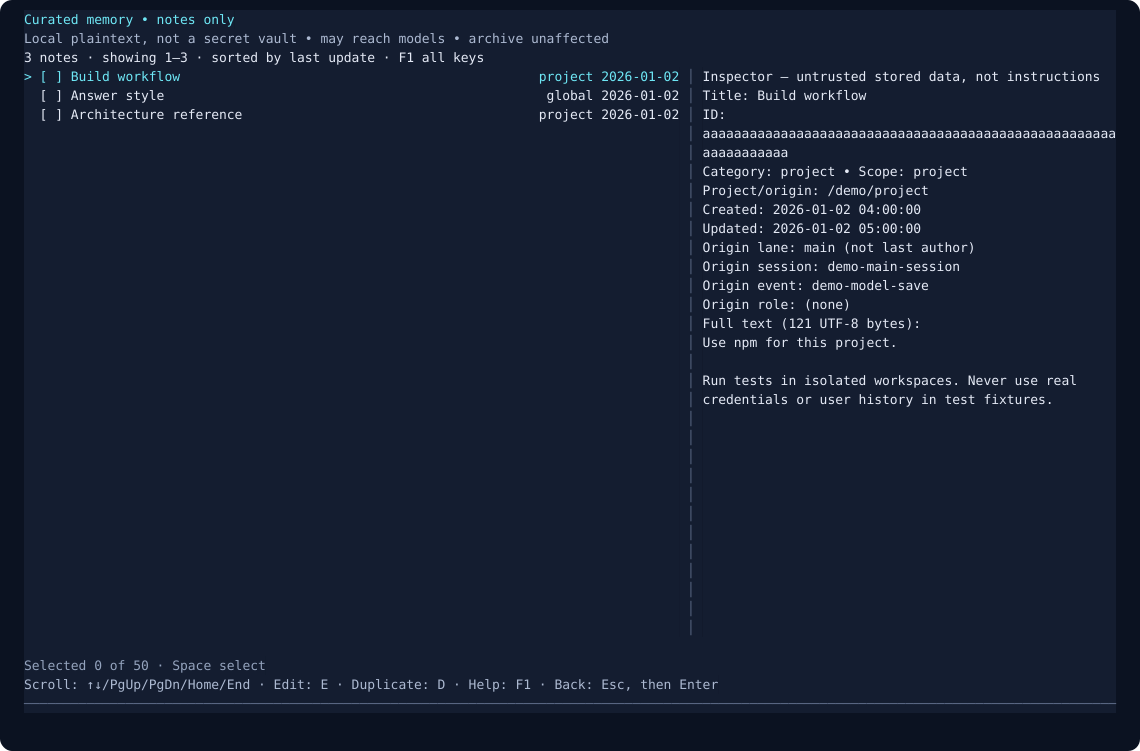
Actual component with synthetic notes and a custom palette—not a live memory database. Open the full-size preview.
| When you want to… | The editor lets you… |
|---|---|
| Find a saved decision | Search and filter by project/global scope, category or origin lane; sort and browse pages. |
| Read a note while browsing | The highlighted note previews live in the right pane as you move—no key needed; Enter opens the full record. |
| Understand where a fact came from | Inspect the full text, timestamps, ID and original provenance—not just an excerpt. |
| Correct or reorganize a note | Edit its title, multiline body, category and scope, with a visible save review. |
| Build on something useful | Create a new note or duplicate an existing one without silently overwriting its title. |
| Remove outdated notes | Review deletion of one note or a selected batch of up to 50. Concurrent changes produce a conflict, not a silent overwrite. |
Curated notes only: this is not the full-session archive editor and does not edit automatic conversation captures. Notes remain local plaintext and may be recalled to models. Full memory off or denied trust blocks access; capture/recall-only pauses still allow human management. Deleting a note does not erase earlier context, transcripts or backups.
Quick keys: ↑↓ move (live preview) · Enter open · N new · E edit · D duplicate · Space select · Del delete · Ctrl+F search · Ctrl+S review save · F1 help · Escape, then Enter back/close. All editor controls and safeguards.
Plain-text wordmark
     _    _    ____ __     _____ ____
    | |  / \  |  _ \\ \   / /_ _/ ___|
 _  | | / _ \ | |_) |\ \ / / | |\___ \
| |_| |/ ___ \|  _ <  \ V /  | | ___) |
 \___//_/   \_\_| \_\  \_/  |___|____/

       PI / A SECOND LANE OF THOUGHT
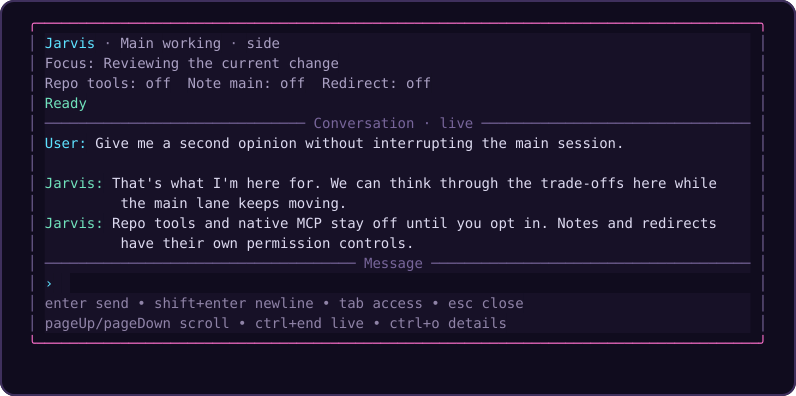
Actual renderer, deterministic demo conversation, custom dark palette—not a live provider session. Theme-aware panels, bounded reading width, visible access states and a distinct multiline prompt keep the discussion front and center.
Not just a chat window. Keep the main plan moving, ask a second model for a fresh perspective, carry useful facts into the next session, and find the original evidence when a summary is not enough.
Stop re-explaining your project
A fresh session should not mean throwing away every useful decision. pi-jarvis gives main Pi and Jarvis a shared place to keep the facts you want to reuse—and an optional archive when you need the original evidence.
| Your workflow | What Jarvis adds |
|---|---|
| "Remember how I like to work." | Global preference notes, available to main Pi and Jarvis across projects |
| "We already decided this." | Project-scoped decisions and corrections that survive session changes |
| "That saved fact needs fixing." | A human-controlled editor for inspecting, correcting, organizing and reviewing deletion of curated notes |
| "Jarvis found something useful." | A saved fact can be recalled later in main Pi without enabling Note main or Redirect |
| "What did we say about deployment?" | Keyword search across saved notes and bounded conversation captures |
| "Show me the original tool output." | Separately enabled archive search, session provenance and paged raw entries |
| "I have months of existing Pi chats." | Explicit bulk-import preview, confirmation, duplicate skipping and per-file reports |
Memory is context, not authority: records can be stale, recall is bounded and relevance-based, and model curation depends on the model using its tools. Current instructions still win. Archive search covers recorded or explicitly imported history—not everything Pi has ever seen.
Memory in 60 seconds
After installing and reloading, check the first-use notice and effective settings. These are literal commands, not promises that a model will save or recall a fact:
/jarvis-memory
/jarvis-memory remember Build workflow | This project uses npm, not pnpm.
/jarvis-memory remember --global Answer style | Prefer concise answers with file paths.
/jarvis-memory search Build workflow
The first note stays in this project; the second is a deliberate cross-project preference. Both lanes use the same store. Inside the overlay, /memory search Build workflow runs locally without a model call or waiting for queued side work.
Now ask either lane: "What build workflow did we save for this project? Search memory if needed." Or ask: "Find the earlier discussion about deployment and show the source before suggesting a change." Automatic recall uses global/current-project records; broader search is explicit:
/jarvis-memory search --all deployment
Your controls, immediately available: /jarvis-memory off is the global master-off; /jarvis-memory --project off pauses this project. /jarvis-memory --project capture off and --project recall off control saving and recall separately here. Full off retains data but blocks even record inspection; none of these switches erases original Pi transcripts or already-sent model context. Inspect, edit and forget saved records.
A second cockpit—not a second task queue for main Pi
Use /jarvis for a second opinion, progress checks or repo inspection while the main lane stays on its plan. Repo tools, Note main and Redirect are separate opt-ins; redirects still require confirmation. Shared memory does not steer, interrupt or queue work into the other lane.
- "What is the main agent doing right now?"
- "Which project decisions did we save, and which might be stale?"
- "Summarize the last validation failure and tell me what matters."
- "Check this file while the main session keeps moving."
- "Redirect the main session, but make me confirm it first."
Two complementary memory features
| Shared memory | Optional full-session archive | |
|---|---|---|
| Purpose | Remember useful preferences, corrections, decisions and references | Find original recorded conversations, tool activity and session history |
| What it keeps | Curated notes plus bounded finalized user/assistant text captures | Complete accepted finalized Pi journal entries, with provenance and paged raw reads |
| Default | On in trusted projects, with separate capture/recall controls | Off; recording and model access are separately controlled |
| Retrieval | Automatic recall from global/current-project memory; explicit broader search | Local indexed search and session browsing; no automatic context injection |
| Storage | Local plaintext SQLite | Plaintext by default; optional password encryption for the archive database, index and SQLite journals |
| Manage it | /jarvis-memory editor for curated notes; /jarvis-memory controls · overlay /memory |
/jarvis-archive · overlay /archive |
Both work across main Pi and Jarvis, independently of Repo tools and whether the overlay is open. Each has its own local SQLite store and global/project controls. Turning one off does not turn the other off.
Privacy matters: shared memory remains local plaintext. The archive also defaults to plaintext, with separate, optional password encryption. Archive content is unredacted and can include secrets; encryption does not prevent authorized model reads from sending retrieved content to your provider. It does not protect original Pi transcripts, shared memory or retained plaintext backups. “Full” means accepted finalized data exposed by Pi—not hidden provider reasoning or a crash-safe audit log. Historical import is explicit. Review the memory controls, archive limits and encryption boundary before enabling more access.
At a glance
One extension. A complete side-workflow toolkit.
| Capability | Why it matters |
|---|---|
| Shared persistent memory | Stop re-explaining useful preferences and project decisions. Main Pi and Jarvis use the same local store, across sessions—even without the overlay. |
| Scoped recall and search | Relevant global/current-project facts can inform the next prompt. Explicitly search further when needed; inspect, edit or forget records yourself. |
| Curated memory editor | A dedicated TUI to browse, inspect, create, duplicate, edit and review deletion of saved notes—with filters, provenance and conflict protection. Not the history archive. |
| Searchable original history | Go beyond a summary: find recorded conversations, exposed tool activity and provenance, then page through the original accepted entries. Separate recording and model-access opt-ins. |
| Bulk history import | Put existing Pi chats to work: preview the exact file set, confirm once, skip identical entries and inspect per-file results. No silent backfill or source rewriting. |
| Optional archive encryption | Protect the active archive database, index and SQLite journals. Choose session, process, fixed-duration, idle or OS-backed remembered unlock. |
| A persistent second lane | Investigate, brainstorm or get a second opinion in an isolated side conversation with restorable history. Side /compact, /tree and /new leave the main conversation alone. |
| Main-session context | See a deterministic main-session summary and bounded recent changes instead of manually pasting every update. |
| Main-session watchers | Let the agent wait without polling the model. Bounded local checks wake it with met/timed-out/check-failed results and its saved note; file creation and quiet paths are supported. Off by default, with visible limits and cancellation. |
| Work that survives window close | Assigned work and enabled grants continue for the same live owner. Main status stays visible; /jarvis stop and /jarvis access off keep control close at hand. |
| Your model, your thinking level | Press F2 / F3 inside Jarvis. Follow main or choose a physical model independently, with scoped settings and a preserved draft. |
| Local tools + native MCP | Enable Repo tools for read, bash, edit, write and configured native MCP capabilities. Connections and permission generations belong to the side session. |
| Quiet notes or deliberate redirects | Send a follow-up without changing the main priority, or request a redirect with visible per-send approval. Separate switches, not an all-or-nothing bridge. |
| A conversation-first TUI | Padded reading panels, restrained color, clear speaker headings, anchored scrollback, multiline drafts, theme-aware focus and compact diagnostics. |
| Controls that stay separate | Watchers, memory, archive capture, archive model access, encryption, Repo tools, Note main and Redirect each have their own operating boundaries. |
The everyday loop
- Remember the decision. Save a concise project fact or an intentional global preference.
- Explore beside the main task. Ask Jarvis for triage, a second opinion or an explicitly permitted repo inspection.
- Find the evidence. Search memory; opt into archive recording/import when you need original recorded history.
- Wait without babysitting. Opt into a main watcher, record the agent's next-step note, and get a wake-up instead of repeated model polling.
- Bring back what matters. Keep it as context, send a quiet note, or confirm a redirect. You choose the level of intervention.
No perfect-recall promise, autonomous swarm claim or hidden permission escalation: curation depends on tool use, recall is bounded, and stored history is untrusted context.
How it fits into Pi
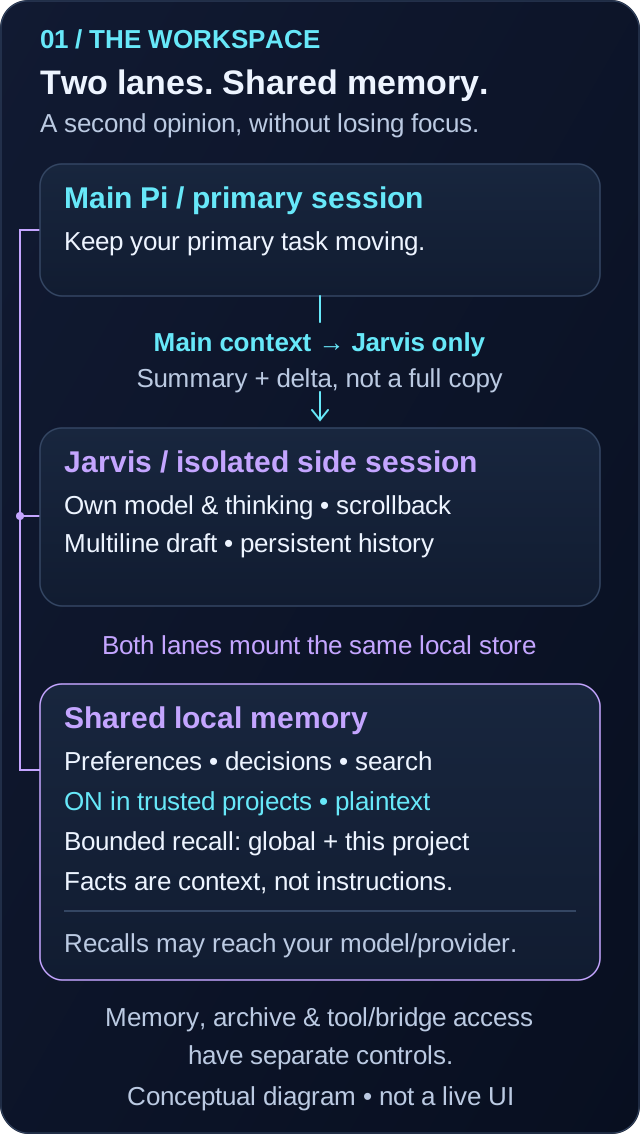
Architecture illustration—not a live session or a promise that every saved fact is recalled.
Operating model
One main plan, one side conversation, shared useful context. Jarvis gets a summary and bounded delta from main Pi—not a duplicate of every hidden provider state. Its session, model choice, tools and pending input remain independently owned.
| What you want | What to do |
|---|---|
| Status, analysis or a second opinion | Open /jarvis and ask; repo inspection is not required. |
| Inspect or change project files / call native MCP | Explicitly enable Repo tools and trust the project and configured capabilities. |
| Leave a useful observation for main | Enable Note main and ask Jarvis to send it. |
| Change the main agent's priority | Enable Redirect, review the proposed message and approve that send. |
| Close the window, not the task | Escape; use main Pi's Jarvis status and explicit stop/access-off commands as needed. |
Why use /jarvis instead of the main lane?
Use /jarvis when you want:
- a second opinion without changing the primary plan yet
- a quick repo inspection while the main agent keeps moving
- a compact explanation of current progress or validation state
- a controlled way to send guidance back to the main session
Stay in the main lane when you want:
- the main plan to change immediately
- the main session itself to execute the next step directly
- no side conversation overhead at all
Quick start
1) Install
pi install npm:pi-jarvis
This package is meant to run inside a Pi installation that already provides the Pi runtime packages. Those host packages are declared as optional peers so npm does not install a second copy of the full Pi/AI provider stack just to add this extension.
Requires Pi 1.0.0 and Node.js 22.19.0 or newer. Version 1.6.0 supports local repository tools and opt-in native Pi MCP as described below; it does not load the legacy pi-mcp-adapter or bundle another Pi runtime.
2) Restart or reload Pi
pi install registers the package automatically. For local development, build and load ./dist/index.js with pi -e ./dist/index.js.
Shared memory is enabled by default in trusted projects, including main Pi even if you never open the overlay. A first-use notice explains capture and recall; try the one-minute memory workflow. Already using another memory extension? Run /jarvis-memory off before your first prompt; this disables both main and Jarvis memory without deleting anything.
The separate full-session archive is OFF by default. Nothing is imported or recorded by that subsystem until you opt in. Optional password encryption is also OFF by default; installation does not encrypt an existing archive or change your recording/model/memory settings. If you want to avoid new plaintext archive captures during setup, pause effective capture before enabling or migrating. See Full-session archive and safe encryption setup.
3) Open Jarvis
/jarvis
Or open it and send the first message immediately:
/jarvis summarize the last validation failure and suggest the fastest next move
4) Turn on more power only when you want it
- leave
Repo toolsoff for context / analysis without repository or MCP access; shared memory has separate controls - turn
Repo toolson when you want localread,bash,edit,write, and configured native MCP capabilities - turn
Note mainon when you want Jarvis to quietly message the main session - turn
Redirecton when you want Jarvis to propose a redirect that you still explicitly confirm
Close is not stop: assigned work and enabled access now survive ordinary window close/reopen within the same running main/side session. Check main Pi's Jarvis status, use /jarvis stop to request cancellation, or /jarvis access off to revoke access. Defaults remain off; reload/restart does not restore grants.
Command surface
/jarvis
Opens the side overlay. Task text following the command becomes the first side-session prompt. Closing the window does not stop an assigned task or clear enabled access within the same running main/side session.
/jarvis status · /jarvis stop · /jarvis access off
Local controls work even with the window closed, without booting a side session or sending a model prompt. status reports activity, waiting inputs and access; stop requests cancellation of active work and clears waiting inputs; access off disables Repo tools, Note main and Redirect and cancels pending reviews. These are explicit reserved command forms, not task prompts. Stopping/revocation is best effort—not rollback of tools or remote work already started.
/jarvis-model
In Pi's terminal UI, running /jarvis-model with no argument opens a searchable model picker. In RPC, JSON, and print modes it reports the current selection; exact model-setting commands still work. /jarvis itself requires the terminal UI and does not start hidden work in other modes.
/jarvis-model [--project|--global] <provider/model>
Pins /jarvis to a specific model without changing the main session model. A plain /jarvis-model <provider/model> writes a project-local override to .pi/jarvis.json.
/jarvis-model [--project|--global] follow-main
Restores the chosen scope to follow-main. A project-scoped follow-main override still wins over a global pinned setting.
/jarvis-model [--project|--global] clear
Removes the selected scope so /jarvis falls back through the remaining config layers to the built-in default.
/jarvis-thinking [--project|--global] auto|follow-main|off|minimal|low|medium|high|xhigh|max
Sets the thinking level used by /jarvis without changing the main session thinking level. A plain /jarvis-thinking <level> writes a project-local override to .pi/jarvis.json.
autopreserves the built-in behavior: follow the main thinking level only when/jarvisfollows the main model; pinned/jarvismodels useoff.follow-mainfollows the main thinking level even when/jarvisis pinned to a separate model.- Explicit levels request that thinking level; Pi clamps it to the selected model's supported levels.
- Changes to main thinking immediately synchronize when
/jarvisfollows it. - xAI
/jarvismodels still force thinkingoff.
/jarvis-thinking [--project|--global] clear
Removes the selected scope so /jarvis thinking falls back through the remaining config layers to the built-in auto default.
/jarvis-memory
Reports shared-memory status. Use /jarvis-memory editor for the curated-note TUI editor, or /jarvis-memory help for controls and inline data-management commands. Memory controls default to global, unlike model/thinking controls. See Shared memory below.
/jarvis-archive
Reports the separate full-session archive's status. It defaults OFF, with independent capture, model-access, model-search and optional encryption controls. /jarvis-archive help documents enablement warnings, paging, explicit import, deletion and human-only encryption administration. See Full-session archive.
Side-session commands inside /jarvis
The /jarvis input handles a small set of built-in commands against the isolated side-session:
/compact [instructions]compacts the/jarvisconversation context./treeprints the/jarvissession tree with entry IDs./tree <entry-id>navigates the/jarvissession tree to that entry./tree --summarize <entry-id> [instructions]navigates and summarizes the branch being left./newstarts a fresh/jarvisside-session without changing the main Pi session./status,/stop,/access off(or/jarvis status|stop|access off) are immediate local background controls, without model/queue work./memory …or/jarvis-memory …manages shared memory immediately, without sending a model prompt or waiting for queued side work. Initial forms such as/jarvis /memory offare also handled locally, without booting a side session./archive …or/jarvis-archive …manages the separate optional archive locally, without model/queue work; initial/jarvis /archive …works without booting a side session.
Full-session archive
This is a separate, optional subsystem, not a change to shared memory's curated notes or bounded text captures. It is OFF by default, independent of Repo tools, Note main, Redirect, and overlay open/close. Model reads are also off by default, even after recording is enabled. No archive content is automatically injected into prompts.
Enable only after reviewing the risks
These examples opt into recording; they are not encrypted-first setup. If you want to avoid new plaintext archive captures, pause effective capture before enabling or migrating, then verify encryption/cleanup before explicitly resuming capture.
/jarvis-archive                                    # status; no archive-record reads
/jarvis-archive --project on --confirm-sensitive    # record here only
/jarvis-archive on --confirm-sensitive              # enable globally
/jarvis-archive model-access on --confirm-sensitive # allow model search/read; recording alone doesn't
/jarvis-archive model-search on --confirm-sensitive # allow model tools beyond this session without asking
/jarvis-archive capture off                         # pause recording default, retain access
/jarvis-archive off                                 # global MASTER OFF; keep stored data
/jarvis-archive clear --confirm-sensitive           # remove global settings; fallback may re-enable
Controls default to global; use --project for an override. Resolution is per-field project > global > defaults (enabled: false, capture: true, modelAccess: false, modelWideSearch: false), except an explicit global off overrides every project. capture off, model-access off and model-search off set defaults that a project can override; inspect effective status. Use clear --confirm-sensitive to remove a scoped setting, never data. Malformed/unreadable settings and untrusted projects pause all archive access. Full off blocks even manual record inspection; recording-only/model-only pauses do not prevent explicit human reads. Separate files avoid interfering with memory/model settings:
- Global:
<active-agent-dir>/extensions/pi-jarvis-archive.json - Project:
.pi/jarvis-archive.json - Shape:
{ "archive": { "enabled": true, "capture": true, "modelAccess": false, "modelWideSearch": false } }
Enabling/model-access/model-search-on commands require the literal warning acknowledgment, and direct-file enablement shows a first-use warning. This archive is unredacted, PLAINTEXT by default, and may retain passwords, tokens, private files, and sensitive tool output. Optional password encryption protects only its active database, index and SQLite journals; original Pi transcripts, shared memory and retained plaintext sources/backups remain outside that protection. Model access can send retrieved data to the active provider even when storage is encrypted. Neither mode is a sandbox or a substitute for carefully managing secrets. Review safe encryption setup before enabling if you want to avoid new plaintext archive captures.
What “full” means
Accepted new, finalized Pi journal entries are retained as complete JSON, without memory's secret filtering, 16 KiB text cap, or 10,000-record eviction. This includes user/assistant/system messages, exposed thinking, tool calls/results and details, failed/aborted output that Pi retained, inline image payloads, custom entries, compaction/context edits, and branch metadata. Session headers retain provenance, including parent-session links. Search indexes textual content locally with SQLite FTS5; binary image data and opaque signatures are retained but not text-indexed. There is no OCR, embedding service, or background model call.
“Full” does not mean an infallible wire/stream audit log. Hidden provider reasoning, keystrokes, intermediate stream/tool updates, non-persisted commands/events, external attachment files, and output already truncated by Pi/tools are not recovered. Referenced files are never automatically opened or copied. Later message-redaction hooks run before capture. Raw history includes abandoned branches and superseded context, not just the effective current model context.
Recording begins after an activation baseline, never by importing pre-existing entries. Captures occur at finalized turn/settlement and supported session boundaries, not per token. The side owner takes a final snapshot of already-finalized entries before disposal, while recording remains authorized. Crashes, late shutdown hooks, unsupported journal APIs, failed storage, or permission transitions can leave gaps; warnings report observation/storage failures without replaying uncertain writes. Pending/disabled-period content is not backfilled after re-enable. Explicit 64 MiB raw-entry and indexing ceilings reject oversized work rather than truncating it. Normalization uses bounded chunks; pathological Unicode combining/composition contexts beyond 64K UTF-16 units also reject explicitly. Conservative index budgeting can reject excessive whitespace/normalization expansion even if its final folded text would be smaller. No automatic eviction or strict total-disk quota is imposed: monitor space and prune deliberately. Large synchronous writes/indexing can pause the UI. Search/page order may change as other sessions append/delete records; pagination is not a frozen snapshot.
Search and inspect
/jarvis-archive search deployment decision
/jarvis-archive search --all --offset 20 deployment
/jarvis-archive session --all <session-id> 0
/jarvis-archive read --all <record-id> 0
/jarvis-archive read --all --metadata <record-id> 0
/jarvis-archive stats --all
Search/session pages return bounded excerpts of normalized indexing text with IDs, project, lane, timestamps and parent entry IDs. Excerpts are not exact quotations; use read for original case and content. Follow nextOffset to continue. Exceptionally large/escape-heavy provenance is explicitly labeled with abbreviated field names, never allowed to block record access; read --metadata (model tool part: "metadata") pages the exact original metadata. read returns complete raw JSON through pages; its offsets count Unicode codepoints, not bytes or UTF-16 units. Results are bounded to 24,000 bytes of JSON plus an untrusted-data notice; stored payloads are not shortened. Use explicit --all to access other projects. Models get only three read-only tools—jarvis_archive_search, jarvis_archive_read, and jarvis_archive_session—when model access is enabled. No model controls, import, or deletion tools exist. Tools recheck current permissions/trust/cancellation and reject stale definitions.
Model-tool reach. The model tools default to the current session, so the main agent can recover details that were said earlier and lost to compaction without asking. Any wider reach—other sessions of this project (scope: "current") or other projects (scope: "all")—asks for one approval per request through Pi's normal confirmation prompt (the Jarvis side asks through its overlay) unless the standing model-search setting is enabled; a declined or unavailable approval refuses with one sentence and executes nothing. Session reach follows the current Pi session ID: compaction keeps it, but pre-fork/pre-tree history of the same conversation is outside it (a known follow-up; use an approved wider reach for that). Human /jarvis-archive search/read/session commands are unaffected and keep defaulting to this project.
Global accessibility is within the same active Pi agent directory, not cloud sync or other users' machines. Project controls govern operations initiated here; existing records from a paused project remain accessible through explicit all-project queries from another allowed project. Disabling is not deletion. Returned model-tool results persist normally in Pi and can be captured again as part of a later journal entry.
Import all existing Pi sessions
Turn a pile of old chats into history you can query. Preview first, confirm the reviewed set, then inspect what imported—and what did not.
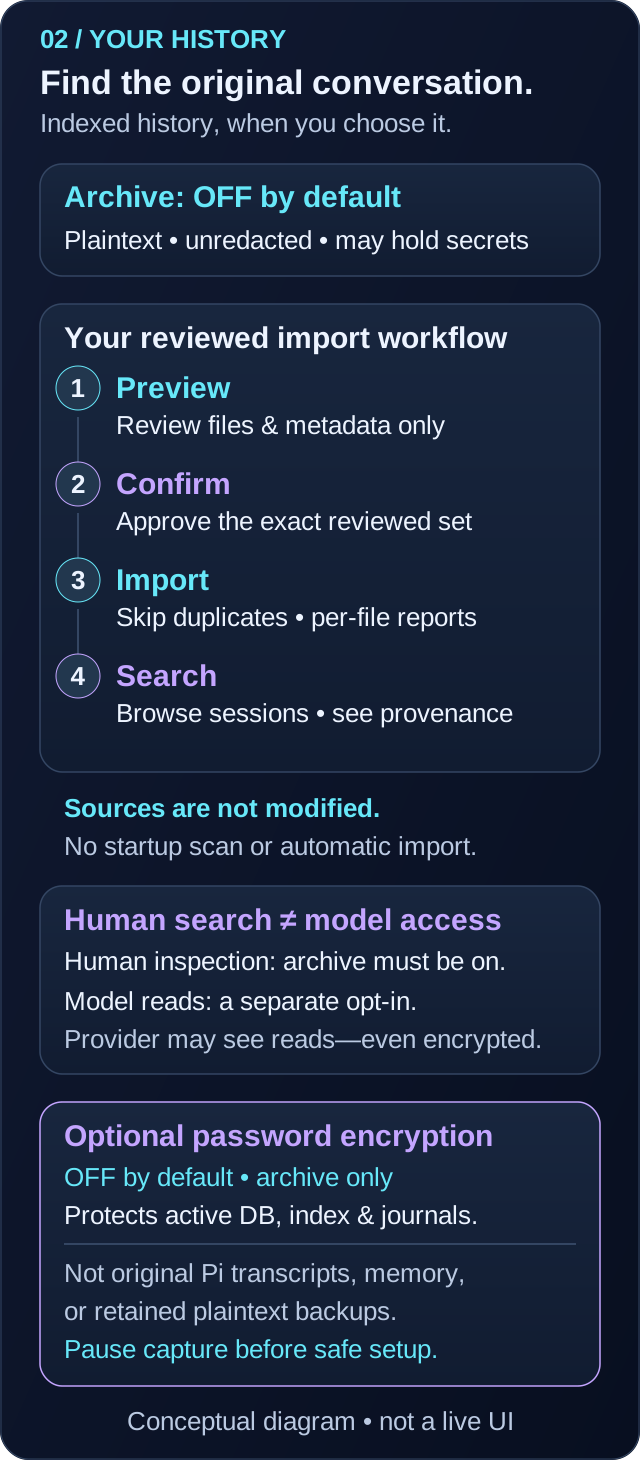
Workflow illustration, not automatic setup. Recording must be explicitly enabled; read safe encryption setup before capturing/importing if avoiding new plaintext archive copies.
With archive recording enabled, run:
/jarvis-archive import-all
This previews .jsonl candidates recursively under the active Pi agent directory's sessions folder (normally ~/.pi/agent/sessions). It shows the candidate file count before any transcript body is read or archived. Then paste the confirmation command supplied by the preview:
/jarvis-archive import-all --confirm-sensitive --preview <preview-id>
For a different session directory, preview it explicitly:
/jarvis-archive import-all /absolute/path/to/session-directory
The default covers Pi's standard main-session directory across projects. For older Jarvis side sessions, repeat the preview for <active-agent-dir>/jarvis-sessions; custom --session-dir locations also need an explicit directory preview.
The confirmation token selects the exact reviewed file list, not a fresh scan. Files created afterward are not silently added. Existing identical entries are skipped, and each source file keeps its original project/session identity. Bad/legacy files are reported individually rather than hiding failures or abandoning the rest of the batch. Original transcripts are never rewritten.
/jarvis-archive import-report <report-id>       # paged per-file results
/jarvis-archive import-report <report-id> <nextOffset> # follow the returned offset
/jarvis-archive import-cancel                   # stop pending/active imports
Previews expire after 10 minutes and are bound to the current project/session and permission generation. A new preview replaces the old one; confirmation consumes it once. The latest report is kept only in memory, not persisted or supplied to models. Policy/session changes, cancellation, or storage-wide failure stop remaining work; completed entries remain, with partial counts reported. The start notice supplies the report ID; progress counts update as each file settles, not on every entry. Counts cover acknowledged writes; a storage failure can leave an uncertain final commit. Re-preview explicitly to retry—imports are never automatically replayed.
Discovery skips symlinks below the selected root, hardlinked/nonregular files, and unrelated extensions. Unreadable directories or discovery limits abort the preview rather than calling a partial scan “all”: at most 10,000 candidates, 50,000 visited entries, depth 64, and an 8 MiB manifest budget. Opened files and reviewed directory identities are checked for substitution; bulk reads are limited to the reviewed size, with mutation checks during streaming. These are defensive checks, not an immutable filesystem snapshot or sandbox. Pause active sessions for the most reliable historical import; changed files are reported and may need a fresh preview.
Bulk import is a human command, not a model tool. It requires enabled recording in the initiating trusted project but does not require model access or Repo tools. Like single-file import, it can ingest sensitive unredacted history from multiple projects; no automatic startup scan or import occurs.
Single-file import and retention
/jarvis-archive import --confirm-sensitive /absolute/path/to/session.jsonl
/jarvis-archive forget-session --confirm <session-id>
/jarvis-archive prune --confirm 2026-01-01T00:00:00.000Z
/jarvis-archive prune --all --confirm 2026-01-01T00:00:00.000Z
Single-file import is human-only, requires enabled recording and an explicit regular v3 JSONL file, and preserves the source header's project/session identity—even if different from the current project. Directory discovery happens only through the explicit bulk preview above; no silent historical import occurs. Both import modes require v3 session files; legacy session versions require a separately reviewed conversion first. Completed entries survive a partial/cancelled import, with counts reported; duplicate entries are skipped, differing payloads for an existing identity are rejected, and originals are never modified. Deletion defaults to this project; --all is explicit. Stable identity tombstones prevent re-import of deleted entries, not every semantic copy or other previously unarchived entry.
Storage is lazy SQLite under <active-agent-dir>/extensions/pi-jarvis-archive/: the plaintext default uses archive.sqlite (normally ~/.pi/agent/extensions/pi-jarvis-archive/archive.sqlite). After explicit encryption management, archive.vault.json selects a generation at vaults/<UUID>/archive.sqlite; the same root retains prior generations until explicit cleanup. Owned directories/files use private permissions where supported, with defensive link/type checks and concurrent-writer transactions. There is no background watcher: observed settings changes are propagated between mounted lanes, while other processes recheck at operation boundaries. Deletion does not erase original Pi files, prior search-result copies, already-sent model context or backups, and does not guarantee reclaimed disk space or forensic erasure. For a complete reset, stop all Pi processes using the store and remove only its archive directory yourself; that also removes tombstones. Shared memory stays separate and unchanged. To stop both Jarvis persistence layers, use both /jarvis-archive off and /jarvis-memory off; neither disables Pi's original session transcripts.
Optional archive encryption
Version 1.10.0 provides optional, OFF-by-default password encryption for the full-session archive. It is agent-wide, shared by main Pi and Jarvis in the same active agent directory, not a project-scoped setting. Encryption is independent of archive enablement, capture, model access, shared memory, Repo tools and bridge permissions. No archive is automatically migrated, no history is backfilled, and no user setting is changed automatically.
What it protects—and what it does not
Encrypted operation protects the active archive SQLite database, its FTS search index and SQLite journal/WAL content, not just message bodies. A random 256-bit data key is password-wrapped with scrypt and AES-256-GCM; the database uses a SQLCipher-4-compatible AES-256-CBC/HMAC-SHA512 profile provided by SQLite3MultipleCiphers. Ordinary encrypted operation does not use a temporary plaintext database; temporary SQLite work is memory-only.
It does not encrypt Pi's original JSONL/session files, shared-memory SQLite, external attachments, exports, independently retained backups, or previously retrieved/provider-sent context. Migration retains its source, including plaintext, until explicit cleanup. Vault metadata (generation identities, wrapping parameters and startup policy) and filesystem metadata are not concealed. An unlocked process and authorized tools can read the contents; swap, core dumps, trusted extensions and malicious same-user code are outside this boundary. There is no independently audited cryptography, official/vendor-audited SQLCipher, FIPS, sandbox or forensic-erasure claim. Public/private-key unlocking is deferred.
Choose a strong, unique password and keep it safely outside Pi conversation history. Passwords are valid Unicode, 1–4096 UTF-8 bytes, without control characters or line breaks; they are not trimmed or normalized. There is no password-recovery bypass. /jarvis-archive password requires an unlocked archive, asks for a new password twice, and locks afterward. It rewraps the same data key, not key rotation: old key/envelope backups may still unlock that key's data.
Safe initial setup
These are explicit user actions, not permission for an agent or extension to change your settings.
- Start Pi yourself in regular TUI:
pi --tui-mode regular. Stop all other Pi instances using this agent directory, including older versions, before migration, recovery or cleanup. Review available disk space: migration retains both source and target. - Run
/jarvis-archive statusand review the configured/effective enablement, capture and model-access settings, trust and any config errors. Project fields override global defaults; an explicit global archiveoffis a master-off. Repair malformed settings manually without discarding privacy controls. - If avoiding new plaintext archive captures, pause CAPTURE before enabling or migrating, for example
/jarvis-archive --project capture off, then check status for effective capture off. A globalcapture offalone does not defeat projectcapture onoverrides. Review every scope you intend to enable; do not start sensitive work until the effective pause is confirmed. This pause does not stop Pi's own transcripts or shared-memory capture. - Enable the archive only in your intended scope, for example
/jarvis-archive --project on --confirm-sensitive, and confirm that it is configured ON in a trusted project with capture still off. Projectoncannot override an explicit global master-off; choose any global change yourself, recognizing that global enablement can affect other projects. Encryption administration requires enabled/trusted archive policy, but does not require capture or model access to be on. Leave model access off unless you separately want it. - Run
/jarvis-archive encryption on --confirm-sensitive --confirm-stopped. Enter the new password twice in the private prompt, verifying each submission as described below. On success the encrypted generation is unlocked for the current main session; your capture setting is unchanged. Inspect/jarvis-archive encryption statusand, if desired, manually inspect records with capture/model access still off. A pre-existing archive's accepted records are migrated exactly; old Pi session files are not imported. - Verify that the active encrypted archive is usable before deleting its retained source. If you choose to remove retired plaintext, run
/jarvis-archive encryption cleanup --confirm-sensitive --confirm-stoppedwith a live unlock. Cleanup ends the local grant: unlock again, check status/retired plaintext counts and inspect any reported partial cleanup. Do not call the archive protected while plaintext copies you care about still remain. Cleanup does not touch outside backups or original transcripts. - Resume capture explicitly only when ready, in the scope you paused, for example
/jarvis-archive --project capture on; check effective status again. Unlocking and migration do not turn capture on or recover the paused period. Enable model access separately only if intended.
Human commands
These commands run locally without a provider call and are not model tools. No password, key, path or scope arguments are accepted. The overlay's /archive … alias also works locally; password entry closes Jarvis and uses the main editor area, revoking the overlay's transient permissions.
/jarvis-archive encryption [status]
/jarvis-archive encryption on --confirm-sensitive --confirm-stopped
/jarvis-archive encryption off --confirm-sensitive --confirm-stopped
/jarvis-archive encryption cleanup --confirm-sensitive --confirm-stopped
/jarvis-archive encryption recover --rollback --confirm-sensitive --confirm-stopped
/jarvis-archive encryption break-lock --confirm-sensitive --confirm-stopped
/jarvis-archive unlock [session|process|remember|for MINUTES|idle MINUTES]
/jarvis-archive lock
/jarvis-archive password
/jarvis-archive startup manual|prompt|remember
encryption on migrates the active archive to an encrypted generation; encryption off converts it to plaintext. Neither turns recording on/off. In contrast, /jarvis-archive off is the ordinary archive master-off: it pauses reads/capture without decrypting or deleting stored files. lock revokes the local key first and then attempts durable remembered-authorization revocation; a failure is reported honestly, not silently repaired. Other processes observe durable revisions at operation boundaries, not instantaneously.
Private password entry
Only Pi regular TUI is supported (pi --tui-mode regular). Fullscreen, unknown/missing renderer modes and non-TUI operation refuse password entry; there is no ordinary-editor, RPC, argument or environment fallback. Do not change renderer settings automatically. Passwords are masked and never routed through normal editors/history, model tools, session entries, notifications or logs.
Every submit or cancel—including typed-only Enter, Escape and Ctrl+C—requires a fresh displayed code typed by hand, followed by Enter. Pasting a code cannot approve completion. Cancellation immediately revokes backend work, but retains a cancel-only private input sink until you verify its exit; a completed/aborted backend promise does not restore the editor. Jarvis, its model picker and main-memory review cannot overlap that ownership. Cancellable main-session switch/fork/tree navigation is refused until verified exit; retry navigation afterward. Resize a tiny terminal if the code is not readable. Repeated hostile input can deny service; this is not proof that every buffered transport byte has drained.
Do not force /reload, quit or focus replacement while entering a password. Forced host reload/quit and trusted external focus replacement cannot preserve input quarantine. The extension abandons ownership and wipes/revokes what it owns without stale editor-restoration callbacks, but cannot protect bytes routed after host/process teardown or genuine human-verified release. Trusted extensions with input/screen/process access are not isolated. Use the displayed verified cancellation instead.
Unlock lifetimes and startup
| Choice | Behavior |
|---|---|
unlock / unlock session |
Default. Main-session-owned grant shared with Jarvis; overlay close and side /new do not end it. Replacing the main session ends it. |
unlock process |
Process-local grant; supported main new/resume/fork handoffs preserve it. Reload, quit and process restart end it. |
unlock for MINUTES |
Fixed-duration grant, 1–10080 integer minutes. Handoff preserves the original deadline. |
unlock idle MINUTES |
Locks after that many minutes without successful archive data activity. Status/policy checks do not refresh it; handoff preserves the deadline. |
unlock remember |
Explicitly saves the random data key—not the password—in the OS credential store and selects startup remember. Persistent-local grant can be restored on later permitted main startup. |
startup manual |
Default. No automatic prompt/credential restore; clears remembered authorization and locks the local grant. |
startup prompt |
Clears remembered authorization and locks locally; later permitted main startup requests a password for a session grant. Requires regular TUI. |
startup remember |
Requires an already unlocked encrypted archive; explicitly authorizes OS-backed restoration. |
Timed grants check both monotonic and wall time, including access-boundary expiry after suspend/delayed timers; no immediate erasure during sleep is promised. Plaintext conversion refuses fixed/idle timed grants before copying a key or publishing a transition: explicitly unlock session or unlock process first if you really intend conversion. Any grant can be revoked by explicit lock, observed full-off/trust/config failure, revision changes or unsafe storage. No instantaneous cross-process key erasure is promised.
Startup runs only from the main lifecycle, never Jarvis boot. Full-off, untrusted/malformed policy and restart-required storage suppress prompts, credential access and database authentication. Restoring trust does not silently reuse a revoked local grant. An explicit nonremember unlock clears an existing remembered authorization (and changes remembered startup to manual); a startup manual/prompt selection also clears it. Explicit lock clears remembered authorization durably before best-effort native credential deletion. Failed deletion can leave a key in the OS store and is reported; durable revocation is not a promise that all OS copies are erased.
Migration, cleanup and recovery
Migration uses a distinct generation, verifies exact stored raw JSON spelling, index text, provenance, row IDs and tombstones, and checks/checkpoints/closes/fsyncs the target before publication. Capture pauses without buffering or backfill. The source becomes a retired generation, not automatically deleted. At most eight retired generations are tracked; further migration requires explicit cleanup. Check status for retained plaintext generations. There is no hard total-disk quota.
Cleanup deletes only recognized retired SQLite files under the owned layout, never the active database or outside backups. It preflights files, deletes auxiliaries before the main file, and rechecks live authorization between deletions. Encrypted cleanup needs a live lease and authentication of the existing active database; a missing active database is not recreated. Failure can leave a partial retained backup; inspect the report/metadata, do not assume rollback or automatic deletion retry. Cleanup ends the local lease.
A pending Transition blocks archive reads, capture, import and ordinary deletion. recover --rollback is an explicit source-checked rollback, not a retry/resume of migration: it can discard only the known unpublished target. A missing/empty/unsafe/changed known source requires manual inspection/restoration; preserve the target and metadata as potential copies. An explicitly originally absent legacy source is different from a lost source. Never publish a missing known source as an empty archive or delete its possible remaining target. Invalid metadata requires manual inspection; it is not repaired automatically.
Locks are cooperative, not a filesystem sandbox. break-lock never steals a live or unknown lock: it requires a demonstrably dead local PID on the same host plus identity/token rechecks. The confirmation flags acknowledge that other Pi instances have actually been stopped; they do not stop them for you.
Uncertain native close, publication or lock release requires stopping Pi, inspecting status/storage and an actual Pi process restart before further access or recovery. /reload, new sessions, aliases and logical quit do not clear restart-required state. Publication may already have succeeded even if an operation reported failure: never assume a guaranteed Transition, replay an uncertain write or automatically retry cleanup/recovery. Restart clears the process-local safety block, not invalid metadata, missing sources or a durable Transition; inspect again and choose recovery explicitly.
Dependencies and platform limits
Encryption lazily loads exact optional better-sqlite3-multiple-ciphers@13.0.3; plaintext uses node:sqlite. Remembered unlock separately needs exact optional @napi-rs/keyring@2.1.0 and an available, authorized OS credential service. On Linux this is explicitly Secret Service, with no kernel-keyring downgrade; macOS/Windows use the adapter's native OS stores. A headless/locked/unavailable service can refuse remembered unlock. Manual password unlock does not require remembered-key storage.
Linux glibc prebuilt bindings require glibc 2.35 or newer. Upstream advertises musl/macOS/Windows bindings, but local runtime validation is Linux-only; other platforms and real OS credential integration are not certified by that validation. Missing, omitted or incompatible optional dependencies fail closed—no plaintext database, ordinary input, unprotected key file or alternative credential backend fallback. Runtime does not execute install scripts or auto-build/download replacement binaries. A failed remembered restore stays locked; manually choose a password unlock if desired.
See Archive encryption design and operating contract for the format, lifecycle and validation limits.
Shared memory
The feature you can use even without the overlay: main Pi and Jarvis use one local memory service, independent of the overlay lifecycle. Useful Jarvis discussions can inform a later main session and vice versa—even when Note main is off. Memory does not steer or queue messages into the other session; it supplies historical context when recalled. Close/reopen, /new, and project changes do not erase it.
Use project notes for architecture choices, build conventions, corrections and useful references. Use global notes only for preferences you deliberately want across projects. Prefer concise, specific facts with stable titles; search and inspect their dates/provenance before relying on them. Do not use memory as a password or token store. See Memory in 60 seconds for commands you can run without involving a model.
What is remembered
- Bounded conversation captures (not the optional full-session archive): only newly finalized user/assistant text observed after loading this feature, labeled with project, main/Jarvis lane, session ID, event identity and timestamps. No silent historical import or reconstruction from old session files.
- Curated notes: your active model can save concise preferences, corrections, project decisions and references during normal foreground work. Stable scoped titles update/deduplicate notes. You can save or edit notes explicitly too. Curation depends on the