pi-image-paste-cards0.1.5
Paste clipboard images into pi as real attachments, with OMP-style 📷 #N chips and rounded preview cards, from Windows Terminal/WSLg, Wayland, X11 or an OSC 5522 terminal.
Untested on omp
This is a pi package. No one has reported whether it works on omp yet. If you try it, add your result below.
Reports 0
No reports yet.
Readme
pi-image-paste-cards
Paste clipboard images into pi as real image attachments, shown the way oh-my-pi shows them: a compact 📷 #1 chip in the editor and a rounded preview card above it.
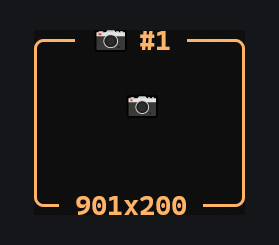
pi's own paste works, but it puts /tmp/pi-clipboard-….png in your prompt as text. This extension keeps the path out of the prompt entirely and gives the attachment a shape you can see and delete:
| pi alone | with this extension | |
|---|---|---|
| Keys | Alt+V on WSL, because Windows Terminal swallows Ctrl+V |
Ctrl+V, Alt+V, /paste-image, or paste an image path |
| What the prompt shows | /tmp/pi-clipboard-….png |
📷 #1; the path never appears |
| Before you send | nothing | card with the pixel size; one keystroke or a right-click removes it |
| After you send | the path text stays in the conversation | [Image #N] in the message, card above it |
Features
Ctrl+V/Alt+Vpastes the clipboard image as an attachment; text clipboards paste as text.- Chips that behave like one character.
📷 #Nis colored per image, and Backspace/Delete/undo treat it as a single unit. Deleting the chip removes the attachment and its card. - Preview cards show the image number and its pixel size. Terminals with inline graphics (Kitty, iTerm2) also attempt a thumbnail; everywhere else, including Windows Terminal, the card shows an icon. See Status for what has actually been verified.
- Sent messages keep their cards in the transcript, including after
/reloadand session resume. Ctrl+Vworks as well asAlt+V. On WSL, Windows Terminal interceptsCtrl+Vand sends an empty bracketed paste that pi's editor drops, which is why pi documentsAlt+Vfor image paste there. This extension catches that empty paste, so either key works.- OSC 5522 terminals. Kitty streams clipboard data over the terminal protocol, and the extension reads it directly.
- Pasted or dragged image paths (
.png .jpg .webp .gif .bmp,file://URLs, andC:\...paths under WSL) become attachments.
- Drafts survive
/reload. Pending attachments are restored, but only for the same session and only from files the extension wrote itself (mode0600). - Enter waits for the paste. If you press Enter while an image is still loading, the message is sent once the image is attached.
- Vision check. If the current model does not accept images, the draft is kept and you get a warning instead of a silent drop.
Status
Verified end-to-end on Linux (WSL2 + WSLg, Windows Terminal 1.24) with pi 1.3.0:
| Area | Status |
|---|---|
Ctrl+V and Alt+V, including the empty bracketed paste Windows Terminal sends for Ctrl+V |
verified |
Clipboard read via Wayland (wl-paste) |
verified |
| WSLg screenshots through the bundled BMP→PNG bridge | verified |
📷 #N chip, rounded card, pixel-size caption, atomic delete and undo |
verified |
Images sent as real bytes, vision check, draft surviving /reload |
verified |
| Temp-file cleanup (on send, on exit, 7-day sweep of leftovers) | verified |
| Right-click removal of a draft card | unit-tested, fullscreen TUI mode only |
X11 (xclip) clipboard |
not tested |
| OSC 5522 terminal clipboard | parser unit-tested; no real terminal available to test |
| Inline thumbnails (Kitty / iTerm2 graphics) | rendering unit-tested; not verified on a real terminal |
| macOS / Windows native clipboard | not tested |
If a row says "not tested", treat the feature as unproven rather than broken. Issues and results from other terminals are welcome.
Install
pi install npm:pi-image-paste-cards
Or try it for one run:
pi -e npm:pi-image-paste-cards
Run /reload if pi is already open.
Requirements
| Platform | Needs |
|---|---|
| Linux, Wayland | wl-clipboard (wl-paste) |
| Linux, X11 | xclip |
| BMP clipboards | ImageMagick (convert) |
| WSL (WSLg) | wl-clipboard, ImageMagick, and the bridge below |
| macOS / Windows | pi's native clipboard helper (bundled with pi) |
WSL: make Windows screenshots pasteable
When you copy an image in Windows, WSLg offers it to Linux only as image/bmp, and the PowerShell fallback is often blocked by ConstrainedLanguage mode. The bundled bridge converts the BMP to PNG in the background:
sudo apt install wl-clipboard imagemagick
# `pi install` puts the package here; with a global npm install use $(npm root -g) instead.
PKG=~/.pi/agent/npm/node_modules/pi-image-paste-cards
install -Dm755 "$PKG/scripts/wslg-clipboard-bridge.sh" ~/.local/bin/wslg-clipboard-bridge.sh
install -Dm644 "$PKG/scripts/wslg-clipboard-bridge.service" ~/.config/systemd/user/wslg-clipboard-bridge.service
systemctl --user daemon-reload
systemctl --user enable --now wslg-clipboard-bridge.service
If you don't use systemd in WSL, run ~/.local/bin/wslg-clipboard-bridge.sh & from your shell profile instead.
Windows Terminal keybinding
Pi defaults image paste to Alt+V on WSL. To use Ctrl+V as well, add this to ~/.pi/agent/keybindings.json:
{ "app.clipboard.pasteImage": ["ctrl+v", "alt+v"] }
The extension also handles the empty paste that Windows Terminal sends for Ctrl+V, so either key works.
Commands
| Command | Effect |
|---|---|
/paste-image |
Paste the clipboard image without a shortcut |
/paste-image <path> |
Attach an image file |
/paste-image-status |
Show diagnostics: trigger count, last trigger, last result |
/paste-image-status trace |
Also record the last control-key sequence (never typed text). off stops it |
Right-click a draft card above the editor to remove that attachment. This needs a mouse-aware terminal and pi's fullscreen TUI mode; in regular mode the terminal owns the mouse.
How it works
- Clipboard read. The extension tries Wayland (
wl-paste) first, then X11 (xclip), then pi's native helper. An empty Wayland clipboard is authoritative, so stale X11 contents are never pasted. Pasted images are checked by their file signature, and BMP is converted to PNG. - Storage. Images are written to
$TMPDIR/pi-image-paste-<uuid>.<ext>with mode0600, and are never part of your prompt text.- The draft copy is deleted as soon as the message is sent — from then on the session file owns the bytes.
- Unsent drafts are deleted when pi quits or starts a new session, and kept across
/reloadso the draft survives it. - Files left behind by a crashed or killed pi are swept at startup once they are older than 7 days. Only files named
pi-image-paste-*are ever touched.
- Sending. On submit, an
inputhook replaces each📷 #Nchip with[Image #N]and attaches the image bytes. Only chips the extension created are converted, so other prompts and files are never touched. - OSC 5522. A small filter in front of pi's stdin parser assembles 5522 packets, because pi would otherwise read them as
Alt+]and type base64 into the editor. All other input is passed through unchanged and in order.
Compatibility
Tested with pi 1.3.0 on Node 22. Pi has no public API for chips or pre-parser input, so the extension decorates a few internals of the current editor and terminal instance (segment, render, stdinDataHandler, setupStdinBuffer). It never patches pi's files, it restores the originals on /reload and shutdown, and it skips any feature whose internals are missing. Pasting and sending still work if a future pi version changes them; only the chip styling or the OSC 5522 path would degrade.
Development
git clone https://github.com/ImSven/pi-image-paste-cards
cd pi-image-paste-cards
npm test                      # needs pi installed globally, or set PI_PACKAGE_DIR
pi -e ./extensions/image-paste.ts
The tests load the extension through pi's real extension loader and exercise pi's real Editor.
License
MIT