pi-epub-translator0.1.3
Translate EPUB books in Pi while preserving structure, styling, images, footnotes, and packaging.
Untested on omp
This is a pi package. No one has reported whether it works on omp yet. If you try it, add your result below.
Reports 0
No reports yet.
Readme
Pi EPUB Translator


A Pi extension for translating selected EPUB content while preserving the book's XML structure and EPUB package.
See it in action
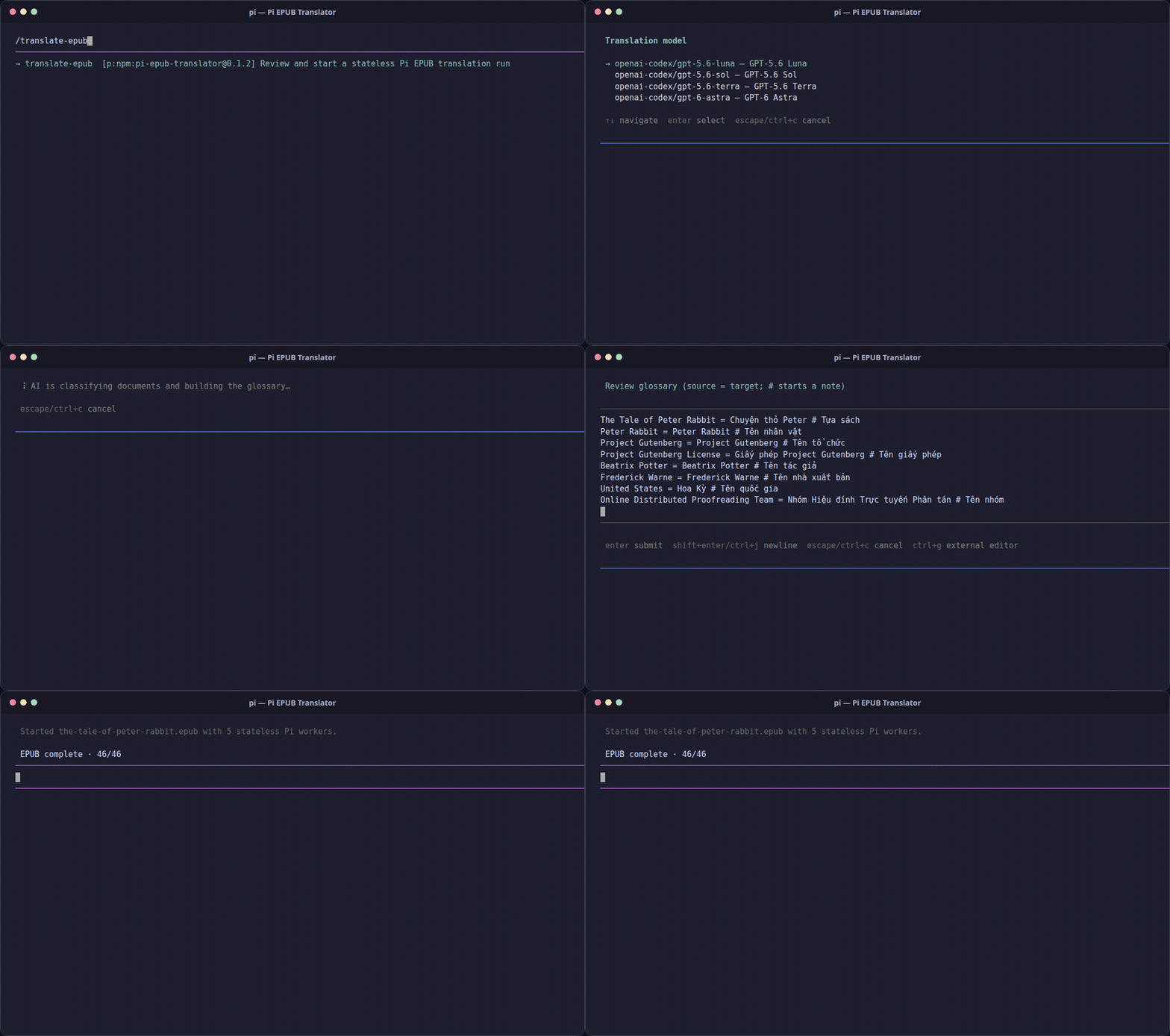
The demo uses the normal package installation flow and a real sample EPUB. Translation progress is shortened in the recording.
Highlights
- Review first — edit the AI-proposed document scope and glossary before translating.
- Preserve structure — translated fragments must keep their tags and attributes; package members are checked before output.
- Parallel workers — isolated, no-session Pi workers claim fragments through SQLite leases and fencing.
- Manage runs — inspect progress, request cancellation, and retry eligible failed fragments.
Install
pi install npm:pi-epub-translator
Use
- Put a non-DRM EPUB in
input/. - Start Pi normally with
pi. - Run
/translate-epub. - Choose the EPUB, model, thinking level, target language, and worker count.
- Review the document scope and glossary, then confirm.
- Find the translated EPUB in
output/after the run completes.
The source EPUB is not modified. Run state is stored in .parallel-translate/.
Commands
| Command | Description |
|---|---|
/translate-epub |
Start the guided translation workflow. |
/epub-progress |
Show progress for the current or most recent run. |
/epub-cancel |
Request cancellation at the next worker checkpoint. |
/epub-retry |
Reset eligible failed fragments and start replacement workers. |
Requirements
- Pi CLI
- Node.js and npm
- Python 3.10+
- A local EPUB without DRM
- At least one model configured in Pi
Selected EPUB content is sent to the configured Pi model. Check your provider's data-handling policy before translating private books.
Files
| Path | Purpose |
|---|---|
input/ |
Source EPUBs; ignored by Git |
output/ |
Translated EPUBs; ignored by Git |
.parallel-translate/ |
SQLite run state; ignored by Git |
Do not commit books, translated output, credentials, or run state.
Development
npm ci
npm test
python3 tests/test_run_store.py
npm pack --dry-run
For local source testing only:
pi --approve -e ./src/index.ts
Release
Publishing is automated by .github/workflows/publish-npm.yml when a v* tag is pushed:
npm version patch
git push --follow-tags
The workflow checks the tag/version match, runs both test suites, and publishes the package with npm provenance.