pi-date-tail1.0.2
Tell the model what day it is without breaking pi's prompt cache: one short hidden message appended once per day, never the system prompt, and again after a compaction summarized it away.
Untested on omp
This is a pi package. No one has reported whether it works on omp yet. If you try it, add your result below.
Reports 0
No reports yet.
Readme
pi-date-tail
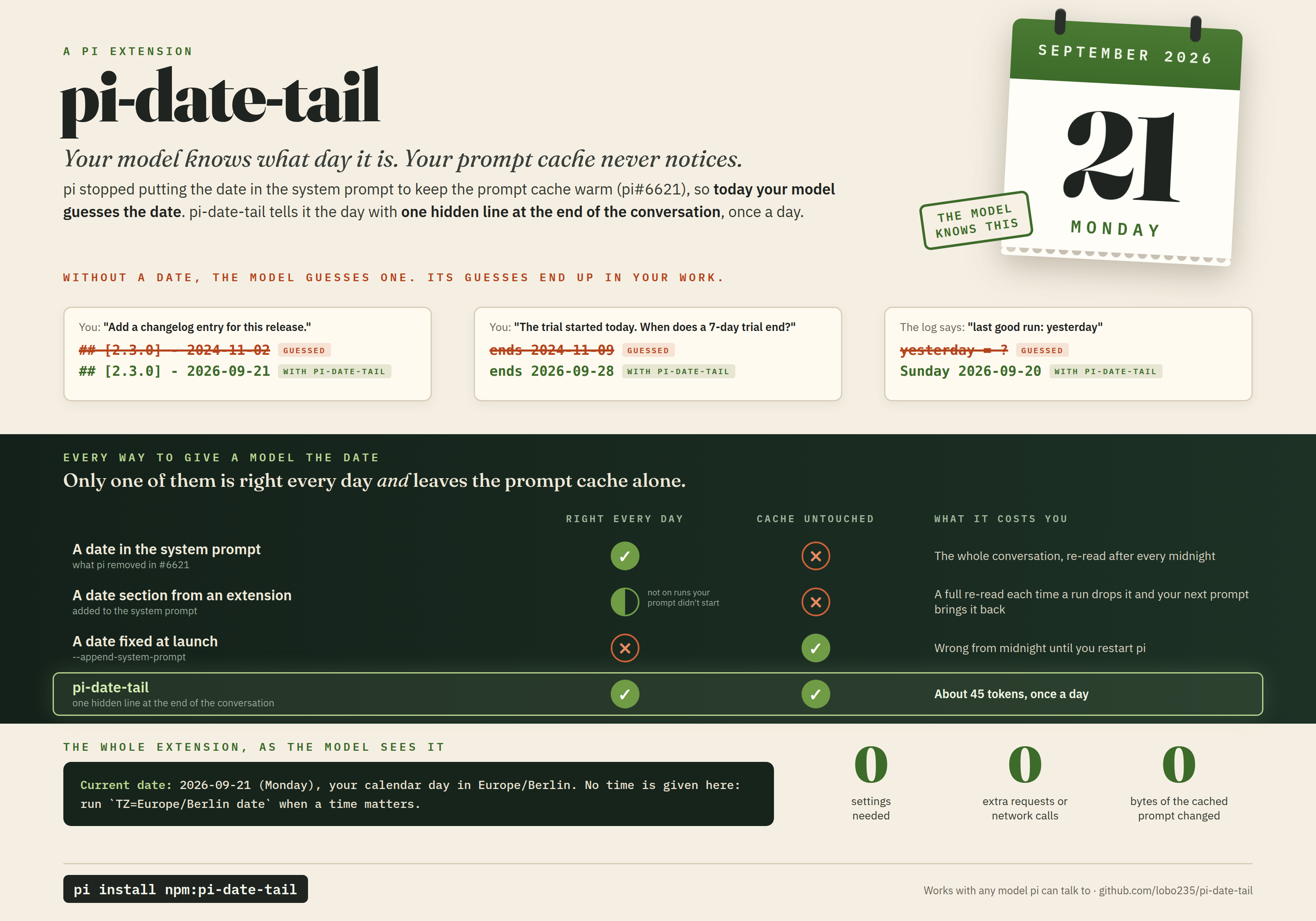
Your model knows what day it is. Your prompt cache never notices. pi-date-tail gives pi's model the calendar day as one short hidden message at the end of the conversation, once a day, so nothing a prompt cache already holds ever changes.
pi install npm:pi-date-tail
Why pi-date-tail
pi does not tell the model what day it is. It took the date out of its system prompt (pi#6621) so the prompt stays the same from one day to the next and a provider's prompt cache keeps working. That is the right call for the cache, but a model with no date guesses one: it dates a changelog entry from its training cutoff, misreads "yesterday" in a log, or works out a deadline from the wrong day.
Giving the date back is harder than it looks, because where it goes decides what the cache has to read again:
- In the system prompt, the first request after midnight re-reads the whole conversation, every day.
- In a section an extension adds, it drops out of every run your prompt did not start and comes back with your next one; on a server that renders all system text first, each change re-reads the conversation.
- Fixed at launch, it never changes, so it is wrong from midnight until you restart.
- pi-date-tail appends the day at the end of the conversation, where it changes nothing ahead of it: 40 to 50 tokens once a day, with no extra requests, no network calls and no settings.
The details are under Why a message, not the system prompt.
What the model sees
Current date: 2026-09-21 (Monday), your calendar day in Europe/Berlin. No time is given here: run `TZ=Europe/Berlin date` when a time matters.
One line, about 40 to 50 input tokens depending on the tokenizer and the zone name, after your prompt, once per calendar day and again after a compaction that summarized it. No extra model requests and no network calls. Hidden in pi's interface; the model receives it like any other message.
Install
pi install npm:pi-date-tail
To try it for one session without installing: pi -e npm:pi-date-tail.
Requirements: Node.js 22.19 or newer (pi's own requirement) and pi (see pi versions). No configuration is needed: the day is your machine's.
How it works
On every prompt you send, pi runs its extensions' before_agent_start handlers. pi-date-tail's handler returns
a custom message of type date-tail with display: false. pi appends it right after your prompt and records it
on the session transcript, so it stays in every later request of the session like any other message.
- Once per calendar day. If the model can still see today's message (the same text, on the current branch), nothing is added. A session that runs for a week gets one message a day.
- Again after a compaction that summarized it. A compaction replaces older messages with a summary and keeps the newest ones. If today's message was among those kept, nothing changes; if it was summarized away, the first prompt after the compaction adds it again. A kept message from an earlier day does not count.
- A new day without a restart. The day is worked out on each prompt, so a session that crosses midnight gets the new day with your next prompt.
- A day, never a time. A time would change on every prompt. The message says so and gives the model the command for the current time, with the zone in it.
- It steps aside for a
datesection, if that extension runs first. pi runs extensions'before_agent_starthandlers in load order, and each sees only what earlier ones changed. If an extension that runs before pi-date-tail has put adatesection in pi's system prompt, pi-date-tail adds nothing and leaves that section as it is. A section added by an extension that runs later is not seen, and the model gets both. - It never fails a prompt. If the clock cannot be read, no message is added. If the session branch cannot be read, the message is added anyway (a repeat is appended, so it costs no cache).
Why a message, not the system prompt
Providers that cache prompts (hosted prompt caching, and self-hosted servers such as vLLM or llama.cpp with prefix caching) reuse work only for the part of a request that is identical to an earlier one, counted from the start. The system prompt comes first. Change one character in it and everything after it, the whole conversation, is read again at full price and full latency.
- A date in the system prompt changes it once a day: the first request after midnight re-reads the whole conversation. That is why pi removed it.
- A
datesection added by an extension changes it much more often. Up to pi 1.1.0, pi asks extensions for their sections only on prompts you send. A run that starts any other way (a message from another extension, a background task reporting back) is built from pi's base sections, so the date drops out, and your next prompt puts it back. Each flip is a change at the start of the request, and a server whose chat template renders all system text first re-reads the conversation every time. pi 1.2.0 fixes this (pi#5581), but a section still changes once a day. - A date fixed at launch (
--append-system-prompt) never flips, but it is wrong from midnight until the session restarts. - A message appended to the conversation changes nothing ahead of it. A new day costs one short message at the end.
When not to use it
- You want the model to be date-blind, for reproducible evaluations or replays: the message makes each day's requests differ.
- You would rather not tell your model provider your time zone. The message names it. Set
PI_DATE_TAIL_TZ=UTCto send only the UTC day. - Another extension already gives the date as a message. The model would get two.
- You need the time of day in context. pi-date-tail gives the day only; a time in the conversation would
have to be re-sent constantly to stay true. The model can run
date.
Configuration
| Variable | Default | Meaning |
|---|---|---|
PI_DATE_TAIL_TZ |
unset: this process's zone | The IANA time zone whose calendar day is given, such as Europe/Berlin, America/New_York or UTC. Unset or empty means the zone pi runs in: TZ when it names a zone, otherwise the system's. Surrounding spaces are ignored and the name is spelled canonically in the message (europe/berlin becomes Europe/Berlin). A value that is not a zone name, or an offset such as +05:00, stops pi at launch with an error naming the variable and the value. |
The zone is read once, when pi loads the extension; a change takes effect at the next pi start.
If PI_DATE_TAIL_TZ is unset and the process has no named zone (TZ set to something that is not a zone, for
example), the day is the one the process itself uses, and the message says "this machine's local time zone" and
suggests plain date.
Turning it off
- Remove it:
pi remove npm:pi-date-tail. - For one session:
pi -nestarts pi without extensions (all of them, not only this one). - There is no switch that turns it off while it stays installed.
pi versions
pi-date-tail uses one public extension event (before_agent_start returning a custom message) and reads the
session branch. It does not check pi's version at runtime.
- Tested with pi 0.87.1, 0.99.0, 0.99.1, 0.99.2, 1.0.0, 1.0.1, 1.0.2, 1.0.3, 1.0.4, 1.1.0 and 1.2.0: the full suite and the real-pi smoke on each. The repository vendors 1.2.0 for its tests.
- CI runs, on every push on Linux, macOS and Windows: the tests, pi's own extension loader on the entry, and a
real pi with a fake model, both on the package as
npm packbuilds it (installed withpi install) and on the source. - A nightly job runs the same against the newest pi on npm and opens an issue when it fails. A pi version known to break pi-date-tail is listed under Known issues until it is fixed.
Known issues
- A run that does not start from your prompt sees the last message. A run started after midnight by another extension's message, before you send a prompt, still sees yesterday's date. That is the cost of never touching the system prompt; your next prompt brings the new day.
- The suggested
TZ=<zone> datecommand assumes a POSIX shell. - No pi version is currently known to break it.
Checking it on your own pi
dir=$(mktemp -d)
pi -p --session-dir "$dir" --model example-provider/example-model "What is today's date? Reply with only YYYY-MM-DD." </dev/null
env ${PI_DATE_TAIL_TZ:+TZ="$PI_DATE_TAIL_TZ"} date +%F     # the two should agree
jq -c 'select(.type == "custom_message")' "$dir"/*.jsonl    # one entry, customType "date-tail"
Name your own model with --model. A second prompt the same day in that session (pi -c --session-dir "$dir" ...) adds no second entry.
Versioning
pi-date-tail follows Semantic Versioning. The contract is:
- the environment variable
PI_DATE_TAIL_TZand its meaning, including that unset means the process's zone and an invalid value stops pi at launch; - the persisted custom message type
date-tail, hidden (display: false), which tools that read transcripts can rely on to recognize it; - that the message gives a calendar day and its zone, never a time, at most once per day per branch, and again after a compaction that summarized it away.
Removing or renaming any of these, or changing what it means, is a major version. The exact wording of the message is not part of the contract; a release that changes it makes a resumed session add the new wording once. Changes are listed in CHANGELOG.md.
More
CONTRIBUTING.md, SECURITY.md, CODE_OF_CONDUCT.md.