pi-codemode-snippets0.2.1
Pi extension that turns user-authored `.js` codemode snippets (a `// @snippet:` pragma plus a sandbox script) into first-class pi tools the model, other tools, and codemode scripts can call.
Untested on omp
This is a pi package. No one has reported whether it works on omp yet. If you try it, add your result below.
Reports 0
No reports yet.
Readme
pi-codemode-snippets
English | 简体中文
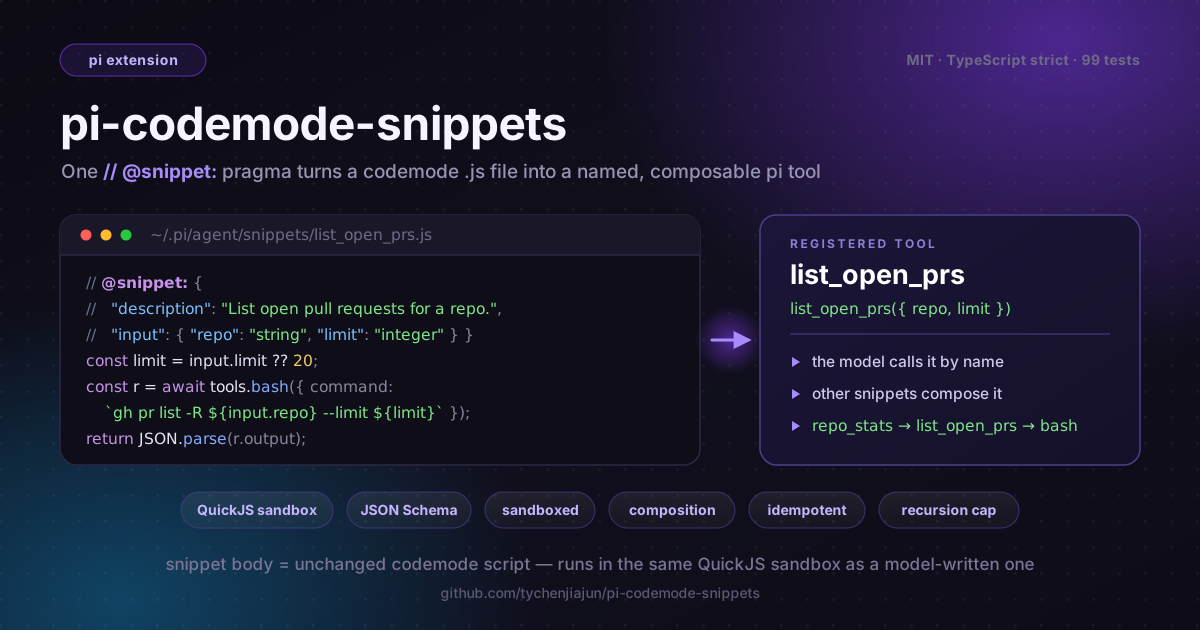





pi-codemode-snippets turns user-authored JavaScript files into first-class
pi tools. Each file is a saved
codemode
script plus a small metadata comment, so a script you already ran and liked
becomes a named tool the model can call, other tools can call, and other
snippets can compose.
It is the "keep the scripts worth keeping" half of Code Mode. Code Mode gives the model a sandbox; this extension gives you a durable, reviewable, versioned library of the scripts that proved useful.
In one sentence: a single
// @snippet:pragma and one.jsrule turn any codemode script on disk into a registered, named pi tool — with JSON Schema input, QuickJS sandboxing, nested-call permissions, usage accounting, and cross-snippet composition — without inventing a new language or a new runtime.
Why snippets exist
Without this extension your codemode scripts are ephemeral. Real problems seen in pi sessions:
- Scripts vanish after one run. A 60-line script the model wrote to triage pull requests is gone by the next session; asking the model to "remember it" makes it rewrite the body and subtly diverge every time.
- No reusable name. You keep copy-pasting the same
gh pr listbody into fresh scripts instead of asking for "the PR-listing tool" by name. - No composition, no DRY library. A script that needs to "fetch, then summarize" duplicates the fetch logic instead of calling the listing tool you already wrote.
- Ephemeral tools drift from spec. Handing the model a fresh inline script every turn means it re-authors the same logic imperfectly, instead of invoking a stable, reviewed tool by its schema.
pi-codemode-snippets fixes all of that with one rule: a snippet file is a
codemode script — just named and registered. The model, other tools, and other
snippets all call it by name, and because the body is unchanged codemode
JavaScript there are no new semantics to learn.
What it does
- Discovers one
.jsfile per tool from the user, project, and setting snippet directories. - Reads a leading
// @snippet:(or/* @snippet:block) pragma as JSON Metadata and registers each file as a pi tool with itsinputJSON Schema. Since pi 1.2.0 each tool also declaresreachesTools, computed from the generated script, so waiting systems (such as the MCP extension) know which tools a call may reach before it runs. - Re-runs the body through pi's built-in
codemodeexecutor, so the snippet keeps the QuickJS sandbox,tools.*,store/load,models, nested-call permissions (parentToolCallId), and usage accounting — nothing else changes. - Lets snippets call snippets, with a recursion cap (default depth 10).
- Exposes
/snippet list | show | validate | previewcommands to inspect the loaded tool set without running anything.
Install
pi packages add pi-codemode-snippets
The extension needs pi's built-in codemode tool, which ships with pi. It
captures that tool's executor internally, so codemode does not need to be in
your active tool list, and it never registers a second codemode tool.
Quick start
Create the user snippet directory and add a file:
mkdir -p ~/.pi/agent/snippets
$EDITOR ~/.pi/agent/snippets/list_open_prs.js   # paste the example above
In pi, run
/reload(pi re-runs extensions and re-scans snippet directories).Check it loaded with
/snippet list, then just ask the model to use it, or call it from a codemode script.// @snippet: { // "description": "List open pull requests for a GitHub repository, newest first.", // "input": { // "type": "object", // "properties": { // "repo": { "type": "string" }, // "limit": { "type": "integer", "minimum": 1, "maximum": 100 } // }, // "required": ["repo"] // }, // "annotations": { "readOnlyHint": true, "openWorldHint": true } // } const limit = input.limit ?? 20; const result = await tools.bash({ command: `gh pr list -R ${input.repo} --state open --limit ${limit} --json number,title`, }); return JSON.parse(result.output);The model now sees a
list_open_prstool, a codemode script can callawait tools.list_open_prs({ repo: "acme/web" }), and another snippet can reuse it the same way.
Snippets are discovered at session start. /reload is the way to pick up an
added, edited, or deleted file — there is no filesystem watcher and no
unregister API, so a full reload is what keeps the tool set authoritative.
File format
One file per snippet, flat directory, *.js only. A file is a @snippet pragma
comment followed by a codemode script body.
// @snippet: { … JSON … }          // one line
/* @snippet: { … JSON … } */       // one block
// @snippet: {                     // several // lines
//   "description": "…"
// }
Everything after the pragma is the body. The body runs as the body of an async
function in the codemode sandbox, so top-level await and return work, and
these globals are available:
| Global | Purpose |
|---|---|
input |
The validated tool arguments (a single object). |
tools.<name>(args) |
Call any tool, including other snippets. |
text(value), image(value), console.log(...), exit() |
Add output. |
return value |
Add the returned value like text(). |
store(key, value) / load(key) |
Persist small JSON values across codemode calls. |
ALL_TOOLS, await searchTools(...), await describeTool(...), await describeNamespace(...) |
Discover other tools (the three helpers are async). |
models |
List and run classifier and image models. |
Pragma fields
| Field | Required | Default | Meaning |
|---|---|---|---|
description |
yes | — | Model-facing description. Files without it are skipped. |
name |
no | filename stem | Tool name. Must match [A-Za-z_][A-Za-z0-9_-]{0,63}. codemode, tool_search, mcp__…, and the MCP resource tool names are reserved. |
label |
no | name |
UI label. |
input |
no | {"type":"object","properties":{}} |
JSON Schema of the argument object. |
enabled |
no | true |
false keeps the file but does not register the tool. |
timeoutMs |
no | unset | Merged into the generated @options.timeout_ms. Positive integer (ms), at most 2147483647. |
maxOutputTokens |
no | unset | Merged into the generated @options.max_output_tokens. Positive integer. |
annotations |
no | unset | readOnlyHint, destructiveHint, idempotentHint, openWorldHint. |
promptGuidelines |
no | unset | Extra guideline bullets shown with the tool. |
Inputs
A snippet has one input: a single JSON object validated against the input
schema before the body runs. Wrong type, missing required field, or a failed
enum rejects the call; there is no coercion and no default-filling, so apply
defaults in the body (input.limit ?? 20). Every caller passes a different
object:
| Caller | Example |
|---|---|
| The model | list_open_prs({ repo: "acme/web" }) |
| Another snippet / codemode script | await tools.list_open_prs({ repo, limit: 5 }) |
| Another extension | ctx.executeTool("list_open_prs", { repo }) |
input is a reserved name; do not redeclare it in the body.
Options
A body may begin with pi's own options line. The extension merges it with the
pragma limits and re-emits a single leading options line. The body wins. Only
pi's own fields are accepted — max_output_tokens (a non-negative integer)
and timeout_ms (a positive integer, at most 2147483647) — and the loader
rejects anything else at load time, because pi 1.2.0+ fails the call on an
unsupported field before the script runs. The options line must also be the
body's first line: pi fails an // @options: line that is not first, and
since the extension always prepends const input = …, a stray // @options:
line anywhere else in the body could never run — the loader rejects it
instead.
// @snippet: {"description":"…","timeoutMs":10000}
// @options: {"max_output_tokens": 500}
const out = await tools.bash({ command: "git log --oneline -20" });
Directories and precedence
| Scope | Directory |
|---|---|
| user | ~/.pi/agent/snippets/ |
| setting | every path in the snippets settings array (~ and relative paths allowed) |
| project | <cwd>/.pi/snippets/ — only when the project is trusted |
When two files share a name, the higher-precedence one wins: project overrides
setting overrides user, and among setting directories later entries override
earlier ones. The losing file is reported by /snippet list.
When a name is already taken by another tool — a built-in such as bash or
read, or another extension's tool — the snippet is skipped at registration
and the conflict is reported by /snippet validate. A few names are rejected
outright, before any tool list exists: codemode (it would shadow the tool
snippets run through), tool_search (it would shadow the deferred-tool
loader), mcp__…, and the MCP resource tool names (list_mcp_resources,
list_mcp_resource_templates, read_mcp_resource) — MCP tools connect after
snippets load, so the runtime check could not see them.
Commands
| Command | Purpose |
|---|---|
/snippet list |
Every file grouped by outcome: registered (✓), not registered (✗ + reason, ⏸ disabled), shadowed, problems. |
/snippet show <name> |
A snippet's pragma summary and body. |
/snippet validate |
Re-scan the directories, report every problem, and count what is registered. |
/snippet preview <name> [json] |
Print the exact codemode script the tool would run. |
Commands run in the command context, which has no executeTool(), so there is
no /snippet run. Running a snippet is an ordinary tool call: ask the model, or
call it from a codemode script. preview is the deterministic dry run.
list answers "did my script become a tool?" in one screen:
Snippets: 4 registered, 1 not registered, 2 problems.

Registered (4):
  ✓ ping_a  project  <cwd>/.pi/snippets/ping_a.js

Not registered (1):
  ✗ bash  user  ~/.pi/agent/snippets/bash.js
      tool name "bash" is already registered by another tool; snippet skipped

Problems (2):
  ⚠ ~/.pi/agent/snippets/codemode.js: snippet name "codemode" is reserved…
A project-level override shows both files and both scopes (… (user) is overridden by … (project)). The status surfaces in three places: this chat
output from list, a footer line (snippets: 4/5 registered, 2 problems)
refreshed at session start and after validate, and a warning carrying the
first reason when anything is wrong. Like /mcp status, the list is written
with notify() — persistent, scrollable chat text — because the commands only
report state; a ctx.ui.custom() screen would add interaction we do not need.
How a snippet runs
Running a snippet is delegation. The extension rebuilds the codemode script:
// @options: {…}
const input = {…};
<body>
and runs it through the executor of pi's built-in codemode tool. The executor
is captured once through a small pi facade (captureCodemodeExecutor), not by
registering or calling the tool. Pi's codemode tool has exposure: "model-only" on purpose — scripts must not start other scripts — so it cannot
be reached through ctx.executeTool. Capturing its execute() runs the
generated script through the identical sandbox while leaving the model's tool
set unchanged.
That means a snippet gets everything a normal script gets:
- the QuickJS sandbox (no filesystem, network, or timers),
tools.*,store/load,models, and output formatting,- the full
tool_call/tool_resultpipeline for every nested tool call, so permission extensions see and can block them (nested calls carryparentToolCallId), - usage accounting for classifier and image models, forwarded onto the snippet result.
Because codemode itself is never registered as a callable tool, a snippet
cannot start another codemode script through the sandbox; it composes with
snippets instead (see below). pi-codemode-guard compiles model-written
codemode scripts at the tool_call event; a snippet body does not go through
that event, so it runs as written.
Composition
Because every snippet is a registered tool, one snippet calls another with
tools.<name>({…}). Recursion is capped (default depth 10) to stop a snippet
that calls itself. Snippets share the session codemode store; prefix keys,
e.g. snippet:<name>:<key>, to avoid collisions.
Safety
Snippet source is trusted, user-authored code, gated by project trust. The extension is not a security boundary: the codemode sandbox and whatever permission extensions you run are. A snippet has no ambient capability; each real effect is a tool call that traverses the normal permission pipeline. The extension adds only a recursion cap, optional per-snippet timeouts, and annotation passthrough.
Non-goals
Not in this version: promoting a script from a live model run into a snippet,
per-snippet exposure control, per-snippet tool allowlists, output schemas,
a filesystem watcher, /snippet new//snippet edit, and recursive directories.
Bundled skill
The package ships the snippet-authoring skill (per the package
layout): a skills/
directory declared in the pi manifest of package.json, so installing the
extension also teaches the model how to author new snippets for it. When the
user asks to "write a snippet" or pastes a codemode script to promote, the
skill covers the file format, pragma, input schema, and sandbox rules, and
gates every file it writes with the bundled compiler check:
node skills/snippet-authoring/scripts/check.mjs <file.js # or a directory
The check script is dependency-free: it validates the @snippet JSON and
fields, enforces the name pattern and input schema (including that the body
only reads declared fields), and compiles the body with node:vm using
codemode's own (async (tools, console) => {…}) wrapper — catching syntax
errors (with the offending file line) and redeclarations of the reserved
input binding, without running pi.
FAQ
How is this different from pi-codemode-guard?
pi-codemode-guard repairs LLM-written codemode at the tool_call event.
pi-codemode-snippets registers user-authored codemode files as named tools,
and intentionally does not touch a snippet body — its body is already canonical
JavaScript (see the design note on guard integration). They
compose: write snippets by hand, and let the guard clean up anything the model
emits inline.
Are snippets secure?
Trust is delegated, not duplicated. Snippets are gated by project trust and share the codemode sandbox (no filesystem, network, or timers). The extension adds no second permission system — it adds only a recursion cap, per-snippet timeouts, and annotation passthrough. Every real effect is a normal tool call that traverses the existing permission pipeline.
Can a snippet call another snippet?
Yes — every snippet is a registered tool, so a body calls another with
tools.<name>({…}). Recursion is capped at depth 10 by default, and snippets
share the session store (prefix your keys, e.g. snippet:<name>:<key>, to
avoid collisions).
Can the model create or edit snippets?
Not in this version. Snippets are user-authored files only — there is no
promote-a-run flow, so the source of truth stays reviewable, diffable, and
shareable. /snippet new//snippet edit are listed under non-goals.
Why isn't there a /snippet run command?
Commands run in pi's command context, which has no executeTool(). Running a
snippet is an ordinary tool call — ask the model, or call it from a codemode
script. /snippet preview is the deterministic dry run.
Is there a filesystem watcher?
No. Snippets are discovered at session start and refreshed with /reload. A
full reload is what keeps the tool set authoritative (there is no unregister
API). A snippets.watch setting is an open item.
What does the @snippet pragma require?
Only description (model-facing) and the optional input JSON Schema. Omit
name and it defaults to the filename stem ([A-Za-z_][A-Za-z0-9_-]{0,63}).
codemode, tool_search, mcp__…, and the MCP resource tool names are
reserved; a name another tool already holds is skipped and reported by
/snippet validate.
Without description the file is skipped, never errored on.
Built on pi
The extension follows pi's package layout: a
default factory exports createCodemodeSnippetsExtension(options), the
pi manifest in package.json registers the extension and the bundled
snippet-authoring skill, and tests run under vitest. See pi's
Extensions and
Packages docs.
Development
pnpm install
pnpm test        # 142 unit tests
pnpm typecheck
pi -e .          # load this checkout as an extension for one session
examples/snippets/ holds a runnable starter set. Copy it to
~/.pi/agent/snippets/ to try the extension.
License
MIT