pi-claude-marketplace0.20.1
Access Claude plugin marketplaces from Pi Coding Agent. Supports Claude commands, skills, agents, hooks, MCP servers, and workflows.
Untested on omp
This is a pi package. No one has reported whether it works on omp yet. If you try it, add your result below.
Reports 0
No reports yet.
Readme

Pi Claude Marketplace




Access Claude plugin marketplaces from Pi Coding Agent. Supports Claude commands, skills, agents, hooks, MCP servers and workflows.
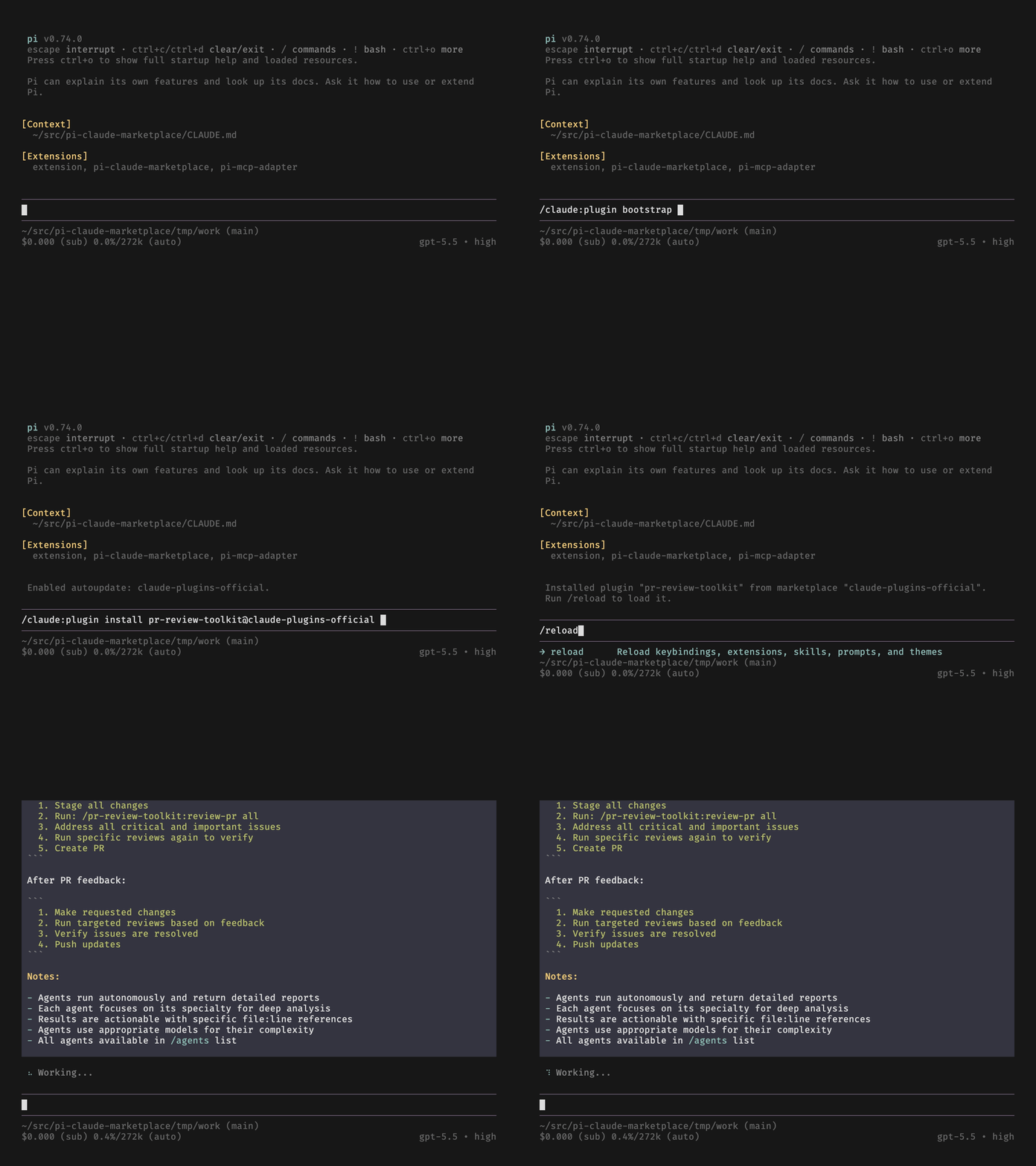
Features
This extension installs plugins from Claude plugin marketplaces that contain these components:
- Commands.
- Skills.
- Agents. Requires pi-subagents.
- Hooks. Partial support. For more information, see Hook compatibility.
- MCP servers. Requires pi-mcp-adapter. For more information, see MCP compatibility.
- Workflows. Requires @quintinshaw/pi-dynamic-workflows. For more information, see Workflow compatibility.
Plugins that contain unsupported components can be partially installed. A partially installed plugin may fail to work as intended.
The /claude:plugin command manages Claude marketplaces and plugins, like Claude Code's /plugin. A desired-state configuration in [~/].pi/agent/claude-plugins[.local].json files makes plugin installations automatic and repeatable. You can share these files across machines or team members.
Prerequisites
- Pi Coding Agent 1.0.0 or newer
- pi-subagents 0.74.0 or newer (optional but recommended,
pi install npm:pi-subagents) - pi-mcp-adapter 5.2.0 or a later 5.x release (optional but recommended,
pi install npm:pi-mcp-adapter). Pi's built-in MCP support does not satisfy this requirement. - @quintinshaw/pi-dynamic-workflows (optional but recommended,
pi install npm:@quintinshaw/pi-dynamic-workflows)
Usage
Install the Pi extension:
pi install npm:pi-claude-marketplace
Bootstrap the official Claude plugin marketplace (anthropics/claude-plugins-official):
/claude:plugin bootstrap
List plugins available for installation:
/claude:plugin list --available
Install a plugin:
/claude:plugin install pr-review-toolkit@claude-plugins-official
Add another marketplace:
/claude:plugin marketplace add upstash/context7
List its plugins:
/claude:plugin list context7-marketplace --available
Add another plugin:
/claude:plugin install context7-plugin@context7-marketplace
Then reload:
/reload
Run a plugin:
/pr-review-toolkit:review-pr
Name mapping
This extension prefixes command and skill names with the plugin name. If the name already starts with the plugin name and -, this extension removes that common part.
Commands use a colon (:) on POSIX and a dot (.) on Windows:
| Plugin name | Command name | Pi name (POSIX) | Pi name (Windows) |
|---|---|---|---|
foo |
bar |
/foo:bar |
/foo.bar |
foo |
foo-bar |
/foo:bar |
/foo.bar |
foo |
foo |
/foo:foo |
/foo.foo |
Skills use Pi's /skill: form and also have an alias in interactive sessions:
| Plugin name | Skill name | Pi skill form | Interactive alias |
|---|---|---|---|
foo |
bar |
/skill:foo-bar |
/foo:bar |
foo |
foo-bar |
/skill:foo-bar |
/foo:bar |
foo |
foo |
/skill:foo |
/foo:foo |
Skill aliases use a colon on every platform. If an alias conflicts with a command, the command takes precedence. Use /skill:foo-bar to invoke the skill.
Plugin MCP servers get the names that Claude Code gives them. The model sees each tool as mcp__plugin_<plugin>_<server>__<tool>. pi-mcp-adapter stores each server under a key that ends with _. /claude:plugin info shows each server as plugin:<plugin>:<server>.
| Plugin name | mcpServers key |
Adapter server key | Tool names | Name shown by info |
|---|---|---|---|---|
foo |
api |
plugin_foo_api_ |
mcp__plugin_foo_api__<tool> |
plugin:foo:api |
foo |
my.db |
plugin_foo_my_db_ |
mcp__plugin_foo_my_db__<tool> |
plugin:foo:my.db |
bar |
api |
plugin_bar_api_ |
mcp__plugin_bar_api__<tool> |
plugin:bar:api |
Scoping
You can install marketplaces and plugins in the user scope or the project scope. The default is user scope.
The project scope inherits the user scope. So you can install a plugin from a user-scope marketplace into the project scope.
You can also install the same plugin in both the user and project scopes. Then the user-scope plugin takes precedence.
Partially available plugins
Some plugins contain unsupported components: an unmappable hook, an LSP server, a theme, or an MCP server that uses a feature pi-mcp-adapter cannot run. To install or update these plugins partially, pass the --partial option. This extension installs the supported components and ignores the unsupported ones.
List partially available plugins.
/claude:plugin list --partial
Install a partially available plugin. Put --partial first to enable argument completion for partially available plugins. Without that flag, completion excludes them.
/claude:plugin install --partial hookify@claude-plugins-official
Configuration files
Each scope stores its declarative configuration for marketplaces and plugins in claude-plugins.json, under the scope root.
| Scope | File path |
|---|---|
user |
~/.pi/agent/claude-plugins.json |
project |
<cwd>/.pi/claude-plugins.json |
These files are the authoritative record of the installed marketplaces and plugins. Pi applies their contents at extension load (/reload).
Whether Pi applies a declared plugin's components depends on the entry's optional enabled key and on the install-time default the plugin author declares. For more information, see Plugin enablement.
Local configuration files
Each scope can also have a claude-plugins.local.json file alongside the base file.
| Scope | File path |
|---|---|
user |
~/.pi/agent/claude-plugins.local.json |
project |
<cwd>/.pi/claude-plugins.local.json |
The local file overrides individual entries from the base file. An entry in claude-plugins.local.json replaces the same-keyed entry in claude-plugins.json completely.
For commands that write configuration, --local selects claude-plugins.local.json. Reads always combine both configuration files. Marketplace update still refreshes cached sources and installed-plugin state.
/claude:plugin install context7-plugin@context7-marketplace --local
/claude:plugin marketplace autoupdate context7-marketplace --local
Gitignore convention
In the project scope, commit claude-plugins.json. Then your collaborators install the same marketplaces and plugins. Keep claude-plugins.local.json out of version control. Add this line to your project's .gitignore:
.pi/claude-plugins.local.json
User-scope files live in your home directory. They are personal and never shared.
Command reference
This extension mirrors Claude Code's /plugin command. Use /claude:plugin in Pi for marketplace and plugin operations. After you install, uninstall, update, or reinstall plugins, run /reload. Then Pi discovers the changed resources.
Marketplace
Add a marketplace from a GitHub repository owner/repo shorthand.
/claude:plugin marketplace add upstash/context7
[!NOTE] If Git is not already authenticated, a private repository will trigger Device Flow authentication.
Add the same marketplace from a GitHub URL.
/claude:plugin marketplace add https://github.com/upstash/context7-marketplace
Pin a GitHub marketplace to a branch, tag, or commit with a #ref suffix.
/claude:plugin marketplace add https://github.com/upstash/context7-marketplace#v1.0.30
Add a marketplace from another https:// git host, such as GitLab.
/claude:plugin marketplace add https://gitlab.com/my-group/my-marketplace
[!NOTE] Device Flow authentication also covers
gitlab.com. Non-GitHub hosts need the fullhttps://URL; theowner/reposhorthand only resolves to GitHub.
Add a marketplace from the local filesystem. The path can be a directory with .claude-plugin/marketplace.json, or a direct path to a marketplace.json file.
/claude:plugin marketplace add ~/my-marketplace
/claude:plugin marketplace add ~/my-marketplace/.claude-plugin/marketplace.json
Add a marketplace local to the current project with --scope project. The default scope is user.
/claude:plugin marketplace add upstash/context7-marketplace --scope project
List configured marketplaces.
/claude:plugin marketplace list
/claude:plugin marketplace ls
Show details for one marketplace.
/claude:plugin marketplace info context7-marketplace
/claude:plugin marketplace info context7-marketplace --scope user
Update one marketplace. If you omit the name, the command updates all marketplaces.
/claude:plugin marketplace update context7-marketplace
/claude:plugin marketplace update
Remove a marketplace and all plugins installed from it.
/claude:plugin marketplace remove context7-marketplace
/claude:plugin marketplace rm context7-marketplace
Toggle marketplace plugin auto-updates. When you update the marketplace manually, this extension also updates the installed plugins.
/claude:plugin marketplace autoupdate context7-marketplace
/claude:plugin marketplace noautoupdate context7-marketplace
Plugin
Browse plugins interactively across configured marketplaces. In interactive mode, running bare /claude:plugin also opens the browser.
/claude:plugin browse
/claude:plugin
List plugins available for installation. Omit the marketplace name to list across configured marketplaces.
/claude:plugin list context7-marketplace --available
/claude:plugin list --available
Filter the list by plugin status, installed, available for installation, partially available (not all features supported), remote (a plugin in a remote repository not yet fetched), or unavailable to install.
/claude:plugin list --installed
/claude:plugin list --available
/claude:plugin list --partial
/claude:plugin list --remote
/claude:plugin list --unavailable
Show details for one plugin.
/claude:plugin info context7-plugin@context7-marketplace
Install a plugin with the <plugin>@<marketplace> format.
/claude:plugin install context7-plugin@context7-marketplace
Install in the project scope instead of the user scope.
/claude:plugin install context7-plugin@context7-marketplace --scope project
A plugin can declare the other plugins it needs. The install adds them too, into the same scope. For more information, see Dependency resolution.
Update one installed plugin, every installed plugin from one marketplace, or all installed plugins.
/claude:plugin update context7-plugin@context7-marketplace
/claude:plugin update @context7-marketplace
/claude:plugin update
[!NOTE] Agent definitions in plugins can name a preferred model for the agent, for example "sonnet" or "opus". This extension discards these models by default. To map them to Pi models as a best effort, use the
--map-modeloption withinstallandupdate.
Reinstall one installed plugin, every installed plugin from one marketplace, or all installed plugins.
/claude:plugin reinstall context7-plugin@context7-marketplace
/claude:plugin reinstall @context7-marketplace
/claude:plugin reinstall
Limit reinstall to one scope with --scope user or --scope project. The flag can appear before or after the target:
/claude:plugin reinstall --scope project
/claude:plugin reinstall @context7-marketplace --scope user
Uninstall a plugin.
/claude:plugin uninstall context7-plugin@context7-marketplace
Keep the plugin's data directory with --keep-data.
/claude:plugin uninstall context7-plugin@context7-marketplace --keep-data
Also remove the dependencies that no remaining plugin needs with --prune.
/claude:plugin uninstall context7-plugin@context7-marketplace --prune
You can uninstall a plugin that another installed plugin needs. Its row names the dependents as {dependents unsatisfied}. At the next reload, Pi disables those dependents. For more information, see Dependency resolution.
To remove orphaned dependency installs without naming a plugin to uninstall, run prune. It selects the user scope by default. Use --scope project to select the project scope.
/claude:plugin prune
/claude:plugin prune --scope project
Preview the same scope with --dry-run. The preview reads the current state and writes nothing. A later prune checks the state again, so its result can change.
/claude:plugin prune --dry-run
/claude:plugin prune --scope project --dry-run
Only dependency-installed plugins that no installed plugin in the same scope declares qualify. Even disabled plugins still hold their dependencies. Plugins you installed by name stay installed. The sweep repeats until no more plugins qualify. Actual rows read (uninstalled) {dependency pruned}; preview rows read (will uninstall) {dependency pruned}. If none qualify, both commands report Nothing to prune in user scope: no orphaned dependency installs were found. for the default scope.
Reload Pi after changes. A reload never prunes orphaned dependencies. Run prune or uninstall <plugin> --prune to remove them.
/reload
Remote plugins
Marketplaces can declare remote plugins hosted in a different Git repository. You can list them with the --remote option.
/claude:plugin list --remote
This extension fetches remote plugin repositories only when needed. So /claude:plugin info does not resolve their components. To fetch the repository of one plugin, pass the --fetch option.
/claude:plugin info 2crunch-api-security-testing@claude-plugins-official --fetch
You can also fetch repositories ahead of time. Fetch one remote plugin, all plugins in one marketplace, or all remote plugins across all marketplaces:
/claude:plugin fetch 2crunch-api-security-testing@claude-plugins-official
/claude:plugin fetch @claude-plugins-official
/claude:plugin fetch
After the fetch, each plugin is available, partially available, or unavailable to install.
The /claude:plugin install command automatically fetches a remote plugin.
/claude:plugin install 2crunch-api-security-testing@claude-plugins-official
Bootstrap
Bootstrap is a one-step setup. It adds the official Anthropic marketplace in the user scope and enables autoupdate.
/claude:plugin bootstrap
It runs these commands:
/claude:plugin marketplace add anthropics/claude-plugins-official
/claude:plugin marketplace autoupdate claude-plugins-official
Import
The import command adds marketplaces and plugins already defined in Claude Code settings.
/claude:plugin import
By default, the import adds each marketplace and plugin to the same scope it has in Claude Code. You can also limit the import to a specific scope.
/claude:plugin import --scope user
/claude:plugin import --scope project
The import skips plugins that Pi cannot install because of unsupported components. It shows a warning for each one.
Contributing
Read CONTRIBUTING and CODE_OF_CONDUCT.
AI disclaimer
The author developed this project with AI agent engineering practices. It uses the Open GSD spec-driven development system.
The author vibe-coded a prototype until it was feature-complete for a first release, then extracted and reviewed a PRD from the implementation.
The PRD then guided GSD through the discussion, planning, and implementation phases of a new implementation.
License
The MIT License covers this project. For details, read the COPYING file.
Copyright 2026 Alessandro Colomba