pi-agent-syntax0.1.0
Pi extension that highlights agent prose like a code editor: failures, successes, hedges, questions, warnings, paths
Untested on omp
This is a pi package. No one has reported whether it works on omp yet. If you try it, add your result below.
Reports 0
No reports yet.
Readme
pi-agent-syntax
A pi extension that syntax-highlights agent conversation text: failures, fixes, hedges, questions, warnings, emphasis, turn markers, and file paths. Just as it's helpful when code editors color syntax to guide your eyes into seeing structure, the same is helpful for agent output.
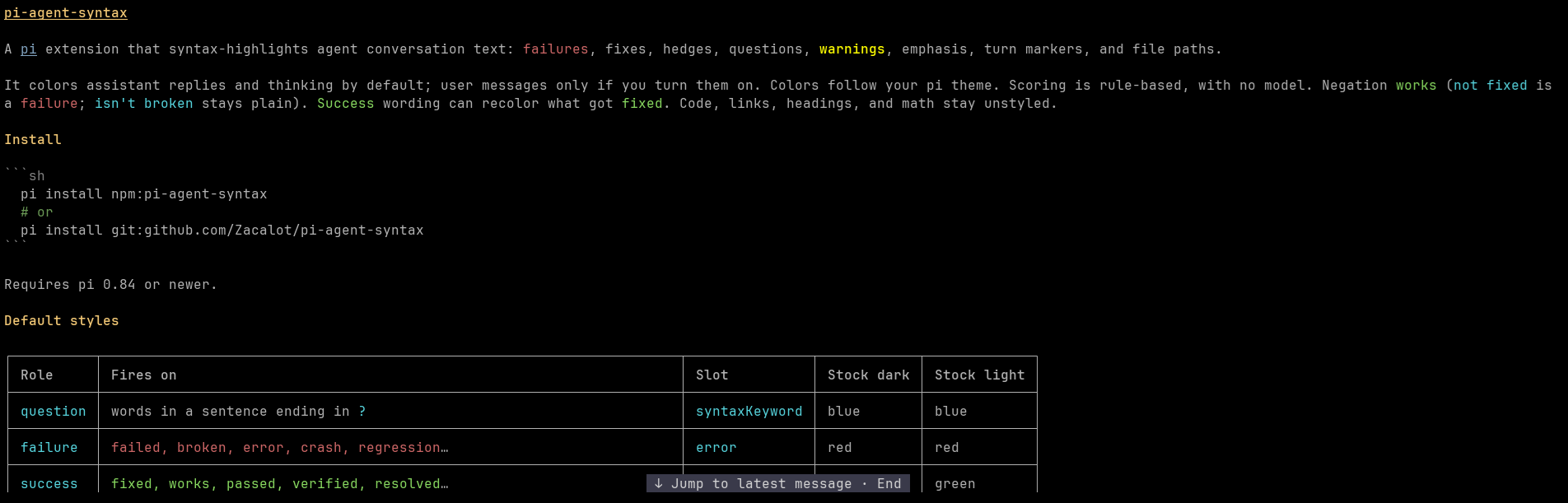
It colors assistant replies and thinking by default; user messages only if you turn them on. Colors follow your pi theme. Scoring is rule-based, with no model. Negation works (not fixed is a failure; isn't broken stays plain). Success wording can recolor what got fixed. Code, links, headings, and math stay unstyled.
Install
pi install npm:pi-agent-syntax
# or
pi install git:github.com/Zacalot/pi-agent-syntax
Requires pi 0.84 or newer.
Default styles
| Role | Fires on | Slot | Stock dark | Stock light |
|---|---|---|---|---|
question |
words in a sentence ending in ? |
syntaxKeyword |
blue | blue |
failure |
failed, broken, error, crash, regression... | error |
red | red |
success |
fixed, works, passed, verified, resolved... | success |
olive | green |
hedge |
maybe, probably, seems, likely, assume, unverified... | thinkingHigh |
lavender | plum |
emphasis |
must, delete, critical, irreversible, overwrite... (+ bold) | warning |
yellow | brown |
warning |
warning, caution, note, important, todo, fixme, deprecated, breaking | warning |
yellow | brown |
| path | src/foo.ts:12, ~/x.json, Makefile |
accent |
teal | teal |
Hedged clauses go italic. Emphasis is bold. Turn markers (actually, wait, instead, ...) are underlined. Emphasis takes the warning color plus bold.
Configuration
~/.pi/agent/pi-agent-syntax.json is optional. Every key is optional. Bad values are reported when a session starts; that key keeps its default.
| Key | Default | Notes |
|---|---|---|
enabled |
true |
|
surfaces |
{ "user": false, "assistant": true, "thinking": true } |
|
colors |
{} |
role - color |
vocabulary |
"agent" |
"semfont" uses a broad everyday word list instead |
sensitivity |
1 |
> 0; strength of the base scoring channels |
thresholds |
valence .2, salience .3, surprise .5, certainty .35, technicality .45, question .5, alert .5, hedge .35, emphasis .6, marker .4 | each in [0, 1) |
map |
the default style rows | replaces the whole list |
lexicon |
built-in agent vocabulary | per-channel weights, merged over defaults |
entities |
{ "path": "accent" } |
null turns off path highlighting |
A color is a pi theme name (error, accent, syntaxString, ...), hex "#rrggbb", or an ANSI-256 index.
A map row is
{ "channel", "render": "fg" | "bold" | "italic" | "underline", "side"?: "negative" | "positive", "threshold"?, "color"? | "negative"? / "positive"?, "role"? }.
Channels: valence, salience, surprise, certainty, technicality, question, alert, hedge, emphasis, marker.
Retint three roles and silence two words:
{
  "colors": { "emphasis": "syntaxString", "hedge": "syntaxFunction", "question": "syntaxVariable" },
  "lexicon": { "certainty": { "maybe": 0 }, "valence": { "fine": 0 } }
}
Skip thinking: { "surfaces": { "thinking": false } }.
Command
/syntax- toggle for the session/syntax on//syntax off- set on or off/syntax reload- re-readpi-agent-syntax.json
Limits
- Messages only: not the prompt editor, tool output, or pi error lines.
- Toggles hit newly drawn messages; older ones keep their look until redrawn.
- Vocabulary is English-oriented; extend it with
lexiconwhen you need to.
Credits
- semfont (Rohan Adwankar, MIT), including VADER (MIT)
- @earendil-works/pi-tui (MIT)
- pi-message-highlights (zigai, MIT)