pi-agent-browser-native0.9.6
pi extension that exposes agent-browser as a native tool for browser automation
Reported broken on omp
1 of 1 report says this package does not work on omp. Read the notes before you install it.
0 works1 broken
Reports 1
- broken
Automated load test on omp 18.12.3: the extension throws at startup. Error: ctx.sessionManager.buildSessionProjection is not a function. (In 'ctx.sessionManager.buildSessionProjection()', 'ctx.sessionManager.buildSessionProjection' is undefined) (during session_start)
Readme
pi-agent-browser-native
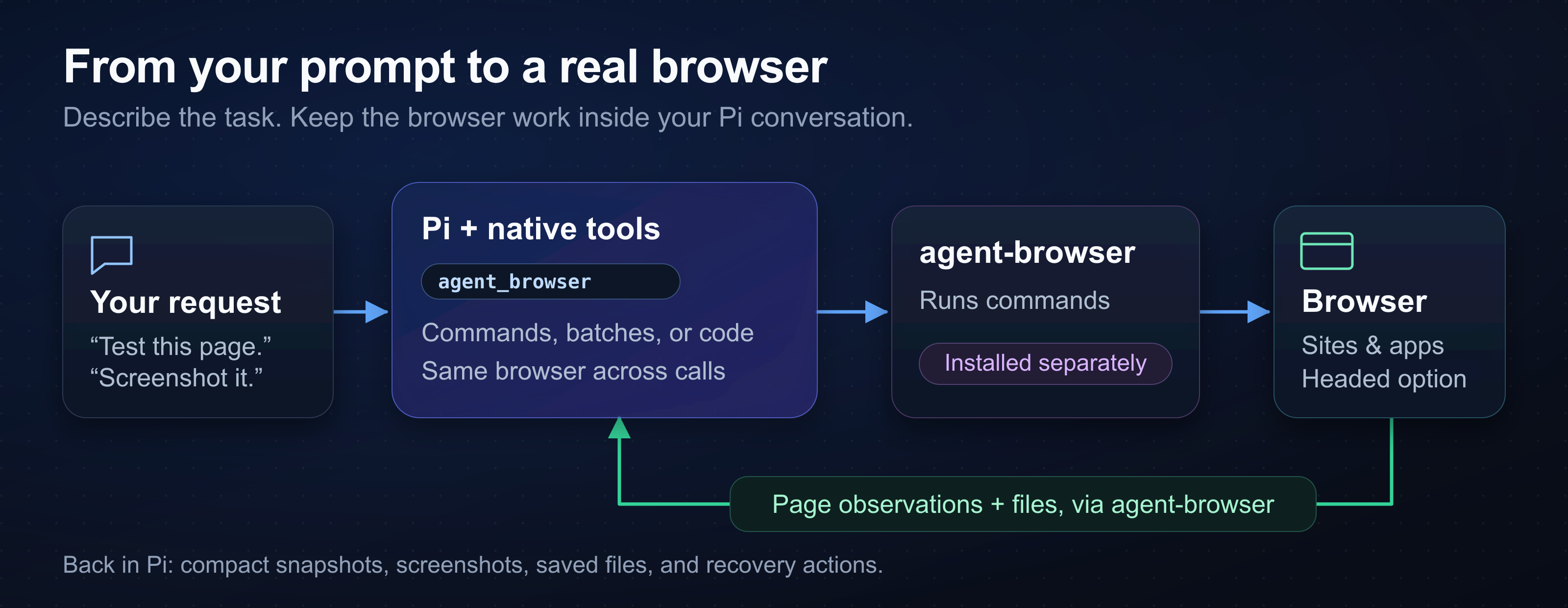
pi-agent-browser-native adds browser tools to Pi. Use it to read pages, test web apps, and save screenshots through agent-browser.
Install and start
Use Node 24.21.0 or later and Pi 1.0.0 or later. This extension requires a separate agent-browser installation.
The recommended agent-browser version is 0.38.1. This extension accepts stable versions 0.35.0 or later.
npm install -g agent-browser
agent-browser install
pi install npm:pi-agent-browser-native
pi
agent-browser install downloads Chrome for Testing. On Linux, use agent-browser install --with-deps if browser libraries are missing. Android users need the Termux setup.
Ask Pi:
Open https://example.com with agent_browser.
Take an interactive snapshot.
Save a screenshot to /tmp/example.png.
Close the browser when finished.
After a package update, quit Pi fully. Start Pi again to load the new tools. /reload can retain the previous compiled code.
Existing browser-bearing conversations resume automatically at their original journal path, without rewriting history or running a converter. See session storage for replay and recovery limits.
Read the command reference for your next browser task.
Browser tools
Describe the task in your conversation. Pi can click controls, fill forms, check text and URLs, and save files.
| Tool | Use |
|---|---|
agent_browser |
Browser commands and fixed batch --bail sequences |
agent_browser_code |
JavaScript loops and branches in the same browser |
agent_browser_tools |
Enable action, QA, Electron, source, and network-source tools |
agent_browser_web_search |
Optional Exa or Brave search through provider APIs |
For example, Pi opens and inspects a page with these calls:
{ "args": ["open", "https://example.com"] }
{ "args": ["snapshot", "-i"] }
Snapshots give Pi current @eN references for controls. Refresh the snapshot after navigation or page changes. Check the resulting page after a click; command success alone does not prove the app changed.
For a trial without a saved package setting, run:
pi --no-extensions -e npm:pi-agent-browser-native
This command loads this extension explicitly and disables automatic extension loading. Other Pi settings and resource types still apply.
Profiles and privacy
Ordinary calls use one named browser per root Pi session. A parent and its subagents share that browser. Separate roots get separate browser names.
Shared root browsers survive Pi exit. Ask Pi to close your group's browser when finished.
Profile access exposes private page content to the model. That content can persist in transcripts and saved files. Use temporary profiles for tests.
Credential-like values are redacted, but ordinary page text stays visible. Verify the signed-in page after you select a profile or restore browser state.
Ask for a headed browser if you need to watch a task or complete a login. Remote environments can keep the window off your desktop.
See profiles and sessions for profile selection, restore limits, and cleanup.
Optional search and settings
To enable web search, set EXA_API_KEY or BRAVE_API_KEY before you start Pi. Exa is the default when both keys work. Provider charges apply.
Set provider preferences and browser defaults in ~/.pi/config/pi-agent-browser-native/config.json. Trusted projects can use .pi/config/pi-agent-browser-native/config.json. PI_AGENT_BROWSER_CONFIG selects an override file.
Malformed config files and search-provider JSON report errors without parser previews that could expose credentials, and search-provider HTTP failures report only the status with a fixed hint.
Read configuration examples for secret references, provider selection, and profile defaults.
Troubleshooting and limits
Run the read-only health check:
npm exec --package pi-agent-browser-native -- pi-agent-browser-doctor
It checks the browser CLI, supported versions, and duplicate Pi package sources. It does not change settings.
This is a pre-1.0 package. Windows has unresolved browser session-locking and restored Electron cleanup test failures. Release tests do not cover Android. Electron desktop tools do not apply to Android apps. See the support matrix for details.
For recordings, install ffmpeg with the encoder for your WebM or MP4 output. Verify the completed file after you stop the recording.
For remote browsers, use a URL that the browser host can reach. localhost refers to the browser host.
For stale references or unexpected tabs, follow the returned recovery actions. Take a fresh snapshot before another interaction. A snapshot inside a batch does not protect refs used after a later page-changing step; add another snapshot after that step or split the batch.
More documentation
- Detailed reference: platform setup, browser examples, compatibility notes, and development checks.
- Tool contract: exact inputs, results, code limits, and image geometry.
- Electron guide: desktop discovery, isolated launch, and cleanup.
- Session storage: replay, large histories, and session conversion.
- Architecture: extension design.
- Performance: measured baselines, improvements, and reproducible profiling.
- Code quality and release process: maintainer procedures.
License
MIT. Copyright Mitch Fultz.