omp-herdr-agents3.5.0
Asynchronous omp (oh-my-pi) subagents in Herdr, with optional isolated Git worktrees
Built for omp
The author tagged this package omp-plugin.
Reports 0
No reports yet.
Readme
omp Herdr Agents


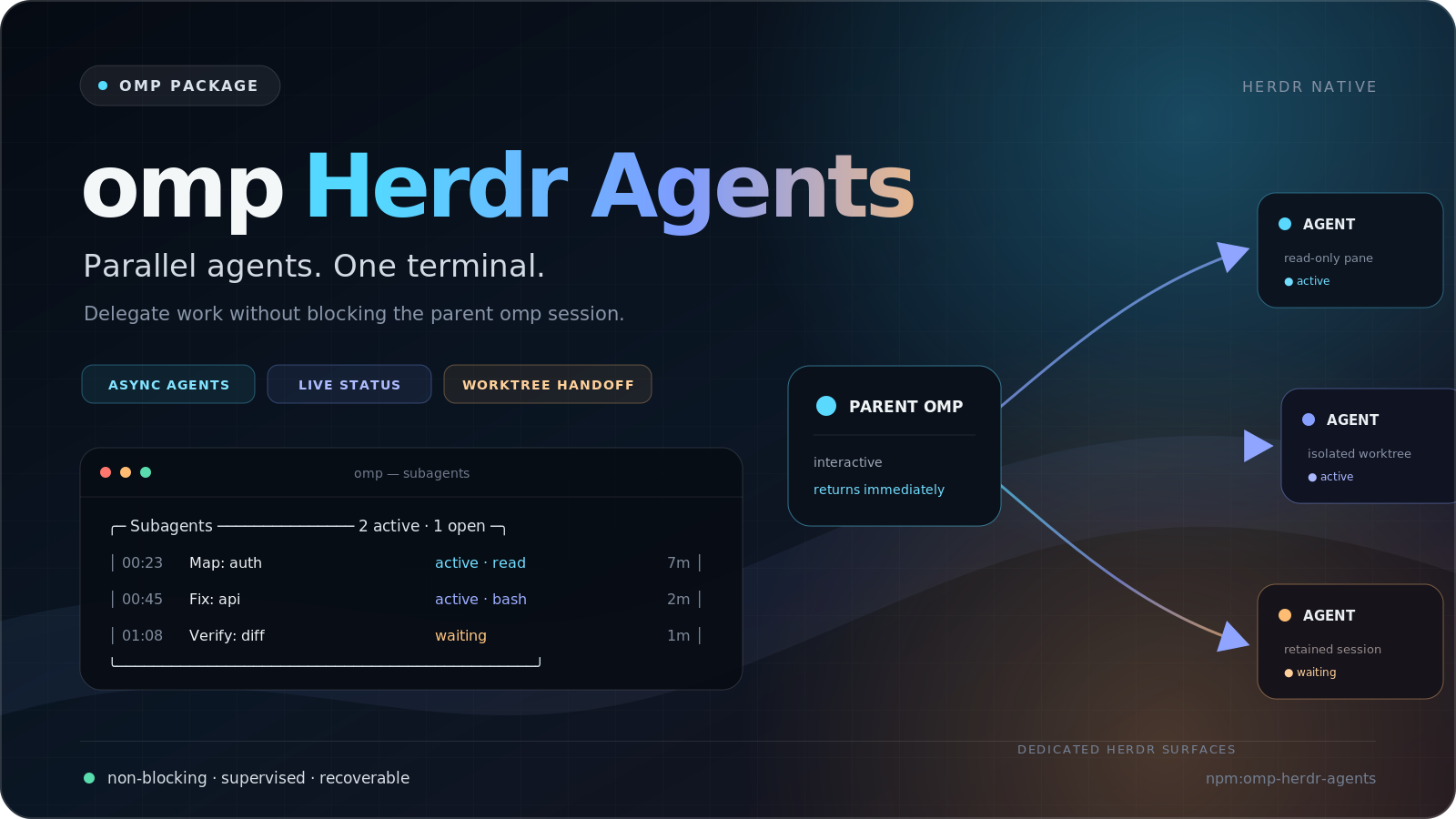
Asynchronous subagents for omp, running exclusively in Herdr.
Delegate investigation, implementation, and review without blocking the parent session. Each child runs as a real omp process in its own Herdr pane. Its result comes back to the parent automatically when it finishes.
Agents: load the operating guide with
/skill:omp-herdr-agents. It covers launching, supervising, interrupting, cancelling, and resuming children, worktrees, persistent specialists, model routing, and configuration. The source isskills/omp-herdr-agents/SKILL.md. Contributors: readAGENTS.md.
Contents
- Features, Requirements, Install
- Quick start, How it works, Tools and commands
- Choose models, Control running children, Worktrees
- Roles, Sidebar plugin, Configuration
- Safety and uninstall, Troubleshooting, Documentation
Features
- Non-blocking delegation.
subagentacknowledges the launch at once, and the parent keeps working. - Parallel execution. Run independent scouts, workers, and reviewers at the same time.
- Live supervision. omp's subagent widget tracks process and turn state. You can interrupt one child turn without ending its session.
- Managed worktrees. Writing agents can run in retained Herdr workspaces with explicit Git ownership and recovery details.
- Conversation handoff.
/subagent-worktreecontinues the active omp conversation in a new worktree and keeps the parent session. - Pack-neutral roles. Use project or global definitions and installable role packs. This package ships no default roles or workflows.
- Persistent specialists. Keep one policy-bound omp session for sequential, turn-based tasks.
- Optional sidebar focus. The companion omp Herdr Agents Sidebar Herdr plugin hides marked delegated children from Herdr's Agents view while Focus is on. Markers are display only and follow the pane. See Sidebar plugin.
Requirements
Other terminal multiplexers are not supported. Session startup skips worktree inventory to avoid blocking omp initialization. Use /subagent-worktree list or worktree_list to inspect managed worktrees. Outside Herdr, explicit inventory tools report unavailable inspection as unknown. Worktrees isolate Git checkouts, not processes or permissions. Child agents and installed omp plugins run with your user account's access.
Install
Install from npm:
omp plugin install npm:omp-herdr-agents
Install a local checkout, or try it for one run:
omp plugin install ./path/to/omp-herdr-agents
omp -e ./path/to/omp-herdr-agents/pi-extension/subagents/index.ts
Then start omp inside Herdr:
herdr
omp
Restart omp after installation. Review package source before you install any omp plugin.
Role-declared skills
A role's declared skills reach the child at the top of its first task. The host reads them from disk, without running project code, so a standalone child has every declared skill before it starts. See How declared skills reach the child.
This fork ships no methodology packs. The upstream pi-herdr-clean-craft pack is a Pi-runtime pack and does not install into omp.
Quick start
A bare launch needs no installed role. Ask omp to delegate in plain language:
Use two subagents in parallel to map the authentication flow and the session schema, then summarize their findings.
omp can also call the tool directly. Each call returns at once, and each result comes back on its own:
subagent({ name: "auth-research", model: "<provider>/<fast-tier-id>", thinking: "low", task: "Map the authentication flow" });
subagent({ name: "auth-research2", model: "<provider>/<fast-tier-id>", thinking: "low", task: "Map the session schema" });
Named roles such as scout come from your project or global definitions or from an installed role pack. This package ships none. When one supplies scout, you can launch it by name:
/subagent scout Analyze the authentication module and report relevant files and risks
For an isolated writing task, hand the conversation to a new worktree:
/subagent-worktree auth-fix Implement the approved authentication fix and run the focused tests
The parent is the coordinator. Give each child one bounded outcome with its goal, allowed files, verification, and commit instruction. Use ordinary panes for read-only agents. A single or sequential writer can work in the parent checkout. Give each parallel, independent writer its own managed worktree, and keep dependent writes sequential. Children are leaves by default, and the parent owns integration and final verification.
How it works
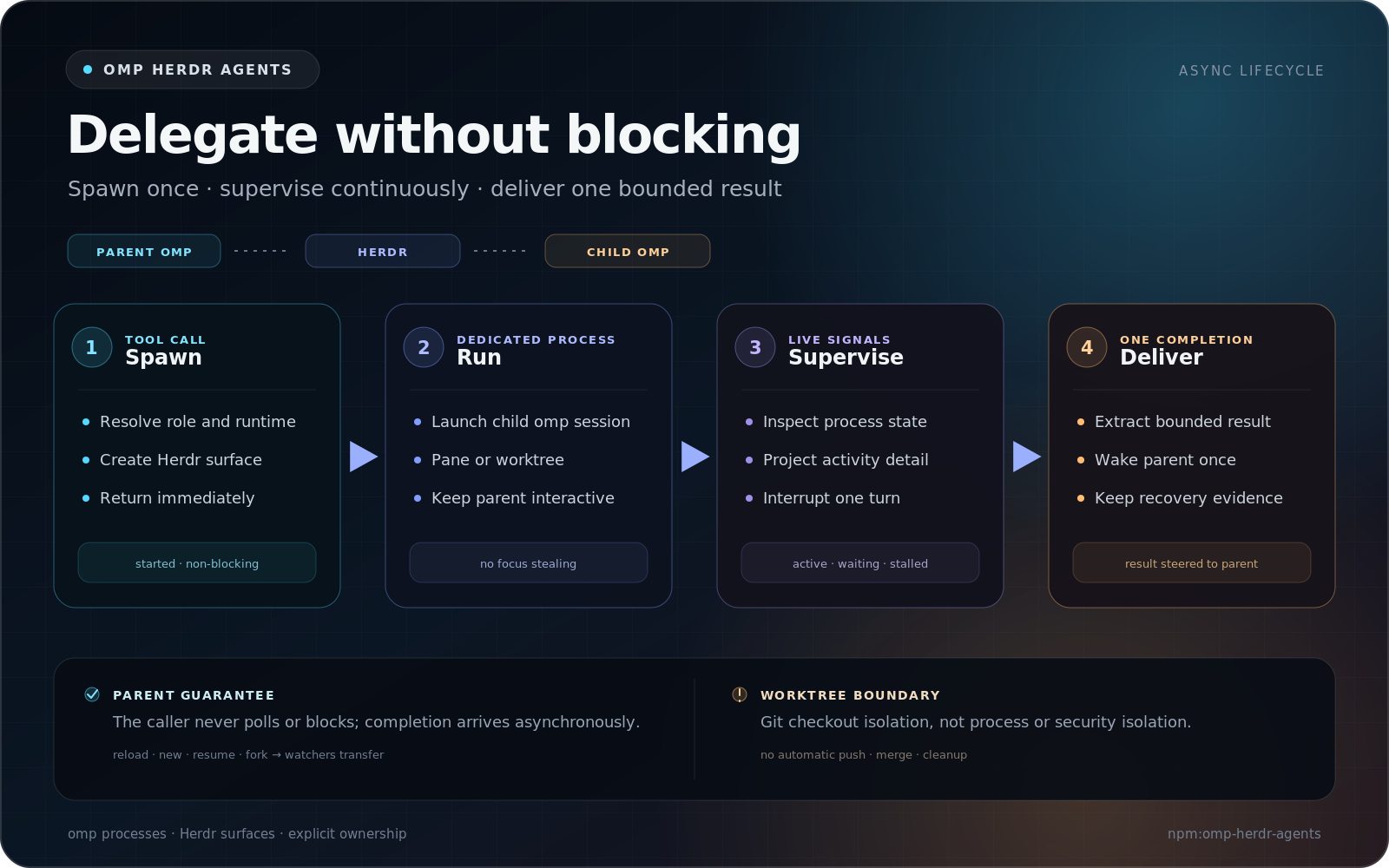
A subagent call selects the target checkout, reuses its Herdr workspace, and gives the child a pane in an extension-owned Agents tab. Four panes fit in each tab by default, and overflow opens another tab in the same workspace. The call launches a child omp session and returns started. The parent watches Herdr process state and child activity and shows the result in a live widget:
╭─ Subagents ──────────────────── 1 active · 1 open ─╮
│ 00:23  Scout: Auth (scout)        active · read 7m │
│ 00:45  Reviewer (reviewer)              waiting 2m │
╰────────────────────────────────────────────────────╯
Results arrive automatically. When a child finishes, the parent receives one bounded subagent_result message and starts a new turn with that result in context. Do not poll, tail session files, or wait in a shell loop. Results longer than 16,000 characters are shortened in the parent context, and the full result stays in the child session. Active watchers survive a parent session switch (/new, /resume, /fork). Quitting omp stops parent-side delivery.
Disposable ordinary panes close after their result is delivered, and Herdr removes a tab when its last pane closes. Persistent specialists keep their pane between tasks. Managed worktree roots return to retained interactive shells. Subagent launches do not steal keyboard focus.
Status labels, the stall watchdog, and no-progress advisories are described in In-progress status updates and Supervision transport.
Tools and commands
The parent session gets these tools:
| Tool | Use |
|---|---|
subagent |
Launch a child in a Herdr pane. Returns at once. |
subagent_interrupt |
Stop the current turn of a running child. The session stays open. |
subagent_cancel |
End an ordinary run. No fallback model is tried, and one cancelled result is delivered. |
subagent_send |
Send the next task to an idle persistent specialist. |
subagent_stop |
Stop a persistent specialist after its active task settles. |
subagent_resume |
Resume an earlier child session in a new ordinary pane. |
subagents_list |
List agent definitions, live specialists, and the supervision mode. |
worktree_list |
List managed worktrees and what blocks their cleanup. |
worktree_remove |
Remove one managed worktree on explicit request. |
subagents_write_task_models |
Internal writer for models.tasks preferences. |
Children get caller_ping to ask the parent for help. Interactive children also get subagent_done to mark themselves complete, and are asked whether they are done when a run ends without it.
| Command | Use |
|---|---|
/subagent <agent> <task> |
Launch a named role. /subagent list lists roles. |
/subagent-worktree <name> [task] |
Continue this conversation in a new managed worktree. /subagent-worktree list and /subagent-worktree remove <target> manage them. |
/subagents-init [preferences] |
Draft task-category model preferences from the live model registry. |
/skill:omp-herdr-agents |
Load the host operating guide. |
The main subagent parameters are name, task, agent, model, thinking, fork, cwd, persistent, interactive, and worktree. See Parameters for every parameter, and Tools and lifecycle reference for the full behavior of each tool. Live tool descriptions and these documents are authoritative. The omp-herdr-agents skill is a general operating guide.
Choose models
Set each child's exact authenticated provider/model-id and a supported thinking level. Pick the model tier first:
- fast for bounded mechanical work and reconnaissance
- mid for ordinary implementation or review
- frontier for architecture, security, hard diagnosis, or adversarial review
Then set thinking within that model's range. Without model, a child uses agent frontmatter, then models.agents.<name>, then models.default, then the parent model. Without thinking, it uses the role's thinking level when set, otherwise the parent level.
A model value can also be an ordered fallback list, such as provider/preferred, provider/fallback, or a whole-value task:<category>. Task categories are coding, review, recon, qa, architecture, and docs. Their candidates come from models.tasks in config.json. Run /subagents-init to draft those preferences from your authenticated models, then start a new session:
/subagents-init Prefer capability over price for implementation; keep recon inexpensive
Ordinary non-persistent runs try later candidates after a launch failure or a provider or agent error, never after a completed negative result. Persistent specialists do not advance after a running-child error. Worktrees use the first authenticated candidate only. A catalog-listed model can still be rejected by your provider account at request time.
Cross-family independent review requires a reviewer from a different model family than the author. task:review alone does not establish that. For ordinary review, prefer a different authenticated model family. When no other authenticated model family is available, ordinary review may use a same-family reviewer in a fresh standalone session. Disclose that this review is context-isolated, not cross-family independent. Cross-family verification must not use this fallback. See Model resolution and fallback, Task routing, and Draft task-model preferences.
Control running children
Three tools end or pause work, and each does something different:
| Goal | Tool | Effect |
|---|---|---|
| Stop the current turn but keep the child | subagent_interrupt({ id | name }) |
Sends Escape. The pane and session stay open, and the widget shows interrupted. |
| End an ordinary run | subagent_cancel({ id | name }) |
Records the cancel first, so no fallback or retry follows. Closes an ordinary pane. A worktree keeps its workspace. One cancelled result arrives. |
| End a persistent specialist | subagent_stop({ id | name }) |
Waits for the active task, confirms process exit, then releases the name. |
subagent_cancel rejects persistent specialists. If termination cannot be confirmed, cancel reports unconfirmed, and the run stays live and supervised. Call it again to retry. Do not poll after a cancel or stop. The result arrives as a message.
A child that needs help calls caller_ping. An ordinary child exits, and you continue it with subagent_resume({ sessionPath, message }). A persistent specialist stays alive, and you answer with subagent_send. subagent_resume restores the child's launch tool policy and rejects managed-worktree sessions. Continue a worktree child in its retained workspace instead.
Set persistent: true to keep one specialist session for sequential tasks. It accepts one task at a time and rejects sends while busy. persistent.maxAgents caps how many stay open (default 3). Persistent sessions cannot be resumed.
Details: Persistent specialists, Interrupting, Cancelling, and caller_ping.
Worktrees
A worktree is opt-in for each launch:
subagent({
  name: "ticket-build",
  model: "<provider>/<mid-tier-id>",
  thinking: "medium",
  worktree: { branch: "ticket/123", base: "main" },
  task: "Implement ticket 123, run its tests, and commit. Do not push, merge, or remove the worktree.",
});
cwdselects the source repository. The child starts at the new worktree root.baseresolves to an exact commit before creation and defaults to the committedHEAD. Uncommitted and untracked parent files are not copied.- Each
branchmust be unique. Use one worktree per parallel, independent writing task. - Successful, failed, and help-requesting runs keep their workspace. Completion reports the path, branch, base and head SHAs, commits ahead, changed files, and clean, dirty, or conflicted state. Failed Git inspection is reported as unknown.
- The extension never pushes, opens pull requests, merges, cherry-picks, switches the parent checkout, or removes worktrees on its own. The parent owns review and integration.
Cleanup is an explicit parent action:
/subagent-worktree list
/subagent-worktree remove ticket/123
Removal rechecks eligibility at the moment it runs. It requires the source repository to be inside the parent session's cwd, no detected process holder or live child, and a clean checkout with no untracked files or conflicts. Unknown Git state or failed process enumeration blocks removal. Unreadable individual process details produce warnings, not proof of inactivity. --preserve (or preserve: true) commits dirty work as a WIP commit first. Ignored files are not preserved and can be deleted. Cleanup never deletes branches, uses force flags, or closes the source repository's primary workspace.
Read Worktree subagents before you run writing agents in worktrees. It covers task selection, review, recovery, and cleanup. The tool-level contract is in Isolated worktree runs and Explicit worktree cleanup.
Roles
A bare launch without agent always works. A named launch resolves agent from these sources, highest priority first:
- project definitions in
<cwd>/.omp/agents/ - global definitions in
$PI_CODING_AGENT_DIR/agents/(default~/.omp/agent/agents/) - roles registered by installed role packs
/subagent list and subagents_list show each visible role and its source. A missing or invalid named role fails before Herdr creates a pane or worktree. It is never replaced by a bare agent.
A role is a Markdown file with frontmatter. The filename stem is the role name:
---
description: Reviews a bounded change for concrete security vulnerabilities
thinking: high
tools: read, bash
spawning: false
auto-exit: true
---

# Security Reviewer

Review only the requested change. Report concrete findings with file and line references. Do not modify files.
A read, bash allowlist is not a read-only boundary, because shell commands can change files. See Roles and custom agents for the frontmatter reference, tool access control, and how to publish a role pack.
Sidebar plugin
The optional omp Herdr Agents Sidebar Herdr plugin adds two actions and turns Focus on by default. Focus hides delegated omp children from Herdr's Agents view. All removes this plugin's filter and stays off until you run Focus again. It needs:
- An
omp-herdr-agentsrelease, which marks children with no setting. The upstreamomp-herdr-agentsreleases3.2.0through3.3.1also needed"sidebar": { "enabled": true }inconfig.json, and macOS needed an upstream release newer than3.2.1. - Linux or macOS
- Herdr's omp integration (
herdr integration install omp), which reports each child's session to Herdr. The extension marks a child only while Herdr reports that child's own session. - Herdr
0.9.0or later, the first release with the agent view API. Tested on0.9.1,0.9.2-preview.2026-09-29-8e78f929d8f0, and0.9.5; other builds are untested. nodeon thePATHof the Herdr server
Install the Herdr plugin. Herdr shows the manifest and commands for review:
herdr plugin install magic3007/omp-herdr-agents/plugins/sidebarAfter upgrading the extension, restart each parent omp session, or start a new one. Running children that were never marked are not marked retroactively; launch new ones.
Focus turns on by itself at the first agent Herdr detects after install, and again after a Herdr server restart. To change it, run an action. Your last choice sticks:
herdr plugin action invoke omp-herdr-agents.sidebar.focus
herdr plugin action invoke omp-herdr-agents.sidebar.all
Focus replaces the server-wide Agents view, including any filter set by another tool. Because Herdr keeps one view, the plugin also replaces another tool's view whenever it detects an agent, unless you chose All. All clears only this plugin's view and leaves another tool's view untouched.
Focus is display only. Hidden children keep running and still raise notifications. Blocked children and children with unknown status stay visible. The marker follows the pane and is cleared within about 5 seconds after the child exits, so an agent you start by hand in a delegated pane can stay hidden that long. With Herdr 0.9.4 or later, a child suspended with Ctrl-Z keeps its session and stays marked, also after it resumes with fg, until it exits, and a non-Pi program started at that pane's shell meanwhile can stay hidden until the suspended child exits. Herdr 0.9.3 and earlier clear the marker within about 5 seconds of suspending. See Sidebar markers and the plugin's limits.
Configuration
The durable configuration file is $PI_CODING_AGENT_DIR/herdr-agents/config.json, default ~/.omp/agent/herdr-agents/config.json. Package upgrades never overwrite it. Create it by copying the installed package's config.json.example, or run /subagents-init. The extension reads it at startup, so restart omp after any change. A package-root config.json is ignored.
| Key | Default | Controls |
|---|---|---|
status.enabled |
true |
The live subagent widget. This section is required. |
models.default, models.agents, models.tasks |
none | Model defaults and task-category candidates. |
persistent.maxAgents |
3 |
How many persistent specialists can stay open. |
spawning.maxDepth |
3 |
Deepest child any launch may create (parent is depth 0); deeper launches are refused. |
supervision.forcePolling, supervision.hangWarningMinutes |
false, 15 |
Supervision transport and no-progress advisories. |
panes.mode, panes.direction, panes.maxPerTab |
"grouped", "right", 4 |
Where child panes open. |
guidelines.launchRoster |
true |
Whether the parent is asked to print a markdown roster table after launching a group. |
See Configuration for every key, the task-model writer, and the events other extensions can use during /subagents-init.
Safety and uninstall
- Child agents are real omp processes running with your user account's permissions, inside Herdr panes. Worktrees isolate Git checkouts, not processes or permissions.
- The extension creates Herdr panes, tabs and managed worktrees only when a launch asks for them. It never pushes, merges, opens pull requests, deletes branches or removes worktrees on its own; cleanup is an explicit parent action (worktree cleanup).
- What it writes:
$PI_CODING_AGENT_DIR/herdr-agents/config.json(only through/subagents-initor the writer tool, never on startup); per-launch artifacts under the parent session'sartifacts/<session-id>/directory beside omp's session store, which hold the child's full task text and anysystemPromptas Markdown files, activity snapshots and worktree manifests; and the child's own Pi session file. A managed worktree that carries its own.omp/agentdirectory receives that child's session inside the checkout. Treat task text as potentially sensitive when you share or inspect those files. - Managed worktree children record their PID, process start time, boot ID, and PID namespace in
<session>.process.jsonbeside their session. Inside Herdr, the parent reads each child pane's agent session from Herdr and reports one display-only sidebar marker, the pane tokenpiha_delegated_v1, on that pane through the Herdr socket. It writes no other pane metadata. - To uninstall: first list and remove any retained worktrees while the extension is still loaded (
/subagent-worktree list, then/subagent-worktree remove <target>), because those commands leave with the package. If you installed the optional sidebar plugin, remove it withherdr plugin uninstall omp-herdr-agents.sidebar(orherdr plugin unlinkfor a linked copy). Then runomp plugin uninstall omp-herdr-agents, and delete$PI_CODING_AGENT_DIR/herdr-agents/and theartifacts/directories above if you no longer want the configuration and launch records.
Troubleshooting
- A child finished, but the parent did not react. Check that a
subagent_resultentry reached the parent session. See Troubleshooting completion delivery. - A child shows
stalledor a no-progress advisory. Advisories never stop a child. Interrupt, cancel, or stop it yourself. See Supervision transport. - A model fails at launch or during the run. The completion keeps each raw provider reason. See Model resolution and fallback.
- Worktree removal is refused. The report names each blocker. See cleanup and recovery.
More checks are in Troubleshooting.
Documentation
| Page | Contents |
|---|---|
| Tools and lifecycle | Every tool and command, parameters, status labels, persistent specialists, interrupt, cancel, resume, and /subagent-worktree |
| Configuration | config.json, model preferences, /subagents-init, init events, sidebar markers, supervision, and pane placement |
| Roles and custom agents | Discovery, frontmatter reference, tool access control, and role packs |
| Worktree subagents | Worktree operation, review, recovery, and cleanup |
| Troubleshooting | Completion delivery and other common problems |
| Development | Code map, CI, and local checks |
| Documentation map | ADRs, active design, and research |
CHANGELOG.md is generated from Git history on each release. The domain glossary is CONTEXT.md.
Development
Run the local checks:
npm ci
npm run format:check
npm test
npm run lint
npm pack --dry-run
Run the deterministic integration suite from inside Herdr with npm run test:integration. See Development for the code map, tool versions, and the optional live-provider test, and RELEASING.md for releases.
Acknowledgements
This package builds on earlier open-source work by HazAT/pi-interactive-subagents and 0xRichardH/pi-herdr-subagents. The sub-agent status supervision and turn-only interruption features were inspired by RepoPrompt's sub-agent snapshot polling and run cancellation features.
License
MIT, see LICENSE. Copyright notice retained from the upstream lineage (HazAT).