omp-cache-meter0.1.1
Prompt-cache meter for omp: read/write/uncached split, a countdown to expiry, and whether /compact pays for itself on a cold cache.
Built for omp
The author tagged this package oh-my-pi.
Reports 0
No reports yet.
Readme
agent-cache-meter
A prompt-cache meter for omp and Claude Code. It shows how many tokens each request read from the cache, wrote to it and sent uncached, and counts down to the cache's expiry. When the cache goes cold it says what rebuilding it costs and whether /compact pays for itself. It also includes a plugin for Tern, Stencil's terminal, that shows every agent's cache in one place.
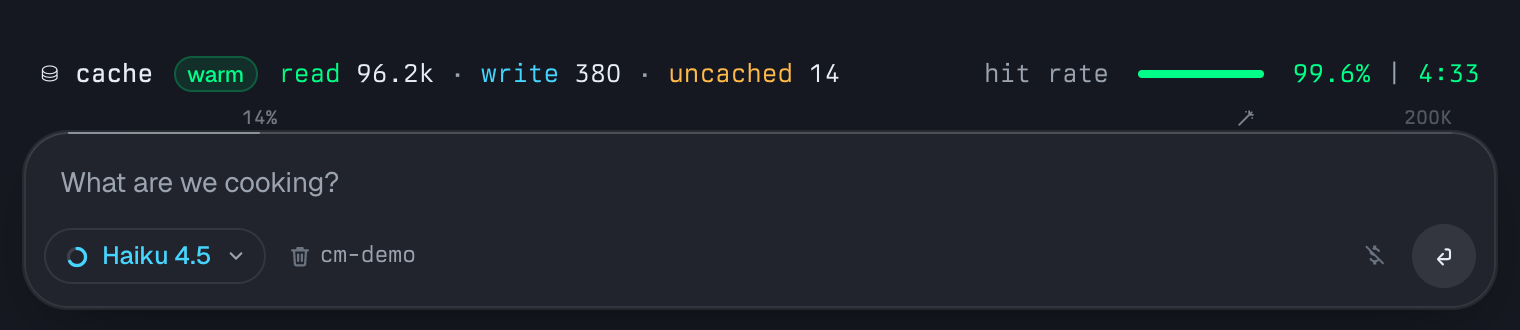
The repo has three parts:
| Part | Runs in | Does |
|---|---|---|
omp-extension/ |
omp | Draws the meter above the composer and adds the /cache panel and /cache settings. In a Tern pane it also writes one state file per pane. |
claude-code/ |
Claude Code | The same meter as Claude Code's status line (npm: claude-cache-meter), built from the extension's meter code, plus a panel command. In a Tern pane it writes the same state file. |
tern-plugin/ |
Tern | Reads those state files. It adds a status-line segment, a countdown on tab titles, a toast shortly before an agent's cache expires, and a canvas listing every agent. |
The omp extension and the Claude Code status line each work on their own in any terminal. The Tern plugin needs one of them.
Install
Tested on omp 18.12.6, Claude Code 2.1.311 and Tern 0.8.2.
# omp
omp install omp-cache-meter

# Claude Code
npx claude-cache-meter install

# Tern (optional)
tern plugin install github.com/andreiverdes/agent-cache-meter/tern-plugin
omp sessions that are already running pick up the extension only after a restart. To update, run omp plugin upgrade omp-cache-meter and tern plugin install github.com/andreiverdes/agent-cache-meter/tern-plugin --force; to remove, omp plugin uninstall omp-cache-meter and tern plugin remove cache-meter.
omp install github:andreiverdes/agent-cache-meter installs the extension straight from this repository instead of npm.
In Claude Code you can install it as a plugin instead: /plugin install cache-meter --marketplace andreiverdes/agent-cache-meter, then /cache-meter:setup. claude-code/ covers the status line's states, its panel command and its settings.
The meter
The meter sits above the composer and redraws every second. It takes one line, two when the cache is cold. What happened is on the left; the hit bar, hit rate and time (or the sizes) sit at the right end:
| State | When | Left | Right end |
|---|---|---|---|
| Warm | More than the warning time left, or omp will refresh the cache in time | read · write · uncached of the last request |
hit rate, split bar, 99.6% | 4:33 |
| Expires soon | Inside the warning time (default 60 s) with no refresh planned | rebuild cost 96.6k ≈ $0.39 after |
the same, the countdown in amber |
| Cold | The cache entry has expired | rebuild cost 96.6k ≈ $0.61; line 2: what to do (below) |
1h · expired | 4:00 ago; /cache for details |
Reset by /compact |
A compaction (manual or automatic) is newer than the last request | ~$0.02 less per turn · +$0.12 now · next ≈ $0.25 |
96.6k → 60.0k |
After /compact the meter keeps two amounts apart. Per turn is what every later request saves by reading the smaller prefix from the cache. Now is the compaction's one-off result, shown only when the cache had already expired: the rebuild it avoided, minus the summary request and the first write of the new prefix. When that is positive the meter says paid for itself (~$0.74).
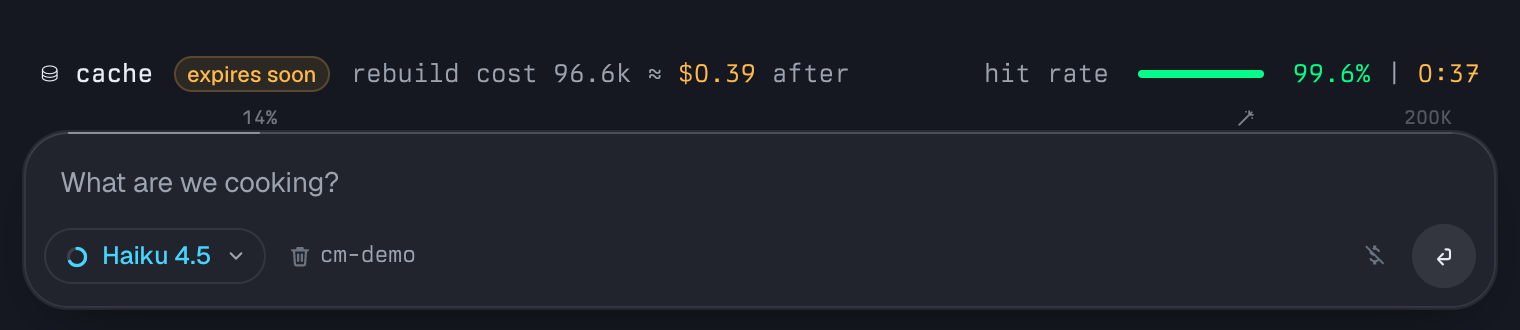
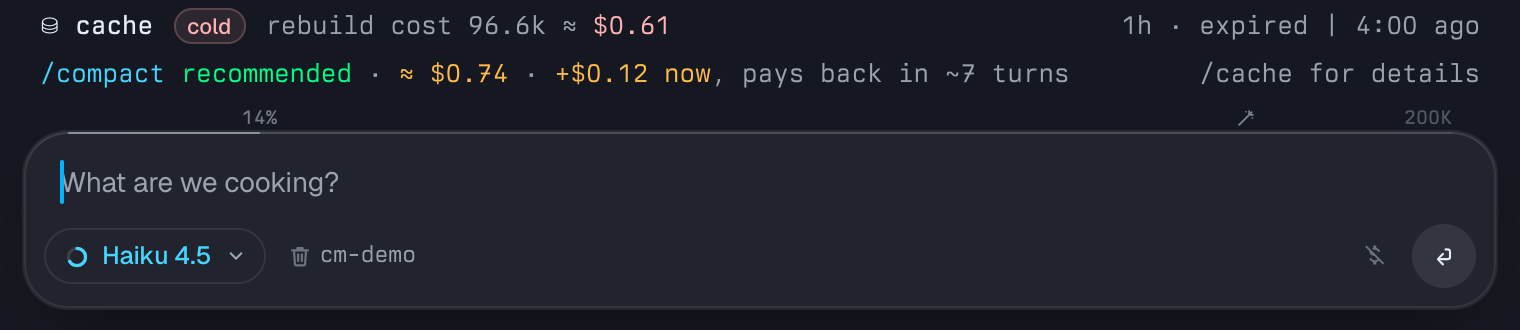
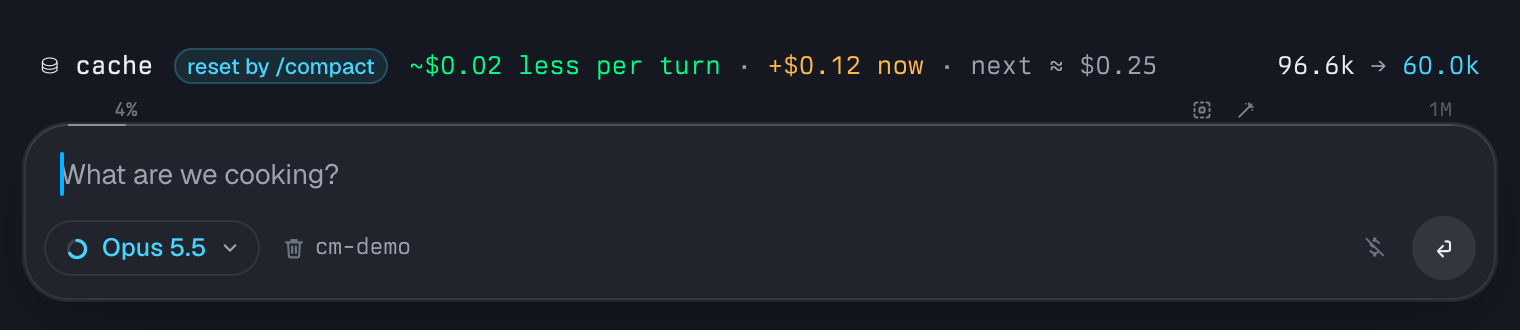
(The screenshots render the extension's own code in omp and Tern with a fixed Opus 4.5 session: a 96.6k-token prompt whose first 37k tokens, the tools and system prompt, stay cached.)
Continue or /compact
On a cold cache your next message rebuilds the cache. The tools and static system prompt are shared by every omp session, so they are usually still cached; the meter takes their size from the session's first request and charges only the rest at the cache-write price.
/compact makes that rebuild smaller, but it is not free. omp's native Anthropic compaction sends the conversation up to the turns it keeps, with cache markers, so on an expired cache that part is written once more, plus a summary of about 3k tokens as output. The next request then writes the new prefix: the head, the summary and the kept recent turns (compaction.keepRecentTokens, 20k by default). Up front /compact therefore usually costs a little more than continuing; after that every turn reads fewer tokens and every later rebuild is cheaper.
The meter recommends /compact when it pays back within 10 turns (advice.paybackTurns), and continue otherwise:
- payback = (summary request + first rewrite − rebuild as is) ÷ (tokens saved per turn × cache-read price)
- cheaper now (payback 0) shows
save ~$…; otherwise+$… now, pays back in ~N turns
/cache shows the breakdown, and /new remains the option when the task is done.
/cache
/cache toggles a panel with session totals and the last eight requests, including warming refreshes and misses. Its title bar shows the next auto-refresh and its cost (auto-refresh in 4:03 (~$0.05)). While the cache is expiring or cold it starts with the details the meter leaves out: why omp didn't warm it, and on a cold cache what continue, /compact and /new each cost. After a compaction it starts with the breakdown behind the meter's two amounts.
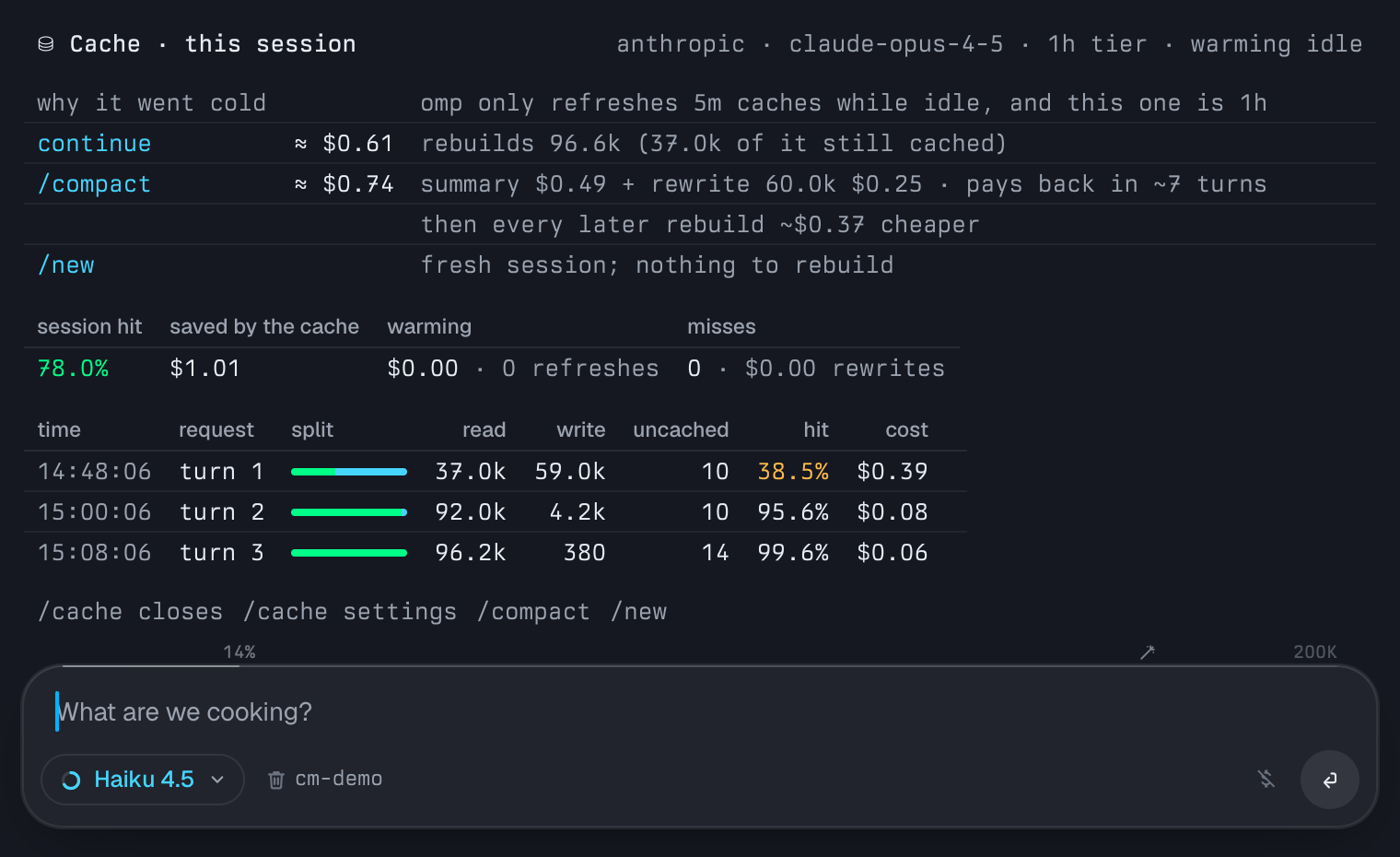
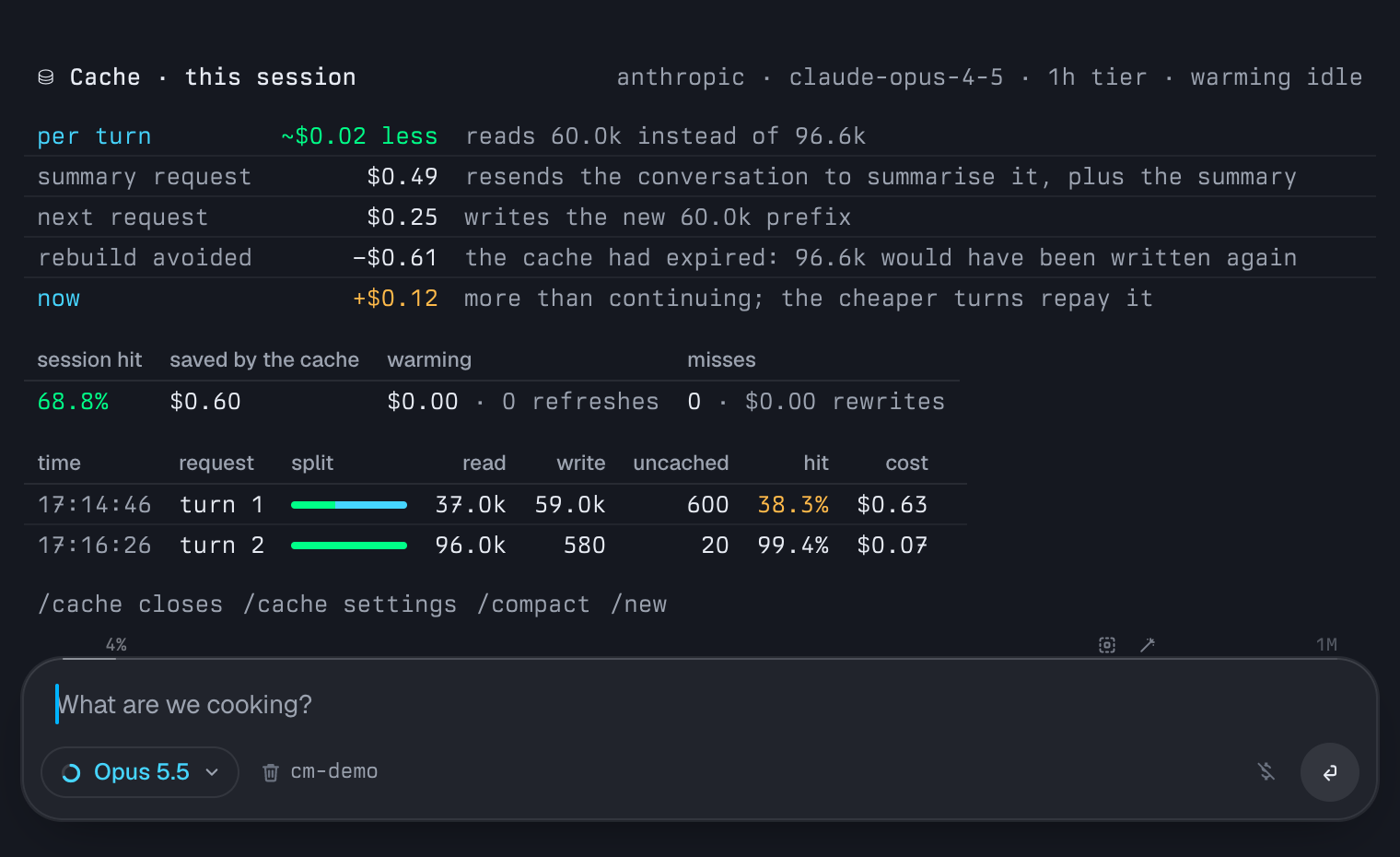
/cache settings
/cache settings edits the extension's settings in place and shows the omp settings the meter follows, read-only.
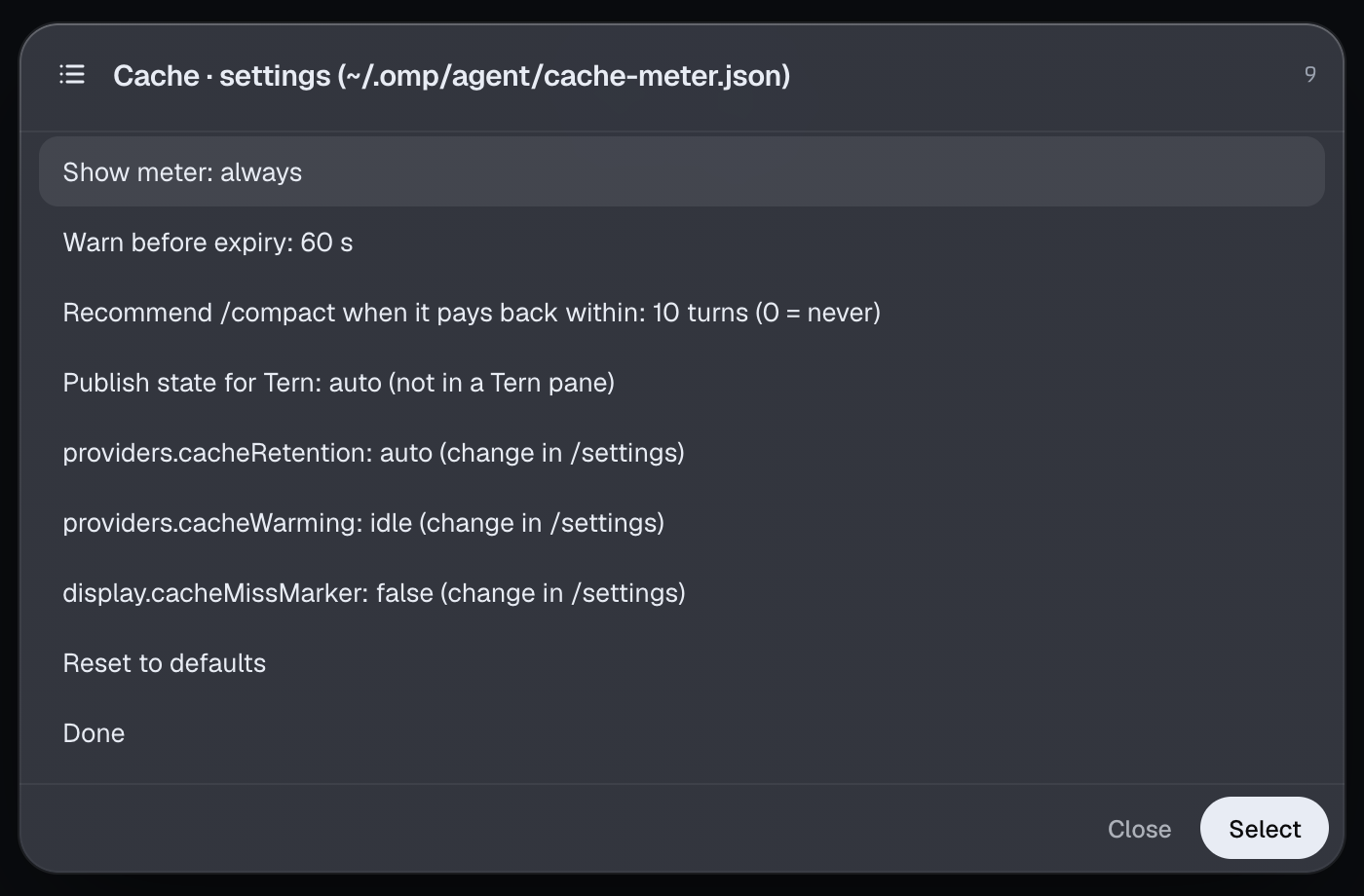
Settings live in ~/.omp/agent/cache-meter.json. A missing or invalid field falls back to its default:
| Setting | Default | Meaning |
|---|---|---|
meter.show |
always |
always, near-expiry (only when expiring or cold) or off |
meter.warnLeadSeconds |
60 |
When a cache with no planned refresh counts as expiring |
advice.paybackTurns |
10 |
On a cold cache, recommend /compact when it pays back within this many turns; 0 never recommends it |
tern.publish |
auto |
Write the state file when TERN_PANE is set; off never writes it |
The Tern plugin
- Status-line segment:
⛁ 4:12 · 97.6% hitfor the focused agent. Clicking it opens the canvas. Tern's status bar must be on (Settings → Appearance). - Tab titles: a countdown suffix such as
my-app ⛁ 4:12. Tern applies plugin tab titles to horizontal tabs only, so vertical tabs don't show it. - Toast: one per agent when its cache is about to expire with no refresh planned (default 60 s ahead).
- Canvas: the palette command Cache: open shows every agent with its split, hit %, prefix, expiry, warming and advice, plus session totals. Focus switches to an agent; Compact sends it
/compact. - Settings: Cache: settings (or the canvas's Settings button) opens a settings canvas. Its settings are saved in the plugin's
kv.jsonand shared by every window.
All colours come from the active omp or Tern theme, so light and dark themes both work.
How it works
- Usage: the extension records each assistant message's usage on
message_end. On session start it rebuilds history from the session branch, including warming refreshes stored asmodel_usageentries, so a resumed session shows its real countdown. - Compaction: on
session_compact(and for compaction entries when it rebuilds) the meter drops the old countdown: the summary replaces the conversation, so the cached prefix is never read again. The first turn after it is labelledafter /compactin the panel instead of being counted as a miss. When the cache had already expired at the compaction, the meter nets the rebuild it avoided against the summary request (its prompt size from omp'susedTokens, its output from the summary's length) and the new prefix. - Cache lifetime: the tier comes from the
cache_control.ttlon the request omp sends (before_provider_request), confirmed by Anthropic's cache-write split in the usage. The lifetime of that tier comes from the model'spromptCacheentry in omp's catalog. - Warming: omp doesn't expose its warmer's state to extensions, so the extension mirrors omp's rules from
cache-warmer.ts. A refresh is scheduled at 90% of the lifetime and at least 10 s before expiry. Idle warming stops 30 minutes after the last request, so it covers 5m entries only. Anycache_warming_decisionandcache_warming_endevents refine that. - State file: the interactive session writes
<Tern config>/plugin-data/cache-meter/panes/<TERN_PANE>.jsonatomically whenever its contents change, and deletes it on exit. Subagent and print-mode sessions have no UI and never write it. - Rendering: the meter and panel are built once as a small layout (bars with badges, inline split bars and right-aligned items, and tables with aligned columns). In Tern it goes out through
describe()as native badges, meters and tables. Each meter line is a badge plus a one-row table, so in a narrow pane the token text is cut and "hit rate" and the bar hide before the countdown does, instead of the line wrapping. In other terminals the same layout is padded with the omp theme's ANSI colours, with the same priorities.
Limitations
- Prices are estimates: costs use the catalog's list prices. 1h cache writes are estimated at 1.6× the 5m write price.
- The
/compactestimate is a model: omp records no usage for the summary request, so the meter assumes a 3k-token summary (real ones were 1.2k–3.2k, plus thinking tokens) and the default compaction method. AcompactionModelset inmodels.ymlis not priced separately. - Warming is mirrored, not read: if omp changes its warming rules, the "warming at …" line can drift until the extension follows.
- Some Tern surfaces depend on your layout: the segment needs the status bar, and the tab countdown needs horizontal tabs.
Development
git clone https://github.com/andreiverdes/agent-cache-meter.git
cd agent-cache-meter
bun install       # type definitions only; omp supplies its own API at runtime
bun run check     # tsc --noEmit, both the extension and claude-code/

# load the working copy instead of an installed package
omp plugin link .
tern plugin link tern-plugin

# Claude Code: build the status line and try it without touching your settings
(cd claude-code && bun run build)
claude --settings '{"statusLine":{"type":"command","command":"node '"$PWD"'/claude-code/dist/claude-cache-meter.js","refreshInterval":1}}'
The omp screenshots were rendered offscreen with tern shot: the extension's own renderers in omp 18.12.6 and Tern 0.8.2, fed a fixed session, and the settings list from the extension itself. The Claude Code screenshot is the built status line in a live Claude Code 2.1.311 session in Tern.