nobrainer-tech-flow2.8.0
From task to done. nobrainer-tech-flow is one workflow of 18 modules for AI coding agents: it scopes the task, does the work in one main loop, checks the result and hands over the evidence, including what was not checked.
Untested on omp
This is a pi package. No one has reported whether it works on omp yet. If you try it, add your result below.
Reports 0
No reports yet.
Readme

nobrainer-tech-flow
From task to done. See what was delivered.
For developers whose coding agent just said "Done."

▶ PROVE IT: a song for every AI agent that says done. Flo & MC P, Episode 1 (2 min, YouTube).
One workflow with 18 modules. Your coding agent does the work and checks it. Then it hands over the evidence: what was delivered, what was checked and what was not.


Install · Launch page · Compare 50+ tools · Public verification notes · Product Hunt
Where it runs
Coding agents: all 18 modules








Packages



No install: free remote MCP server, any MCP client

The MCP server is verified in Claude Code, Codex CLI and OpenCode. The MCP server README has setup steps for Claude.ai, ChatGPT, Cursor, VS Code / Copilot, Gemini CLI, Cline, Windsurf and Zed. These are not verified yet. What has been loaded and tested in each coding agent is in the compatibility evidence.
What it does
- A handoff you can check. Each finished task ends with
Delivered,Checked(command and result) andNot checked(gap and reason). An optional evidence receipt marks a checkSTALEonce its input files change. - Small tasks stay small. A quick answer stays a quick answer; larger work gets one focused question round, a short TODO, execution and verification.
- One main loop, workers only where they pay. A part goes to a native worker only for parallel work, context isolation, independent review or specialization.
- A pause before risky commands. Optional Claude Code guards ask before
git push --force,git reset --hard, a production deploy or a publish. - Ideas and plans to delivery. SDD turns an idea into checkable acceptance criteria; autopilot carries an approved plan through to the whole goal.
Free, MIT. The Git install previews every change and has undo. Your coding client's usage costs still apply.
Install safely
Pick one channel. The first four install the same 18 modules.
Claude Code (plugin):
claude plugin marketplace add nobrainer-tech/nobrainer-tech-flow
claude plugin install nobrainer-tech-flow@nobrainer-tech
Then start with /nobrainer-tech-flow:nobrainer-tech-flow or say "Use nobrainer-tech-flow".
Codex (plugin):
codex plugin marketplace add nobrainer-tech/nobrainer-tech-flow
codex plugin add nobrainer-tech-flow@nobrainer-tech
Then start with $nobrainer-tech-flow:nobrainer-tech-flow or say "Use nobrainer-tech-flow".
npm (Node 18+ and Python 3.11+); --client is codex, claude, opencode or copilot:
npx nobrainer-tech-flow@2.8.0 --client codex            # preview: changes nothing
npx nobrainer-tech-flow@2.8.0 --client codex --apply    # install
npx nobrainer-tech-flow@2.8.0 --client codex --undo --apply
Any coding agent (Git install with preview and undo; macOS, Linux and Windows, no Python needed). Paste this prompt into your agent; the same prompt installs and updates:
Install nobrainer-tech-flow from https://github.com/nobrainer-tech/nobrainer-tech-flow
for the coding agent you are, or update it if it is already installed.

1. Keep a copy in ~/.nobrainer-tech-flow: clone the repository there, or run
   git pull there if it already exists. Do not delete that folder later; the
   skills link to it.
2. Read the install section of its README and follow the method it gives for
   your client and operating system (docs/INSTALL.md has the details).
3. Preview first and show me what will change. Apply only after I agree, and
   do not edit my files beyond what that method does.
4. Tell me the undo command, and whether I need to restart you.
Or run it yourself (on Windows, in Git Bash):
git clone https://github.com/nobrainer-tech/nobrainer-tech-flow ~/.nobrainer-tech-flow
sh ~/.nobrainer-tech-flow/scripts/install.sh --client claude           # preview: changes nothing
sh ~/.nobrainer-tech-flow/scripts/install.sh --client claude --apply   # link the skills, add the block
--client is claude, codex, opencode or copilot; undo with --undo --apply.
Cursor, Gemini CLI, Pi and Kimi Code use a plugin or extension:
client channels. The installer adds one instruction
block that lets Flow update itself to verified stable releases once a day;
install_personalization.py --no-auto-update makes that a notification only. To pin a
reviewed commit, see Safe default.
MCP server, no install: add https://mcp.nobrainer.tech/mcp (no sign-in, stateless).
In Claude Code:
claude mcp add --transport http nobrainer-tech-flow https://mcp.nobrainer.tech/mcp
Its six read-only tools give the agent a task contract, an evidence check, a done gate and a model advisor. It does not install the 18 modules. Other clients: MCP server README.
First task. In a fresh session, give it one small task with a checkable result:
Use nobrainer-tech-flow. Fix one bug in this project. Reproduce it first, make the smallest correction and run the relevant check. Tell me what changed and what remains unverified.
More first tasks: docs/TRY_IT.md.
How it works
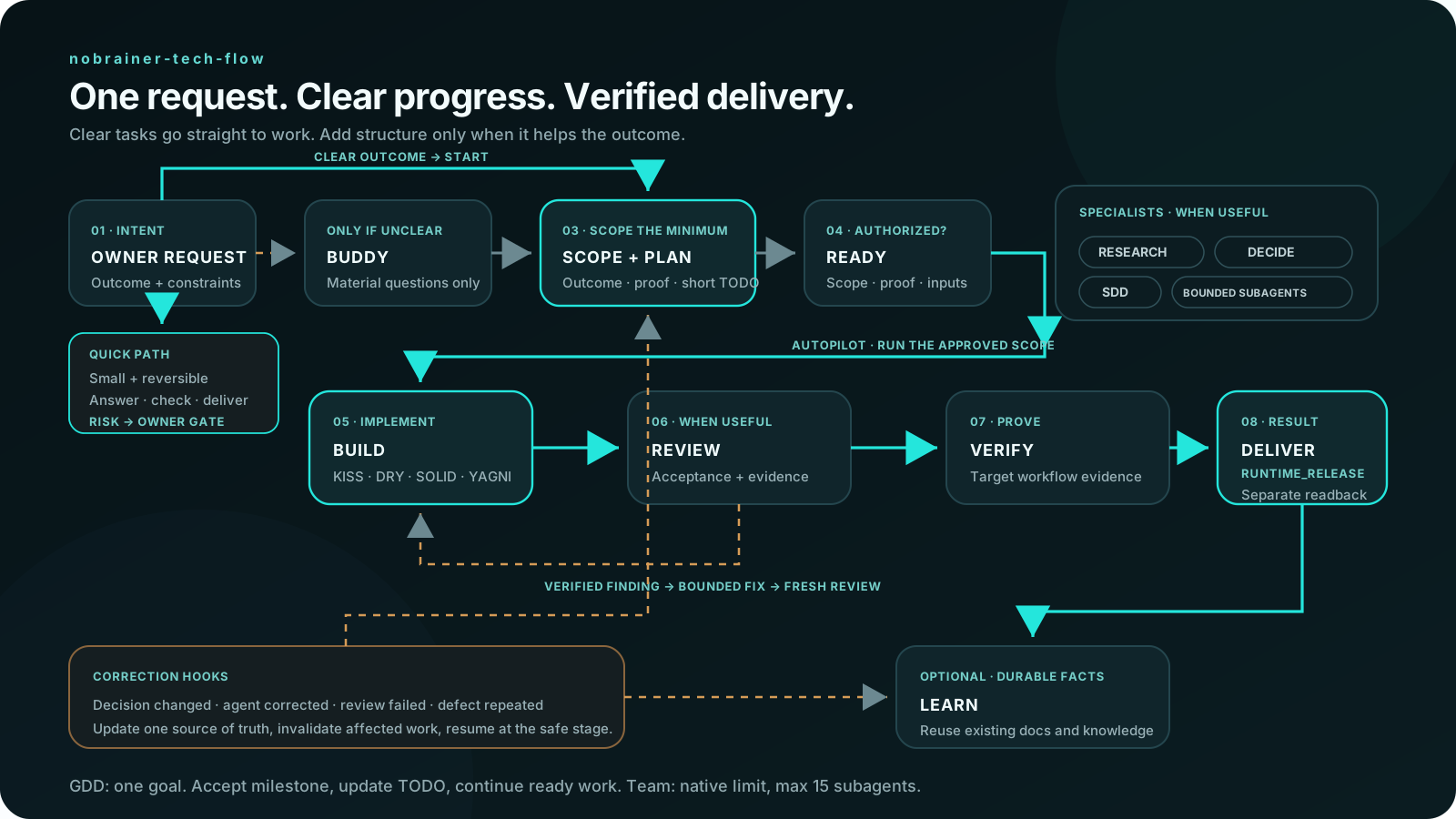
Small, clear tasks take the quick path. Larger work is scoped, carried through and verified, with bounded corrective attempts, and the handoff says what is left for you to decide. The full guide is in How it works.
Workflow chart
%%{init: {'theme': 'base', 'themeVariables': {'primaryColor': '#161B23', 'primaryTextColor': '#F3EEE6', 'primaryBorderColor': '#7F9BFF', 'lineColor': '#D94724', 'secondaryColor': '#0F1319', 'tertiaryColor': '#0F1319', 'fontFamily': 'Inter, system-ui, sans-serif'}}}%%
flowchart TD
    A[Task or idea; check nobrainer-tech-flow release once today] --> B{Material ambiguity?}
    B -->|yes| C[BUDDY: one focused question round]
    B -->|no| D{Small and clear?}
    C --> D
    D -->|yes| E[Direct answer or edit; check the result]
    D -->|no| F[SCOPE + PLAN: outcome, authority, proof; concise TODO]
    F --> S[Short-term goal from long-term direction]
    F -. SDD requested or justified .-> U[Reviewed spec; acceptance IDs; keep approval gates]
    U --> G
    S --> G[AUTOPILOT: execute the authorized scope; select ready work and check]
    G --> H[Verify; independent REVIEW when useful]
    H -->|verified defect; attempt budget remains| G
    H -->|acceptance met| I[Audit delegated artifacts and stop owned workers]
    H -->|blocked| J[Checkpoint; report one unblock action]
    E --> K[Deliver evidence and stop; use the requested language]
    I -->|whole-goal DoD met| K
    I -. accepted milestone; goal incomplete .-> P[Update TODO; select next ready milestone]
    P --> G
    J -. independent authorized work remains .-> P
    F -. optional .-> L[Markdown goal for resume]
    G -. only units that gain from parallel work, isolated context, review or specialization .-> M[Bounded native subagents; model and effort you approved]
    M -->|Plain technical English reports| H
    H -. audited unit; dispatch the next qualifying unit .-> M
    F -. first project use .-> R[Inspect layers and relevant wiki]
    R --> G
    M -. recurring workload .-> T[Auto Fine Tune: measured worker route]
    T --> M
    L -. context pressure; transfer supported .-> N[Fresh session: same task + started DD-MM]
    N -->|takeover verified; archive old if authorized| G
    G -. entry and milestones .-> O[Date at startup; assess context health]
    O -. safe transfer qualifies .-> N
    L -. unavailable native goals or telemetry .-> G
Modules: nobrainer-tech-flow (entrypoint) ·
nobrainer-auto-fine-tune ·
nobrainer-context ·
nobrainer-skill-doctor ·
nobrainer-team ·
nobrainer-dispatcher ·
nobrainer-research ·
nobrainer-writing ·
nobrainer-build ·
nobrainer-security ·
nobrainer-sessions ·
nobrainer-spec-driven-development ·
nobrainer-wiki ·
nobrainer-browser ·
nobrainer-autoimprove ·
nobrainer-decide ·
nobrainer-rca ·
nobrainer-review.
What each one owns and its trigger aliases:
skill table.
What's new in 2.8.0
Every finished task now ends with the same three-part handoff: Delivered, Checked
(each command with its result) and Not checked (each gap with its reason). A validator
keeps that block in the skill. The done gate also asks the agent to list each place where
docs and code disagree. Each module description now starts with the situation it handles,
so you can find the right module by what you need. See the
2.8.0 verification record.
What's new in 2.7.0
Before substantial work the agent shows what done means and sets it as the host's native goal where one exists. Flow delegates only where it pays, records each of your requests in the goal file as it arrives so compaction cannot drop it, and a security review needs a second independent pass before it can report a clean result. Full notes: RELEASE-NOTES.md and the 2.7.0 verification record.
Documentation
| Installation | Every channel, reviewed-commit install, guards, rollback |
| Compatibility | What has been loaded and tested in each client |
| Testing | Acceptance evidence and how to run the checks |
| How it works | Workflow, skills, learning loop, quality rules |
| Release notes and verification records | What changed and how each release was checked |
| MCP server | Remote server tools and per-client setup |
| Chat plugins | Plugin ZIP for Claude and ChatGPT |
| Migration and naming | Moving from the previous nobrainer-tech-skills ID |
Community
- Run this as a ready workflow: from requirement to CI with a ready AI engineering workflow built on nobrainer-tech-flow.
- New to AI? Start the free course.
- If this workflow helps with a real task, star the repository and follow @nobrainer_tech for build notes and practical examples.
Contributions: read CONTRIBUTING.md and SECURITY.md.
nobrainer-autoimprove and nobrainer-wiki adapt Andrej Karpathy's
autoresearch loop and
LLM wiki concept.
NoBrainer.Tech builds practical agentic workflows for teams that want speed without surrendering control. Learn more at nobrainer.tech or browse ready-to-use workflow products on Gumroad.