maintain-plugins0.4.0
Pi extension that checks installed plugin versions against npm and updates them safely on request
Untested on omp
This is a pi package. No one has reported whether it works on omp yet. If you try it, add your result below.
Reports 0
No reports yet.
Readme
maintain-plugins
Know what's stale before the host does, then update every plugin in one confirmed step.
A Pi / OMP extension that compares the plugins your host has installed against the npm registry, tells you what moved, and updates the stale ones on request. Works in both Pi and OMP; it resolves the host it is running under and uses that host's own package manager.
Install
OMP
omp install npm:maintain-plugins
PI
pi install npm:maintain-plugins
That's it. The extension registers on next session start. Works in both Pi and OMP.
What it does
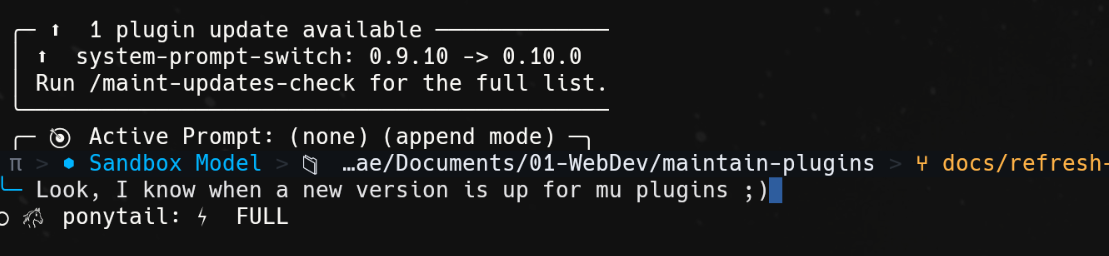
- Session-start notice — when at least one plugin has a newer version published, a row above the editor names each stale plugin with its current and newest version, then points at
/maint-updates-checkfor the rest. It disappears the moment you use the session — run any command or send a message — and on its own after 20 seconds, so it can never outlive the moment it was meant for. The host's built-in commands like/pluginfire no event an extension can see, so that deadline is what guarantees it always leaves. The list is capped at four rows, with the remainder counted, so a machine with many stale plugins gets a summary rather than a wall of text. - Nothing can hide it — the notice renders as a widget rather than a notification. The host replaces the status line when two plugins notify at once, so with a plain notification another plugin starting up could silently remove this one. A widget is a separate layer and is never overwritten.
- Read-only report —
/maint-updates-checkprints every installed plugin with its installed version, the newest published version, and whether an update is available. Stale rows carry a⬆️and current ones a·, because the host paints every notification level the same grey. It writes nothing. - Confirmed bulk update —
/maint-update-alllists every version delta before touching anything, asks for one confirmation, then rewrites the pin and lets the host's own installer do the work (omp plugin installunder OMP,npm installunder Pi). - Per-plugin progress — while the batch installs, an animated row above the editor reads
⠹ ⬆️ Updating 2/5 — <name>and disappears when the run ends. Installing produces no output of its own, so without it a long update is an unexplained pause. - Reload offered, not forced — after a successful update the session is still running the old plugin code, so the extension asks whether to reload now, listing each plugin and the version it would activate. Declining is fine; it names
/reload-plugins(OMP) or/reload(Pi) for later. - Manifest backup and automatic rollback — the host's plugin
package.jsonis copied before the pin is rewritten and restored if the install fails, so a pin for a version that never installed cannot be left behind. - Two kinds of failure, told apart — an update can fail because the package would not install, or because it installed and the host then could not load it. The second is usually a plugin using a host API that only exists in the other host — pi's
registerEntryRendererdoes not exist in omp, for instance. The failure notice says which happened, and points at/maint-uninstall-pluginwhen removal is the fix. - Cached checks — registry results are cached for 6 hours per host, so a session start does not make one request per plugin. If the registry is unreachable, the last known versions are reported rather than nothing, and a total outage does not reset the cache clock.
- Disabled plugins are reported, never updated — a plugin the host has switched off shows up as
(disabled)and is skipped. - No downgrade — a version is only treated as newer when it genuinely is; a registry that answers with an older number leaves the plugin alone.
Commands
| Command | What it does |
|---|---|
/maint-updates-check |
Check installed plugin versions against npm (read-only) |
/maint-update-all |
Update every stale plugin, after showing the full delta and confirming |
/maint-uninstall-plugin |
Remove an installed plugin: pick from a list, then confirm |
Demos
/maint-updates-check — a read-only report. Every plugin, its installed and newest version, and whether an update exists. Writes nothing:

/maint-update-all — the full update: confirmation, per-plugin progress, install, then the reload offer:

What is read and written
| Host | Plugins read from | Updated by rewriting | Install command |
|---|---|---|---|
| OMP | ~/.omp/plugins/ (package.json + omp-plugins.lock.json) |
~/.omp/plugins/package.json |
omp plugin install <pkg>@<ver>, run from the plugin dir |
| Pi | ~/.pi/agent/npm/node_modules/<pkg>/package.json (versions) and ~/.pi/agent/settings.json (which packages are wanted) |
~/.pi/agent/npm/package.json |
npm install --prefix <dir> <pkg>@<ver> |
Check cache, per host: ~/.omp/agent/state/maintain-plugins/check.json / ~/.pi/agent/state/maintain-plugins/check.json.
Discovery reads the host's own manifests instead of shelling out to omp plugin list / pi list: those outputs differ per host, pi's has no JSON mode, and a CLI flag change would break discovery silently. A missing or unreadable manifest yields an empty list, never an error — this runs on session start, where a throw would take the session down.
A plugin that is listed but not actually installed is ignored. Removing one by hand leaves its lockfile entry behind, and reporting that leftover as upgradable would tell you to run /maint-update-all for a package that does not exist — omp plugin uninstall would refuse the same name. Both hosts are checked against node_modules, which is the same authority omp plugin list uses.
Each host is updated through its own installer, because that is what keeps the host's own record of what is installed current. bun add would rewrite only package.json and leave OMP's omp-plugins.lock.json on the old version, so the next check would offer the update you just applied all over again. omp plugin install rewrites the lock; npm install writes straight into node_modules, which is exactly what Pi reads.
Safety notes
- Nothing happens without a confirmation.
/maint-updates-checkis read-only;/maint-update-allshows every delta and asks;/maint-uninstall-pluginlists what is installed, then asks a second time before deleting anything. Removal is the one irreversible action here and is not backed up by the manifest copy described above — reinstalling from npm is the way back. - A plugin pinned for a reason is your call. The extension reports; it does not decide.
- Self-update is out of scope. A plugin cannot meaningfully roll back the copy of itself that is currently executing, so
maintain-pluginsnever updates itself. - Test with a sandbox
HOME, not--profile. See README.dev.md. Underomp --profile <name>the host reads~/.omp/profiles/<name>/pluginswhile this extension still targets~/.omp/plugins, so a test run in a profile would edit your real manifest.
For developers
Architecture, layout, test suite, sandbox recipe, versioning and publish flow: see README.dev.md.
License
MIT