harness-remote3.3.0
Local-first control plane for native AI coding-agent sessions across Codex CLI, Claude Code, OpenCode, Oh My Pi and PI.
Built for omp
The author tagged this package oh-my-pi.
Reports 0
No reports yet.
Readme
Harness Remote
Your coding sessions. Any supported agent. Any device.
A local-first control plane for native AI coding-agent sessions.
Run, observe, resume and continue work across Codex CLI, Claude Code, GitHub Copilot CLI, OpenCode, MiMo Code, Oh My Pi and PI from desktop, web or Android — while code, credentials and native Sessions stay on your own machines.


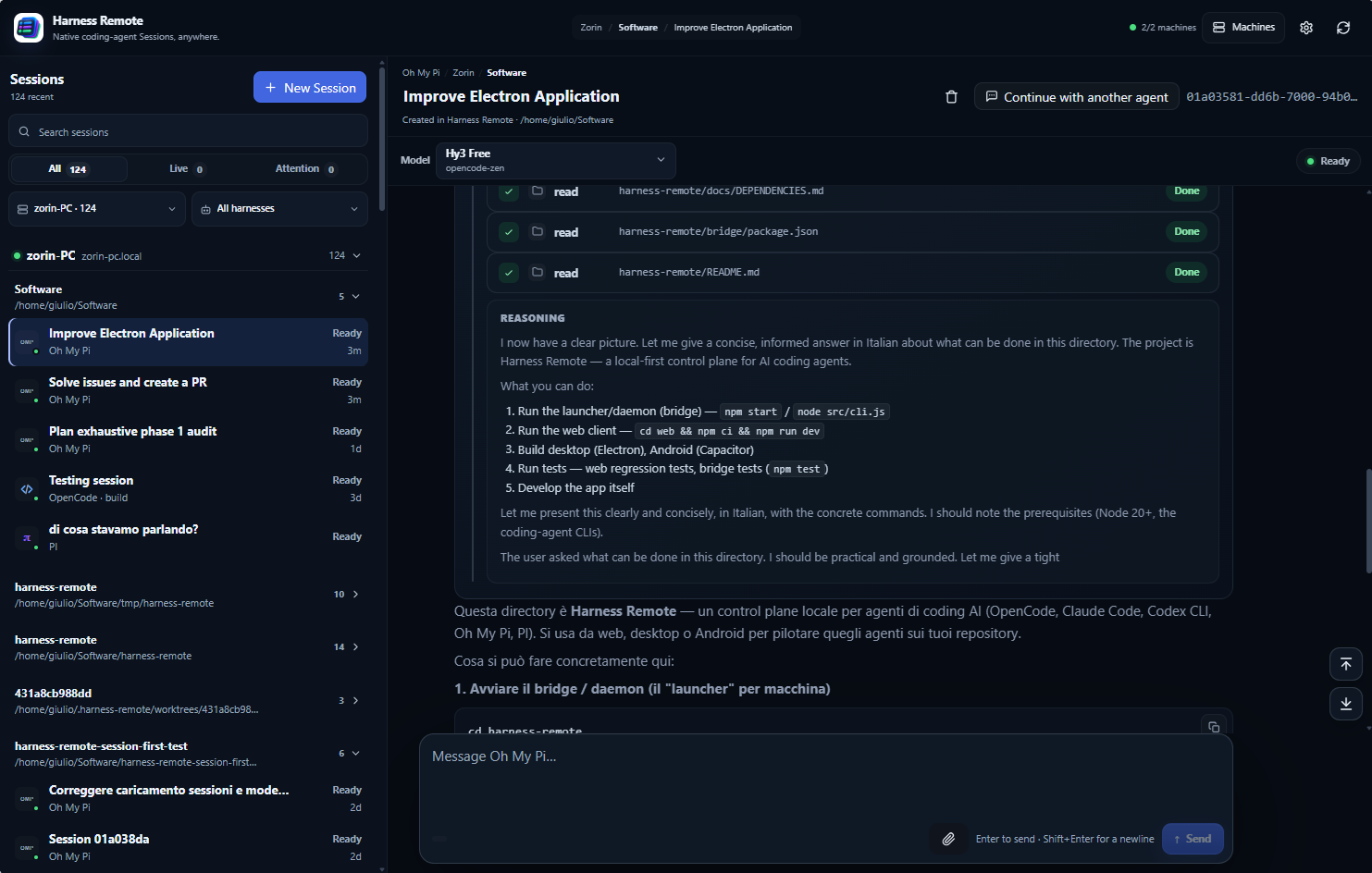
Harness Remote is not another coding agent. It is the remote-control and continuity layer around the coding agents you already use.
Quick start
Desktop
Download Harness Remote from the latest release and open it.
On Windows and macOS, the local computer works immediately: you do not need to start a gateway in a terminal. The desktop app starts and supervises its local Machine runtime automatically.
Add another computer
On the computer you want to control, install Node.js 20+ and make sure at least one supported coding-agent CLI is installed and authenticated.
Then run:
npx harness-remote
Direct-from-GitHub fallback:
npx --yes github:giuliastro/harness-remote
Keep that terminal open. Harness Remote automatically detects the installed coding agents, chooses available ports, generates credentials and starts one Machine gateway.
Common options are optional:
npx harness-remote --root ~/dev
npx harness-remote --port 4900
npx harness-remote --cors https://giuliastro.github.io
Android
Start the gateway on the computer you want to control, then:
- Open Machines.
- Tap Scan machine QR code.
- Scan the QR printed by the gateway.
- Tap View sessions.
The QR uses a short-lived one-time pairing token. Manual address/credential entry remains available as a fallback.
The same QR is available without the terminal: in the desktop or web app, open Machines, choose Pair a phone on the machine you want to connect, and scan the code it shows. It counts down the remaining validity and can be regenerated at any time; a new code replaces the previous one immediately.
A daemon bound to loopback only explains that no phone can reach it instead of showing a dead QR. The desktop app's own local runtime starts loopback-only too: enable Phone pairing in the app Settings to let it accept phones on your local network. The daemon keeps its password and every connection still needs the app credentials or a one-time pairing code; changing the setting restarts the local runtime after a confirmation.
Web / PWA
Use the hosted web app and allow that browser origin when starting the remote gateway:
npx harness-remote --cors https://giuliastro.github.io
For local web development:
cd web
npm ci
npm run dev
Then start the gateway with:
npx harness-remote --cors http://localhost:5173
See the Quick start guide for advanced options and troubleshooting.
What it gives you
- Native Sessions — existing Sessions remain owned by Codex, Claude, Copilot, OpenCode, MiMo, OMP or PI.
- Remote control — follow activity, send prompts, Stop turns and handle supported questions/permissions.
- Prompt while the agent works — a prompt sent mid-turn is never blocked: Codex takes it into the running turn, every other harness queues it in a Queued strip above the composer, where each waiting prompt can be withdrawn on its own.
- Background work that comes back — when a Claude Code subagent, background command or monitor finishes, the agent's follow-up turn appears live in the Session, exactly as in the CLI, with no prompt from you.
- One workspace — Machines → Projects → native Sessions.
- Cross-agent continuation — continue a task with another coding agent without pretending their hidden contexts are the same.
- Cross-machine continuation — continue work on another configured machine while preserving Project identity and lineage.
- Model discovery — models, defaults and variants come from the running harness instead of hardcoded assumptions.
- Attention visibility — questions, permissions and other blocking states stay visible even when the Session is not open, and a Session that finishes while you are elsewhere stays marked Ready until you open it.
- Recovery — reconnect, idle/wake and desktop-runtime recovery are built around the native Session as the source of truth.
- Local-first operation — repositories, credentials, subscriptions and native Session persistence stay on your machines.
Native Sessions stay authoritative
Harness Remote does not create a synthetic universal conversation model.
The coding agent still owns:
- transcript and message semantics;
- reasoning and activity;
- tool execution;
- questions and permissions;
- context, memory and compaction;
- model behavior;
- Stop/cancel and resume semantics.
Harness Remote owns the layer around it:
- Machines and Projects;
- Session discovery and presentation;
- remote observation and control;
- capability/model discovery;
- continuation and lineage;
- reconciliation and diagnostics;
- desktop, web and Android access.
That means you can start in a normal CLI, open Harness Remote later, find the same native Session and continue from there.
Supported coding agents
| Coding agent | Backend | Integration |
|---|---|---|
| Codex CLI | codex |
Official Codex ACP adapter |
| Claude Code | claude |
Official Claude Agent ACP adapter |
| GitHub Copilot CLI | copilot |
Native ACP (copilot --acp) |
| OpenCode 2 | opencode2 |
Native ACP (opencode acp) |
| OpenCode Legacy (v1) | opencode |
HTTP + live event stream |
| MiMo Code | mimo |
Native ACP (mimo acp) |
| Oh My Pi (OMP) | omp |
Native ACP (omp acp) |
| PI | pi |
PI ACP adapter |
Install and sign in to the coding-agent CLIs you want to use; the gateway detects them on start. OpenCode 2 and OpenCode Legacy share the opencode command, and Harness Remote picks the integration that matches the installed version.
Harness Remote surfaces capabilities advertised by the harness instead of inventing controls the harness does not support.
A turn runs inside the harness process that the gateway started, so stopping or restarting the gateway interrupts any turn still in progress. The Session itself is kept by the harness: open it again to see what was done and continue from there.
See the capability matrix for the detailed runtime contract.
Continue work without copy/paste
A typical flow can be:
Machine
  Project
    OpenCode Session
      └─ Continue with Codex
          └─ Continue with Claude
A continuation creates a real native Session on the target harness and records the relationship to the source Session.
The handoff can carry bounded, inspectable context such as objective, decisions, unresolved work and checks already run. The target harness owns its own context from that point forward.
The same model also works across configured machines, with Project identity checks and fail-closed behavior when the destination does not match.
Local-first and security
Your machine keeps:
- source code and repositories;
- coding-agent CLIs;
- provider credentials and subscriptions;
- native Session persistence;
- the real development environment.
Use remote gateways over a trusted LAN or VPN. Do not expose a Harness Remote gateway directly to the public internet.
--root limits which directories Harness Remote offers for Project selection. It is not an operating-system sandbox; coding agents still run with the permissions of the account that launched them.
See REFERENCE.md for security and backend details.
Development
# Gateway / daemon
npm start

# Bridge tests
npm test

# Web client
cd web
npm ci
npm run dev

# Electron desktop app
npm run electron:dev
Documentation
- Quick start
- Architecture and roadmap
- Capability matrix
- OpenCode reliability contract
- Backend reference
- Contributing
Keep ownership of your tools. Keep ownership of your Sessions. Change agents without losing the work.
Apache-2.0