auto-permission-system3.12.0
Claude auto mode for Pi & security for Pi. A zero-trust permission system for Pi coding agent powered by Advanced Secure mode to scan files, content, and tools to prevent data breaches.
Untested on omp
This is a pi package. No one has reported whether it works on omp yet. If you try it, add your result below.
Reports 0
No reports yet.
Readme

Auto Permission System: Secure Auto Mode & Security for Pi Coding Agent








Auto Permission System is a zero-trust permission architecture and Secure Auto Mode / Claude Auto Mode for the Pi coding agent. It brings the confidence of Claude's auto mode to Pi—enabling autonomous agent workflows while actively scanning files, shell commands, and tool content to prevent data breaches and credential exfiltration.
Whether running interactively with keyboard-driven ask prompts or running headlessly in CI/CD pipelines, this package enforces multi-layer boundaries across filesystem access, network egress, shell commands, and MCP tools.
Demo: Zero-Trust Security in Action
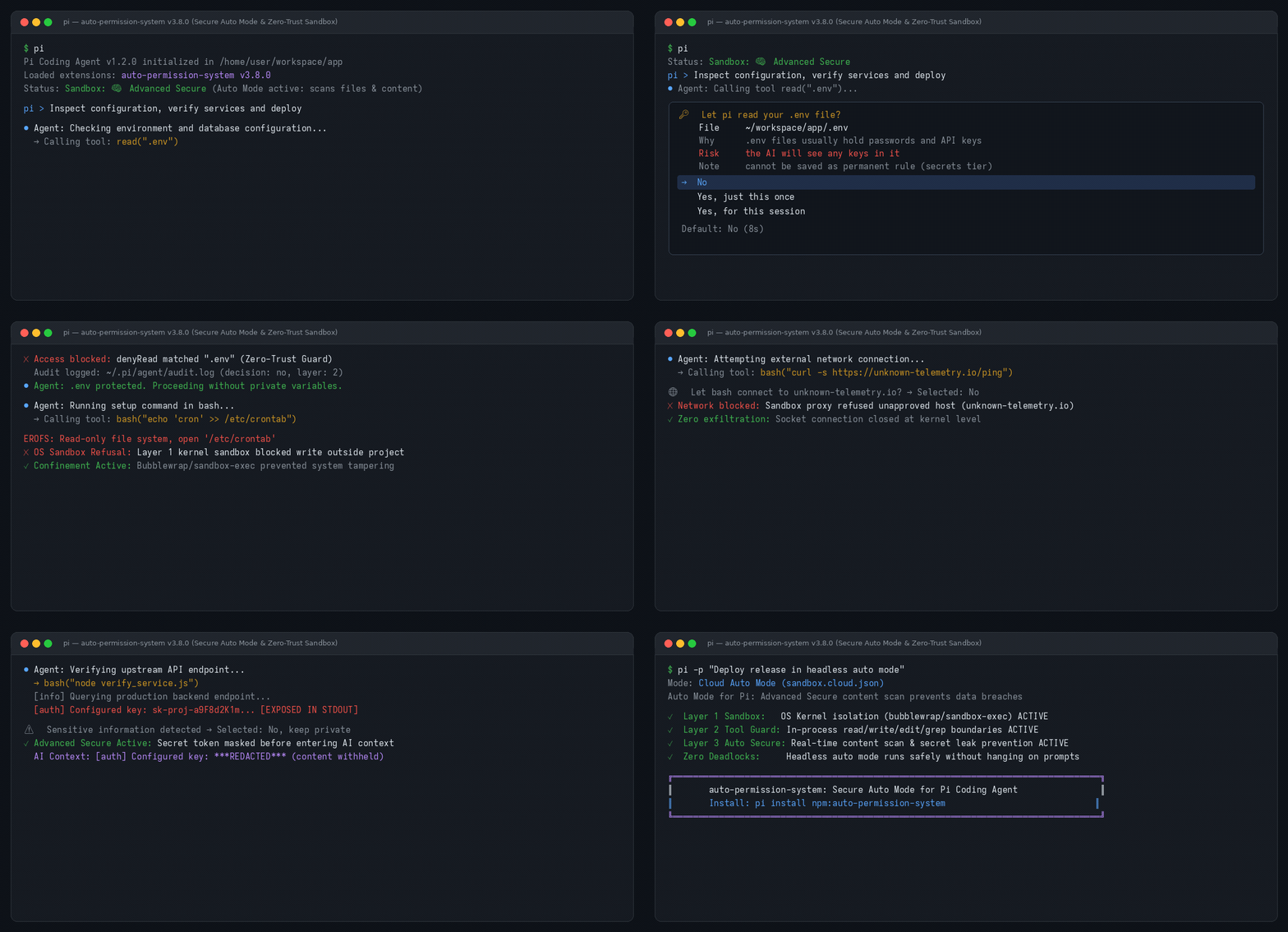
Demonstrated Moments in the Recording:
- Interactive
.envRead Guard: Interceptsread(".env")before the AI can see secrets. Displays a 10s countdown prompt defaulting toNo(Block). - Kernel OS Sandbox Confinement: Prevents bash commands from writing to system paths outside allowed roots (
EROFS: Read-only file system). - Governed Network Egress: Catches unknown outbound connections (
curl) with an interactive domain ask prompt and a 15s countdown timer. - Real-Time API Key & Secret Redaction: Automatically detects exposed API tokens (
sk-proj-...,ghp_...) in command output and replaces them with***REDACTED***before reaching the LLM context. - Autonomous Claude Auto Mode: Demonstrates headless, fail-closed CI execution (
pi -p) with zero deadlocks and zero hangs.
Contents
- Quickstart & Installation
- Requirements
- Key Features at a Glance
- Security for Pi: How It Works
- Interactive Ask Prompts
- Secure Auto Mode & Claude Auto Mode
- Real-Time Secret Detection & Content Scanning
- Permission System & Modes
- Configuration Reference
- Commands & Mid-Session Controls
- Escape Hatches
- Audit Logging
- FAQ & Scenarios
- Development & Testing
- Releasing
- License
Quickstart & Installation
Install auto-permission-system directly through the Pi package manager:
# 1. Install from npm (recommended)
pi install npm:auto-permission-system

# 2. Or install directly from GitHub
pi install git:github.com/Navin009/auto-permission-system

# 3. Or try it for a single session without permanent installation
pi -e npm:auto-permission-system
Once installed, the extension automatically loads whenever you launch pi. Check your active security status in the terminal footer or by typing /security.
Requirements
- Linux: Requires
bubblewrapandsocatfor Layer 1 OS-level isolation:# Ubuntu / Debian sudo apt-get install -y bubblewrap socat # Fedora / RHEL sudo dnf install -y bubblewrap socat # Arch Linux sudo pacman -S bubblewrap socat - macOS: Built-in
sandbox-execis utilized automatically (no extra packages required). - Node.js: v18.0.0 or later.
- Pi Coding Agent:
@earendil-works/pi-coding-agent(pi.dev).
Key Features at a Glance
| Feature | Description | Protection Level |
|---|---|---|
| 🛡️ 3-Layer Defense | OS Kernel sandbox (bubblewrap/sandbox-exec) + in-process tool guard + real-time content redactor. |
Zero-Trust |
| ⚡ Secure Auto Mode | Autonomous execution inspired by Claude's auto mode; scans files and output to prevent data breaches. | Autonomous / Claude |
| 🔑 Interactive Ask Prompts | Real-time terminal prompts with 10s countdowns (Once, Session, Project, Global). |
Interactive Human-in-the-Loop |
| 🔍 AST & Regex Secret Scanner | Scans tool stdout/stderr for API keys, private keys, and tokens, redacting them before model context. | Data Breach Prevention |
| 🌐 Network Egress Gate | Intercepts unapproved network connections and prompts for confirmation with wildcards. | Data Leak Prevention |
| 🔒 Absolute-Deny Tier | Strict two-step confirmation required for high-risk keys (~/.ssh, ~/.aws, auth.json). |
Maximum Protection |
| 📋 Full JSONL Audit Trail | Every allow, deny, ask, and redaction event is recorded to ~/.pi/agent/audit.log. |
Compliance & Auditing |
Security for Pi: How It Works
auto-permission-system employs a defense-in-depth model across three coordinated layers:
┌────────────────────────────────────────────────────────────────────────┐
│                        AI Coding Agent Execution                       │
└───────────────────────────────────┬────────────────────────────────────┘
                                    │
           ┌────────────────────────┴────────────────────────┐
           ▼                                                 ▼
┌─────────────────────────────────────┐   ┌─────────────────────────────────────┐
│    Layer 2: In-Process Tool Guard   │   │     Layer 1: OS Kernel Sandbox      │
│  - Intercepts read, grep, find, ls  │   │  - Bubblewrap (Linux) / sandbox-exec│
│  - Intercepts write, edit, fetch    │   │  - Read-only root filesystem (EROFS)│
│  - Filters secrets from searches    │   │  - Enforces allowWrite roots        │
│  - Gates MCP tool calls & risk verbs│   │  - Intercepts unlisted network egress
└──────────────────┬──────────────────┘   └──────────────────┬──────────────────┘
                   │                                         │
                   └────────────────────┬────────────────────┘
                                        ▼
┌────────────────────────────────────────────────────────────────────────┐
│              Layer 3 / Auto Secure: Real-Time Content Redactor          │
│  - Scans stdout/stderr & tool results for API keys, AWS & GitHub tokens│
│  - Replaces exposed secrets with ***REDACTED*** before model context   │
└────────────────────────────────────────────────────────────────────────┘
- Layer 1 (OS Kernel Sandbox):
Wraps all
bashcommands in an unprivileged kernel container. Writes outside designated folders (.and/tmp) are refused by the kernel withEROFS: Read-only file system. Sensitive directories (~/.ssh,~/.aws,~/.gnupg) are masked. Network egress to unlisted domains is intercepted via a local proxy. - Layer 2 (In-Process Tool Guard):
Applies consistent policy rules to tools that run in-process within Pi (
read,grep,find,ls,write,edit,fetch_content,web_search). Denied files are hidden from search listings before the LLM can observe them. - Layer 3 / Auto Secure (Sensitive Content Redactor): Operates before any tool output reaches the model's context window. Analyzes content using AST and regex pattern matchers for known tokens (OpenAI, Anthropic, GitHub, AWS, Stripe). If sensitive data is detected, the user can withhold it or have it redacted automatically.
Interactive Ask Prompts
When an unlisted domain, .env file, or directory write is requested during an interactive terminal session, auto-permission-system renders a clean, keyboard-driven prompt:
1. Sensitive .env Read Prompt
🔑  Let pi read your .env file?

    File     ~/workspace/app/.env
    Command  grep -r TOKEN .env
    Why      .env files usually hold passwords and API keys
    Risk     the AI will see any keys in it
    Note     can't be saved as a permanent rule (secrets tier)

  > No
    Yes, just this once
    Yes, for this conversation

  Default: No (10s)
- Preselected Default:
Nois preselected. Pressing Enter immediately blocks the read. - Expiry: If unattended for 10 seconds, the prompt resolves safely to No (Block).
2. Governed Network Egress Prompt
🌐  Let bash connect to unknown-telemetry.io?

    Site     unknown-telemetry.io
    Command  curl -s https://unknown-telemetry.io/ping
    Why      this site isn't on your allowed list yet

  > No
    Yes, just this once
    Yes, all in group for this conversation
    Yes, always…

  Default: Yes, just this once (15s)
- Network Expiry Rule: Domain prompts feature a 15-second countdown defaulting to
Allow oncefor smooth browsing. Pressing↑or↓immediately stops the countdown, returning complete control to Enter/Esc.
3. Real-Time Token Leak Redaction Prompt
⚠  Sensitive information detected: API Secret Key

    Tool     bash (node verify_service.js)
    Finding  23: sk-(?!ant-)[A-Za-z0-9_-]
    Question Should the AI be allowed to see it?

  > No, keep private  (recommended)
    Yes, allow
Findingprints the complete detected line and its line number — oneFindingrow per match when several secrets appear, with no truncation.- Choosing No, keep private replaces the token with
***REDACTED***in the model's context window, preventing credentials from leaking to LLM providers.
Secure Auto Mode & Claude Auto Mode
In modern AI coding tools like Claude Code, developers love auto mode because the agent can execute tasks autonomously without constantly prompting for confirmation on trivial, harmless steps.
However, unconstrained auto mode is a significant data breach risk. If an autonomous agent reads credentials, runs unvetted scripts, or sends code to third-party endpoints, the entire developer environment can be compromised.
Claude Auto Mode for Pi delivers Claude-style auto mode with zero-trust security:
- Autonomous Execution with Real-Time Guardrails: The agent operates autonomously within approved boundaries, allowing rapid development while guarding sensitive resources.
- Advanced Secure Scanning: Uses
advanced-securemode to scan files, commands, and content to stop data breaches before they can occur. - Fail-Closed in Headless CI/CD: When running unattended (
pi -p, GitHub Actions, Docker, remote devboxes), unapproved operations fail closed immediately with a structured reason instead of hanging or deadlocking the pipeline.
Activating Claude Auto Mode in CI/CD:
# 1. Copy the shipped Claude Auto Mode template to your repository:
mkdir -p .pi
cp node_modules/auto-permission-system/sandbox.claude.json .pi/sandbox.json

# 2. Run Pi headlessly with complete automated protection:
pi -p "Review pull request changes, verify dependencies, and execute test suite"
GitHub Actions Workflow Example:
name: CI Security & Agent Review
on: [pull_request]

jobs:
  agent-review:
    runs-on: ubuntu-latest
    steps:
      - uses: actions/checkout@v4
      - uses: actions/setup-node@v4
        with:
          node-version: 20
      - name: Install Pi and Auto Permission System
        run: |
          npm install -g @earendil-works/pi-coding-agent
          pi install npm:auto-permission-system
      - name: Activate Claude Auto Mode Preset
        run: |
          mkdir -p .pi
          cp node_modules/auto-permission-system/sandbox.claude.json .pi/sandbox.json
      - name: Run Autonomous Review in Auto Mode
        run: |
          pi -p "Verify changes, run npm test, and flag security issues"
Real-Time Secret Detection & Content Scanning
When running in Advanced Secure Mode (advanced-secure), auto-permission-system continuously inspects tool payloads and command stdout/stderr:
- High-Confidence Credential Recognition: Recognizes OpenAI API keys, Anthropic keys, AWS credentials (
AKIA...), GitHub personal access tokens (ghp_...,github_pat_...), database URIs (postgres://,mongodb://), and RSA/OpenSSH private keys. - Context Protection: If a build command or tool outputs a secret, the system intercepts the stream and prompts the user or redacts the credential to
***REDACTED***. - Zero-Loss Model Feedback: The language model is informed that sensitive information was masked, allowing the AI to continue its task without ever seeing or transmitting the actual secret.
Permission System & Modes
auto-permission-system provides three selectable permission modes:
| Mode | Inspection Level | Use Case |
|---|---|---|
advanced-secure (Recommended) |
Full rule engine + real-time AST/regex secret detection + MCP risk scoring. | Daily development, autonomous auto mode, untrusted codebases. |
default (Shipped) |
Rule-based filesystem and network sandbox without inspecting payload content. | Standard development where secret detection is not required. |
yolo (Emergency) |
Temporarily disables all sandboxing and tool guards. | Emergency troubleshooting only. |
Switch modes anytime mid-session using /permission-mode. Your choice is saved to global settings (~/.pi/agent/extensions/sandbox.json) and reflected in the status chip:
Sandbox: 🧠 N domains, M pathsforadvanced-secureSandbox: 🔒 N domains, M pathsfordefault⚠️ YOLO — all security layers disabledforyolo
Configuration Reference
Policy files are merged hierarchically:
| Priority | Scope | Location | Purpose |
|---|---|---|---|
| 1 (Base) | Package Default | sandbox.default.json |
Baseline policy shipped with the extension. |
| 2 (Global) | User Global | ~/.pi/agent/extensions/sandbox.json |
Global overrides across all repositories. |
| 3 (Project) | Project Local | <cwd>/.pi/sandbox.json |
Repository-specific rules (auto-written by prompts). |
Annotated sandbox.json:
{
  "enabled": true,                      // Set false to disable Layer 2
  "mode": "advanced-secure",            // "advanced-secure" (recommended) | "default" | "yolo"
  "network": {
    "allowedDomains": [                 // Allowed domains for bash and fetch_content
      "github.com", "*.github.com",
      "registry.npmjs.org"
    ],
    "deniedDomains": [],                // Hard-denied domains (never asked, always blocked)
    "strictAllowlist": false            // true = fail closed on unknown domains without asking
  },
  "filesystem": {
    "denyRead": [                       // Absolute denied reads (Layer 1 + Layer 2)
      "~/.ssh", "~/.aws", "~/.pi/agent"
    ],
    "askRead": [                        // Sensitive files that prompt instead of hard-blocking
      ".env", ".env.*"
    ],
    "modelDenyRead": ["~/.netrc"],      // Hidden from LLM read tool; subprocesses can read
    "allowWrite": [".", "/tmp"],        // Writable roots for bash and edit/write tools
    "denyWrite": [".env", "*.pem"]      // Writes always blocked
  },
  "subagent": {
    "network": "allow"                  // "allow" | "deny" | "research-only"
  },
  "mcp": {
    "allowTools": [],                   // MCP tool names that never prompt
    "askThreshold": 30                  // Risk score threshold to prompt (lower = stricter)
  },
  "commands": {
    "ask": ["printenv", "env", "/proc/*/environ"] // Bash commands that prompt before running
  }
}
Project Policy Files & Trust (ADR-013)
When cloning a repository with a .pi/sandbox.json:
- Hardening rules (additional deny paths) apply immediately.
- Relaxing rules (allowing
/, disabling layers, adding external domains) require explicit trust. - Run
/security trustto inspect and approve changes, or/security untrustto revoke.
Commands & Mid-Session Controls
| Command | Action |
|---|---|
/security |
View active Layer 2 policy, project trust status, and the last 10 audit events. |
/sandbox |
View active Layer 1 (OS sandbox) status and configuration. |
/sandbox reload |
Hot-reload policy rules after manual edits to sandbox.json. |
/permission-mode |
Switch between Default, Advanced Secure, and YOLO mid-session. |
/security trust |
Inspect and trust project-local policy widening in .pi/sandbox.json. |
/security untrust |
Revoke trust for the current project's policy file. |
Escape Hatches
For emergencies or troubleshooting, disable security temporarily:
# Disable all security layers for a single invocation
pi --yolo

# Alias for --yolo
pi --no-sandbox
Mid-session, type /permission-mode and pick YOLO to disable layers in place without restarting.
Audit Logging
Every decision (allow, block, ask, redaction) is appended as a structured JSON Line to ~/.pi/agent/audit.log:
{
  "ts": "2026-10-13T19:22:15.000Z",
  "layer": 1,
  "tool": "bash",
  "subject": "/etc/crontab",
  "reason": "denyWrite matched /etc/crontab",
  "decision": "no",
  "cwd": "/home/user/workspace/app"
}
Querying the Audit Log:
# View recent blocked actions
grep '"decision":"no"' ~/.pi/agent/audit.log | tail -n 10

# View secret redaction events
grep '"finding"' ~/.pi/agent/audit.log | tail -n 10
FAQ & Scenarios
A selection of common questions is below. For the complete, detailed guide, read docs/FAQ.md.
How does Claude Auto Mode secure unattended runs?
In headless mode (pi -p or subagent executions), interactive ask prompts cannot be presented to a human. Auto Permission System operates in a fail-closed posture: any tool call or bash command targeting an unlisted domain, credential file, or outside-project path is automatically blocked, and the refusal reason is provided to the agent and recorded in the audit log.
What is the relationship between Claude Auto Mode and Claude's auto mode?
Claude Code popularized autonomous "auto mode", allowing developers to let AI code without stopping for confirmation on harmless steps. Claude Auto Mode brings this exact convenience to the Pi coding agent, but adds essential zero-trust boundaries: using Advanced Secure Mode to scan files, shell commands, and content to guarantee that autonomous execution never leads to data breaches or leaked API tokens.
How do I allow the agent to reach a new domain?
Add it to network.allowedDomains in <cwd>/.pi/sandbox.json or ~/.pi/agent/extensions/sandbox.json, or run a curl command once and select Yes, always… → All in group in this project.
Why was my tool call or command blocked?
Run /security to inspect active policy rules and the last 10 audit events. Check ~/.pi/agent/audit.log to view the exact matching rule (reason).
Does it work on Windows?
Layer 2 (In-Process Tool Guard) and Layer 3 (Output Redactor) are platform-independent. Layer 1 (OS Sandbox) requires sandbox-exec (macOS, built-in) or bubblewrap + socat (Linux).
Development & Testing
Running Tests:
# Clone repository
git clone https://github.com/Navin009/auto-permission-system
cd auto-permission-system

# Install development dependencies
npm install

# Typecheck TypeScript against Pi's bundled types
npm run typecheck

# Run unit and contract test suites (27 test suites)
npm test

# Run manual Layer 1 sandbox end-to-end test (requires bubblewrap)
APS_E2E=1 node --import ./security/tests/ts-loader.mjs security/tests/e2e/sandbox-fs.mjs
Running the Demo Suite:
# Run interactive terminal simulation
./demo/run-demo.sh

# Regenerate MP4 and GIF recording assets
python3 demo/generate-recording.py
Releasing
Releases are fully automated with semantic-release, driven by Conventional Commits on main:
fix: ...→ Patch releasefeat: ...→ Minor releasefeat!: ...orBREAKING CHANGE:→ Major release
Pull requests are verified via commitlint. Publishing to npm is triggered automatically when NPM_PUBLISH is true. See PUBLISHING.md for details.
License
MIT © Navin Kumar